
Hi,
Is there anybody to use it from harbour?
Thanks.
Regards,
Hakan ONEMLI
Harbour & MSVC 2022 & FWH 23.06
Hakan ONEMLI
Harbour & MSVC 2022 & FWH 23.06
Hi,
Is there anybody to use it from harbour?
Thanks.
Hi,
We have to download chromedriver from https://chromedriver.chromium.org/downloads and copy it to pathed directory.
(https://chromedriver.chromium.org/getting-started)
To use it, We should download Selenium webdriver from https://www.selenium.dev/downloads/.
Next step is that run chromedriver using selenium webdriver and open any web site from application.
using System;
using System.Collections.Generic;
using System.Linq;
using System.Text;
using System.Threading;
using System.Threading.Tasks;
using OpenQA.Selenium;
using OpenQA.Selenium.Chrome;
using OpenQA.Selenium.Support.UI;

namespace mySelenium
{
    class Program
    {
        static void Main(string[] args)
        {
            //!Make sure to add the path to where you extracting the chromedriver.exe:
            IWebDriver driver = new ChromeDriver(@"C:\WebDriver\bin"); //<-Add your path
            driver.Navigate().GoToUrl("http://forums.fivetechsupport.com/viewforum.php?f=3");

//            IWebElement myField = driver.FindElement(By.Id("btn red-flamingo"));
//            IWebElement myField = driver.FindElement(By.ClassName("red-flamingo"));
//            myField.Click();

//            myField = driver.FindElement(By.Name("tridField"));
//            myField.SendKeys("3333");

//            myField = driver.FindElement(By.Name("egpField"));
//            myField.SendKeys("4444");


//            myField = driver.FindElement(By.ClassName("submitButton"));
//            myField.Click();


            Thread.Sleep(15000);
            driver.Quit();
        }
    }
}Hi,
I build test project in c# msvc 2019. in the build folder, there is a Webdriver.dll file.
How to create lib file from this dll?
D:\bcc7\bin\implib -a Selenium.lib Selenium.dll

Embarcadero Implib Version 3.3.0 Copyright (c) 1991-2014 Embarcadero Technologies, Inc.
Warning Selenium.dll: no exports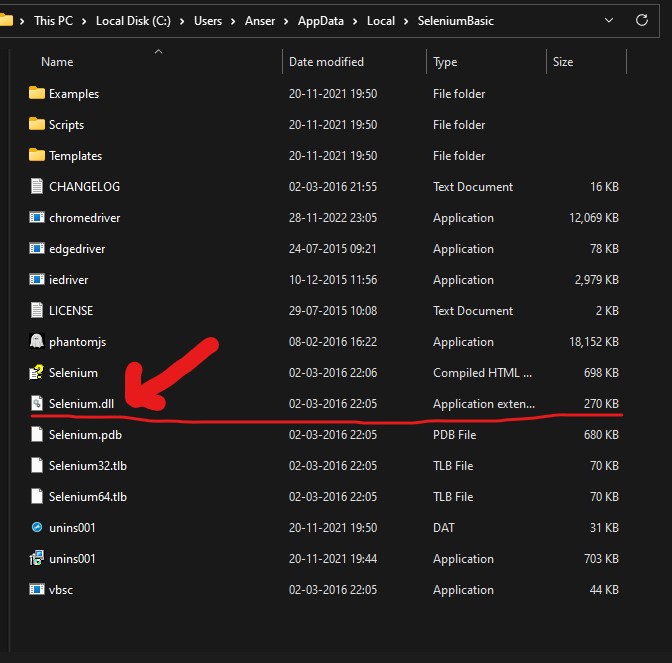
Dear Anser,
It seems as it is a .NET DLL.
You can use FWH WebView to do Web browser automation.
Please review FWH\samples\webviewuni.prg
Function TestSelenium()

    Local oSel, oPost, aData:={}

    oSel := CreateObject("Selenium.ChromeDriver")
    oSel:Start("chrome")
    Sleep(500)
    // Works fine till here. It opens Chrome with a label "The Chrome is being controlled by automated test software"
    // next it has to open the website. As per the documentation
    // we should call Get("URL")

    // Fails at the next line. Says no  exported method https://www.google.co.in
    oSel:Get( "https://www.google.co.in" ) // Fails here a

    oSel:Quit()
Return
Set oSel = CreateObject("Selenium.ChromeDriver")

oSel.Get "https://accounts.google.com/ServiceLogin"
oSel.FindElementById("identifierId").SendKeys "MyEmailId@gmail.com"
Antonio Linares wrote: You can use FWH WebView to do Web browser automation.Shall try that.
// sample from http://www.codeproject.com/dotnet/nettocom.asp

using System;
using System.Runtime.InteropServices;

namespace Tester
{
    [Guid("D6F88E95-8A27-4ae6-B6DE-0542A0FC7039")]
    [InterfaceType(ComInterfaceType.InterfaceIsIDispatch)]
    public interface _Numbers
    {
        [DispId(1)]
        int GetDay();

        [DispId(2)]
        int GetMonth();

        [DispId(3)]
        int GetYear();

        [DispId(4)]
        int DayOfYear();
    }

    [Guid("13FE32AD-4BF8-495f-AB4D-6C61BD463EA4")]
    [ClassInterface(ClassInterfaceType.None)]
    [ProgId("Tester.Numbers")]
    public class Numbers : _Numbers
    {
        public Numbers(){}

        public int GetDay()
        {
            return(DateTime.Today.Day);
        }

        public int GetMonth()
        {
            return(DateTime.Today.Month);
        }

        public int GetYear()
        {
            return(DateTime.Today.Year);
        }

        public int DayOfYear()
        {
            return(DateTime.Now.DayOfYear);
        }
    }
}regasm test.dll /unregister
csc /t:library test.cs
::csc /t:library /debug:full /debug+ %1.cs
regasm test.dll#pragma library( "ascom10.lib" ) // Xbase++ LIB for ActiveX
proc main()
local oAX
oAX := CreateObject("Tester.Numbers")
? oAX:getDay()
return

