FiveTech Support Forums

FiveWin / Harbour / xBase community
Board index FiveWin for Harbour/xHarbour FTP disk
Posts: 1392
Joined: Mon May 14, 2007 09:49 AM
FTP disk
Posted: Fri Oct 02, 2020 03:06 PM

Hi,

When an FTP connection is made to a resource, I get a virtual disk. I need to scan the files on this disk. However, the directory() function does not see this disk. What's the matter?

Posts: 6983
Joined: Fri Oct 07, 2005 07:07 PM
Re: FTP disk
Posted: Fri Oct 02, 2020 06:30 PM

Hello,
which class do you use for the FTP connection?
Have you tested the ftpdir.prg from the FIVEWIN samples.
Best regards,
Otto

Posts: 1392
Joined: Mon May 14, 2007 09:49 AM
Re: FTP disk
Posted: Sat Oct 03, 2020 06:47 AM

I made an FTP connection using Total Commander, so the program on FW does not see the disk. Thank You, Otto !

Posts: 6983
Joined: Fri Oct 07, 2005 07:07 PM
Re: FTP disk
Posted: Sat Oct 03, 2020 07:45 AM
Hello Natter,
There is a tool called netDrive, where you can map a drive. I tested some time. But I decided to use other connections.
Look inside my videos for "ecrverbund".

https://www.modharbour.club/mh_videogallery/index.prg

Best regards,
Otto
Posts: 1487
Joined: Tue Jun 14, 2016 07:51 AM
Re: FTP disk
Posted: Sat Oct 03, 2020 12:38 PM

Otto,

In the gallery i see Autocode software. It seems to be yours since there is no recent link.... in the forum (also not in the contribution section)

Is it a commercial product ?

Marc Venken

Using: FWH 23.08 with Harbour
Posts: 1487
Joined: Tue Jun 14, 2016 07:51 AM
Re: FTP disk
Posted: Sat Oct 03, 2020 12:49 PM
Natter wrote:Hi,

When an FTP connection is made to a resource, I get a virtual disk. I need to scan the files on this disk. However, the directory() function does not see this disk. What's the matter?


I think the code you can use is inside this topic ?

viewtopic.php?f=3&t=34465&hilit=link+to+ftp
Marc Venken

Using: FWH 23.08 with Harbour
Posts: 6983
Joined: Fri Oct 07, 2005 07:07 PM
Re: FTP disk
Posted: Sat Oct 03, 2020 03:46 PM

Hello Marc,
no it is not commercial. I can give it to you.
Do you use resources or hardcoded dialogs?
It only suports hardcoded style.
Best regards,
Otto

Please download https://mybergland.com/fwforum/autocode.zip and extract the file.

Then run adc.EXE. You get a little window.
Make, for example a say command in your FIVEWIN source - press CTRL+C and click on the paste button.
Then autocode should open and you should see your command with all possible parameters.
Is this working?

Redefine is not supported as I do not use. But if someone needs, we could edit the acd5.ch file.

Then you have to press button copy the changes are then in clipboard. With Ctrl + V you copy the changes back to your source.

Posts: 1487
Joined: Tue Jun 14, 2016 07:51 AM
Re: FTP disk
Posted: Sat Oct 03, 2020 08:54 PM

Otto,

I don't use resources in this project.

The program is working, but i have to search more in the forum for samples of use.

It works with text like this ( the code in in autocode)

     WITH OBJECT oRec:oBrw
        :MakeTotals()
        :RefreshFooters()
        Eval( :bChange, oRec:oBrw )
     END

But i see nothing with this :

@ 60,1500 GET oGet VAR cEan SIZE 150,26 PIXEL OF oDlg VALID lookupean ( cEan )

I have to see witch part of the code has to be selected for the code to work

BTW : I use multiEdit
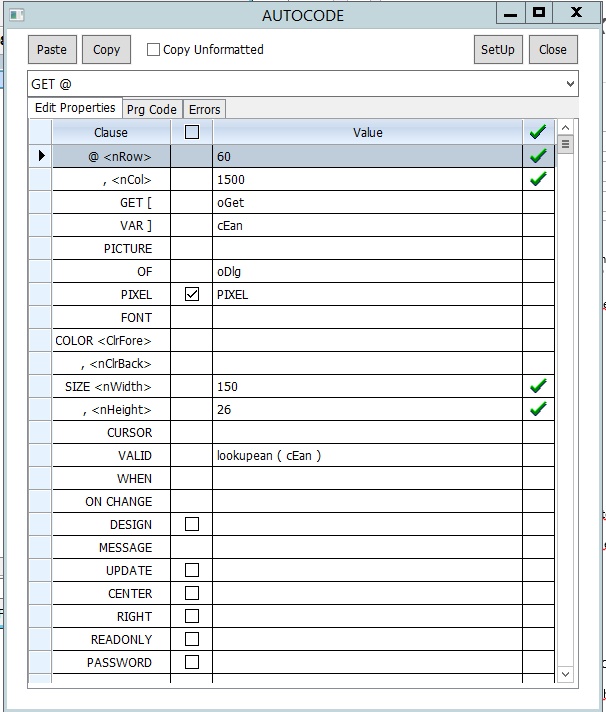
Marc Venken

Using: FWH 23.08 with Harbour
Posts: 6983
Joined: Fri Oct 07, 2005 07:07 PM
Re: FTP disk
Posted: Sat Oct 03, 2020 10:20 PM
Marc,
you have to select
@ 60,1500 GET oGet VAR cEan SIZE 150,26 PIXEL OF oDlg VALID lookupean ( cEan )
in your code. PRESS CTRL-C and then paste - button in AUTOCODE.

Then you can make your changes in AUTOCODE.
PRESS button copy and CTRL-C in your editor.

Best regards,
Otto
Posts: 1487
Joined: Tue Jun 14, 2016 07:51 AM
Re: FTP disk
Posted: Sun Oct 04, 2020 08:37 AM
The get is not working yet.
I also copy/paste into word in order to see that Multiedit is not the problem (copy is the + (plus) sign

Copy/paste from word also not working for the get, but working for the other code.

Also unzipped the file again... same result

The setup button has no effect (no reaction) but maybe this is correct ?

https://www.maveco.be/fivewin/autocode.png
" alt="" loading="lazy">
Marc Venken

Using: FWH 23.08 with Harbour
Posts: 6983
Joined: Fri Oct 07, 2005 07:07 PM
Re: FTP disk
Posted: Sun Oct 04, 2020 09:28 AM
Hello Marc,
Please see this video:

https://mybergland.com/fwforum/acget.mp4
Best regards,
Otto
Posts: 1487
Joined: Tue Jun 14, 2016 07:51 AM
Re: FTP disk
Posted: Sun Oct 04, 2020 09:59 AM
I do it also like you, but no result...

How to make the vido like you did ? Than I can show it also

Here the content of adc dir.

Marc Venken

Using: FWH 23.08 with Harbour
Posts: 1487
Joined: Tue Jun 14, 2016 07:51 AM
Re: FTP disk
Posted: Sun Oct 04, 2020 10:02 AM

If I copy the code from your post above

@ 60,1500 GET oGet VAR cEan SIZE 150,26 PIXEL OF oDlg VALID lookupean ( cEan )

and 'Paste Code" also no effect.

Marc Venken

Using: FWH 23.08 with Harbour
Posts: 1487
Joined: Tue Jun 14, 2016 07:51 AM
Re: FTP disk
Posted: Sun Oct 04, 2020 10:04 AM

Should I copy some of the files into the application dir maybe ?

Marc Venken

Using: FWH 23.08 with Harbour
Posts: 6983
Joined: Fri Oct 07, 2005 07:07 PM
Re: FTP disk
Posted: Sun Oct 04, 2020 10:26 AM

Marc, no it should work.
I can check with TV if you want
Best regards,
Otto