

for issues that I am not here to explain I had to move a menu (vtaskbar) from left to right.
this class has the ability to create popup submenus and I managed to make the menu appear no longer on the right but on the left,
now the problem is the popup menu which creates a huge space compared to the options that are entered.
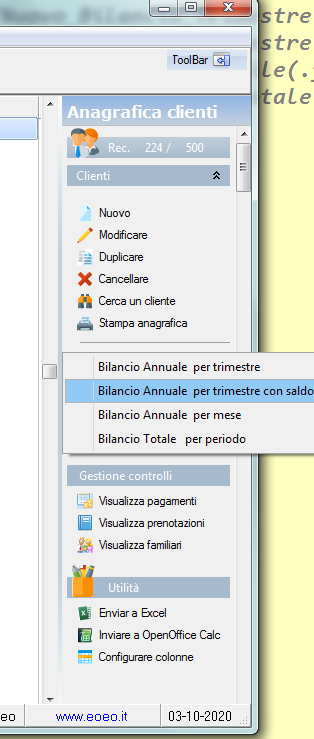
and logically the menupopup is show bad that is bad to see because it comes out of the program window
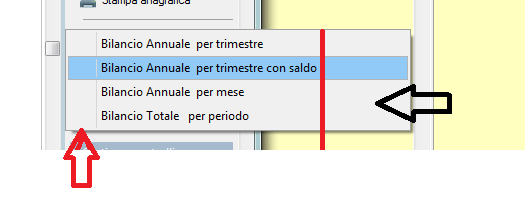
obviously I could find a solution by moving the coordinates of the popup by n spaces
What do you think is the best solution?
this class has the ability to create popup submenus and I managed to make the menu appear no longer on the right but on the left,
now the problem is the popup menu which creates a huge space compared to the options that are entered.
and logically the menupopup is show bad that is bad to see because it comes out of the program window
obviously I could find a solution by moving the coordinates of the popup by n spaces
What do you think is the best solution?
Since from 1991/1992 ( fw for clipper Rel. 14.4 - Momos)
I use : FiveWin for Harbour March-April 2024 - Harbour 3.2.0dev (harbour_bcc770_32_20240309) - Bcc7.70 - xMate ver. 1.15.3 - PellesC - mail: silvio[dot]falconi[at]gmail[dot]com
I use : FiveWin for Harbour March-April 2024 - Harbour 3.2.0dev (harbour_bcc770_32_20240309) - Bcc7.70 - xMate ver. 1.15.3 - PellesC - mail: silvio[dot]falconi[at]gmail[dot]com
