Hola a todos
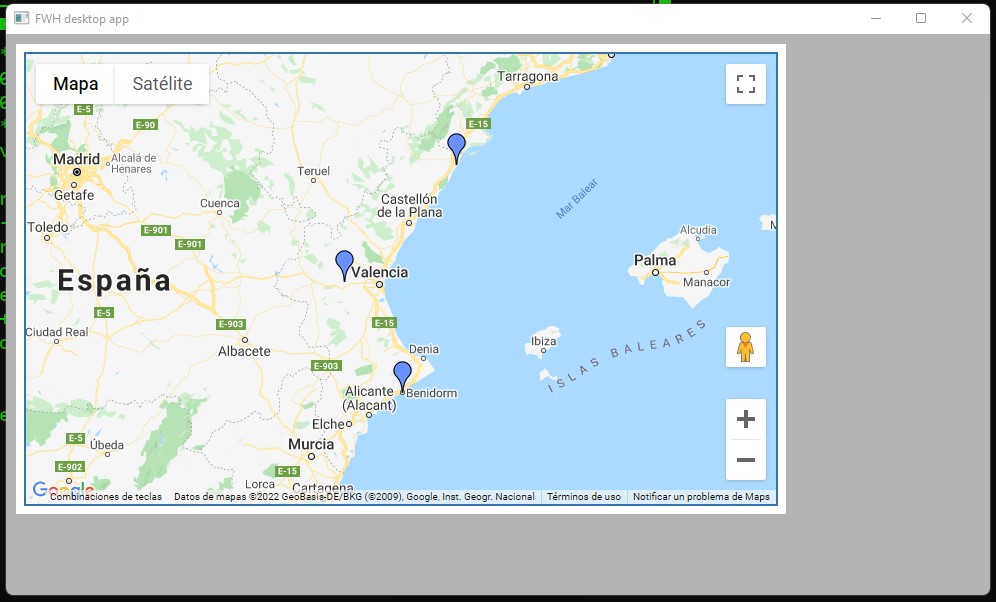
Siguiendo los ejemplos de Antonio, he construido un mapa, pero me gustaría cómo incluyo los marcadores desde la dbf y asignarles un marcador diferente según sea la actividad profesional.
El código con el que he construido el mapa es el siguiente:
<!DOCTYPE html>
<html lang="es">
<head>
</head>
<body>

<div id="map_canvas" style="width:750px; height:450px; border: 2px solid #3872ac;"></div>
<script
type="text/javascript"
src="https://maps.googleapis.com/maps/api/js?key=[REDACTED:GOOGLE_API_KEY]&libraries=places">
</script>


<script type="text/javascript">
    var locations = [
    ['Location 1 Name', 'València, Comunidad Valencia, España', 'Location 1 URL'],
    ['Location 2 Name', 'Benidorm, Comunidad Valenciana, España', 'Location 2 URL'],
    ['Location 3 Name', 'Vinarós, Comunidad Valenciana, España', 'Location 3 URL']
];

var geocoder;
var map;
var bounds = new google.maps.LatLngBounds();

function initialize() {
    map = new google.maps.Map(
    document.getElementById("map_canvas"), {
        center: new google.maps.LatLng( 39.13354, -0.491389),
        zoom: 13,
        mapTypeId: google.maps.MapTypeId.ROADMAP
    });
    geocoder = new google.maps.Geocoder();

    for (i = 0; i < locations.length; i++) {
        geocodeAddress(locations, i);
    }
}
google.maps.event.addDomListener(window, "load", initialize);

function geocodeAddress(locations, i) {
    var title = locations[i][0];
    var address = locations[i][1];
    var url = locations[i][2];
    geocoder.geocode({
        'address': locations[i][1]
    },

    function (results, status) {
        if (status == google.maps.GeocoderStatus.OK) {
            var marker = new google.maps.Marker({
                icon: 'http://maps.google.com/mapfiles/ms/icons/blue.png',
                map: map,
                position: results[0].geometry.location,
                title: title,
                animation: google.maps.Animation.DROP,
                address: address,
                url: url
            })
            infoWindow(marker, map, title, address, url);
            bounds.extend(marker.getPosition());
            map.fitBounds(bounds);
        } else {
            alert("geocode of " + address + " failed:" + status);
        }
    });
}

function infoWindow(marker, map, title, address, url) {
    google.maps.event.addListener(marker, 'click', function () {
        var html = "<div><h3>" + title + "</h3><p>" + address + "<br></div><a href='" + url + "'>View location</a></p></div>";
        iw = new google.maps.InfoWindow({
            content: html,
            maxWidth: 350
        });
        iw.open(map, marker);
    });
}

function createMarker(results) {
    var marker = new google.maps.Marker({
        icon: 'http://maps.google.com/mapfiles/ms/icons/blue.png',
        map: map,
        position: results[0].geometry.location,
        title: title,
        animation: google.maps.Animation.DROP,
        address: address,
        url: url
    })
    bounds.extend(marker.getPosition());
    map.fitBounds(bounds);
    infoWindow(marker, map, title, address, url);
    return marker;
}
</script>
</body>
</html>
Gracias