FiveTech Support Forums

FiveWin / Harbour / xBase community
Board index FiveWin for Harbour/xHarbour Know the size of a font selected - Resolved -
Posts: 7317
Joined: Thu Oct 18, 2012 07:17 PM
Know the size of a font selected - Resolved -
Posted: Thu Oct 29, 2020 09:17 AM
I wish Know the size of the font selected and save on aGet[15]
it give me a bad number and then not insert it on get
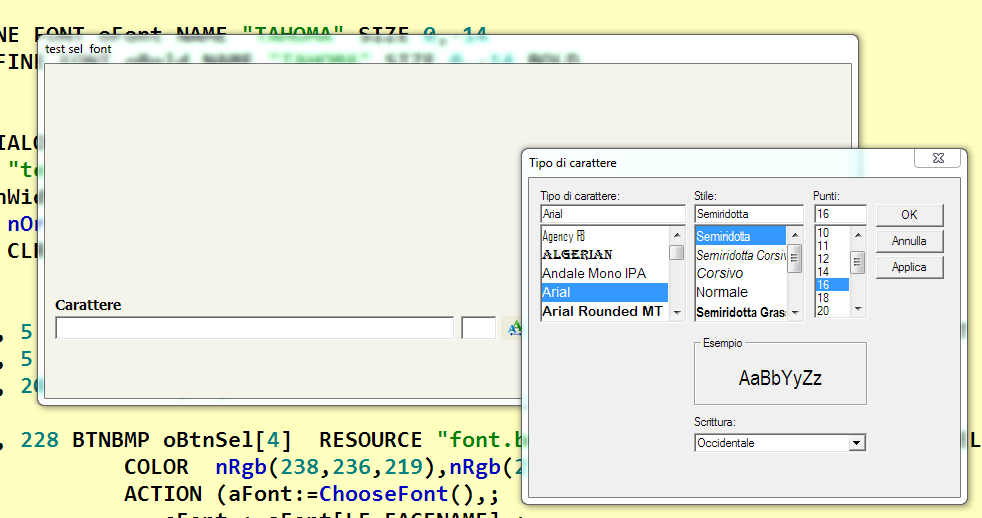


the test

Code (fw): Select all Collapse
#include "fivewin.ch"
#include "constant.ch"


Function Test()
Local oDlg,oFont,oBold
Local ObtnSel[10]
Local cFont:=""
Local nSizeFont:=0

       Local nBottom   := 22
       Local nRight    := 102
       Local nWidth :=  Max( nRight * DLG_CHARPIX_W, 180 )
       Local nHeight := nBottom * DLG_CHARPIX_H
       local aGet[20]
       local oSay[10]

    DEFINE FONT oFont NAME "TAHOMA" SIZE 0,-14
      DEFINE FONT oBold NAME "TAHOMA" SIZE 0,-14 BOLD


DEFINE DIALOG oDlg        ;
   TITLE "test sel  font"     ;
   SIZE nWidth, nHeight   PIXEL  FONT oFont    ;
   STYLE nOr( DS_MODALFRAME, WS_POPUP, WS_CAPTION,  4 ) ;
   COLOR CLR_BLACK,  nRgb( 245,244,234)


   @ 116, 5   SAY oSay[6] Prompt "Carattere"  SIZE 80,14 PIXEL OF oDlg  TRANSPARENT  FONT oBold

   @ 126, 5   GET aGet[14] VAR cFont SIZE 200,12  PIXEL OF oDlg

   @ 126, 208 GET aGet[15] VAR nSizeFont SIZE 18,12  PIXEL OF oDlg

   @ 126, 228 BTNBMP oBtnSel[4]  RESOURCE "font.bmp"  FLAT SIZE 14, 12 OF oDlg PIXEL ;
                  COLOR  nRgb(238,236,219),nRgb(238,236,219) BORDER;
                  ACTION (aFont:=ChooseFont(),;
                     cFont :=aFont[LF_FACENAME],;
                     nSizeFont:= aFont[LF_HEIGHT ],;
                     msginfo( nSizeFont),;
                  aGet[14]:refresh(),aGet[15]:refresh())


ACTIVATE DIALOG oDLG CENTER
RETURN NIL
Since from 1991/1992 ( fw for clipper Rel. 14.4 - Momos)

I use : FiveWin for Harbour March-April 2024 - Harbour 3.2.0dev (harbour_bcc770_32_20240309) - Bcc7.70 - xMate ver. 1.15.3 - PellesC - mail: silvio[dot]falconi[at]gmail[dot]com
Posts: 1487
Joined: Tue Jun 14, 2016 07:51 AM
Re: Know the size of a font selected
Posted: Thu Oct 29, 2020 11:13 PM

If you look into the aFont : there is no correct size from to font ? Strange...

For the save : it seems that the lenght of aGet[15] is to small to see it.

Marc Venken

Using: FWH 23.08 with Harbour
Posts: 7317
Joined: Thu Oct 18, 2012 07:17 PM
Re: Know the size of a font selected
Posted: Fri Oct 30, 2020 07:50 AM

I solved it in another way

Since from 1991/1992 ( fw for clipper Rel. 14.4 - Momos)

I use : FiveWin for Harbour March-April 2024 - Harbour 3.2.0dev (harbour_bcc770_32_20240309) - Bcc7.70 - xMate ver. 1.15.3 - PellesC - mail: silvio[dot]falconi[at]gmail[dot]com
Posts: 6983
Joined: Fri Oct 07, 2005 07:07 PM
Re: Know the size of a font selected
Posted: Fri Oct 30, 2020 08:30 AM

Hello Silvio,
would you be so kind to post the solution here.
Best regards,
Otto

Posts: 7317
Joined: Thu Oct 18, 2012 07:17 PM
Re: Know the size of a font selected
Posted: Fri Oct 30, 2020 08:37 AM

I made a combobox for the fonts and another for the size from 6 to 99

Since from 1991/1992 ( fw for clipper Rel. 14.4 - Momos)

I use : FiveWin for Harbour March-April 2024 - Harbour 3.2.0dev (harbour_bcc770_32_20240309) - Bcc7.70 - xMate ver. 1.15.3 - PellesC - mail: silvio[dot]falconi[at]gmail[dot]com
Posts: 10733
Joined: Sun Nov 19, 2006 05:22 AM
Re: Know the size of a font selected
Posted: Sun Nov 01, 2020 05:32 PM
ChooseFont() function of FWH is a straight forward implementation of Windows function ChooseFont().

The font size displayed in the ChooseFont() dialog box is in "Points". This size in points is converted to font height with this formula.
Code (fw): Select all Collapse
lfHeight = -MulDiv(PointSize, GetDeviceCaps(hDC, LOGPIXELSY), 72)


https://docs.microsoft.com/en-us/window ... i-logfonta

To get the size in points, we need to use reverse formula.

Code (fw): Select all Collapse
function FontHeightInPoints( nHeight )

   local nPoints, hDC

   nPoints := Round( Abs( nHeight ) * 72 / GetDeviceCaps( hDC := GetDC( 0 ), 90 ), 0 )
   ReleaseDC( 0, hDC )

return nPoints
Regards


G. N. Rao.

Hyderabad, India
Posts: 7317
Joined: Thu Oct 18, 2012 07:17 PM
Re: Know the size of a font selected
Posted: Tue Nov 03, 2020 09:58 AM
nageswaragunupudi wrote:ChooseFont() function of FWH is a straight forward implementation of Windows function ChooseFont().

The font size displayed in the ChooseFont() dialog box is in "Points". This size in points is converted to font height with this formula.
Code (fw): Select all Collapse
lfHeight = -MulDiv(PointSize, GetDeviceCaps(hDC, LOGPIXELSY), 72)


https://docs.microsoft.com/en-us/window ... i-logfonta

To get the size in points, we need to use reverse formula.

Code (fw): Select all Collapse
function FontHeightInPoints( nHeight )

   local nPoints, hDC

   nPoints := Round( Abs( nHeight ) * 72 / GetDeviceCaps( hDC := GetDC( 0 ), 90 ), 0 )
   ReleaseDC( 0, hDC )

return nPoints


Thanks Rao
But I not understood How call that function

ACTION (aFont:=ChooseFont(),;
cFont :=aFont[LF_FACENAME],;
nSizeFont:=FontHeightInPoints( aFont[LF_HEIGHT ]),;
aGet[14]:refresh(),aGet[15]:refresh())

run ok


I need also to Know these parameters

Font name
Font size
Color
Bold
Italic
Underlined
Strikethrough


why I not see the color of the font ????

Since from 1991/1992 ( fw for clipper Rel. 14.4 - Momos)

I use : FiveWin for Harbour March-April 2024 - Harbour 3.2.0dev (harbour_bcc770_32_20240309) - Bcc7.70 - xMate ver. 1.15.3 - PellesC - mail: silvio[dot]falconi[at]gmail[dot]com
Posts: 6983
Joined: Fri Oct 07, 2005 07:07 PM
Re: Know the size of a font selected
Posted: Tue Nov 03, 2020 10:56 AM

Hello Silvio, please look into EasyReport. Here you see how to do. You have to change the pen before printing.

Best regards,
Otto

METHOD Say( nRow, nCol, cText, oFont, nWidth, nClrText, nBkMode, nPad ) CLASS VRD

IF ::oPrn:hDC = 0
RETURN NIL
ENDIF

DEFAULT oFont := ::oPrn:oFont
DEFAULT nBkMode := 1
DEFAULT nPad := 0

IF oFont != nil
oFont:Activate( ::oPrn:hDCOut )
ENDIF

// 1,2 transparent or Opaque
SetbkMode( ::oPrn:hDCOut, nBkMode )

IF nClrText != NIL
#IFDEF HARBOUR
SetTextColor( ::oPrn:hDCOut, nClrText )
#ELSE
SetTextCol( ::oPrn:hDCOut, nClrText )
#ENDIF
ENDIF

DO CASE
CASE nPad == 1 // right
nCol := Max( 0, nCol - ::GetTextWidth( cText, oFont ) )
CASE nPad == 2 // center
nCol := Max( 0, nCol - ( ::GetTextWidth( cText, oFont ) / 2 ) )
ENDCASE

TextOut( ::oPrn:hDCOut, nRow, nCol, cText )

IF oFont != nil
oFont:DeActivate( ::oPrn:hDCOut )
ENDIF

IF nClrText != NIL
#IFDEF HARBOUR
SetTextColor( ::oPrn:hDCOut, 0 )
#ELSE
SetTextCol( ::oPrn:hDCOut, 0 )
#ENDIF
ENDIF

RETURN ( NIL )

Posts: 7317
Joined: Thu Oct 18, 2012 07:17 PM
Re: Know the size of a font selected
Posted: Tue Nov 03, 2020 12:44 PM
Otto wrote:Hello Silvio, please look into EasyReport. Here you see how to do. You have to change the pen before printing.

Best regards,
Otto


Perhaps you not understood what I mean

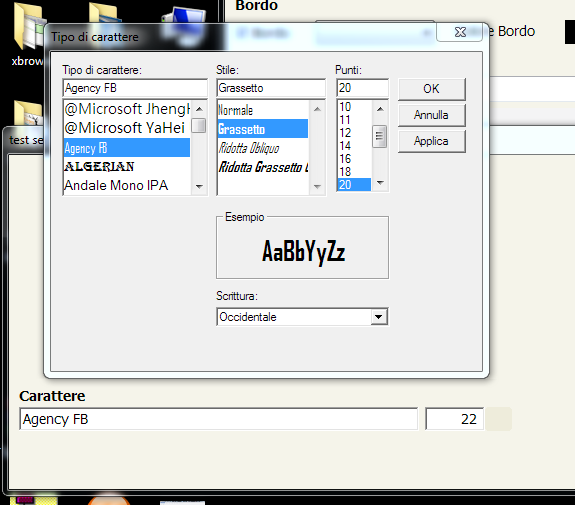
this Image is from web


here , I not see bold... and color

when you make choosefont you must have

Font name
Font size
Color
Bold
Italic
Underlined
Strikethrough

I remember EasyReport save 20 type of font with 20 type of colors and it no good ( error )
on my app you can select any font you want and then it build a font when it print the text
Since from 1991/1992 ( fw for clipper Rel. 14.4 - Momos)

I use : FiveWin for Harbour March-April 2024 - Harbour 3.2.0dev (harbour_bcc770_32_20240309) - Bcc7.70 - xMate ver. 1.15.3 - PellesC - mail: silvio[dot]falconi[at]gmail[dot]com
Posts: 7317
Joined: Thu Oct 18, 2012 07:17 PM
Re: Know the size of a font selected
Posted: Tue Nov 03, 2020 06:58 PM

resolved!!!
see the topic viewtopic.php?f=3&t=39554&start=0

Since from 1991/1992 ( fw for clipper Rel. 14.4 - Momos)

I use : FiveWin for Harbour March-April 2024 - Harbour 3.2.0dev (harbour_bcc770_32_20240309) - Bcc7.70 - xMate ver. 1.15.3 - PellesC - mail: silvio[dot]falconi[at]gmail[dot]com

Continue the discussion