

in an old dialog I easily search for customers (using a Dbf) by entering even a few letters in a get and selecting in the combo which field I want to search, the procedure uses IncrFilter and everything works fine.
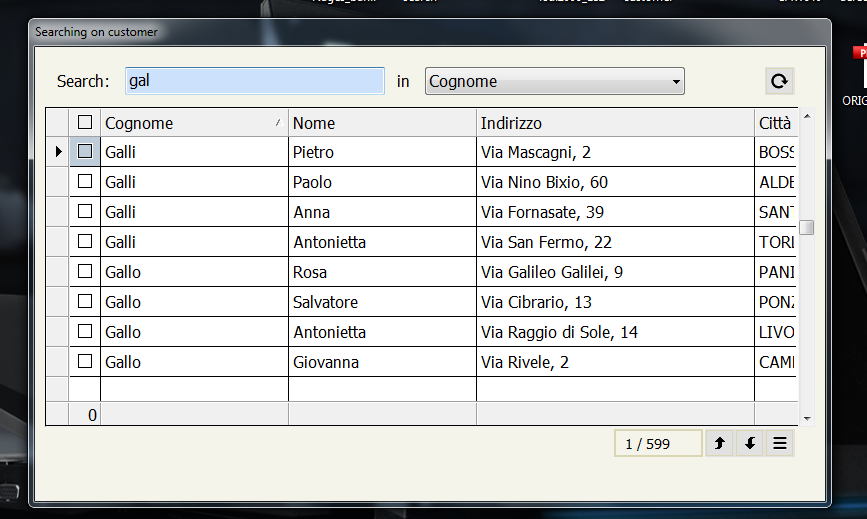
I made it with a get and th epossibility to select the column where search
So if I must search a City init with "Orz" I select the city column
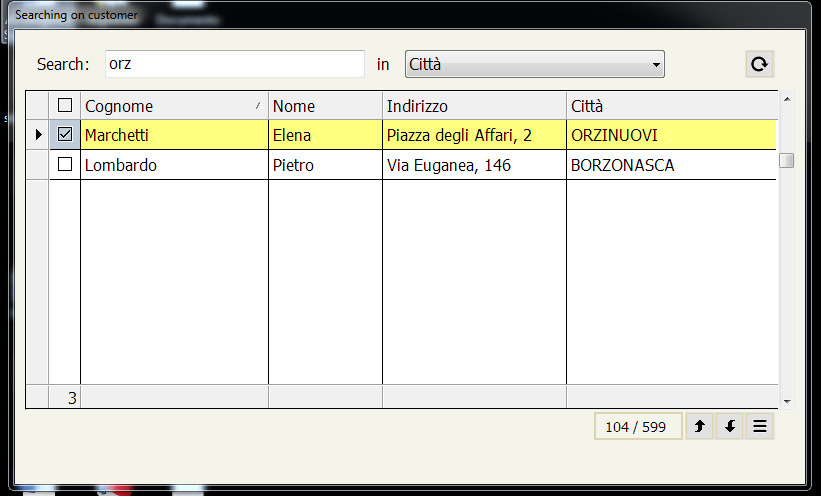
On Dbf it seem be more easy than on array
Now I'd like to try searching an array in the same way except I don't understand how to do it
Could anyone help me figure out how to do it?
I tried to make a test but make me error on function xSetFilter( oBrw ) and method oBrw:ArrayIncrFilter
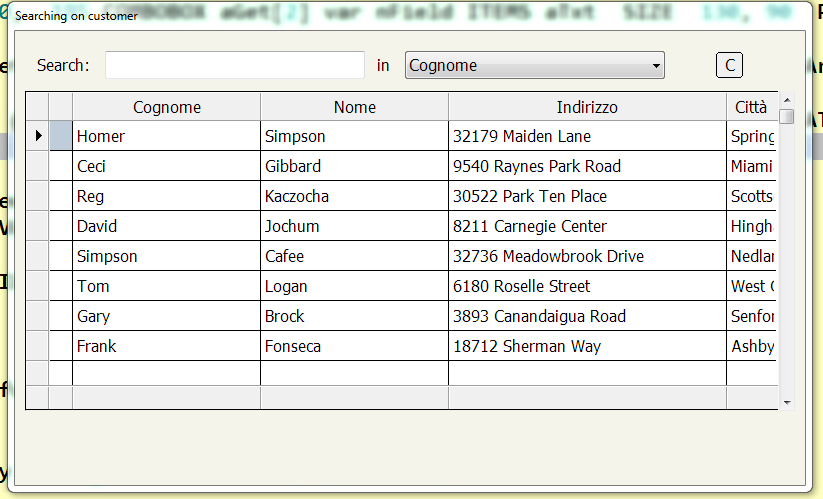
I wish have a get and the combobox to select column where search
and I need to have a first column with the possibility to check it
I made it with a get and th epossibility to select the column where search
So if I must search a City init with "Orz" I select the city column
On Dbf it seem be more easy than on array
Now I'd like to try searching an array in the same way except I don't understand how to do it
Could anyone help me figure out how to do it?
I tried to make a test but make me error on function xSetFilter( oBrw ) and method oBrw:ArrayIncrFilter
I wish have a get and the combobox to select column where search
and I need to have a first column with the possibility to check it
#include "fivewin.ch"
 #include "constant.ch"

REQUEST DBFCDX


static cSeek   := ''
static oSeek


Function MAin()
local aData  :=  {}
local afield :=  { "FIRST","LAST","STREET","CITY","STATE"}
local aTxt   :=  { "Cognome","Nome","Indirizzo","Città","Provincia"}
local nField := 1

       USE CUSTOMER
       aData := FW_DbfToArray( "FIRST,LAST,STREET,CITY,STATE" )
       CLOSE CUSTOMER

Tabella(adata,afield,aTxt,nField)

RETURN NIL

//------------------------------------------------------------------------------------------//

Function Tabella(adata,afield,aTxt,nField)
   local  oTabella,oLbx,oFontDialog,oBrw,oFontDialog2
   local  nBottom   := 30
   local  nRight    := 99.9
   local  nWidth    :=  Max( nRight * DLG_CHARPIX_W, 180 )
   local  nHeight   := nBottom * DLG_CHARPIX_H
   local  aBtnBrow  := array(4)
   local  oCursorBtn :=TCursor():New(,'HAND')
   local  cSearch:=space(20)
   local aGet[2]


      DEFINE FONT oFontDialog NAME 'Tahoma' SIZE 0, -16
      DEFINE FONT oFontDialog2 NAME 'Tahoma' SIZE 0, -14
      DEFINE DIALOG oTabella  SIZE nWidth, nHeight TRANSPARENT ;
      TITLE "Searching on customer" COLOR CLR_BLACK,  nRgb( 245,244,234) FONT oFontDialog;
      STYLE nOr( DS_MODALFRAME, WS_POPUP, WS_CAPTION,  4 )


   @ 30, 05 XBROWSE oBrw SIZE 385,160 PIXEL OF oTabella ;
      DATASOURCE aData AUTOCOLS;   //COLUMNS { || .F. }, "FIRST","LAST","STREET","CITY","STATE" ;
      HEADERS "Cognome","Nome","Indirizzo","Città", "State" ;
      CELL LINES NOBORDER  FOOTERS


      ADD COLUMN TO XBROWSE oBrw   AT 1 // add a column for checkbox

    FOR i := 1 TO LEN(oBrw:aCols)
      oCol := oBrw:aCols[ i ]
      oCol:bClrSelFocus  := { || { CLR_BLACK, nRGB(202,224,252) } }
    NEXT


 WITH OBJECT oBrw
   :l2007:=.f.
   :lColDividerComplete := .t.
   :lRecordSelector     := .t.
   :lHScroll            := .f.
   :nHeaderHeight       := 30
   :nRowHeight          := 30
   :nStretchCol         := -1
   :lDrawBorder := .t.
   :CreateFromCode()
  END


     @ 12,  11 SAY "Search:"     SIZE  55,   12 PIXEL  OF  oTabella  COLOR 0, 14215660
     @ 10,  45  GET aGet[1] VAR cSearch  SIZE  130,  14  PIXEL OF oTabella;
      ON CHANGE  (cSeek:=AllTrim( cSearch )   )    UPDATE

     @ 12,  181 SAY "in"     SIZE  55,   12 PIXEL  OF  oTabella  COLOR 0, 14215660
     @ 10,  195 COMBOBOX aGet[2] var nField ITEMS aTxt  SIZE  130, 90  PIXEL OF oTabella HEIGHTGET 22  UPDATE

      aGet[1]:bKeyDown := { | nKey | KeyChar( oBrw, nKey,nField,oBrw:aArrayData,afield[nField],aGet, cSeek) }

@ 10, 350  BTNBMP PROMPT "C" SIZE 15, 14 PIXEL OF oTabella FLAT ;
          ACTION ( oBrw:Seek( "" ), oBrw:SetFocus() )

 oBrw:bSeek  := nil
    ACTIVATE DIALOG oTabella CENTER

RETURN NIL


 static function KeyChar( oBrw, nKey,n,cdbf,cField,aGet,cSeek)


  If nKey == VK_BACK .and. ! Empty( cSeek )

     xSetFilter( oBrw, cSeek + Chr( nKey ),n,cField ,aget)

      return 0
   elseIf nKey > 31
      xSetFilter( oBrw, cSeek + Chr( nKey ),n,cField,aGet )

      return 0
   Endif

   return nil


  function xSetFilter( oBrw, cpattern,n,cField,aGet )

       local cFilter  := ""
       local oCol, c
       local cField_name :=alltrim(cField)
       local nCol  := n // column select with combobox


       if !Empty( cpattern )
          c  := Upper( AllTrim( cpattern ) )
          c  := "'" + c + "' $ Upper( cValToChar( aRow[" + LTrim( Str( nCol ) ) + "] ) )"
          cFilter  += c
        endif


       if Empty( cFilter )
          xClearFilter( oBrw,aGet )
       else
          cFilter  := "{ |c,aRow,oBrw| " + cFilter + " }"
          oBrw:bFilterExp  := &( cFilter )
          oBrw:ArrayIncrFilter( "dummy" )
          oBrw:Refresh()
          oBrw:SetFocus()
       endif

    return .t.


  function xClearFilter( oBrw,aGet )

        aget[1]:cText := Space(20)

       if oBrw:nLen < Len( oBrw:aArrayData )
          oBrw:bKeyCount    := { || Len( oBrw:aArrayData ) }
          oBrw:Refresh()
       endif
       oBrw:SetFocus()

    return .t.
Since from 1991/1992 ( fw for clipper Rel. 14.4 - Momos)
I use : FiveWin for Harbour March-April 2024 - Harbour 3.2.0dev (harbour_bcc770_32_20240309) - Bcc7.70 - xMate ver. 1.15.3 - PellesC - mail: silvio[dot]falconi[at]gmail[dot]com
I use : FiveWin for Harbour March-April 2024 - Harbour 3.2.0dev (harbour_bcc770_32_20240309) - Bcc7.70 - xMate ver. 1.15.3 - PellesC - mail: silvio[dot]falconi[at]gmail[dot]com
