FiveTech Support Forums

FiveWin / Harbour / xBase community
Board index FiveWin for Harbour/xHarbour FW_BarCodeBmp() / FW_SaveImage() help please [Solved]
Posts: 53
Joined: Wed Aug 06, 2008 05:27 PM
FW_BarCodeBmp() / FW_SaveImage() help please [Solved]
Posted: Mon Nov 09, 2020 11:45 AM
Hello to all members,
I try to create QRcode with function FW_BarCodeBmp() and save it to JPG or PNG file but saved picture has black border around QRcode. Is there any way to disable border?
I modified "\fwh\samples\QRcode.prg" to "QRcode1.prg" to make simple example of my problem. In example I also use "oWnd:SayBarCode()" which works well.

Example #1
Code (fw): Select all Collapse
#include "fivewin.ch"

REQUEST FWZEBRA  // Important

function Main()

   local hBmp,cText    
   cText:="https://ancdefg.hij.hr/rn?ilz=7fc0d4da335dedcf569a4e365fc8cf62&datv=20201107_1036&izn=18,90"
   
   hBmp := FW_BarCodeBmp( cText, "QRCODE", 200, 200 )
   FW_SaveImage( hBmp, "name.png" )

return nil


Example #2
Code (fw): Select all Collapse
#include "fivewin.ch"

REQUEST FWZEBRA

//----------------------------------------------------------------------------//

function Main()

   local oWnd, cText, cPrg := cFileSetExt( ExeName(), "prg" )
   //cText    := MEMOREAD( cPrg )
   cText    := "https://ancdefg.hij.hr/rn?ilz=7fc0d4da335dedcf569a4e365fc8cf62&datv=20201107_1036&izn=18,90"

   DEFINE WINDOW oWnd TITLE cPrg FROM 0,0 to 500,200 pixel
   ACTIVATE WINDOW oWnd CENTERED ;
      ON INIT DrawCode(oWnd,cText) 
   
return nil

//----------------------------------------------------------------------------//

function DrawCode(oWnd,cText)

   local oImage, hBmp, hNew

   *
   *   Create QRcode with function FW_BarCodeBmp()
   * 
   hBmp := FW_BarCodeBmp( cText, "QRCODE", 500, 500 )
   FW_SaveImage( hBmp, "test1.png" )                                                // save
   @ 37,37 XIMAGE oImage SIZE 110,110 OF oWnd SOURCE "test1.png"                    // draw QRcode at top of window


   *
   * 
   * 
   oWnd:SayBarCode( cText, { 20,20,-20,-20 }, "QR-CODE" )                           // draw QRcode at center of window

   *
   *   Cut part of image ...
   * 
   hNew := FW_TransformBitmap( hBmp, { nil, nil, 0.5, 0.5 }, 1, 0 )                 // cut part of image
   FW_SaveImage( hNew, "test2.png" )                                                // save
   @ 317,37 XIMAGE oImage SIZE 110,110 OF oWnd SOURCE "test2.png"                   // draw QRcode at bottom of window

return nil

Boris (FWH 20.07, xHarbour 1.2.3, Harbour 3.2.0, BCC74, MySql 5.7)
Posts: 7317
Joined: Thu Oct 18, 2012 07:17 PM
Re: FW_BarCodeBmp() / FW_SaveImage() help please ...
Posted: Mon Nov 09, 2020 12:11 PM
try

@ 317,37 XIMAGE oImage SIZE 110,110 OF oWnd SOURCE "test2.png" NOBORDER

Since from 1991/1992 ( fw for clipper Rel. 14.4 - Momos)

I use : FiveWin for Harbour March-April 2024 - Harbour 3.2.0dev (harbour_bcc770_32_20240309) - Bcc7.70 - xMate ver. 1.15.3 - PellesC - mail: silvio[dot]falconi[at]gmail[dot]com
Posts: 53
Joined: Wed Aug 06, 2008 05:27 PM
Re: FW_BarCodeBmp() / FW_SaveImage() help please ...
Posted: Mon Nov 09, 2020 01:22 PM

Thanks Silvio,
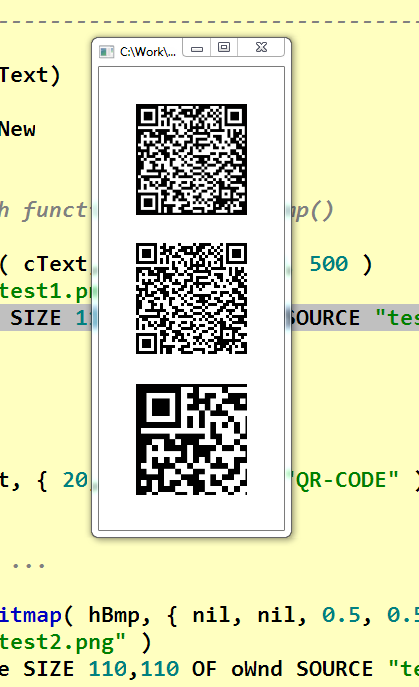
but I may not have described the problem in good way. My problem is not the draw QRcode on screen but the save to PNG/JPG file.
After you compile and start my example you can open with some external picture viewer "test1.png" and "test2.png" and see border on QRcode.
Picture in this topic is only to describe how does it look like in saved files.

Problem is in these two lines:
hBmp := FW_BarCodeBmp( cText, "QRCODE", 500, 500 )
FW_SaveImage( hBmp, "test1.png" )

Boris (FWH 20.07, xHarbour 1.2.3, Harbour 3.2.0, BCC74, MySql 5.7)
Posts: 53
Joined: Wed Aug 06, 2008 05:27 PM
Re: FW_BarCodeBmp() / FW_SaveImage() help please [Solved]
Posted: Mon Nov 09, 2020 07:38 PM
I found solution from Mr. Nages, works great. Here is working example without black border / background:

Code (fw): Select all Collapse
#include "fivewin.ch"

REQUEST FWZEBRA  // Important

function Main()

   local hBmp,cText    
   
   cText:="https://ancdefg.hij.hr/rn?ilz=7fc0d4da335dedcf569a4e365fc8cf62&datv=20201107_1036&izn=18,90"
   
   hBmp := FW_BarCodeBmp( cText, "QRCODE", 200, 200 )
   hBmp := bmp2alpha( hBmp )                                    // without this line QRcode has black frame/background ...
   
   FW_SaveImage( hBmp, "name.png" )

return nil

//-----------------------------------------------------//

function bmp2alpha( hBmp1 )

   local hBmp, oBmp

   oBmp  := GdiBmp():New()
   oBmp:CreateFromRes( hBmp1, 0 )
   oBmp:Conver24to32Alpha( .f. )
   hBmp  := oBmp:GetGDIHbitmap()
   oBmp:Destroy()
   DeleteObject( hBmp1 )

return hBmp
Boris (FWH 20.07, xHarbour 1.2.3, Harbour 3.2.0, BCC74, MySql 5.7)
Posts: 1096
Joined: Fri Oct 28, 2005 02:27 AM
Re: FW_BarCodeBmp() / FW_SaveImage() help please [Solved]
Posted: Fri Sep 08, 2023 08:00 AM

When I tested with FWH1912, bmp2alpha() is still necessary to avoid getting the frame which would render the qrcode unreadable

FWH 11.08/FWH 19.12

BCC5.82/BCC7.3

xHarbour/Harbour
Posts: 10733
Joined: Sun Nov 19, 2006 05:22 AM
Re: FW_BarCodeBmp() / FW_SaveImage() help please [Solved]
Posted: Fri Sep 08, 2023 08:53 AM
Please try:
Code (fw): Select all Collapse
    hBmp := FW_BarCodeBmp( cText, "QRCODE", nWidth, nHeight, nil, .t. )
   FW_SaveImage( hBmp, "qr.png" )
   DeleteObject( hBmp )
   XImage( "qr.png" )
Regards


G. N. Rao.

Hyderabad, India
Posts: 1096
Joined: Fri Oct 28, 2005 02:27 AM
Re: FW_BarCodeBmp() / FW_SaveImage() help please [Solved]
Posted: Fri Sep 08, 2023 09:14 AM

Thanks Rao. That worked!

FWH 11.08/FWH 19.12

BCC5.82/BCC7.3

xHarbour/Harbour
Posts: 1096
Joined: Fri Oct 28, 2005 02:27 AM
Re: FW_BarCodeBmp() / FW_SaveImage() help please [Solved]
Posted: Mon Sep 11, 2023 02:33 AM

Just out of curiosity, could the qrcode be generated with white background instead of being transparent?

FWH 11.08/FWH 19.12

BCC5.82/BCC7.3

xHarbour/Harbour
Posts: 10733
Joined: Sun Nov 19, 2006 05:22 AM
Re: FW_BarCodeBmp() / FW_SaveImage() help please [Solved]
Posted: Mon Sep 11, 2023 03:27 AM
Please try
Code (fw): Select all Collapse
hBmp := FW_BarCodeBmp( cText, "QRCODE", nWidth, nHeight, nil, CLR_WHITE )
and let us know if this is working well for all purposes.
Regards


G. N. Rao.

Hyderabad, India
Posts: 1096
Joined: Fri Oct 28, 2005 02:27 AM
Re: FW_BarCodeBmp() / FW_SaveImage() help please [Solved]
Posted: Mon Sep 11, 2023 04:39 AM
I got this error
Code (fw): Select all Collapse
Application Internal Error - C:\test\TPlusSST\bin\inv.exe
Terminated at: 2023-09-11 12:27:48
Unrecoverable error 9001: Error recovery failure
Called from FW_MAKEYOURBITMAP(2098) in .\source\function\IMGTXTIO.PRG
Called from FW_BARCODEBMP(2071) in .\source\function\IMGTXTIO.PRG
FWH 11.08/FWH 19.12

BCC5.82/BCC7.3

xHarbour/Harbour
Posts: 10733
Joined: Sun Nov 19, 2006 05:22 AM
Re: FW_BarCodeBmp() / FW_SaveImage() help please [Solved]
Posted: Mon Sep 11, 2023 04:49 AM

Yes, sorry.

This does not work in FWH1912.

You need to use later version.

This works in the current version.

Regards


G. N. Rao.

Hyderabad, India

Continue the discussion