FiveTech Support Forums

FiveWin / Harbour / xBase community
Board index mod_harbour views static variables
Posts: 6983
Joined: Fri Oct 07, 2005 07:07 PM
views static variables
Posted: Wed Nov 11, 2020 09:53 AM
Dear Antonio,
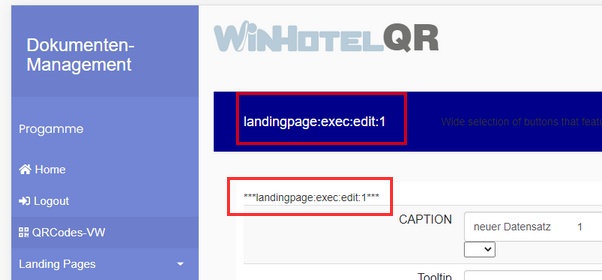
Can you please help me to understand what I am doing wrong?

If I change a static variable in the router module, I don't see the change in the "VIEW" module.

But if I insert the code directly into the mod_harbour prg instead of VIEW, then everything fits.
What mistake am I making here?
Thank you in advance and best regards

Otto
I test with GENESIS.
Router function
...
cbreadcrumbneu := "***" + cbreadcrumbneu + "***"
return View( cRoute )

view( "body" )
...
<a id="title" class="navbar-brand mr-auto" style="color:white;padding-left:30px;">{{ breadcrumbs() }}</a>
...

function BuildEdit
...

cHtml += '{{ breadcrumbs() }}'
...

Posts: 6983
Joined: Fri Oct 07, 2005 07:07 PM
Re: views static variables
Posted: Wed Nov 11, 2020 04:26 PM
Dear Antonio,
I'm sorry. I found my mistake.
I first query breadcrumbs before calling the router which sets the variable.
Best regards,
Otto

Code (fw): Select all Collapse
 <!-- Page Content  -->
  <div id="content">
     <img  src="./assets/img/winhotelqr.svg" width="300px"/>
     <p></p>
     <span style="font-size:30px;cursor:pointer" id="open" onclick="openNav()">☰ NAV open</span>
  
     <nav class="navbar navbar-expand-lg navbar-inverse" style="background-color:{{GetColor2()}};border:0px;">
      <a id="title" class="navbar-brand mr-auto" style="color:white;padding-left:30px;">{{ breadcrumbs() }}</a>

      {{ cRouteGesamt() }}      
     
      <div class="nav-item" style="color:white;display:inline-block;cursor:pointer;" onclick="Logout();">
         <a class="nav-link" style="color:white;" style="cursor:pointer;">{{GetUserName()}}
         <i class="fa fa-sign-out" style="padding-left:15px;"></i></a>
      </div>
   </nav> 

     {{Router()}} 

   </div>
Posts: 6983
Joined: Fri Oct 07, 2005 07:07 PM
Re: views static variables
Posted: Wed Nov 11, 2020 04:55 PM
Hello,
Using document.read and innerHTML helped.

Code (fw): Select all Collapse
 <script>
      $(document).ready(function() {
         document.getElementById('title').innerHTML='{{ breadcrumbs() }}' ;
      });
</script>

---------------------------------------------------------------------------------------------------
In this context, I also googled the following question:

Can you have multiple $(document).ready(function(){ … }); sections?

You can have multiple ones, but it's not always the neatest thing to do. Try not to overuse them, as it will seriously affect readability. Other than that , it's perfectly legal.
https://stackoverflow.com/questions/132 ... n-sections

Best regards,
Otto
Posts: 44158
Joined: Thu Oct 06, 2005 05:47 PM
Re: views static variables
Posted: Wed Nov 11, 2020 06:59 PM

Great

Thank you for sharing it

regards, saludos

Antonio Linares
www.fivetechsoft.com

Continue the discussion