FiveTech Support Forums

FiveWin / Harbour / xBase community
Board index FiveWin for Harbour/xHarbour NOT click on one column
Posts: 7317
Joined: Thu Oct 18, 2012 07:17 PM
NOT click on one column
Posted: Mon Nov 16, 2020 12:52 PM


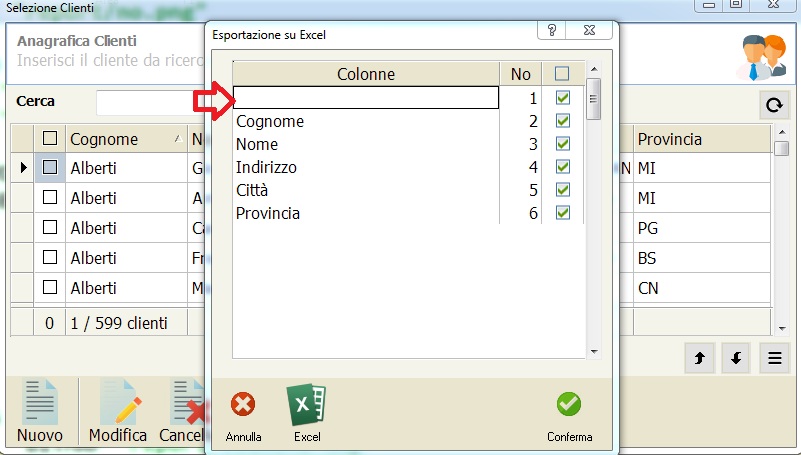
the row with the arrow does not have the content because it relates to the checkbox first column of the browse (that of customers)

Since the display of this line cannot be avoided

it is possible to block it in case of choice of the end user

this line cannot be changed by user

How resolve ?
Since from 1991/1992 ( fw for clipper Rel. 14.4 - Momos)

I use : FiveWin for Harbour March-April 2024 - Harbour 3.2.0dev (harbour_bcc770_32_20240309) - Bcc7.70 - xMate ver. 1.15.3 - PellesC - mail: silvio[dot]falconi[at]gmail[dot]com
Posts: 2170
Joined: Fri Jul 18, 2008 01:24 AM
Re: NOT click on one column
Posted: Mon Nov 16, 2020 04:01 PM
Silvio.Falconi wrote:

the row with the arrow does not have the content because it relates to the checkbox first column of the browse (that of customers)

Since the display of this line cannot be avoided

it is possible to block it in case of choice of the end user

this line cannot be changed by user

How resolve ?


I think if you put the following code in the ON INIT of the dialog, and in the bChange of the browse, could be solve it.
Code (fw): Select all Collapse
 
    if( Empty(oBrw:Colonne:Value),  oBrw:Skip(), )
Francisco J. Alegría P.

Chinandega, Nicaragua.


Fwxh-MySql-TMySql

Continue the discussion