FiveTech Support Forums

FiveWin / Harbour / xBase community
Board index FiveWin for Harbour/xHarbour XBrowse: Using Get for incremental Seek/Filters
Posts: 7317
Joined: Thu Oct 18, 2012 07:17 PM
Re: XBrowse: Using Get for incremental Seek/Filters
Posted: Wed Dec 30, 2020 09:48 PM
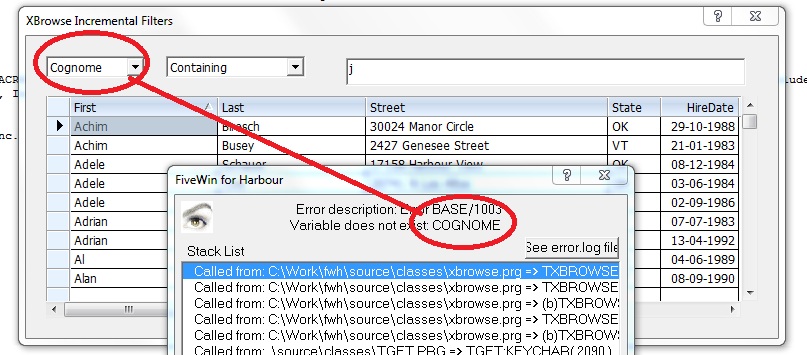
nageswaragunupudi wrote:As the name suggests, oBrw:cFilterFld is to be assigned with a Field Name, not cHeader of a column.
When the user selects a column in the combobox, you need to find of the name of the field used for that column and assign that name to oBrw:cFilterFld.


Rao,
U're right

but

on sample test (xbincflt.prg) I assign the field name on oBrw:cFilterFld with oBrw:cFilterFld:=aFlds[::nat], what is wrong ?

Code (fw): Select all Collapse
 @ 10, 10 COMBOBOX oBrw:cFilterFld ;
      ITEMS aHdrs ;
      ON CHANGE (   CUST->(OrdSetFocus(::nat)),;
                     oBrw:refresh(),;
                     oBrw:cFilterFld:=aFlds[::nat],;
                     Msginfo(oBrw:cFilterFld, aFlds[::nat]),;
                     oBrw:Seek( "" ),;
                     oBrw:SetFocus() ) ;
      SIZE 50,400 PIXEL OF oDlg


I insert a Msginfo to check if the oBrw:cFilterFld is changed


on your sample test modified, adding the combobox, I made the same


Code (fw): Select all Collapse
   
    #include "fivewin.ch"

    REQUEST DBFCDX

    //----------------------------------------------------------------------------//

    function Main()

       local oDlg, oGet, oBrw
       local cSeek := Space( 100 )
       local oCbx
       local aColumns :={"ID","FIRST","LAST"}
       LOCAL nField:=  2
       SetGetColorFocus()

       FERASE( "CUSTOMER.CDX" )
       USE CUSTOMER NEW EXCLUSIVE VIA "DBFCDX"
       FW_CdxCreate()
       SET ORDER TO TAG FIRST
       GO TOP

       DEFINE DIALOG oDlg SIZE 500,500 PIXEL TRUEPIXEL

       @ 20,20 GET oGet VAR cSeek SIZE 160,20 PIXEL OF oDlg

       @ 60,20 XBROWSE oBrw SIZE -20,-20 PIXEL OF oDlg ;
          DATASOURCE "CUSTOMER" ;
          COLUMNS 1,2,3 ;
          HEADERS "Codice","Nome","Cognome" ;
          AUTOCOLS AUTOSORT CELL LINES NOBORDER

       WITH OBJECT oBrw
          :lIncrFilter   := .t.
          :cFilterFld    := aColumns[nField]
          :oSeek         := oGet // Required before :CreateFromCode()
          :CreateFromCode()
       END


      @ 20,  195 COMBOBOX oCbx Var oBrw:cFilterFld ;
               ITEMS {"Codice","Nome","Cognome"} ;
      SIZE 150,400 PIXEL OF oDlg HEIGHTGET 22

                         oCbx:bchange := <|Self|
                           nField:= ::nat
                           oBrw:cFilterFld := aColumns[nField]
                          Msginfo(oBrw:cFilterFld, aColumns[nField])                //CHECK
                           cSeek := Space( 100 )
                           oGet:refresh()
                           oBrw:Seek( "" )
                           oBrw:SetFocus()
                           oBrw:refresh()
                           oGet:setfocus()
                        return nil
                      >


       ACTIVATE DIALOG oDlg CENTERED

    return nil


when I change on combobocx give me a msginfo to check if the field is changed

Msginfo(oBrw:cFilterFld, aColumns[nField])

So, the oBrw:cFilterFld is changed but the xbrowse search allways the name of the Header
Since from 1991/1992 ( fw for clipper Rel. 14.4 - Momos)

I use : FiveWin for Harbour March-April 2024 - Harbour 3.2.0dev (harbour_bcc770_32_20240309) - Bcc7.70 - xMate ver. 1.15.3 - PellesC - mail: silvio[dot]falconi[at]gmail[dot]com
Posts: 7317
Joined: Thu Oct 18, 2012 07:17 PM
Re: XBrowse: Using Get for incremental Seek/Filters
Posted: Wed Dec 30, 2020 10:09 PM
Nages,
trying this evening I saw on 7471 (xbrowse)

I insert the same text on xbrowse as the fields

@ 30,10 XBROWSE oBrw SIZE -10,-10 PIXEL OF oDlg ;
COLUMNS aFlds HEADERS aFlds ;
DATASOURCE uDataSource AUTOSORT CELL LINES NOBORDER


but the search take the name of the Items of combobox

Since from 1991/1992 ( fw for clipper Rel. 14.4 - Momos)

I use : FiveWin for Harbour March-April 2024 - Harbour 3.2.0dev (harbour_bcc770_32_20240309) - Bcc7.70 - xMate ver. 1.15.3 - PellesC - mail: silvio[dot]falconi[at]gmail[dot]com
Posts: 7317
Joined: Thu Oct 18, 2012 07:17 PM
Re: XBrowse: Using Get for incremental Seek/Filters
Posted: Wed Dec 30, 2020 10:55 PM
Antonio, Nages

@ 20, 280 COMBOBOX oCbx var oBrw:cFilterFld ;
ITEMS aHdrs SIZE 150,400 PIXEL OF oDlg ;
ON CHANGE ( oBrw:cFilterFld := "LAST",;
oBrw:Seek( "" ),;
oBrw:SetFocus() )


it's possible combobox not execute bchange codeblock ?
because I force oBrw:cFilterFld := "LAST" and it not is changed
Since from 1991/1992 ( fw for clipper Rel. 14.4 - Momos)

I use : FiveWin for Harbour March-April 2024 - Harbour 3.2.0dev (harbour_bcc770_32_20240309) - Bcc7.70 - xMate ver. 1.15.3 - PellesC - mail: silvio[dot]falconi[at]gmail[dot]com
Posts: 518
Joined: Fri Jun 29, 2012 12:49 PM
Re: XBrowse: Using Get for incremental Seek/Filters
Posted: Thu Dec 31, 2020 10:56 AM
Hello,

This is not working:

Code (fw): Select all Collapse
   @ 10,10 SAY oBrw:oSeek PROMPT oBrw:cSeek SIZE 200,10 PIXEL ;
      OF oDlg COLOR CLR_BLACK,CLR_YELLOW  PICTURE '@!'

       oBrw:oSeek:bValid := { || oBrw:Seek( Trim( oBrw:cSeek ) ) }


Thank you
Posts: 518
Joined: Fri Jun 29, 2012 12:49 PM
Re: XBrowse: Using Get for incremental Seek/Filters
Posted: Thu Dec 31, 2020 11:02 AM

I need, can be in say or in get, that the user enters all the string, press enter and the filter is processed.

Please, how is it done?

Thank you very much.

Posts: 10733
Joined: Sun Nov 19, 2006 05:22 AM
Re: XBrowse: Using Get for incremental Seek/Filters
Posted: Fri Jan 01, 2021 06:29 AM
elvira wrote:I need, can be in say or in get, that the user enters all the string, press enter and the filter is processed.

Please, how is it done?

Thank you very much.


Code (fw): Select all Collapse
local cSeek := Space(50)

...
...

@ r, c GET cSeek SIZE w,h PIXEL OF oDlg VALID If( oBrw:Seek( Trim( cSeek ) ), .t., ( MsgInfo( "Not Found", Trim( cSeek ) ), .f. ) )
Regards


G. N. Rao.

Hyderabad, India
Posts: 518
Joined: Fri Jun 29, 2012 12:49 PM
Re: XBrowse: Using Get for incremental Seek/Filters
Posted: Fri Jan 01, 2021 11:42 AM
Thank you, it is almost working.

But when I press delete key, the filter is changed and the get not updated.

I please need to either that the delete key does nothing, or it deletes the content of the get field.

This is a sample:

Code (fw): Select all Collapse
#include "fivewin.ch"

REQUEST DBFCDX

//----------------------------------------------------------------------------//

function Main()

   local oDlg, oGet, oBrw
   local cSeek := Space( 100 )

   SetGetColorFocus()

   FERASE( "CUSTOMER.CDX" )
   USE c:\fwh\samples\CUSTOMER NEW EXCLUSIVE VIA "DBFCDX"
   FW_CdxCreate()
   SET ORDER TO TAG FIRST
   GO TOP

   DEFINE DIALOG oDlg SIZE 500,500 PIXEL TRUEPIXEL

   @ 20,20 GET cSeek SIZE 460,20 PIXEL OF oDlg ;
           VALID If( oBrw:Seek( Trim( cSeek ) ), .t., ( MsgInfo( "Not Found", Trim( cSeek ) ), .f. ) )


   @ 60,20 XBROWSE oBrw SIZE -20,-20 PIXEL OF oDlg ;
      DATASOURCE "CUSTOMER" ;
      AUTOCOLS AUTOSORT CELL LINES NOBORDER

   WITH OBJECT oBrw
      :lIncrFilter   := .t.
      :lSeekWild     := .t.
      :oSeek         := nil 
      :CreateFromCode()
   END

   ACTIVATE DIALOG oDlg CENTERED on init obrw:setfocus()

return nil
Posts: 10733
Joined: Sun Nov 19, 2006 05:22 AM
Re: XBrowse: Using Get for incremental Seek/Filters
Posted: Sat Jan 02, 2021 08:22 AM

Are you using FWH2012? If not, what version of FWH are you using?

Regards


G. N. Rao.

Hyderabad, India
Posts: 518
Joined: Fri Jun 29, 2012 12:49 PM
Re: XBrowse: Using Get for incremental Seek/Filters
Posted: Sat Jan 02, 2021 08:34 AM

19.12, thank you.

Posts: 10733
Joined: Sun Nov 19, 2006 05:22 AM
Re: XBrowse: Using Get for incremental Seek/Filters
Posted: Mon Jan 04, 2021 02:23 AM
For 19.12, please try this:
Code (fw): Select all Collapse
#include "fivewin.ch"

REQUEST DBFCDX

//----------------------------------------------------------------------------//

function Main()

   local oDlg, oGet, oBrw
   local cSeek := Space( 100 )

   SetGetColorFocus()

   FERASE( "CUSTOMER.CDX" )
   USE c:\fwh\samples\CUSTOMER NEW EXCLUSIVE VIA "DBFCDX"
   FW_CdxCreate()
   SET ORDER TO TAG FIRST
   GO TOP

   DEFINE DIALOG oDlg SIZE 500,500 PIXEL TRUEPIXEL

   @ 20,20 GET oGet VAR cSeek SIZE 460,20 PIXEL OF oDlg ;
           VALID If( oBrw:Seek( Trim( cSeek ) ), .t., ( MsgInfo( "Not Found", Trim( cSeek ) ), .f. ) )

   @ 60,20 XBROWSE oBrw SIZE -20,-20 PIXEL OF oDlg ;
      DATASOURCE "CUSTOMER" ;
      AUTOCOLS AUTOSORT CELL LINES NOBORDER

   WITH OBJECT oBrw
      :lIncrFilter   := .t.
      :lSeekWild     := .t.
      :oSeek         := oGet
      :CreateFromCode()
   END

   ACTIVATE DIALOG oDlg CENTERED on init obrw:setfocus()

return nil
Regards


G. N. Rao.

Hyderabad, India
Posts: 7317
Joined: Thu Oct 18, 2012 07:17 PM
Re: XBrowse: Using Get for incremental Seek/Filters
Posted: Mon Jan 04, 2021 09:07 PM
nageswaragunupudi wrote:For 19.12, please try this:
Code (fw): Select all Collapse
#include "fivewin.ch"

REQUEST DBFCDX

//----------------------------------------------------------------------------//

function Main()

   local oDlg, oGet, oBrw
   local cSeek := Space( 100 )

   SetGetColorFocus()

   FERASE( "CUSTOMER.CDX" )
   USE c:\fwh\samples\CUSTOMER NEW EXCLUSIVE VIA "DBFCDX"
   FW_CdxCreate()
   SET ORDER TO TAG FIRST
   GO TOP

   DEFINE DIALOG oDlg SIZE 500,500 PIXEL TRUEPIXEL

   @ 20,20 GET oGet VAR cSeek SIZE 460,20 PIXEL OF oDlg ;
           VALID If( oBrw:Seek( Trim( cSeek ) ), .t., ( MsgInfo( "Not Found", Trim( cSeek ) ), .f. ) )

   @ 60,20 XBROWSE oBrw SIZE -20,-20 PIXEL OF oDlg ;
      DATASOURCE "CUSTOMER" ;
      AUTOCOLS AUTOSORT CELL LINES NOBORDER

   WITH OBJECT oBrw
      :lIncrFilter   := .t.
      :lSeekWild     := .t.
      :oSeek         := oGet
      :CreateFromCode()
   END

   ACTIVATE DIALOG oDlg CENTERED on init obrw:setfocus()

return nil


Can I see a sample as xbincflt.prg (with combobox and get) with the name of columns different by fields name?
I need to use a dbf anf change text of columns
I need have the system as xbincflt.prg with get and combobox controls
@ 10, 10 COMBOBOX oBrw:cFilterFld ITEMS aHdrs // columns
@ 10, 70 COMBOBOX nWild ITEMS { "Starting With", "Containing" } //
@ 11,160 GET oGet VAR cSeek SIZE 200,14 PIXEL OF oDlg //new feature

thanks
Since from 1991/1992 ( fw for clipper Rel. 14.4 - Momos)

I use : FiveWin for Harbour March-April 2024 - Harbour 3.2.0dev (harbour_bcc770_32_20240309) - Bcc7.70 - xMate ver. 1.15.3 - PellesC - mail: silvio[dot]falconi[at]gmail[dot]com
Posts: 7317
Joined: Thu Oct 18, 2012 07:17 PM
Re: XBrowse: Using Get for incremental Seek/Filters
Posted: Sun Jan 31, 2021 11:27 PM

Nages, You promised me a new test , do you remember ?

Since from 1991/1992 ( fw for clipper Rel. 14.4 - Momos)

I use : FiveWin for Harbour March-April 2024 - Harbour 3.2.0dev (harbour_bcc770_32_20240309) - Bcc7.70 - xMate ver. 1.15.3 - PellesC - mail: silvio[dot]falconi[at]gmail[dot]com
Posts: 10733
Joined: Sun Nov 19, 2006 05:22 AM
Re: XBrowse: Using Get for incremental Seek/Filters
Posted: Sun Feb 07, 2021 09:22 PM
Code (fw): Select all Collapse
#include "fivewin.ch"

REQUEST DBFCDX

//----------------------------------------------------------------------------//

function Main()

   local oDlg, oFont, oBrw, aCols, oGet, oCbx, cHead, aHead
   local cSeek    := Space( 100 )


   SET DATE ITALIAN
   SET CENTURY ON
   SET DELETED ON

   SetGetColorFocus()

   FERASE( "CUSTOMER.CDX" )
   USE CUSTOMER VIA "DBFCDX"
   FW_CdxCreate()
   SET ORDER TO TAG FIRST
   GO TOP

   aCols    := { ;
      { "FIRST",  "Nome",,      120, },;
      { "LAST",   "Cognome",,   120, },;
      { "STREET", "Indirizzo",, 180, },;
      { "CITY",   "Città",,     150, },;
      { "STATE",  "Stato",,      50, } }
   aHead    := ArrTranspose( aCols )[ 2 ]
   cHead    := "Nome"

   DEFINE FONT oFont NAME "TAHOMA" SIZE 0,-14
   DEFINE DIALOG oDlg SIZE 800,600 PIXEL TRUEPIXEL FONT oFont

   @ 20, 20 COMBOBOX oCbx VAR cHead ITEMS aHead ;
      SIZE 150,200 PIXEL OF oDlg ;
      ON CHANGE ( oBrw:Seek( "" ), ;
                  oBrw:cFilterFld := oBrw:oCol( cHead ):cExpr, ;
                  oBrw:SetFocus() )

   @ 20,300 GET oGet VAR cSeek SIZE 480,24 PIXEL OF oDlg

   @ 70, 20 XBROWSE oBrw SIZE -20,-20 PIXEL OF oDlg ;
      DATASOURCE "CUSTOMER" COLUMNS aCols ;
      AUTOSORT CELL LINES NOBORDER

   WITH OBJECT oBrw
      :lIncrFilter   := .t.
      :oSeek         := oGet
      //
      :CreateFromCode()
   END

   ACTIVATE DIALOG oDlg CENTERED ON INIT oBrw:SetFocus()
   RELEASE FONT oFont

return nil

//----------------------------------------------------------------------------//
Regards


G. N. Rao.

Hyderabad, India
Posts: 7317
Joined: Thu Oct 18, 2012 07:17 PM
Re: XBrowse: Using Get for incremental Seek/Filters
Posted: Mon Feb 08, 2021 08:53 AM
nageswaragunupudi wrote:
Code (fw): Select all Collapse
#include "fivewin.ch"

REQUEST DBFCDX

//----------------------------------------------------------------------------//

function Main()

   local oDlg, oFont, oBrw, aCols, oGet, oCbx, cHead, aHead
   local cSeek    := Space( 100 )


   SET DATE ITALIAN
   SET CENTURY ON
   SET DELETED ON

   SetGetColorFocus()

   FERASE( "CUSTOMER.CDX" )
   USE CUSTOMER VIA "DBFCDX"
   FW_CdxCreate()
   SET ORDER TO TAG FIRST
   GO TOP

   aCols    := { ;
      { "FIRST",  "Nome",,      120, },;
      { "LAST",   "Cognome",,   120, },;
      { "STREET", "Indirizzo",, 180, },;
      { "CITY",   "Città",,     150, },;
      { "STATE",  "Stato",,      50, } }
   aHead    := ArrTranspose( aCols )[ 2 ]
   cHead    := "Nome"

   DEFINE FONT oFont NAME "TAHOMA" SIZE 0,-14
   DEFINE DIALOG oDlg SIZE 800,600 PIXEL TRUEPIXEL FONT oFont

   @ 20, 20 COMBOBOX oCbx VAR cHead ITEMS aHead ;
      SIZE 150,200 PIXEL OF oDlg ;
      ON CHANGE ( oBrw:Seek( "" ), ;
                  oBrw:cFilterFld := oBrw:oCol( cHead ):cExpr, ;
                  oBrw:SetFocus() )

   @ 20,300 GET oGet VAR cSeek SIZE 480,24 PIXEL OF oDlg

   @ 70, 20 XBROWSE oBrw SIZE -20,-20 PIXEL OF oDlg ;
      DATASOURCE "CUSTOMER" COLUMNS aCols ;
      AUTOSORT CELL LINES NOBORDER

   WITH OBJECT oBrw
      :lIncrFilter   := .t.
      :oSeek         := oGet
      //
      :CreateFromCode()
   END

   ACTIVATE DIALOG oDlg CENTERED ON INIT oBrw:SetFocus()
   RELEASE FONT oFont

return nil

//----------------------------------------------------------------------------//


Wonderful
and then If a user hides a column ?, the combobox does not update creating problems
Since from 1991/1992 ( fw for clipper Rel. 14.4 - Momos)

I use : FiveWin for Harbour March-April 2024 - Harbour 3.2.0dev (harbour_bcc770_32_20240309) - Bcc7.70 - xMate ver. 1.15.3 - PellesC - mail: silvio[dot]falconi[at]gmail[dot]com
Posts: 10733
Joined: Sun Nov 19, 2006 05:22 AM
Re: XBrowse: Using Get for incremental Seek/Filters
Posted: Mon Feb 08, 2021 10:22 AM

You have to reset the items of the combobox on the basis of columns where oCol:lHide == .f.

Regards


G. N. Rao.

Hyderabad, India