Just define a array with the colorvalues.
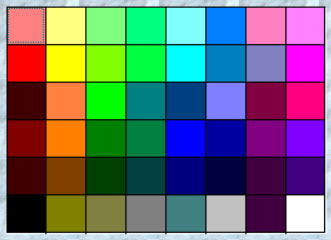
This sample shows a array with the basiccolors.
FUNCTION RGB_BASIC( oDlgMain )
LOCAL oBrw2, n
// array of cellcolors for colorselection
LOCAL aDat1 := { { nRGB( 255, 128, 128 ), nRGB( 255, 255, 128 ), nRGB( 128, 255, 128 ), nRGB( 0, 255, 128 ), ;
                              nRGB( 128, 255, 255 ), nRGB( 0, 128, 255 ), nRGB( 255, 128, 192 ), nRGB( 255, 128, 255 ) },;
                            { nRGB( 255, 0, 0 ), nRGB( 255, 255, 0 ), nRGB( 128, 255, 0 ), nRGB( 0, 255, 64 ), ;
                               nRGB( 0, 255, 255 ), nRGB( 0, 128, 192 ), nRGB( 128, 128, 192 ), nRGB( 255, 0, 255 ) },;
                            { nRGB( 64, 0, 0 ), nRGB( 255, 128, 64 ), nRGB( 0, 255, 0 ), nRGB( 0, 128, 128 ), ;
                              nRGB( 0, 64, 128 ), nRGB( 128, 128, 255 ), nRGB( 128, 0, 64 ), nRGB( 255, 0, 128 ) },;
                            { nRGB( 128, 0, 0 ), nRGB( 255, 128, 0 ), nRGB( 0, 128, 0 ), nRGB( 0, 128, 64 ), ;
                              nRGB( 0, 0, 255 ), nRGB( 0, 0, 160 ), nRGB( 128, 0, 128 ), nRGB( 128, 0, 255 ) },;
                            { nRGB( 64, 0, 0 ), nRGB( 128, 64, 0 ), nRGB( 0, 64, 0 ), nRGB( 0, 64, 64 ), ;
                              nRGB( 0, 0, 128 ), nRGB( 0, 0, 64 ), nRGB( 64, 0, 64 ), nRGB( 64, 0, 128 ) },;
                            { nRGB( 0, 0, 0 ), nRGB( 128, 128, 0 ), nRGB( 128, 128, 64 ), nRGB( 128, 128, 128 ), ;
                              nRGB( 64, 128, 128 ), nRGB( 192, 192, 192 ), nRGB( 64, 0, 64 ), nRGB( 255, 255, 255 ) } }

REDEFINE XBROWSE oBrw2 ID 120 OF oDlgMain ARRAY aDat1 ;
FIELDS aDat1[ oBrw2:nArrayAt ][ 1 ], aDat1[ oBrw2:nArrayAt ][ 2 ], aDat1[ oBrw2:nArrayAt ][ 3 ], ;
              aDat1[ oBrw2:nArrayAt ][ 4 ], aDat1[ oBrw2:nArrayAt ][ 5 ], aDat1[ oBrw2:nArrayAt ][ 6 ], ;
              aDat1[ oBrw2:nArrayAt ][ 7 ], aDat1[ oBrw2:nArrayAt ][ 8 ] ;
LINES COLSIZES 30, 30, 30, 30, 30, 30, 30, 30 PIXEL

WITH OBJECT oBrw2
    :lRecordSelector        := .F. // .t.
    :lColDividerComplete    := .T. // .f.
    :lAllowColSwapping      := .F.
    :lAllowColHiding        := .F.
    :lFastEdit              := .F.
    :lHeader                := .F.
    :nStretchCol            := -1
    :lRecordSelector        := .F.
    :lAllowRowSizing        := .F.
    :lHScroll               := .F.
    :lVScroll               := .F.
    :lDrawBorder            := .T.
    :nMarqueeStyle      := 1
    :nRowHeight         := 30

    :aCols[1]:bClrstd := {|| { , aDat1[ oBrw2:KeyNo() ][1] } }
    :aCols[2]:bClrstd := {|| { , aDat1[ oBrw2:KeyNo() ][2] } }
    :aCols[3]:bClrstd := {|| { , aDat1[ oBrw2:KeyNo() ][3] } }
    :aCols[4]:bClrstd := {|| { , aDat1[ oBrw2:KeyNo() ][4] } }
    :aCols[5]:bClrstd := {|| { , aDat1[ oBrw2:KeyNo() ][5] } }
    :aCols[6]:bClrstd := {|| { , aDat1[ oBrw2:KeyNo() ][6] } }
    :aCols[7]:bClrstd := {|| { , aDat1[ oBrw2:KeyNo() ][7] } }
    :aCols[8]:bClrstd := {|| { , aDat1[ oBrw2:KeyNo() ][8] } }
END

FOR n := 1 to LEN( oBrw2:aCols )
      oBrw2:aCols[ n ]:bPaintText = { | oCol, hDC, cText | "" }
      oBrw2:aCols[ n ]:lAllowSizing := .F.
NEXT

oBrw2:bLClicked := { | nRow, nCol | ( nRPos := oBrw2:KeyNo(), ;
                                                        nCPos := oBrw2:SelectedCol():nCreationOrder, ;
                            COLORVALUE( aDat1[nRPos][nCPos]) ) }
oBrw2:bChange := { | nRow, nCol | (  nRPos := oBrw2:KeyNo(), ;
                                                        nCPos := oBrw2:SelectedCol():nCreationOrder, ;
                            COLORVALUE( aDat1[nRPos][nCPos]) ) }
RETURN NIL

// -------------

FUNCTION COLORVALUE( nColor )
LOCAL nRed := nRGBRed( nColor )
LOCAL nGreen := nRGBGreen( nColor )
LOCAL nBlue := nRGBBlue( nColor )

LOCal cWordRGB := "nRGB( " + ALLTRIM(STR(nRed)) + ", " + ;
                                     ALLTRIM(STR(nGreen)) + ", " + ;
                                     ALLTRIM(STR(nBlue)) + " )"

// save result to ???
MsgAlert( nColor, "Color NUMERIC")
MsgAlert( cWordRGB, "Color RGB")

RETURN NIL