FiveTech Support Forums

FiveWin / Harbour / xBase community
Board index FiveWin for Harbour/xHarbour Evaluate whether a color value is dark or light
Posts: 4043
Joined: Wed Dec 19, 2007 06:40 PM
Evaluate whether a color value is dark or light
Posted: Thu Feb 11, 2021 09:18 AM
Hello,

is it possible to get the dark- or light-info from
a selected xbrowse-cell :-)

after cell-selection I can draw a border around the selected cell
for the moment I define a xbrowse-area where the cellborder has to be black or white
but maybe it is possible to calculate the needed color for each selected cell.
the return-values from a selection are RGB, decimal and HEX

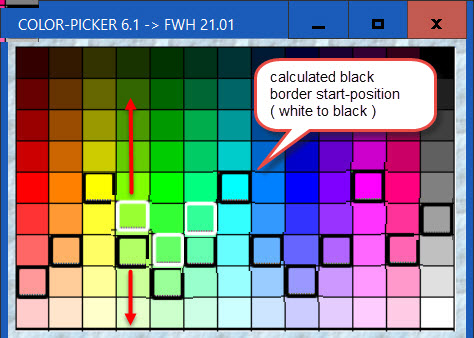
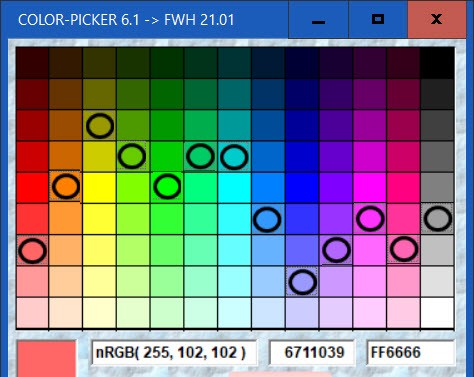
The image shows the start-positions of the border colorchange (calculated )
after a cellselection.


regards
Uwe :-)
Since 1995 ( the first release of FW 1.9 )

i work with FW.

If you have any questions about special functions, maybe i can help.
Posts: 375
Joined: Tue Feb 10, 2015 09:48 AM
Re: Evaluate whether a color value is dark or light
Posted: Thu Feb 11, 2021 11:13 AM

In those case you can convert the color to gray scale using the formula 0.3R+0.6G+0.1*B then check if it is nearest to white or to black :D

Posts: 4043
Joined: Wed Dec 19, 2007 06:40 PM
Re: Evaluate whether a color value is dark or light
Posted: Thu Feb 11, 2021 03:06 PM

Thank You,

it is a good idea but I noticed a problem with some colors
I changed the image to show the problem of the borderswitch.
Like You can see, with green the startposition of the black border is much to late.
Another idea is using maybe a array with defines .T. for black and .F. for
white borders after selecting a cell.

best regards
Uwe

Since 1995 ( the first release of FW 1.9 )

i work with FW.

If you have any questions about special functions, maybe i can help.
Posts: 375
Joined: Tue Feb 10, 2015 09:48 AM
Re: Evaluate whether a color value is dark or light
Posted: Sun Feb 14, 2021 11:35 AM

In your screenshot applied my formula? because I see a green (153,255,50) that become 0.3153+2550.6+50*0.1 = 203.9 that is clearly a light color and you put the white border...

Posts: 4043
Joined: Wed Dec 19, 2007 06:40 PM
Re: Evaluate whether a color value is dark or light
Posted: Sun Feb 14, 2021 02:03 PM
Thank You
I did a better testing ( all cells ) and it seems to work now.
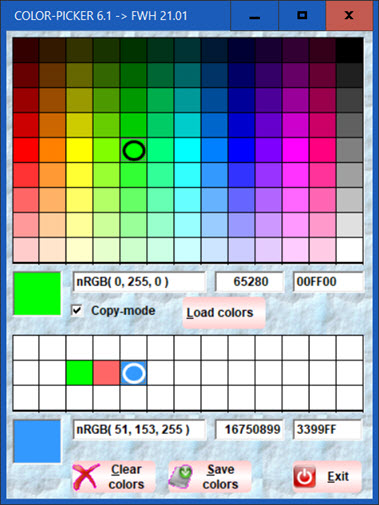
There will be more different colortables inside a folder
( the new solution I'm working on ).
It is possible to create a own color-combination that can be saved to a DBF
You can activate < copy mode > that means selecting a color from table 1
will copy the color to table 2 on cellclick of a selected cell

I changed the cell-selector to round.


testing the color-change from black to white
row 4 = white, row 5 = black


0.3*R+0.6*G+0.1*B


black check
row 5 = nRGB( 128, 128, 128 ) = white
row 6 = RGB( 160, 160, 160 ) = black
< 128 = white
>= 128 = black

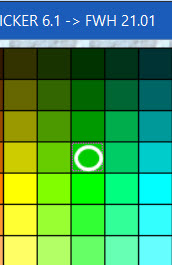
test with green ( column 5 )

row
1 nRGB( 0, 51, 0 )
2 nRGB( 0, 102, 0 )
3 nRGB( 0, 153, 0 )
4 nRGB( 0, 204, 0 ) = 122.4 = white
5 nRGB( 0, 255, 0 ) = 153 = black
6 nRGB( 51, 255, 51 ) = 173.4 = black
7 nRGB( 102, 255, 102 )
8 nRGB( 153, 255, 153 )
9 nRGB( 204, 255, 204 )

best regards
Uwe :-)
Since 1995 ( the first release of FW 1.9 )

i work with FW.

If you have any questions about special functions, maybe i can help.
Posts: 10733
Joined: Sun Nov 19, 2006 05:22 AM
Re: Evaluate whether a color value is dark or light
Posted: Mon Feb 15, 2021 06:16 AM
Without doing any of these calculations yourself, you can get the contrast color by calling the FWH builtin function:
Code (fw): Select all Collapse
ContrastClr( nYourColor ) // ---> CLR_WHITE or CLR_BLACK


Note: Logic is the same. But there is already a ready-made function.
Regards


G. N. Rao.

Hyderabad, India
Posts: 4043
Joined: Wed Dec 19, 2007 06:40 PM
Re: Evaluate whether a color value is dark or light
Posted: Mon Feb 15, 2021 09:13 AM
The result ( switchung from white to black ) is nearly the same
some colors with only a difference of 1 colorstep

From calculation

nRGBColor := 0
nRed := nRGBRed( nValRGB0 )
nGreen := nRGBGreen( nValRGB0 )
nBlue := nRGBBlue( nValRGB0 )

IF 0.3*nRed + 0.6*nGreen + 0.1*nBlue < 128
nRGBColor := 16777215 // white
ENDIF


From function

nRGBColor := ContrastClr( nValRGB0 ) // ---> CLR_WHITE or CLR_BLACK


regards
Uwe
Since 1995 ( the first release of FW 1.9 )

i work with FW.

If you have any questions about special functions, maybe i can help.
Posts: 375
Joined: Tue Feb 10, 2015 09:48 AM
Re: Evaluate whether a color value is dark or light
Posted: Mon Feb 15, 2021 09:27 AM
nageswaragunupudi wrote:Without doing any of these calculations yourself, you can get the contrast color by calling the FWH builtin function:
Code (fw): Select all Collapse
ContrastClr( nYourColor ) // ---> CLR_WHITE or CLR_BLACK


Note: Logic is the same. But there is already a ready-made function.


Just curiosity, which version of FWH has this function? on mine 18.01 there is not and I don't found any reference inside the forum.

Anyway, I did a quick research and the most popular values: 0.2126 R + 0.7152 G + 0.0722 B
Posts: 4043
Joined: Wed Dec 19, 2007 06:40 PM
Re: Evaluate whether a color value is dark or light
Posted: Mon Feb 15, 2021 09:58 AM
Just curiosity, which version of FWH has this function?


I found the function in :
tarrdata.prg ( doesn't exist in FWH 18.01 )
C:\FWH\source\classes\tarrdata.prg"(2447,17):static function ContrastClr( nClr )

regards
Uwe :-)
Since 1995 ( the first release of FW 1.9 )

i work with FW.

If you have any questions about special functions, maybe i can help.
Posts: 10733
Joined: Sun Nov 19, 2006 05:22 AM
Re: Evaluate whether a color value is dark or light
Posted: Mon Feb 15, 2021 10:20 AM
Mr. Antonino

This is the source code of the function in imgtxtio.prg:
Code (fw): Select all Collapse
function ContrastClr( nClr )

   local nLuma

   if HB_ISNUMERIC( nClr ) .and. nClr >= 0 .and. nClr <= 0x00ffffff
      nLuma := ( 0.299 * nRGBRed( nClr ) + 0.587 * nRGBGreen( nClr ) + 0.114 * nRGBBlue( nClr ) )
   else
      return CLR_WHITE
   endif

return If( nLuma < 150, CLR_WHITE, CLR_BLACK )

This function was not there in fwh1801.
The formula basically is the same as suggested by you in the posts above.

But xbrowse was internally using a similar function ContrastColor(...) to decide the color of text to be displayed on brushed cells. You may review this function. Again it is the same formula.

But now I am considering better alternatives. Let us see. For the time being the present logic seems to be enough.

https://stackoverflow.com/questions/596 ... -rgb-color
https://www.nbdtech.com/Blog/archive/20 ... Color.aspx
http://alienryderflex.com/hsp.html
Regards


G. N. Rao.

Hyderabad, India

Continue the discussion