FiveTech Support Forums

FiveWin / Harbour / xBase community
Board index FiveWin for Harbour/xHarbour BTNBMP FONT
Posts: 17
Joined: Wed Feb 04, 2009 09:38 PM
BTNBMP FONT
Posted: Thu Feb 11, 2021 03:56 PM
Hello everyone,

I am using BTNBMP to show a set of buttons but I have already modified the FONT several times and it does not change.

I can even set the font but I can't increase the size

Do any of you know any solutions?

Code (fw): Select all Collapse
REDEFINE BTNBMP ButQST[nContST] ID nIDST OF oStObj FONT oFont13 PROMPT ALLTRIM(STR(nContST,2)) PIXELS ;
FILE "H:\LSOFT\BINGO\FIGURAS\BOLAQD.PNG" ADJUST CENTER NOBORDER TRANSPARENT

ButQST[nContST]:SETCOLOR( NRGB(180,180,180) )


Thank you!
Posts: 10733
Joined: Sun Nov 19, 2006 05:22 AM
Re: BTNBMP FONT
Posted: Thu Feb 11, 2021 07:52 PM

You can change font, size everything.
Let us know how you tried and what is not working for you.

Regards


G. N. Rao.

Hyderabad, India
Posts: 17
Joined: Wed Feb 04, 2009 09:38 PM
Re: BTNBMP FONT
Posted: Thu Feb 11, 2021 08:22 PM
I change the size of the FONT but it remains with a defined size ...

Code (fw): Select all Collapse
DEFINE FONT oFont2000 NAME "ARIAL ROUNDED MT BOLD" SIZE 0,-14 BOLD

DEFINE FONT oFont2000 NAME "ARIAL ROUNDED MT BOLD" SIZE 0,-18 BOLD

DEFINE FONT oFont2000 NAME "ARIAL ROUNDED MT BOLD" SIZE 0,-32 BOLD

DEFINE FONT oFont2000 NAME "ARIAL ROUNDED MT BOLD" SIZE 0,-46 BOLD


I changed for all these sizes but it hasn't changed
Posts: 10733
Joined: Sun Nov 19, 2006 05:22 AM
Re: BTNBMP FONT
Posted: Thu Feb 11, 2021 08:41 PM

If you want to change the font of BtnBmp (or any control, window, dialog)

DEFINE oNewFont NAME ....................
and then
oBtn:SetFont( oNewFont )
RELEASE FONT oNewFont

Regards


G. N. Rao.

Hyderabad, India
Posts: 17
Joined: Wed Feb 04, 2009 09:38 PM
Re: BTNBMP FONT
Posted: Thu Feb 11, 2021 08:57 PM
Yes i already tried this...
Code (fw): Select all Collapse
ButQST[nContST]:SETFONT(oFont2000)


just like this ...
Code (fw): Select all Collapse
ButQST[nContST]:oFontBold := oFont2000


and I didn't get any results
I think you are at REDEFINE this problem because using @ it seems that it works
Posts: 10733
Joined: Sun Nov 19, 2006 05:22 AM
Re: BTNBMP FONT
Posted: Fri Feb 12, 2021 04:23 AM
I think you are at REDEFINE this problem because using @ it seems that it works

No. It is because you are not doing it correctly.

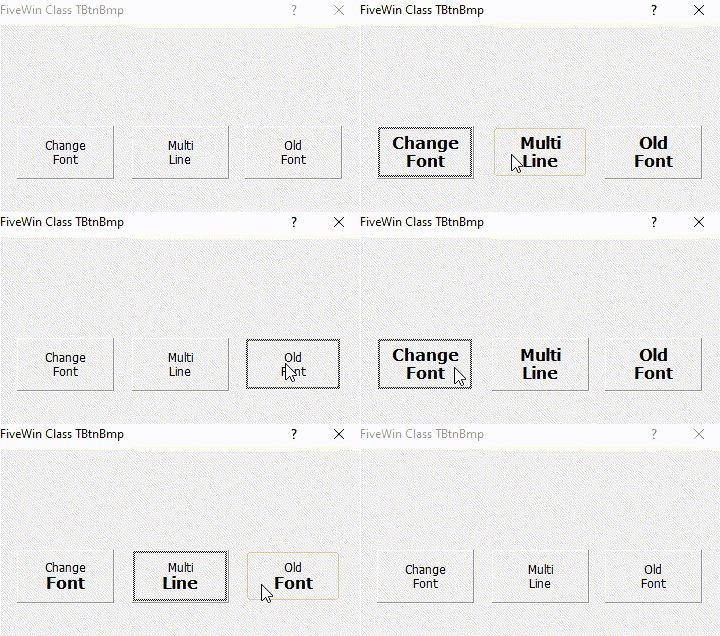
Please try this program:
Code (fw): Select all Collapse
#include "FiveWin.ch"

//----------------------------------------------------------------------------//

function Main()

   local oDlg, aBtn[ 3 ]
   local oFont1, oFont2

   DEFINE FONT oFont1 NAME "TAHOMA" SIZE 0,-12
   DEFINE DIALOG oDlg RESOURCE "Main" FONT oFont1

   REDEFINE BTNBMP aBtn[ 1 ] PROMPT "Change" + CRLF + "Font" ID 110 OF oDlg CENTER
   aBtn[ 1 ]:bAction := <||
      DEFINE FONT oFont2 NAME "VERDANA" SIZE 0,-16 BOLD
      AEval( aBtn, { |oBtn| oBtn:SetFont( oFont2 ), oBtn:Refresh() } )
      RELEASE FONT oFont2
      return nil
      >

   REDEFINE BTNBMP aBtn[ 2 ] PROMPT "Multi" + CRLF + "Line"    ID 120 OF oDlg CENTER ;
      ACTION AEval( aBtn, { |oBtn| oBtn:oFontBold := oFont1, oBtn:Refresh() } )

   REDEFINE BTNBMP aBtn[ 3 ] PROMPT "Old" + CRLF + "Font"  ID 130 OF oDlg CENTER ;
      ACTION AEval( aBtn, { |oBtn| oBtn:oFontBold := nil, oBtn:SetFont( oFont1 ), oBtn:Refresh() } )

   ACTIVATE DIALOG oDlg CENTERED
   RELEASE FONT oFont1

return nil


rc file:
Code (fw): Select all Collapse
#include "..\include\WinApi.ch"

main DIALOG 50, 67, 162, 76
STYLE DS_MODALFRAME | WS_POPUP | WS_VISIBLE | WS_CAPTION | WS_SYSMENU
CAPTION "FiveWin Class TBtnBmp"
FONT 12, "MS Sans Serif"
{
 CONTROL "", 110, "TBtnBmp", 0 | WS_CHILD | WS_VISIBLE | WS_TABSTOP, 9, 41, 43, 21
 CONTROL "", 120, "TBtnBmp", 0 | WS_CHILD | WS_VISIBLE | WS_TABSTOP, 60, 41, 43, 21
 CONTROL "", 130, "TBtnBmp", 0 | WS_CHILD | WS_VISIBLE | WS_TABSTOP, 110, 41, 43, 21
}


Regards


G. N. Rao.

Hyderabad, India
Posts: 17
Joined: Wed Feb 04, 2009 09:38 PM
Re: BTNBMP FONT
Posted: Fri Feb 12, 2021 06:01 AM

Thanks G. N. Rao.!

Continue the discussion