FiveTech Support Forums

FiveWin / Harbour / xBase community
Board index FiveWin for Harbour/xHarbour How to draw gray box in dialog *Fixed*
Posts: 1598
Joined: Fri Oct 07, 2005 05:56 PM
How to draw gray box in dialog *Fixed*
Posted: Fri Feb 26, 2021 02:34 AM
Dear All,

How to draw gray box in Dialog as picture?


Thank you in advance,
Regards,

Dutch


FWH 2304 / xHarbour Simplex 1.2.3 / BCC73 / Pelles C / UEStudio

FWPPC 10.02 / Harbour for PPC (FTDN)

ADS V.9 / MySql / MariaDB

R&R 12 Infinity / Crystal Report XI R2

(Thailand)
Posts: 44158
Joined: Thu Oct 06, 2005 05:47 PM
Re: How to draw gray box in dialog *Fixed*
Posted: Fri Feb 26, 2021 12:50 PM

Dear Dutch,

How did you solved it ?

regards, saludos

Antonio Linares
www.fivetechsoft.com
Posts: 2170
Joined: Fri Jul 18, 2008 01:24 AM
Re: How to draw gray box in dialog *Fixed*
Posted: Fri Feb 26, 2021 05:04 PM
dutch wrote:Dear All,

How to draw gray box in Dialog as picture?


Thank you in advance,


http://fivetechsupport.com/forums/viewt ... 4c#p228461
Francisco J. Alegría P.

Chinandega, Nicaragua.


Fwxh-MySql-TMySql
Posts: 1598
Joined: Fri Oct 07, 2005 05:56 PM
Re: How to draw gray box in dialog *Fixed*
Posted: Sat Feb 27, 2021 12:21 AM
Antonio Linares wrote:Dear Dutch,

How did you solved it ?


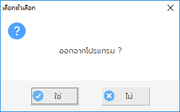
I need to define FONT for the message.

@ nBottom-50, 0 SAY oSays PROMPT space(1000) OF oDlg SIZE nRight+1, 50 PIXEL COLOR CLR_WHITE, nRGB( 245, 245, 245 )
oSays:lTransparent := .F.

Code (fw): Select all Collapse
Function MsgYesNo( cText, cTitle, lLeftAlign )
local oDlg, oSay, oSays, oBtn[3], oImg
local lChk, nRight, nBottom

Default cTitle := TE('เลือกตัวเลือก','Select Options'), lLeftAlign := .F.

lChk  := .F. 

nRight  := iif(HB_UTF8LEN(cText)<60,300,iif(HB_UTF8LEN(cText)<100,350,400))
nBottom := iif(HB_UTF8LEN(cText)<100,160,180) // 180

DEFINE DIALOG oDlg FROM  0,  0  TO  nBottom, nRight PIXEL TITLE cTitle ;
         COLOR FONTTHEME, THEME2007 ;
       FONT MEMVAR->oFont ;
       TRUEPIXEL ;  
          
         oDlg:lHelpIcon := .F.

         @  10, 10 XIMAGE oImg RESOURCE "MSGYESNO" OF oDlg SIZE 32, 32 NOBORDER 

         if lLeftAlign
             @  50, 30 SAY oSay PROMPT rtrim(cText)  OF oDlg SIZE nRight-60, 80 PIXEL COLOR nRGB( 40, 40, 40 )
         else
             @  50, 30 SAY oSay PROMPT rtrim(cText)  OF oDlg SIZE nRight-60, 80 CENTER PIXEL COLOR nRGB( 40, 40, 40 )
         end

         @ nBottom-50,  0 SAY oSays PROMPT space(1000)  OF oDlg SIZE nRight+1, 50 PIXEL COLOR CLR_WHITE, nRGB( 245, 245, 245 )
 
              oSays:lTransparent := .F.
         
         @ nBottom-40,(nRight/2)-100 SBUTTON oBtn[1] PROMPT TE('ใช่','Yes') OF oDlg SIZE 80, 30 PIXEL ;
                      RESOURCE 'OK8' ;
                   COLOR bSColors NOBORDER ; //                ROUNDRECT ;
                   TEXT ON_RIGHT ;
                      ACTION (lChk := .T., oDlg:End())
                      
         @ nBottom-40,(nRight/2)+20 SBUTTON oBtn[2] PROMPT TE('ไม่','No') OF oDlg SIZE 80, 30 PIXEL ;
                      RESOURCE 'NO8' ;
                   COLOR bSColors NOBORDER ;  //                   ROUNDRECT ;
                   TEXT ON_RIGHT ;
                      ACTION (oDlg:End())

                      oBtn[2]:bLostFocus := {|| oBtn[1]:SetFocus() }

ACTIVATE DIALOG oDlg CENTER ON INIT (oBtn[1]:SetFocus())

return lChk

Regards,

Dutch


FWH 2304 / xHarbour Simplex 1.2.3 / BCC73 / Pelles C / UEStudio

FWPPC 10.02 / Harbour for PPC (FTDN)

ADS V.9 / MySql / MariaDB

R&R 12 Infinity / Crystal Report XI R2

(Thailand)
Posts: 10733
Joined: Sun Nov 19, 2006 05:22 AM
Re: How to draw gray box in dialog *Fixed*
Posted: Sat Feb 27, 2021 08:13 AM
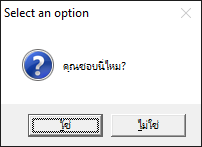
You can have all messagebox function like MsgInfo(), MsgYesNo(), MsgStop(), etc in your own language like this:
Code (fw): Select all Collapse
#include "fivewin.ch"

function Main()

   FW_SetUnicode( .t. )

   SetMsgLangID( 0x041e ) // Thai

   MsgYesNo( "คุณชอบนี่ไหม?" )

return nil


This is a built-in feature of Windows and FWH makes it available to you through the function SetMsgLangID().
You can also enable your software to display all these alert messages in any language of your choice depending on the need
Code (fw): Select all Collapse
nSaveLangID := SetMsgLangID( nNewLangID )
// show your messages and restore the original lang
SetMsgLangID( nSaveLangID )
Regards


G. N. Rao.

Hyderabad, India
Posts: 1598
Joined: Fri Oct 07, 2005 05:56 PM
Re: How to draw gray box in dialog *Fixed*
Posted: Sat Feb 27, 2021 11:18 AM

Dear Master Rao,

Thai language is not a problem. It can show correctly without problem.

I need to set the different image, button and font style. The standard is working properly but
1. font is too small.
2. font style is unable to change.
3. the image of info, alert, stop and question are not flat style that I like.

This is the reason, I need.

Thanks and regards,

Regards,

Dutch


FWH 2304 / xHarbour Simplex 1.2.3 / BCC73 / Pelles C / UEStudio

FWPPC 10.02 / Harbour for PPC (FTDN)

ADS V.9 / MySql / MariaDB

R&R 12 Infinity / Crystal Report XI R2

(Thailand)
Posts: 10733
Joined: Sun Nov 19, 2006 05:22 AM
Re: How to draw gray box in dialog *Fixed*
Posted: Sat Feb 27, 2021 11:23 AM
Code (fw): Select all Collapse
DEFINE DIALOG oDlg SIZE 400,500 PIXEL TRUEPIXEL

// Define all your controls here

oDlg:bPainted := <|hDC|
   FillRectEx( hDC, { 350, 0, 500, 400 }, <yourcolor> )
   return nil
   >

ACTIVATE DIALOG oDlg CENTERED
Regards


G. N. Rao.

Hyderabad, India
Posts: 1598
Joined: Fri Oct 07, 2005 05:56 PM
Re: How to draw gray box in dialog *Fixed*
Posted: Sun Feb 28, 2021 01:25 AM
Dear Master,

Thank you so much.
nageswaragunupudi wrote:
Code (fw): Select all Collapse
DEFINE DIALOG oDlg SIZE 400,500 PIXEL TRUEPIXEL

// Define all your controls here

oDlg:bPainted := <|hDC|
   FillRectEx( hDC, { 350, 0, 500, 400 }, <yourcolor> )
   return nil
   >

ACTIVATE DIALOG oDlg CENTERED
Regards,

Dutch


FWH 2304 / xHarbour Simplex 1.2.3 / BCC73 / Pelles C / UEStudio

FWPPC 10.02 / Harbour for PPC (FTDN)

ADS V.9 / MySql / MariaDB

R&R 12 Infinity / Crystal Report XI R2

(Thailand)

Continue the discussion