FiveTech Support Forums

FiveWin / Harbour / xBase community
Board index FiveWin for Harbour/xHarbour How to change SAY background color on transparent DIALOG
Posts: 11
Joined: Mon Jun 29, 2015 08:16 PM
How to change SAY background color on transparent DIALOG
Posted: Sat Apr 03, 2021 06:13 PM

Hi all!

If a DIALG is TRANSPARENT the SAY background color inherits that of the DIALOG. Is it possible to set a different background color to REDEFINE SAY in this case?

Thanks in advance!

[~~~~~~~~~~~~~~~~~~~~~~~~~~~~~~~~~~~~~~~~~~~~~~~~~~~~~~~~~~]

FWH1206 / XHB121 / BCC582 / RESOURCE WORKSHOP / XDEVSTUDIO

Please visit: arsoft-ap.com

[~~~~~~~~~~~~~~~~~~~~~~~~~~~~~~~~~~~~~~~~~~~~~~~~~~~~~~~~~~]
Posts: 4043
Joined: Wed Dec 19, 2007 06:40 PM
Re: How to change SAY background color on transparent DIALOG
Posted: Sun Apr 04, 2021 11:19 AM
Hello ariston.ap

DEFINE DIALOG oDlg RESOURCE "Test" OF ownd PIXEL TRANSPARENT

is used to make a global transparent for included objects
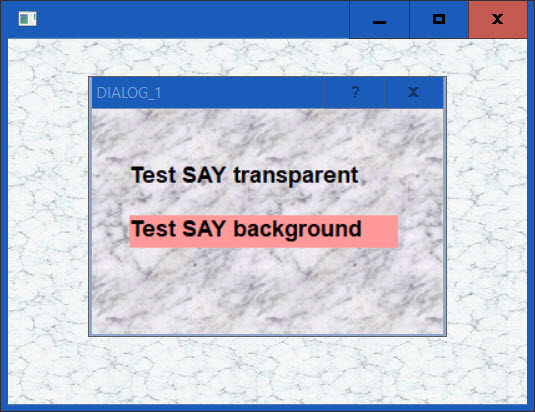
If You need a mix of transparent and NO transparent,
You have to define this for each needed object.


A little test

#include "Fivewin.ch"

FUNCTION MAIN()
local oWnd, oDlg, oSay1, oSay2, oFont, oBrush1, oBrush2

DEFINE FONT oFont NAME "Arial" SIZE 0,-18 BOLD
DEFINE BRUSH oBrush1 FILE "MARBLE.bmp"
DEFINE BRUSH oBrush2 FILE "MARBLE6.bmp"

DEFINE WINDOW oWnd FROM 70, 70 TO 400, 500 PIXEL
oWnd:SetBrush( oBrush1 )

DEFINE DIALOG oDlg RESOURCE "Test" OF ownd PIXEL // TRANSPARENT
oDlg:SetBrush( oBrush2 )

REDEFINE SAY oSay1 PROMPT "Test SAY transparent" ID 100 OF oDlg FONT oFont
oSay1:Setcolor( 0, 10066431 ) // background ignored
oSay1:lTransparent := .T. // to be defined if needed :-)

REDEFINE SAY oSay2 PROMPT "Test SAY background" ID 110 OF oDlg FONT oFont
oSay2:Setcolor( 0, 10066431 )

ACTIVATE DIALOG oDlg CENTERED NOWAIT

ACTIVATE WINDOW oWnd CENTERED //;
RELEASE BRUSH oBrush1, oBrush2
oFont:End()

RETURN NIL

regards
Uwe :-)
Since 1995 ( the first release of FW 1.9 )

i work with FW.

If you have any questions about special functions, maybe i can help.
Posts: 11
Joined: Mon Jun 29, 2015 08:16 PM
Re: How to change SAY background color on transparent DIALOG
Posted: Sun Apr 04, 2021 02:42 PM

Perfect!

It worked excactly as I expected.

Great! :)

[~~~~~~~~~~~~~~~~~~~~~~~~~~~~~~~~~~~~~~~~~~~~~~~~~~~~~~~~~~]

FWH1206 / XHB121 / BCC582 / RESOURCE WORKSHOP / XDEVSTUDIO

Please visit: arsoft-ap.com

[~~~~~~~~~~~~~~~~~~~~~~~~~~~~~~~~~~~~~~~~~~~~~~~~~~~~~~~~~~]
Continue the discussion