FiveTech Support Forums

FiveWin / Harbour / xBase community
Board index FiveWin for Harbour/xHarbour Screenshot email
Posts: 6984
Joined: Fri Oct 07, 2005 07:07 PM
Screenshot email
Posted: Tue Apr 06, 2021 12:15 PM
Hello,
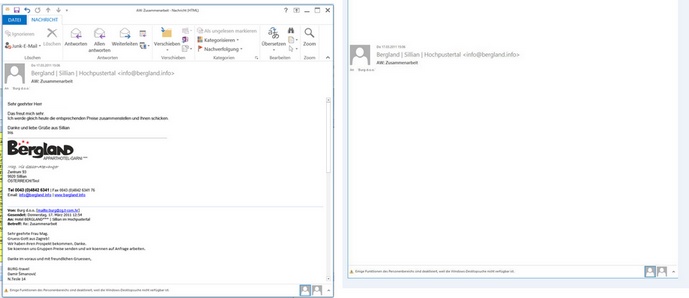
I try to take a screenshot of an email msg file.
The problem is that the part with the email - body is missing in the screenshot.
Maybe someone has a solution.
Best regards,
Otto


Code (fw): Select all Collapse
function MSGToJpeg( cMSG )
   local cTitle   := ""
   local hWnd, hBmp, hBmp2, hDib, cBuf, nWait := 2
   local lRet := .f.
   local nWidth := GetSysMetrics( 0 )
   local nHeight := GetSysMetrics( 1 )
   local aClass := {}

   cTitle := msgGetTitle( cMSG )

   if nWidth > 1920
      nWidth :=  1920
   endif

   if File( cMSG )
      ShellExecute( 0, 'Open', cMSG )
      SysWait( 3 )

      do while nWait < 5 .and. Empty( hWnd :=  FindWnd( cTitle ) )
         SysWait( nWait )
         nWait    += 1
      enddo


      if ! Empty( hWnd )
         SetFocus( hWnd )
         SetForeGroundWindow( hWnd )
         SysRefresh()
         SysWait( 0.8 )
            // for a test
         EnumChildWindows( hWnd,;
            { | hWnd, nLParam | AADD( aClass,{ GetClassName( hWnd ), hWnd } ), .T. },; // .T. means continue
            0 )                                 // optional supplied value

         xbrowse( aClass )
            // for a test end

         hBmp  := WndBitmap( hWnd )

         SendMessage( hWnd, WM_CLOSE )
         hBmp2 := BmpTrim( hBmp )

         DeleteObject( hBmp )

         //    hBmp2 := CropImage( hBmp2, 150, 420, nHeight,nWidth-420 )
         hDib              := DibFromBitmap( hBmp2 )
         cBuf              := DibToStr( hDib )
         GlobalFree( hDib )

         DeleteObject( hBmp2 )

         lRet  := BmpBufToJpg( cFileSetExt( cMSG, "jpg" ), cBuf )
         cBuf  := nil


      endif
   endif

return lRet

//----------------------------------------------------------------------------//

function msgGetTitle( cFile )
  
   LOCAL oOutlook       := TOleAuto():New( "Outlook.Application" )
   local myOlExp        := oOutlook:ActiveExplorer
   local oMail 

        oMail := oOutlook:CreateItemFromTemplate( Alltrim(  cFile ) )

return ( oMail:Subject )

//----------------------------------------------------------------------------//
Posts: 6984
Joined: Fri Oct 07, 2005 07:07 PM
Re: Screenshot email
Posted: Tue Apr 06, 2021 03:43 PM

Hello,
I have found a workaround for me.
I installed a printer driver, which can print into a jpg-file.
Now I open msg file and then print it to the printer driver.
Best regards,
Otto

Posts: 1096
Joined: Fri Oct 28, 2005 02:27 AM
Re: Screenshot email
Posted: Tue Apr 13, 2021 04:53 AM

Hi Otto,
Can I ask what does BmpTrim() and BmpBufToJpg() do and can you share their source?

TIA

FWH 11.08/FWH 19.12

BCC5.82/BCC7.3

xHarbour/Harbour
Posts: 1487
Joined: Tue Jun 14, 2016 07:51 AM
Re: Screenshot email
Posted: Tue Apr 13, 2021 07:29 AM

Otto,

I use Greenshot for this kind of things. I'ts free and, small and very usefull (copy,print,save,....) select part of windows...

Marc Venken

Using: FWH 23.08 with Harbour
Posts: 6984
Joined: Fri Oct 07, 2005 07:07 PM
Re: Screenshot email
Posted: Tue Apr 13, 2021 07:33 AM
Hello Hua,

These functions Mr. Rao showed in a session when we had the FIVEWIN meeting in Sillian.


https://mybergland.com/fwforum/meeting.mp4


BmpTrim( hBmp ) is function to crop black borders of a bitmap, if any.

Code (fw): Select all Collapse
static function BmpTrim( hBmp )  // Trim black sides on left and right

   local hOldBmp, hDC, hDCMem, hBmpTrim
   local nLeft := 0, nRight := 0
   local nHeight, nWidth, ny
   *----------------------------------------------------------

   nWidth   := nBmpWidth(  hBmp )
   nHeight  := nBmpHeight( hBmp )

   hDC      := GetDC( GetDeskTopWindow() )
   hDCMem   := CreateCompatibleDC( hDC )
   hOldBmp  := SelectObject( hDCMem, hBmp )

   ny       := Int( nHeight / 2 )
   do while nLeft < .4 * nWidth .and. GetPixel( hDCMem, nLeft, ny ) == 0
      nLeft++
   enddo
   nRight   := nWidth - 1
   do while nRight > .6 * nWidth .and. GetPixel( hDCMem, nRight, ny ) == 0
      nRight--
   enddo
   SelectObject( hDCMem, hOldBmp )
   DeleteDC( hDCMem )
   ReleaseDC( GetDesktopWindow(), hdc )

   hBmpTrim    := CropImage( hBmp, 0, nLeft, nHeight, nRight )

return hBmpTrim

//----------------------------------------------------------------------------//


BmpBufToJpg( cFileJpg, cBuf ) is also my very old function to save hBitmap as Jpg file, using Freeimage.dll.

Code (fw): Select all Collapse
static function BmpBufToJpg( cJpeg, cBuf )

   local hMem, nFormat, hDib, hDib2, lRet := .f.
   local nQuality    := 0  // Default

   if LoadFreeImage() <= 32
      MsgAlert( "freeimage.dll not found" )
      return .f.
   endif

   hMem        := FI_OpenMemory( cBuf, Len( cBuf ) )
   nFormat     := FI_GetFileTypeFromMemory( hMem, 0 )
   hDib        := FI_LoadFromMemory( nFormat, hMem, 0 )
   cBuf        := nil  // to release memory
   FI_CloseMemory( hMem )
   hDib2       := FICnv24( hDib )
   FIUnload( hDib )
   lRet        := FISave( 2, hDib2, cJpeg, nQuality )
   FIUnload( hDib2 )


return lRet

//----------------------------------------------------------------------------//


This was before FWH implemented more advanced image functions, without the need for freeimage.dll.


It is now better to use the latest function:
FW_SaveImage( hBitmap, JpgFile, nJpgQuality )


Best regards,
Otto
Posts: 6984
Joined: Fri Oct 07, 2005 07:07 PM
Re: Screenshot email
Posted: Tue Apr 13, 2021 07:40 AM

Hello Mark,

Can you use Greenshot from command com?
If yes, would you be so kind as to show some code?

Best regards,
Otto

Posts: 1487
Joined: Tue Jun 14, 2016 07:51 AM
Re: Screenshot email
Posted: Tue Apr 13, 2021 07:50 AM
Otto wrote:Hello Mark,

Can you use Greenshot from command com?
If yes, would you be so kind as to show some code?

Best regards,
Otto


I never used it, but it seems to be possible :

FAQ's :
Are there any command line options available for Greenshot?
Yes, a few are implemented. Find the actual list by running the executable on the command line with the parameter /help, e.g.: "C:\Program Files\Greenshot\Greenshot.exe" /help.
Marc Venken

Using: FWH 23.08 with Harbour
Posts: 1487
Joined: Tue Jun 14, 2016 07:51 AM
Re: Screenshot email
Posted: Tue Apr 13, 2021 07:54 AM
Marc Venken wrote:
Otto wrote:Hello Mark,

Can you use Greenshot from command com?
If yes, would you be so kind as to show some code?

Best regards,
Otto


I never used it from command line, but it seems to be possible :

FAQ's :
Are there any command line options available for Greenshot?
Yes, a few are implemented. Find the actual list by running the executable on the command line with the parameter /help, e.g.: "C:\Program Files\Greenshot\Greenshot.exe" /help.
Marc Venken

Using: FWH 23.08 with Harbour
Posts: 1096
Joined: Fri Oct 28, 2005 02:27 AM
Re: Screenshot email
Posted: Tue Apr 13, 2021 09:02 AM

Thank you very much for your time and reply Otto.

I did found a command line utility https://www.nirsoft.net/utils/nircmd.html during my research that supports screenshot but didn't experiment with it yet

FWH 11.08/FWH 19.12

BCC5.82/BCC7.3

xHarbour/Harbour
Posts: 10733
Joined: Sun Nov 19, 2006 05:22 AM
Re: Screenshot email
Posted: Wed Apr 14, 2021 06:54 AM
hua wrote:Thank you very much for your time and reply Otto.

I did found a command line utility https://www.nirsoft.net/utils/nircmd.html during my research that supports screenshot but didn't experiment with it yet


Why do we have to look elsewhere when Wiindows 10 comes with a built-in snipping tool? The best of its kind.

What Mr. Otto is trying to do is to automate the entire process from inside a FWH application without using a 3rd party tool.
Regards


G. N. Rao.

Hyderabad, India
Posts: 6984
Joined: Fri Oct 07, 2005 07:07 PM
Re: Screenshot email
Posted: Thu Apr 15, 2021 03:47 PM
Hello friends,
Yes I need jpg creation in my program to automate the process.

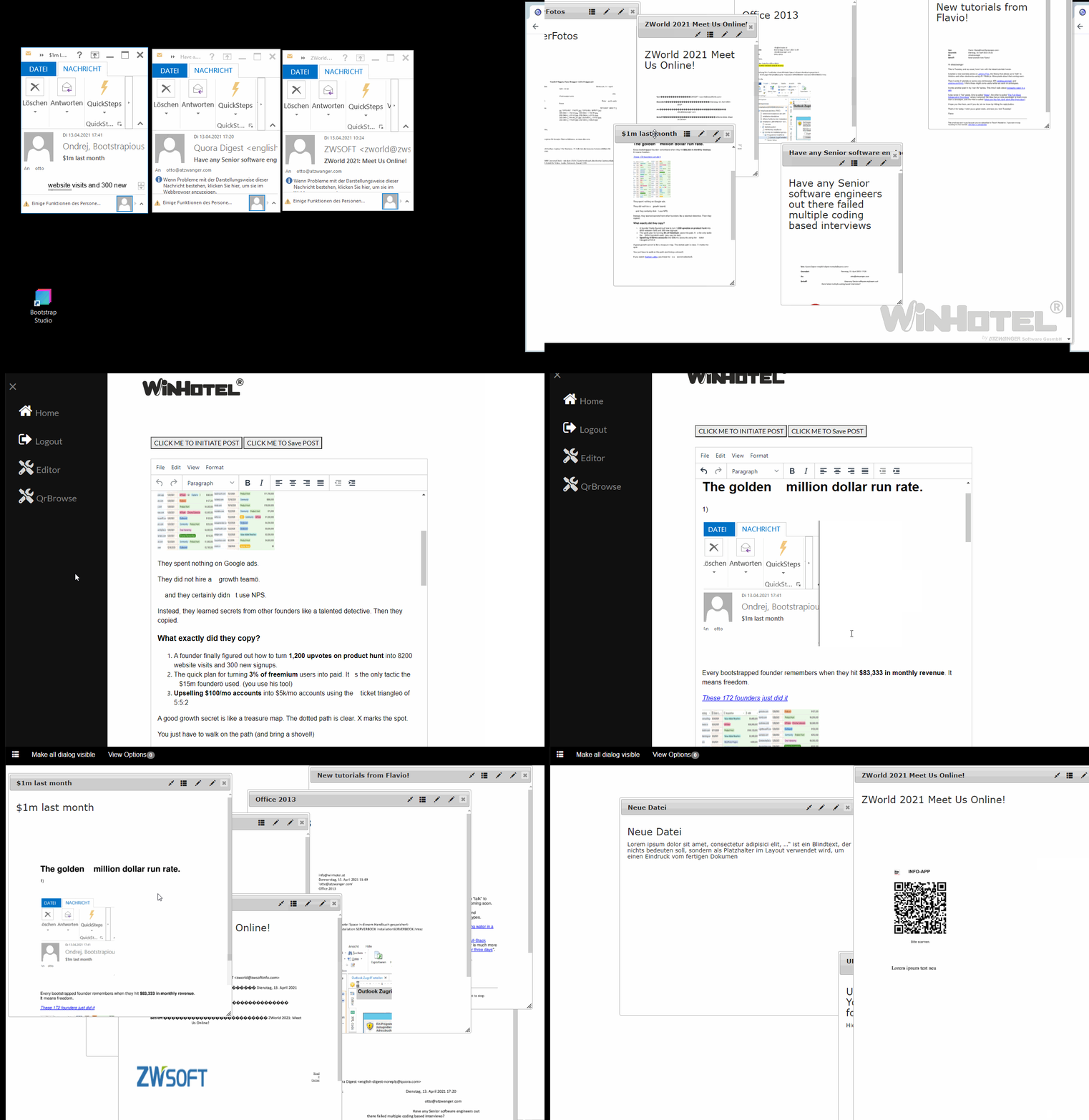
My program "EmailDeskTop" uses FIVEWIN and mod harbour.

As you see, a new preview is recreated after inserting some data into an email item.

Best regards,
Otto

Continue the discussion