FiveTech Support Forums

FiveWin / Harbour / xBase community
Board index FiveWin for Harbour/xHarbour xBrowser
Posts: 148
Joined: Tue Mar 20, 2007 03:13 PM
xBrowser
Posted: Tue Apr 06, 2021 09:06 PM

Hello Guys, good afternoon!

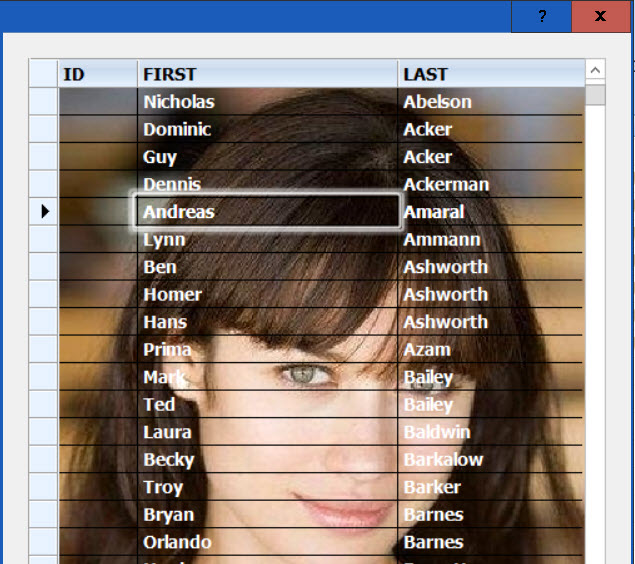
I would like to know if it is possible that a browse does not have color on the selected line. Put an image in the background, and I would like that when walking on the browse, I would not modify the background image or the colors of the words. It's possible?

Thanks in advance!

Oliveiros Junior

Posts: 10733
Joined: Sun Nov 19, 2006 05:22 AM
Re: xBrowser
Posted: Wed Apr 07, 2021 03:41 AM
To avoid highlighting any cell, use
Code (fw): Select all Collapse
oBrw:nMarqueeStyle := MARQSTYLE_NOMARQUEE  // 0


For fixed background image, use this clause while creating the browse.
Code (fw): Select all Collapse
BACKGROUND "c:\fwh\bitmaps\olga1.jpg" FILL  // FILL or STRETCH or TILED


Try this sample
Code (fw): Select all Collapse
#include "fivewin.ch"

REQUEST DBFCDX

function Main()

   local oDlg, oBrw, oFont

   USE CUSTOMER NEW VIA "DBFCDX"

   DEFINE FONT oFont NAME "TAHOMA" SIZE 0,-14 BOLD
   DEFINE DIALOG oDlg SIZE 500,600 PIXEL TRUEPIXEL FONT oFont

   @ 20,20 XBROWSE oBrw SIZE -20,-20 PIXEL OF oDlg ;
      DATASOURCE "CUSTOMER" AUTOCOLS LINES NOBORDER ;
      BACKGROUND "c:\fwh\bitmaps\olga1.jpg" FILL

   WITH OBJECT oBrw
      :nMarqueeStyle := MARQSTYLE_NOMARQUEE  // 0
      :bClrStd       := { || { CLR_WHITE, CLR_BLACK } }
      :lContrastClr  := .f.
      //
      :CreateFromCode()
   END

   ACTIVATE DIALOG oDlg CENTERED
   RELEASE FONT oFont

return nil


Regards


G. N. Rao.

Hyderabad, India
Posts: 148
Joined: Tue Mar 20, 2007 03:13 PM
Re: xBrowser
Posted: Wed Apr 07, 2021 04:16 PM

Mr Rao,

Thank you

Att.,

Oliveiros Junior

Posts: 4043
Joined: Wed Dec 19, 2007 06:40 PM
Re: xBrowser
Posted: Wed Apr 07, 2021 05:21 PM
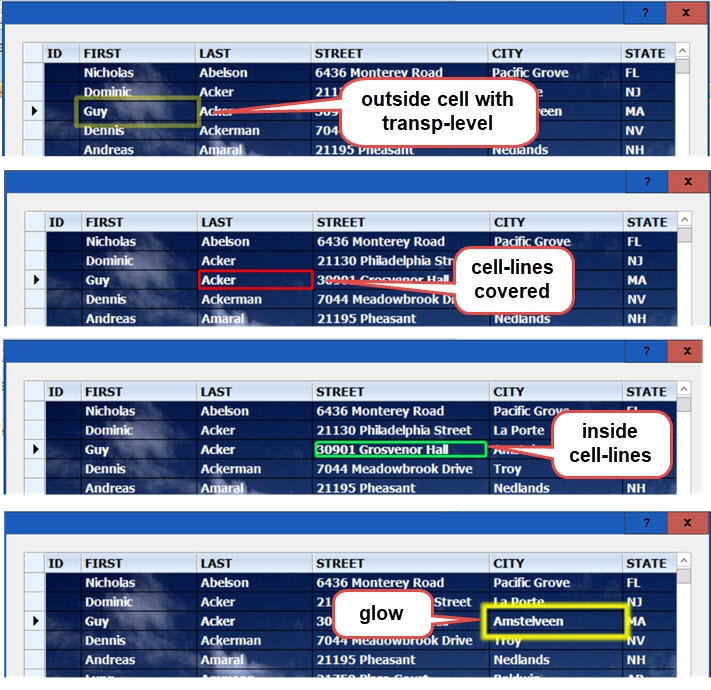
Maybe a focused cell or row with border and any linestyle :-)

defined color
pensize
transp level
normal or glowing
square or round corners
border painted with cellsize or outside or inside of a cell


regards
Uwe :-)
Since 1995 ( the first release of FW 1.9 )

i work with FW.

If you have any questions about special functions, maybe i can help.
Posts: 148
Joined: Tue Mar 20, 2007 03:13 PM
Re: xBrowser
Posted: Fri Apr 09, 2021 02:08 AM

Mr Uwe,

Thanks for the suggestion.

Att.,

Oliveiros Junior

Posts: 1487
Joined: Tue Jun 14, 2016 07:51 AM
Re: xBrowser
Posted: Fri Apr 09, 2021 07:28 AM
ukoenig wrote:Maybe a focused cell or row with border and any linestyle :-)

defined color
pensize
transp level
normal or glowing
square or round corners
border painted with cellsize or outside or inside of a cell


regards
Uwe :-)


Uwe,

How do you code look like for this ?
Marc Venken

Using: FWH 23.08 with Harbour
Posts: 4043
Joined: Wed Dec 19, 2007 06:40 PM
Re: xBrowser
Posted: Fri Apr 09, 2021 09:11 AM
Marc,

here are just some more options what is possible
the design of each cell can be different like You can see
I still need a little bit time to complete the tool.
It is small and easy to understand.


On top the style of each cell is defined
the styles / settings of the 13 customer.dbf fields :

Code (fw): Select all Collapse
// enable / disable borderpainting of cells
LOCAL aShowBord := { .F., .T., .T., .T., .T., .F., .T., .T., .T., .T.,  .F., .T., .T. }
// defined pensize
LOCAL aPensize      :=  { 2, 5, 3, 3, 4, 4, 2, 2, 2, 3.,4, 4, 2 }        
// border-colors
LOCAL aRGBColor := { 16777215, 65535, 255, 4259584, 65535, 65535, 16711935, ;
                       16777215, 16777215, 255., 255, 16777215, 16777215 }
// no transparent = 255  transp = 100 to 255
LOCAL aTranpL       := { 255, 100, 255, 255, 255, 255, 255, 255, 255, 255., 255, 255, 255 }  
// round corners
LOCAL aRound        := { 10, 1, 2, 3, 3, 1, 1, 1, 2, 3.,1, 1, 2 }    
// 1 = outside, 2 = cell-line, 3 = inside, 4 = glow 
LOCAL aBordStyle        := { 3, 1, 2, 3, 4, 1, 1, 1, 2, 3.,1, 1, 3 }


regards
Uwe :-)
Since 1995 ( the first release of FW 1.9 )

i work with FW.

If you have any questions about special functions, maybe i can help.
Posts: 4043
Joined: Wed Dec 19, 2007 06:40 PM
Re: xBrowser
Posted: Tue Apr 13, 2021 10:30 AM
Marc,

I'm still busy working on the tool
some amazing things are possible with xBrowse
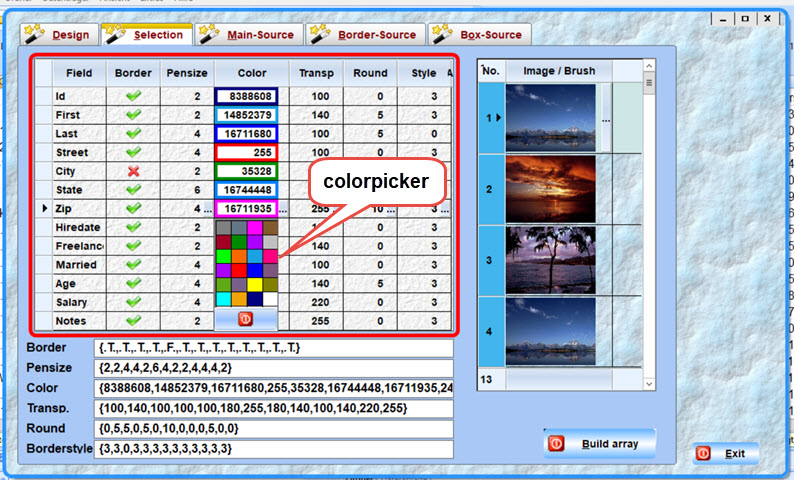
I created a colorpicker on a xBrowse-cell :-)
The cell is showing the selected border and colovalue
Each column can have a sifferent cellborder
six values can be defined for each border.
The folderpages 3, 4 and 5 including the generated source
of a full working sample.


regards
Uwe :-)
Since 1995 ( the first release of FW 1.9 )

i work with FW.

If you have any questions about special functions, maybe i can help.
Posts: 1487
Joined: Tue Jun 14, 2016 07:51 AM
Re: xBrowser
Posted: Tue Apr 13, 2021 07:24 PM

You are changing the source of Xbrowse for this ?

Marc Venken

Using: FWH 23.08 with Harbour
Posts: 4043
Joined: Wed Dec 19, 2007 06:40 PM
Re: xBrowser
Posted: Wed Apr 14, 2021 06:06 AM
Marc,

nothing has to be changed :-)
I'm just working on a solution
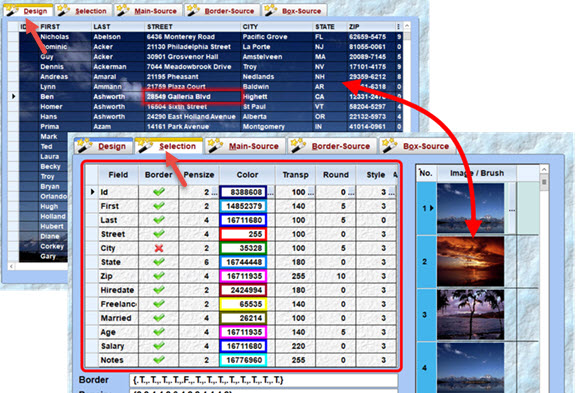
to UPDATE the xBrowse-background on folderpage 1
with a selected image from folderpage 2 at runtime

because the selected image can be a image ( FILL ) or brush
related to the selection I habe to change the < xBrowse-BkMode > as well
on folderpage 1 the border-results selected on folderpage 2
are visible on pagechange as well like the background

on folderpage 1

@ 10, 10 XBROWSE oBrw1 SIZE 850, 525 PIXEL OF oFld:aDialogs[ 1 ] ;
COLSIZES 40, 110, 110, 200, 150, 70, 100, 100, 100, 80, 60, 120, 160 ;
DATASOURCE oCustomer AUTOCOLS LINES NOBORDER ;
BACKGROUND cBackImg FILL :-)

the var cBackImg is new defined on folderpage 2

oBrw1:SetBackGround( cBackImg, BCK_FILL ), ;
works as a background-change on folderpage 1
oBrw1 is defined as STATIC


regards
Uwe :-)
Since 1995 ( the first release of FW 1.9 )

i work with FW.

If you have any questions about special functions, maybe i can help.

Continue the discussion