FiveTech Support Forums

FiveWin / Harbour / xBase community
Board index FiveWin for Harbour/xHarbour Xbrowse : Setup configuration file
Posts: 1487
Joined: Tue Jun 14, 2016 07:51 AM
Xbrowse : Setup configuration file
Posted: Thu Apr 15, 2021 03:20 PM

Xbrowse has become so powerfull that we can build programs with less code then ever before. In all my programs xbrowse is the engine and fine tuning the Xbrowse is often a task of looking into samples for witch
tool/option/flag can be set.

Maybe a idea to have a setup button on every browse that we can call to configure the browse in runtime. Mr. Uwe has done this many times, but if it can be build into the FW source, it is available for all of us.
Not all can be setup i think, but mr. Rao is very good.... You never know ) It can also be a process of enhancement in every update.

Just a idea

Marc Venken

Using: FWH 23.08 with Harbour
Posts: 4043
Joined: Wed Dec 19, 2007 06:40 PM
Re: Xbrowse : Setup configuration file
Posted: Thu Apr 15, 2021 04:49 PM
Marc,

yes a good idea.
Most of it I have done already
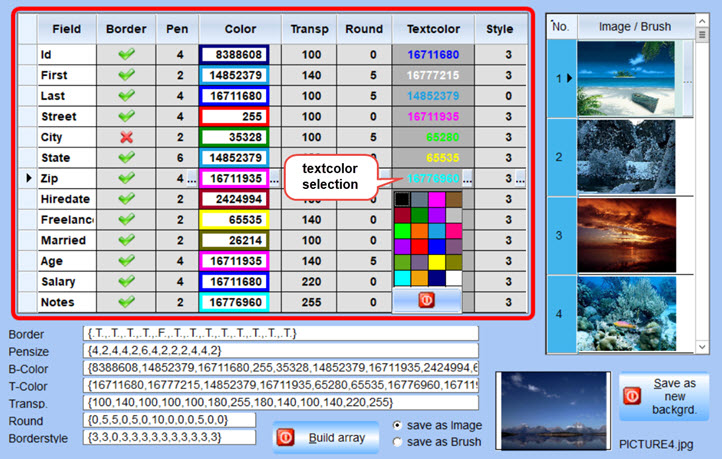
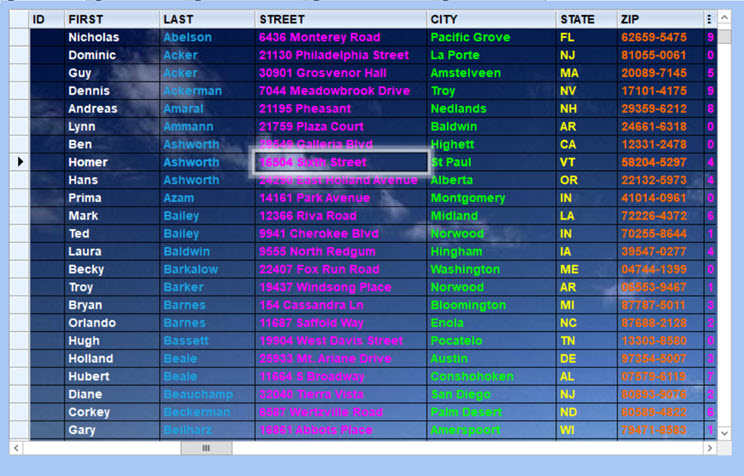
NEW a textcolor-selector added using the colorpicker from the border-colors.


the test


regards
Uwe :-)
Since 1995 ( the first release of FW 1.9 )

i work with FW.

If you have any questions about special functions, maybe i can help.
Posts: 1487
Joined: Tue Jun 14, 2016 07:51 AM
Re: Xbrowse : Setup configuration file
Posted: Thu Apr 15, 2021 09:44 PM

Uwe,

I know that you have done this before (forum sample reader).

There you use a setup button that opens a dialog with some folders. (Dialog and Xbrowse) are the one for this topic.

But can this setup be activated for any xbrowse we define ? Save settings by name or so
Uwe, absolut with the best intension, but don't take it to far for general use. You have a colorfull mind when programming :wink: :wink:

Mr. Otto also uses a technique to define a Xbrowse setup from a 'Xbrowse data file'. It's more the general options to in/exclude. (VERY interesting)

the combination of the two could become a good setup system. Personel I would prefer a Xbrowse to hold the settings above a INI file.

Maybe Mr. Rao prefers to have a setup system as a standalone class that can be included if the programmer would like to use it.
It's up to us then to have a class/function to link in or Mr. Rao provides something that can be used as setup.

Marc Venken

Using: FWH 23.08 with Harbour
Posts: 474
Joined: Sun Oct 30, 2005 06:37 AM
Re: Xbrowse : Setup configuration file
Posted: Sat Apr 17, 2021 12:11 AM
1.
data osettingbmp
method helpmenu()
2.
METHOD New( oWnd ) CLASS TXBrowse
...
::hBmpRecSel := FwRArrow()

// add the lines
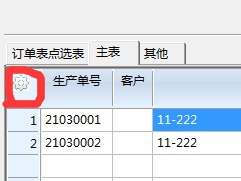
::osettingbmp:=TBitmap():Define( "config",,::oWnd)
::osettingbmp:ltransparent:=.t.


3.
METHOD Paint() CLASS TXBrowse
...
PalBmpDraw( ::hDC, (::nHeaderHeight - 3-if(::lgetbar,::nrowheight*2,0))*0.2, RECORDSELECTOR_WIDTH*0.2,;
::osettingbmp:hBitmap,;
::osettingbmp:hPalette,;
if(::lgetbar,::nHeaderHeight - 3-::nrowheight*2,::nheaderHeight/::nHeaderLines)*0.8,;
if(::lgetbar,::nHeaderHeight - 3-::nrowheight*2,::nheaderHeight/::nHeaderLines)*0.8;
,, .t., Eval( ::bClrHeader, Self ) [ 2 ] )

end
// add lines end

::DispEnd( aInfo )
::Deactivate( hDC )
return 0

4.
METHOD LButtonDown( nRow, nCol, nFlags ) CLASS TXBrowse
...
if ::lDrag
return Super:LButtonDown( nRow, nCol, nFlags )
endif

// add the lines
if nRow < ::HeaderHeight()-if(::lgetbar,::nrowheight*2,0) .and. nCol > 0 .and.ncol<RECORDSELECTOR_WIDTH
::setmenu()
return
end

5.
METHOD helpmenu( nRow, nCol, nFlags ) CLASS TXBrowse

local oMenu, oCol
local cPrompt
local nFor, nLen
local omenu2
local color1,color2

nLen := len( ::aCols )

MENU omenu2 2007 popup
if ::nMarqueeStyle == MARQSTYLE_HIGHLROWMS
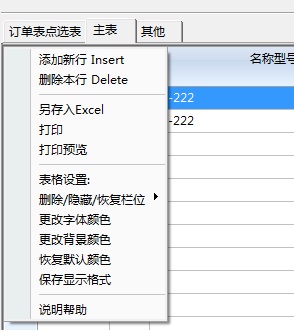
MENUITEM "选择行,取消选择行 Contrl+点击" ACTION (::SELECT(2),::drawline(.t.))
MENUITEM "选择块 Shift+点击" ACTION ::SELECT(3)
MENUITEM "选择全部 " ACTION ::SELECT(4)
MENUITEM "取消全部选择 " ACTION ::SELECT(0)
end
if ::nMarqueeStyle == MARQSTYLE_HIGHLROW
MENUITEM "双击鼠标,本行拖入单据主表" ACTION EVAL(::BLDBLClick) WHEN !EVAL(::beof())

end
if ::bkeydown<>nil.and.::nMarqueeStyle==MARQSTYLE_HIGHLCELL
MENUITEM "添加新行 Insert" ACTION EVAL(::bkeydown,VK_INSERT) WHEN !EVAL(::beof())
MENUITEM "删除本行 Delete" ACTION EVAL(::bkeydown,VK_DELETE) WHEN !EVAL(::beof())
end

separator
MENUITEM "另存入Excel" ACTION ::SAVE()
MENUITEM "打印" ACTION ::REPORT(,.f.)
MENUITEM "打印预览" ACTION ::REPORT(,.t.)
separator
MENUITEM "表格设置:" ACTION tablesethelp(self)

MENUITEM "删除/隐藏/恢复栏位"
MENU
for nFor := 1 to nLen
oCol := ::aCols[ nFor ]
cPrompt := Trim( MemoLine( if(VALTYPE(oCol:cHeader)=="C",oCol:cHeader,EVAL(oCol:cHeader)), 250, 1 ) )
MenuAddItem( cPrompt, , !oCol:lHide, ( len(::aDisplay) != 1 .or. ocol:nPos != 1 ), GenMenuBlock( ::aCols, nFor ) )
next

ENDMENU
if ::bkeydown<>nil.and.::nMarqueeStyle==MARQSTYLE_HIGHLCELL
MENUITEM "更改字体颜色" ACTION (color1:=ChooseColor(),restorestate2(self,color1,color2))
MENUITEM "更改背景颜色" ACTION (color2:=ChooseColor(),restorestate2(self,color1,color2))
MENUITEM "恢复默认颜色" ACTION (restorestate2(self,CLR_BLACK,GetSysColor( 5 )))
end
if ::cid<>nil
MENUITEM "保存显示格式" ACTION savestate(self)
end
separator
MENUITEM "说明帮助" ACTION help(::ccaption)
ENDMENU

ACTIVATE POPUP oMenu2 AT nRow, nCol OF Self

6.

Shuming Wang
http://www.xtech2.top
Mobile:(86)13802729058
Email:100200651@qq.com
QQ:100200651
Weixin: qq100200651
Posts: 1487
Joined: Tue Jun 14, 2016 07:51 AM
Re: Xbrowse : Setup configuration file
Posted: Sun Apr 18, 2021 08:06 AM

This will change the original Xbrowse code not? or do you subclass or how can we call it ?

I always want to keep the original from FW always.

Marc Venken

Using: FWH 23.08 with Harbour
Posts: 474
Joined: Sun Oct 30, 2005 06:37 AM
Re: Xbrowse : Setup configuration file
Posted: Mon Apr 19, 2021 02:28 AM

change the original Xbrowse code.

Shuming Wang

http://www.xtech2.top
Mobile:(86)13802729058
Email:100200651@qq.com
QQ:100200651
Weixin: qq100200651

Continue the discussion