FiveTech Support Forums

FiveWin / Harbour / xBase community
Board index FiveWin for Harbour/xHarbour How to update xBrowse
Posts: 6983
Joined: Fri Oct 07, 2005 07:07 PM
How to update xBrowse
Posted: Fri Apr 23, 2021 07:30 AM
Dear Mr. Rao.

Fivewin samples: barondlg.prg

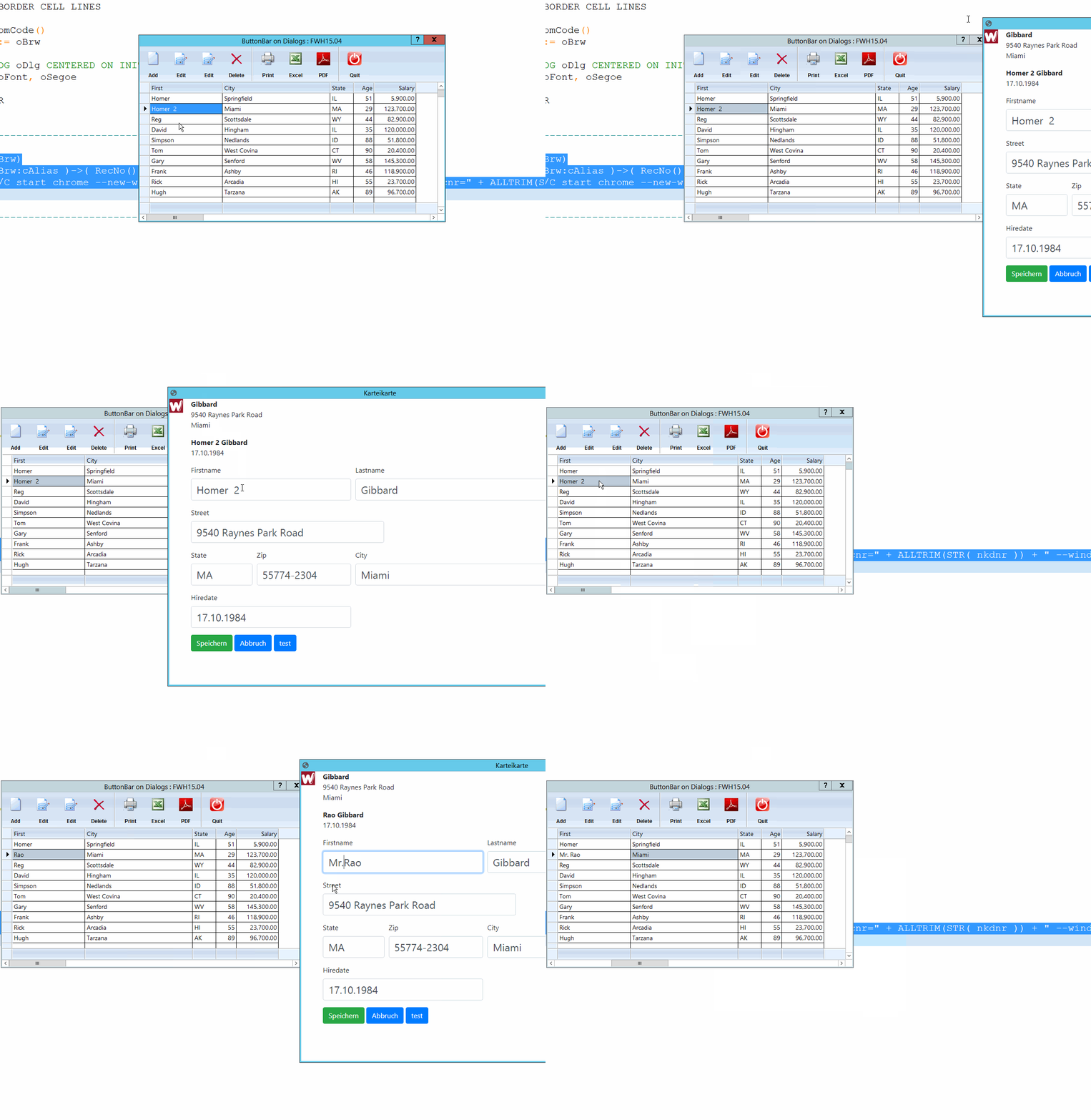
I insert a new button, and from here, I open a mod harbour program to edit the selected database record.


Code (fw): Select all Collapse
function runMH(oBrw)
    nkdnr :=  ( oBrw:cAlias )->( RecNo() )
    WinExec("CMD /C start chrome --new-window --app=http://localhost/formular/index.prg?recnr=" + ALLTRIM(STR( nkdnr )) + " --window-position=1600,300  --window-size=980,700",0)
return nil


Then I change some fields in the MH APP and save the changes.

My problem is how I notify the xBrowse in barondlg.prg to paint the line and show the changes?

Best regards,
Otto
Posts: 1487
Joined: Tue Jun 14, 2016 07:51 AM
Re: How to update xBrowse
Posted: Fri Apr 23, 2021 07:50 AM

Otto,

A Sollution could be to edit the database record directly outside the xbrowse (in your Mod program)
in stead of changing the Xbrowse values. A refresh of the xbrowse when comming back from Mod. would then also change the view of the browse

Unless there is a solution from Xbrowse itself

Marc Venken

Using: FWH 23.08 with Harbour
Posts: 9020
Joined: Thu Oct 06, 2005 08:17 PM
Re: How to update xBrowse
Posted: Fri Apr 23, 2021 08:20 AM
Otto wrote:My problem is how I notify the xBrowse in barondlg.prg to paint the line and show the changes?


Try

Code (fw): Select all Collapse
oBrw:bGotFocus = { || oBrw:Refresh() }


Not tested.

EMG
Posts: 6983
Joined: Fri Oct 07, 2005 07:07 PM
Re: How to update xBrowse
Posted: Fri Apr 23, 2021 08:30 AM
Hello Mark,

>A Sollution could be to edit the database record directly outside the xbrowse (in your Mod program)

That is exactly what I do.

From FIVEWIN

Code (fw): Select all Collapse
WinExec("CMD /C start chrome --new-window --app=http://localhost/formular/index.prg?recnr=" + ALLTRIM(STR( nkdnr )) )


I start a mod harbour APP and pass the record number with the request.

Then in mod harbour I read the argument from the URL

request: index.prg?recnr=999

Code (fw): Select all Collapse
//mod harbour 
 function main
 
 
   cArgs := AP_Args()
   nRecno = VAL( SubStr( cArgs, 7 ) )


In mod harbour I open the customer.dbf and go to record number.
Code (fw): Select all Collapse
    use ( cdbf_file ) new ALIAS TMPDBF_FILE
   goto nRecno

then I fill a HASH and pass the HASH to the HTML part of the web page

Code (fw): Select all Collapse
    TEMPLATE PARAMS hTmp


In the HTML <form> I asign the HASH to a javascript object - this is very similar to harbour HASH.
Code (fw): Select all Collapse
    <script>
    var object=<?prg return hb_jsonEncode( hTmp, .T. )?>;
    
    document.getElementById("first").value = object[ "FIRST" ];


> A refresh of the xbrowse when comming back from Mod.
How can you notify xBrowse that you are "comming back" now.

Maybe a timer is a good solution. In practice, it is the same if you are working in a multiuser environment.

Best regards,
Otto
Posts: 6983
Joined: Fri Oct 07, 2005 07:07 PM
Re: How to update xBrowse
Posted: Fri Apr 23, 2021 08:35 AM

Enrico,

I didn't found a way to open mod harbour with waitrun().
So if you close the mod harbour prg you are not sure that xbrowse gets focus.

Best regards,
Otto

Posts: 1487
Joined: Tue Jun 14, 2016 07:51 AM
Re: How to update xBrowse
Posted: Fri Apr 23, 2021 09:27 AM

Is it not so that afther the call to Mod.

WinExec ....

oBrw:setfocus()
oBrw:refresh()

Marc Venken

Using: FWH 23.08 with Harbour
Posts: 6983
Joined: Fri Oct 07, 2005 07:07 PM
Re: How to update xBrowse
Posted: Fri Apr 23, 2021 09:32 AM

Mark,
Thank you.
But winexec does not wait till the mod harbour program ends.
That is the problem.
Best regards,
Otto

Posts: 1487
Joined: Tue Jun 14, 2016 07:51 AM
Re: How to update xBrowse
Posted: Fri Apr 23, 2021 09:59 AM

Ok,

Now I get it... Sorry

The Mod program will have some time to changes the input and FW is long passed it..

I would put FW in a permanent loop after calling MOD and looking for a field in the database like 'haschanged' to become true. The Mod program changes the values and finaly set the 'haschanged' set to true

Could work, but maybe there a finer techniques around ))

Marc Venken

Using: FWH 23.08 with Harbour
Posts: 6983
Joined: Fri Oct 07, 2005 07:07 PM
Re: How to update xBrowse
Posted: Fri Apr 23, 2021 11:50 AM

Mark,
Thank you.

As refresh/paint is an essential part, I think it is worth thinking about.

We have the same situation with FWH.
You have two workstations. Both have open the client xBrowse.
Now one of the workstations changes something.

Until you do not set focus on the other workstation to the xBrowse you always see the old data.

The next question is how to handle concurrency changing.

I mean, this is the same problem in Fivewin multiuser environment.
Workstation 1 opens a client record makes changes but does not save.
In the meantime, another user made some changes.
If you have done your job well, you have to notify Workstation 1 that the record has changed.

I will look how to use a timer.

Best regards,
Otto

Posts: 9020
Joined: Thu Oct 06, 2005 08:17 PM
Re: How to update xBrowse
Posted: Fri Apr 23, 2021 12:13 PM

Yes, a timed refresh of the browse (each few seconds) looks like a good solution to me.

EMG

Posts: 6983
Joined: Fri Oct 07, 2005 07:07 PM
Re: How to update xBrowse
Posted: Fri Apr 23, 2021 08:16 PM
Hello friends,
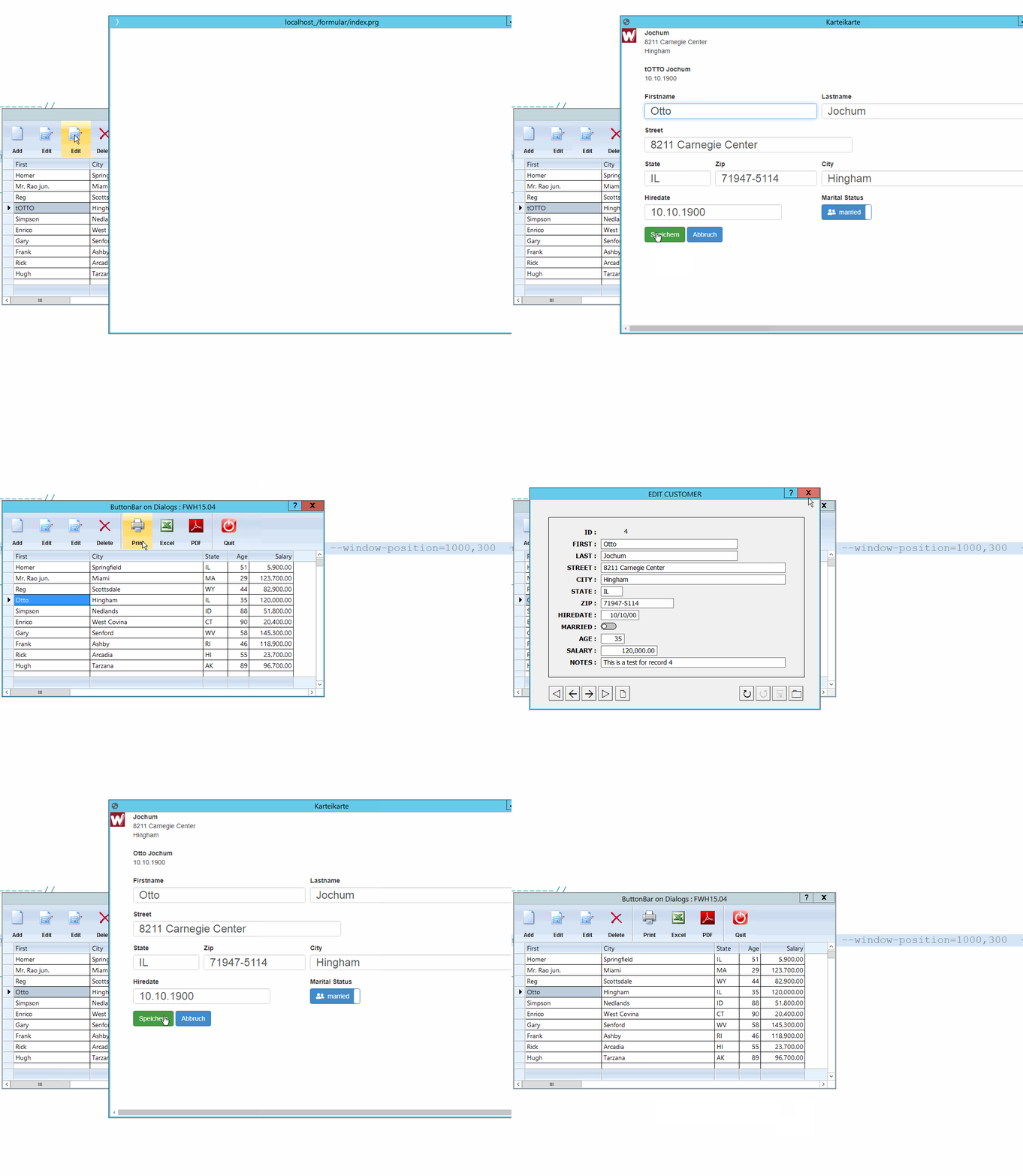
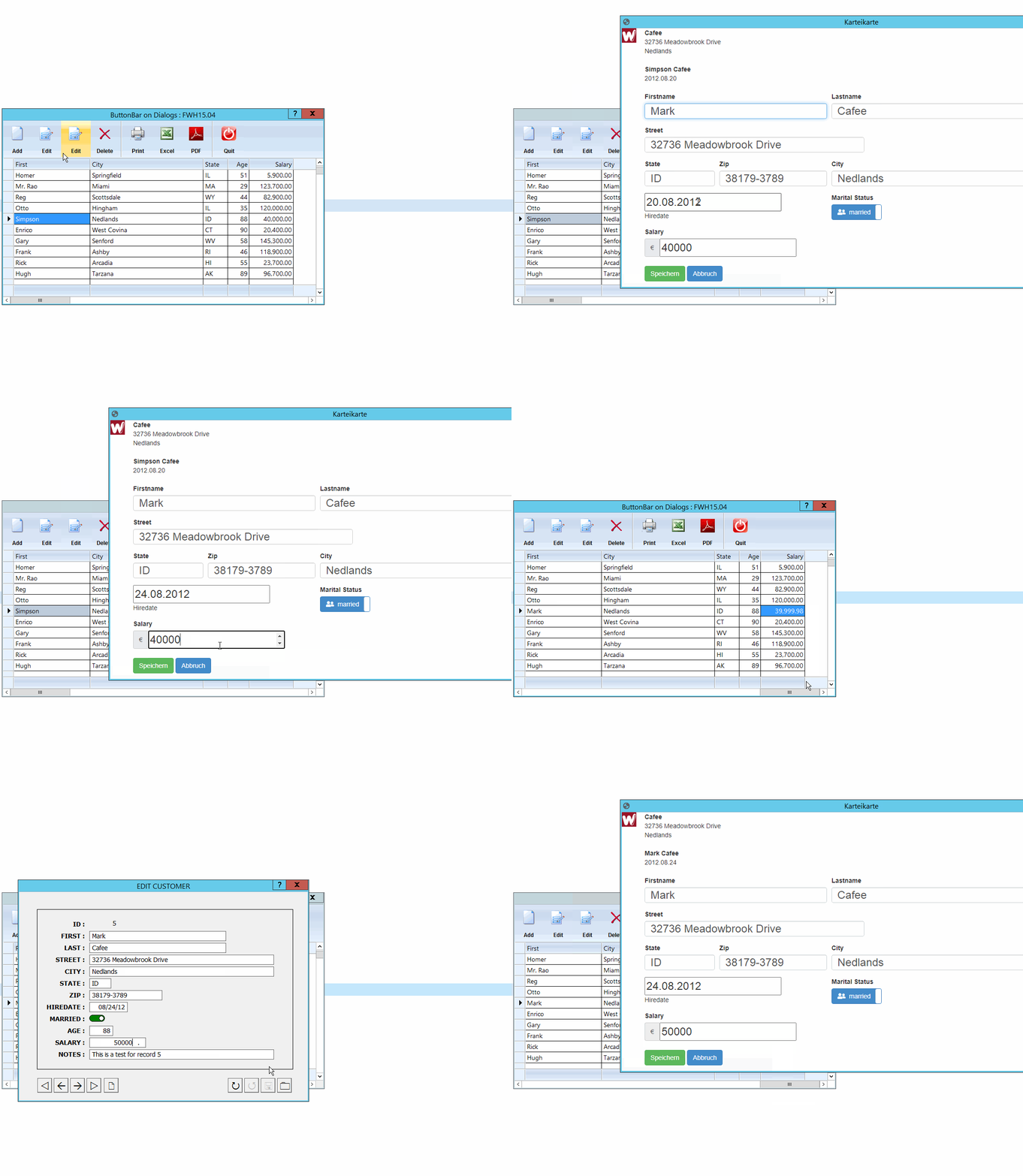
I think this will become a nice sample for a hybrid FWH/MH program.
Now checkbox is updating fine.
Best regards,
Otto

Posts: 1487
Joined: Tue Jun 14, 2016 07:51 AM
Re: How to update xBrowse
Posted: Sat Apr 24, 2021 07:56 AM

Did you use a loop ?

Marc Venken

Using: FWH 23.08 with Harbour
Posts: 6983
Joined: Fri Oct 07, 2005 07:07 PM
Re: How to update xBrowse
Posted: Sat Apr 24, 2021 09:16 AM
Hello Mark,
No, not yet. First, I worked through all the different types of variables.
The dialog you see is mod harbour running in localhost.

Best regards,
Otto

Posts: 6983
Joined: Fri Oct 07, 2005 07:07 PM
Re: How to update xBrowse
Posted: Sat Apr 24, 2021 01:31 PM
Dear Mr. Rao,
I see that there is some code in xBrowse which seems to me that you are working on an autorefresh().

Will you provide this option soon?

Best regards,
Otto


Code (fw): Select all Collapse
METHOD Display() CLASS TXBrowse

   local nSecs    := SECONDS()

   if !::lCreated
      return nil
   endif

   ::BeginPaint()
   ::Paint()
   ::EndPaint()

   ::nRefreshSecs := SECONDS() - nSecs
   if ::lProfiler
      FWLOG ::cTitle, ::nLen, ::nRefreshSecs
   endif

return 0
Posts: 10733
Joined: Sun Nov 19, 2006 05:22 AM
Re: How to update xBrowse
Posted: Sat Apr 24, 2021 05:40 PM

1) The above code is not for any autorefresh.
If oBrw:lProfiler is set to .T., similar code in different parts of xbrowse logs time taken for different operations of xbrowse. This is useful for a programmer and also us to know which operations are consuming more time and to see if we can optimize.

2) Whenever XBrowse gets focus, it is automatically refreshed.
When you go to edit data in the mod-harbour dialog, xbrowse lost focus. When you close the mod-harbour dialog and return to the main xbrowse, the browse is refreshed and the changes are reflected there automatically.

Regards


G. N. Rao.

Hyderabad, India