
Hi,
Is it possible to show tooltip when the checkbox is disabled?
Regards,
Hakan ONEMLI
Harbour & MSVC 2022 & FWH 23.06
Hakan ONEMLI
Harbour & MSVC 2022 & FWH 23.06
Hi,
Is it possible to show tooltip when the checkbox is disabled?
Hakan,
Place an "empty" SAY below the checkbox and use the SAY tooltip
Place an "empty" SAY below the checkbox and use the SAY tooltip
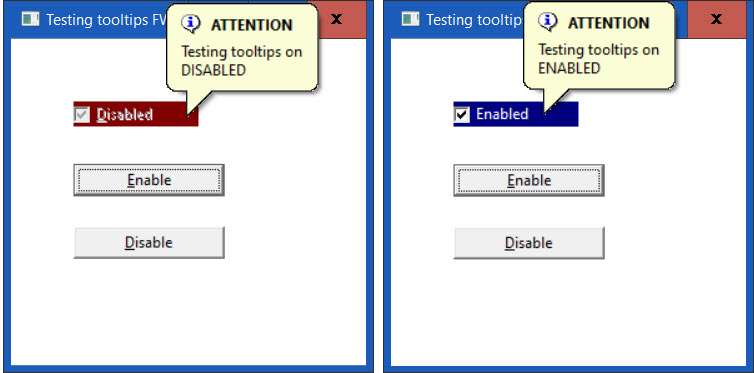
#include "FiveWin.ch"

static oWnd

//---------------------------

FUNCTION MAIN()
LOCAL oBtn[3], oChk, lValue := .T.

SetBalloon( .T. )

DEFINE WINDOW oWnd TITLE "Testing tooltips " + FWVERSION from 1,1 to 300, 300 pixel

@ 50, 50 BTNBMP oBtn[3] OF oWnd ;
SIZE 100, 20 PIXEL NOBORDER TRANSPARENT
oBtn[3]:cToolTip :=  { "Testing tooltips on" + CRLF + "DISABLED", "ATTENTION", 1, CLR_BLACK, 14089979 }
@ 0, 0 CHECKBOX oChk VAR lValue PROMPT "&Disabled" SIZE 100, 20 OF oBtn[3] PIXEL ;
ON CHANGE oChk:SetText( "Enabled" )
oChk:cToolTip :=  { "Testing tooltips on" + CRLF + "ENABLED", "ATTENTION", 1, CLR_BLACK, 14089979 }
oChk:disable()
oChk:SetColor("W+/R")

@ 100, 50 BUTTON "&Enable" SIZE 120, 25 PIXEL ;
ACTION ( oChk:Enable(), oChk:SetColor("W+/B"), oChk:SetText( "Enabled" ), oChk:Refresh() )

@ 150, 50 BUTTON "&Disable" SIZE 120, 25 PIXEL ;
ACTION ( oChk:Disable(), oChk:SetColor("W+/R"), oChk:SetText( "Disablrd" ), oChk:Refresh() )

ACTIVATE WINDOW oWnd CENTERED

RETURN NIL
// \SAMPLES\CHKDISAB.PRG

#Include "FiveWin.ch"

STATIC oWnd

// ---------------------------

FUNCTION Main()

   LOCAL oBtn[ 3 ], oChk, lValue := .T.

   SetBalloon( .T. )

   DEFINE WINDOW oWnd TITLE "Testing tooltips " + FWVERSION ;
      FROM 1, 1 TO 300, 300 PIXEL

   @ 50, 50 BTNBMP oBtn[ 3 ] OF oWnd ;
      SIZE 100, 20 PIXEL NOBORDER TRANSPARENT

   oBtn[ 3 ]:cToolTip :=  { "Testing tooltips on" + CRLF + "DISABLED", "ATTENTION", 1, CLR_BLACK, 14089979 }

   @ 0, 0 CHECKBOX oChk VAR lValue PROMPT "&Disabled" SIZE 100, 20 OF oBtn[ 3 ] PIXEL ;
      ON CHANGE oChk:SetText( "Enabled" )

   oChk:cToolTip :=  { "Testing tooltips on" + CRLF + "ENABLED", "ATTENTION", 1, CLR_BLACK, 14089979 }

   oChk:disable()
   oChk:SetColor( "W+/R" )

   @ 100, 50 BUTTON "&Enable" SIZE 120, 25 PIXEL ;
      ACTION ( oChk:Enable(), oChk:SetColor( "W+/B" ), oChk:SetText( "Enabled" ), oChk:Refresh() )

   /* // Original:
   @ 150, 50 BUTTON "&Disable" SIZE 120, 25 PIXEL ;
      ACTION ( oChk:Disable(), oChk:SetColor( "W+/R" ), oChk:SetText( "Disabled" ), oChk:Refresh() )
   */

   // Modified:
   @ 150, 50 BUTTON "&Disable" SIZE 120, 25 PIXEL ;
      ACTION ( oChk:Disable(), oChk:SetColor( "W+/R" ), ;
      oChk:SetText( "Disabled" ), CHANGE_COLOR_CHECBOX() )

   ACTIVATE WINDOW oWnd CENTERED

RETURN NIL

STATIC FUNCTION CHANGE_COLOR_CHECBOX()

   LOCAL oSay AS OBJECT

   @  50, 63 SAY oSay PROMPT "Disabled " OF oWnd SIZE 088, 20 ;
      COLORS CLR_BLACK, CLR_YELLOW PIXEL CENTER BORDER ADJUST

RETURN( .T. )Antonio Linares wrote:Hakan,
Place an "empty" SAY below the checkbox and use the SAY tooltip
ukoenig wrote:Place an "empty" SAY below the checkbox and use the SAY tooltip
another solution to keep the mouse-cursor inside
the checkboxarea :
#include "FiveWin.ch"

static oWnd

//---------------------------

FUNCTION MAIN()
LOCAL oBtn[3], oChk, lValue := .T.

SetBalloon( .T. )

DEFINE WINDOW oWnd TITLE "Testing tooltips " + FWVERSION from 1,1 to 300, 300 pixel

@ 50, 50 BTNBMP oBtn[3] OF oWnd ;
SIZE 100, 20 PIXEL NOBORDER TRANSPARENT
oBtn[3]:cToolTip :=  { "Testing tooltips on" + CRLF + "DISABLED", "ATTENTION", 1, CLR_BLACK, 14089979 }
@ 0, 0 CHECKBOX oChk VAR lValue PROMPT "&Disabled" SIZE 100, 20 OF oBtn[3] PIXEL ;
ON CHANGE oChk:SetText( "Enabled" )
oChk:cToolTip :=  { "Testing tooltips on" + CRLF + "ENABLED", "ATTENTION", 1, CLR_BLACK, 14089979 }
oChk:disable()
oChk:SetColor("W+/R")

@ 100, 50 BUTTON "&Enable" SIZE 120, 25 PIXEL ;
ACTION ( oChk:Enable(), oChk:SetColor("W+/B"), oChk:SetText( "Enabled" ), oChk:Refresh() )

@ 150, 50 BUTTON "&Disable" SIZE 120, 25 PIXEL ;
ACTION ( oChk:Disable(), oChk:SetColor("W+/R"), oChk:SetText( "Disablrd" ), oChk:Refresh() )

ACTIVATE WINDOW oWnd CENTERED

RETURN NIL
best regards
Uwe
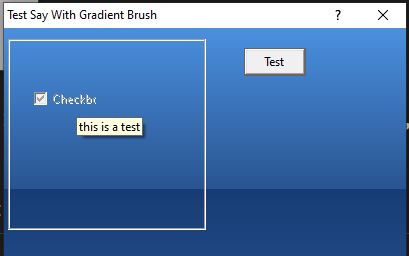
procedure Dlg_Grad

local oDlg, oSay, oBrush, lTest := .T., oCbx

   define brush oBrush gradient { { 0.4, nRGB( 75, 144, 223 ), nRGB( 41, 85, 145 ) },;
                                  { 0.6, nRGB( 24,  61, 118 ), nRGB( 50, 95, 158 ) } }

   define dialog odlg title "Test Say With Gradient Brush" ;
      size 400,400 pixel brush oBrush transparent

   @ 2,2 GROUP TO 100,100 of odlg pixel

   @ 25,15 say oSay prompt "This a Test" of oDlg SIZE 40, 40 COLOR CLR_WHITE PIXEL  transparent adjust
   @ 25.5,15 CHECKBOX oCbx VAR lTest PROMPT "Checkbox" OF oDlg SIZE 30, 20 PIXEL

   @ 10,120 button "Test" pixel action oSay:SetText( "Change Text" )


   ACTIVATE DIALOG oDlg CENTERED ;
      ON INIT ( EnableWindow( oCbx:hWnd, .F. ), oSay:lWantClick := .T., oSay:cTooltip := "this is a test", oSay:ShowToolTip(), .T. )

   release brush oBrush

return

