FiveTech Support Forums

FiveWin / Harbour / xBase community
Board index FiveWin for Harbour/xHarbour Colors (SOLVED)
Posts: 115
Joined: Wed Oct 26, 2005 02:38 PM
Colors (SOLVED)
Posted: Sun Jun 13, 2021 11:27 PM

Hello friends!

I need a little help, I have a color in decimal (for example 6736896). How to get tones above or below, what's the logic?

Thanks

Christiano Augusto Silveira
christiano.silveira@gmail.com

MaxxTech Soluções em TI
http://www.maxxtech.com.br
Posts: 44158
Joined: Thu Oct 06, 2005 05:47 PM
Re: Colors
Posted: Mon Jun 14, 2021 07:09 AM
Christiano,

? hb_NumToHex( 6736896 ) => 0x66CC00 (hexadecimal)

? hb_NumToHex( hb_bitAnd( 6736896, 0xFF0000 ) / 0xFF00 )
? hb_NumToHex( hb_bitAnd( 6736896, 0x00FF00 ) / 0x00FF )
? hb_NumToHex( hb_bitAnd( 6736896, 0x0000FF ) )

In FWH\include\colors.ch there is a:

#translate RGB( <nRed>, <nGreen>, <nBlue> ) => ;
( <nRed> + ( <nGreen> * 256 ) + ( <nBlue> * 65536 ) )
regards, saludos

Antonio Linares
www.fivetechsoft.com
Posts: 115
Joined: Wed Oct 26, 2005 02:38 PM
Re: Colors (SOLVED)
Posted: Mon Jun 14, 2021 05:56 PM

Thanks Antonio

Christiano Augusto Silveira
christiano.silveira@gmail.com

MaxxTech Soluções em TI
http://www.maxxtech.com.br
Posts: 4043
Joined: Wed Dec 19, 2007 06:40 PM
Re: Colors (SOLVED)
Posted: Wed Jun 16, 2021 12:58 PM
Hello,

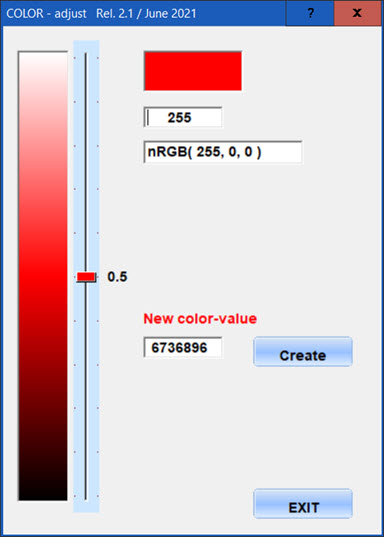
about the color-adjustment of a given color
can be selected with the slider or a imageclick

How to get tones above or below, what's the logic?


Visual adjustment
A gradient created from < white . Your color. black >
This tool uses a given value as Dec or RGB
the startposition is 0.5 and can be adjusted to lighter or darker
6736896


is that what You want to do :-)

regards
Uwe :-)
Since 1995 ( the first release of FW 1.9 )

i work with FW.

If you have any questions about special functions, maybe i can help.
Posts: 115
Joined: Wed Oct 26, 2005 02:38 PM
Re: Colors (SOLVED)
Posted: Wed Jun 16, 2021 01:24 PM
Hi Uwe, thanks for replying.

I'm adjusting the visual part of my calendar, as the user can change the predominant color of the screen, the calendar has differences in the colors of today, Sundays and holidays. In the way I'm doing it, in some situations it's out of color.

So I want to calculate to get a few shades above or below the predominant color.


Hugs
Christiano Augusto Silveira
christiano.silveira@gmail.com

MaxxTech Soluções em TI
http://www.maxxtech.com.br
Posts: 4043
Joined: Wed Dec 19, 2007 06:40 PM
Re: Colors (SOLVED)
Posted: Thu Jun 17, 2021 03:34 PM
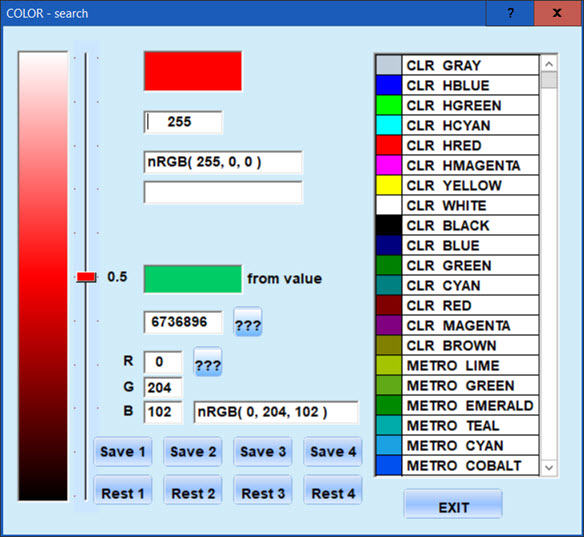
Maybe useful for You

paint colors from a given DEC or RGB-value
or use predefined colors
You can save and restore 4 colors
adjust the color with the slider or click inside the image
as well You get the colornames
the ??? buttons will paint the color and shows the values


Download
http://www.service-fivewin.de/DOWNLOADS/CAdjust.zip

best regards
Uwe
Since 1995 ( the first release of FW 1.9 )

i work with FW.

If you have any questions about special functions, maybe i can help.
Posts: 115
Joined: Wed Oct 26, 2005 02:38 PM
Re: Colors (SOLVED)
Posted: Thu Jun 17, 2021 03:53 PM

Hi.

I haven't touched it yet but that's almost what I need when using the slider but automatically, I think it would be more interesting in my case although I could do something similar and let the user choose the tone they prefer.

Would it be possible to share so you can have a beginning?

Hugs

Christiano Augusto Silveira
christiano.silveira@gmail.com

MaxxTech Soluções em TI
http://www.maxxtech.com.br
Posts: 375
Joined: Tue Feb 10, 2015 09:48 AM
Re: Colors
Posted: Mon Jun 21, 2021 02:51 PM
Antonio Linares wrote:Christiano,

? hb_NumToHex( 6736896 ) => 0x66CC00 (hexadecimal)

? hb_NumToHex( hb_bitAnd( 6736896, 0xFF0000 ) / 0xFF00 )
? hb_NumToHex( hb_bitAnd( 6736896, 0x00FF00 ) / 0x00FF )
? hb_NumToHex( hb_bitAnd( 6736896, 0x0000FF ) )

I must disagree, the correct formulas are:
? hb_NumToHex( hb_bitAnd( 6736896, 0xFF0000 ) / 0x10000 )
? hb_NumToHex( hb_bitAnd( 6736896, 0x00FF00 ) / 0x100 )
? hb_NumToHex( hb_bitAnd( 6736896, 0x0000FF ) )
or better
? hb_NumToHex( hb_bitShift( hb_bitAnd( 6736896, 0xFF0000 ) ,-16) )
? hb_NumToHex( hb_bitShift( hb_bitAnd( 6736896, 0x00FF00 ) ,-8) )
? hb_NumToHex( hb_bitAnd( 6736896, 0x0000FF ) )
Posts: 4043
Joined: Wed Dec 19, 2007 06:40 PM
Re: Colors (SOLVED)
Posted: Tue Jun 22, 2021 11:24 AM
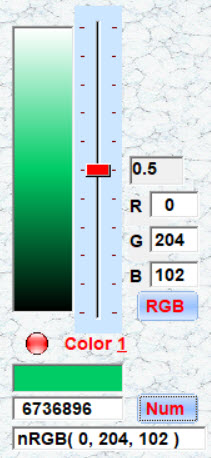
I added some new options

1, testing the color as a dialog-brush ( ON / OFF )
2. saving a color to INI pos. 1, this color is displayed at new start
3. copy to clipboard
4. some internal fixes

ctoas
what sections do You need ?
I can delete the unneeded parts for better reading.


Download
http://www.service-fivewin.de/DOWNLOADS/CAdjus1t.zip


The extracted main-functions
now it is easy to include this color-adjustment in Your own application


Download
http://www.service-fivewin.de/DOWNLOADS/CAdjus12.zip

best regards
Uwe
Since 1995 ( the first release of FW 1.9 )

i work with FW.

If you have any questions about special functions, maybe i can help.
Posts: 115
Joined: Wed Oct 26, 2005 02:38 PM
Re: Colors (SOLVED)
Posted: Wed Jun 23, 2021 06:19 PM

Hello Uwe, thanks for the reply.

It's already a good size for you to share. Now I turn around!

I appreciate the help!

Christiano Augusto Silveira
christiano.silveira@gmail.com

MaxxTech Soluções em TI
http://www.maxxtech.com.br
Posts: 4043
Joined: Wed Dec 19, 2007 06:40 PM
Re: Colors (SOLVED)
Posted: Sat Jun 26, 2021 06:52 AM
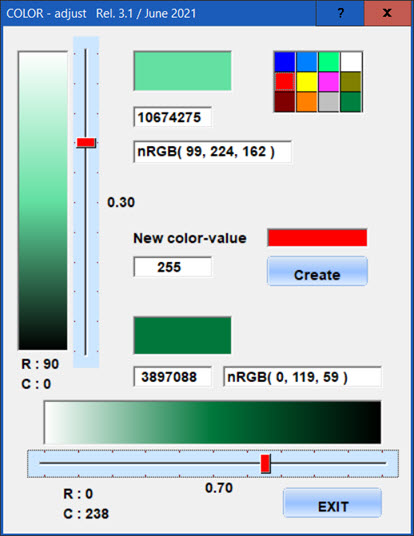
I tested and added a horizontal solution
a little colorpicker and control-fields of the pickpositions as a info
are included as well.

Because of the 2. slider it is posssible to compare 2 colorlevels
like the image shows ( bright and dark )
< Create > a new color will update both sliders and all fields

I think it will give You the basics to create Your own tool.


Download
http://www.service-fivewin.de/DOWNLOADS/CAdjust3.zip

the needed calculations are included inside the prg
Code (fw): Select all Collapse
// calculation vertical
// ------------------------
// imageheight = 300
// sliderheight = 330
// slidertop = imagetop - 15
// slidermarks = 11 = 10 spaces
// slider-pixelrowpos = slider rowpos * 10
// sliderpos on imageclick = imagepixelpos / 300
// imagepos on sliderclick = sliderpos * 30
// image-columnpos = imagewidth / 2 = 25

// calculation horizontal
// --------------------------
// imagewidth = 340
// sliderwidth = 370
// sliderleft = imagejeft - 15
// slidermarks = 11 = 10 spaces
// slider-pixel-colpos = slider colpos * 10
// sliderpos on imageclick = imagepixelpos / 340
// imagepos on sliderclick = sliderpos * 34
// image-rowpos = imageheight / 2 = 22


best regards
Uwe :-)
Since 1995 ( the first release of FW 1.9 )

i work with FW.

If you have any questions about special functions, maybe i can help.

Continue the discussion