James,
What panels do you mean ?
James,
What panels do you mean ?
FWH provides oWindowOrAnyControl:Shadow()
not sure if the effect will be the same, probably smaller
What panels do you mean?
FWH provides oWindowOrAnyControl:Shadow()
/*
Purpose  : Test Panel with shadows
Program  : PanelShadow.prg
Author   : James Bott, <!-- e --><a href="mailto:jbott@compuserve.com">jbott@compuserve.com</a><!-- e -->
Date     : 07/09/2021 10:11:13 AM
Company  : Intellitech
Copyright: Copyright © 2021 Intellitech. All rights reserved.
Language : Fivewin/xHarbour
Updated  :
Notes    : Attempting to figure out how to give a "panel" shadows
           on all 4 sides like the new Windows 11.

*/

#include "fivewin.ch"
//#include "window.ch" // can't find this file anywhere

#define CS_DROPSHADOW  0x00020000
#define GCL_STYLE         (-26)

Function Main()
   Local oWnd, oPanel1, oPanel2 //, nColor:= RGB(123,123,123)


   Set default to ".\"

   define window oWnd title "Windows Fluent Design Test"  ;
     from 50,50 to 71, 101
   //oWnd:shadow(,,,CS_DROPSHADOW)   // makes strange show with outine on the outer edge on bottom and right side
   //oWnd:setColor(rgb(23,23,23),Rgb(138,177,206))   // darker
   //oWnd:setColor(rgb(23,23,23),Rgb(212,229,239))

      oWnd:setColor(rgb(23,23,23), rgb(138,178,207))


       @ 65,65 panel oPanel2 size 300,200 of oWnd //TRANSPARENT

       oPanel2:setColor(rgb(0,0,0),Rgb(255,255,255))


     //oPanel:= TPanel:New(50,50,300,550,oWnd)
      //define panel oPanel from 50,50 to 300,500 of oWnd
      @ 50,50 panel oPanel1 size 200,100 of oWnd //SHADOWSIZE 10 //TRANSPARENT BORDER BASE //SHADOWSIZE 10

      oPanel1:setColor(rgb(0,0,0),Rgb(243,243,243))

      //oPanel1:shadow()   // doesn't do anything

      //oPanel1:box(1,1,201,101,rgb(225,255,255)) // no effect

      //oPanel1:cTitle("App Title") // doesn't work

      oPanel1:say(1,1,"App title")


      // Method Shadow() inherited from TWindow
      // However it does nothing on oPanel. I found that this works only on upper level windows
      //oPanel1:shadow(oPanel1:hWnd, GCL_STYLE, nOr( GetClassLong( oPanel1:hWnd, GCL_STYLE ), CS_DROPSHADOW) )

      //oPanel2:shadow()

      // msgInfo(valtype(oPanel1),"valtype(oPanel1")

      // This errors with "message not found GetClassLong"
      //oPanel1:SetClassLong( oWnd:hWnd, GCL_STYLE, nOr( GetClassLong( oWnd:hWnd, GCL_STYLE ), CS_DROPSHADOW ) )


   activate Window oWnd center  // on init

   oWnd:end()

   //-----------------------------------------------------------------------//
/*
   Define window oWnd title "Mountian Lumber"

      oWnd:setColor(rgb(23,23,23),Rgb(212,229,239))

   activate window oWnd centered on init doDialogs(oWnd)
 */

Return nil

function doDialogs(oWnd)
    local oDlg1,oDlg2

    msgInfo("27 Invoices","Number of Outstanding Invoices")

   //function Dialog1(oWnd)
      DEFINE DIALOG oDlg1 FROM 5, 5 TO 15, 40 TITLE "Dialog Box" of oWnd
      // oDlg:shadow()  // has 4 sided shadow without this
      activate dialog oDlg
   //return nil
/*
   //function Dialog2(oWnd)
      DEFINE DIALOG oDlg2 FROM 5, 5 TO 15, 40 TITLE "Dialog Box" of oWnd
      // oDlg:shadow()  // has 4 sided shadow without this
      activate dialog oDlg
   //return nil
*/
Return oDlg oPanel1:bPainted = { | hDC | hDC := oWnd:GetDC(), FW_DrawShadow( hDC, { oPanel1:nTop, oPanel1:nLeft,;
oPanel1:nTop + oPanel1:nHeight(), oPanel1:nLeft + oPanel1:nWidth() }, 10 ),;
oWnd:ReleaseDC() }function FW_DrawShadow( hDC, aRect, nSize, nAlpha )
local hRgn1, hRgn2
DEFAULT nSize := 10, nAlpha := 0x70
hRgn1 := CreateRectRgn( aRect[ 2 ], aRect[ 1 ], aRect[ 3 ] + nSize, aRect[ 4 ] + nSize )
hRgn2 := CreateRectRgn( aRect[ 2 ], aRect[ 1 ], aRect[ 3 ], aRect[ 4 ] )
CombineRgn( hRgn1, hRgn1, hRgn2, 4 )
DeleteObject( hRgn2 )
SelectClipRgn( hDC, hRgn1 )
FillRectEx( hDC, { aRect[ 1 ] + nSize, aRect[ 2 ] + nSize, aRect[ 3 ] + nSize, aRect[ 4 ] + nSize }, ;
nAlpha * 0x1000000 )
SelectClipRgn( hDC )
DeleteObject( hRgn1 )
return nil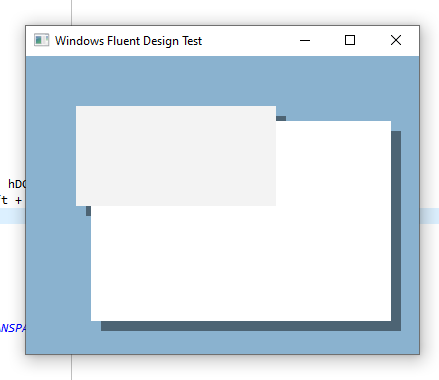 screen capture open source
James,
Yes, we are going to paint it the same way (hopefully!) and have the elevation very nice concept 
Antonio,
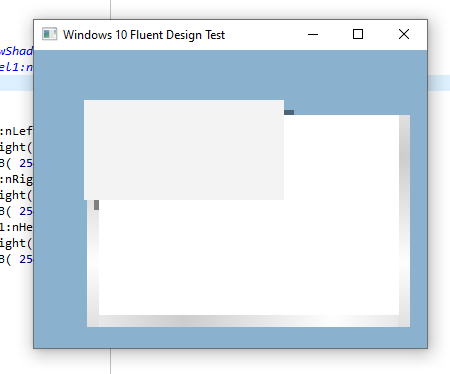
I measured the gradient shadow on a standard window on my current Windows 10. The gradient is 13 pixels wide and goes from RGB(205,205,205) to RGB(254, 254, 254). So that is what we need on panels too.
James
   oPanel1:bPainted = { | hDC | hDC := oWnd:GetDC(),;
                        GradientFill( hDC, oPanel1:nTop, oPanel1:nLeft - 12,;
                                      oPanel1:nTop + oPanel1:nHeight() + 12, oPanel1:nLeft,;
                                      { { 1, RGB( 254, 254, 254 ),  RGB( 205, 205, 205 ) }, .F. } ),;
                        GradientFill( hDC, oPanel1:nTop, oPanel1:nRight,;
                                      oPanel1:nTop + oPanel1:nHeight() + 12, oPanel1:nRight + 12,;
                                      { { 1, RGB( 205, 205, 205),  RGB( 254, 254, 254 ) }, .F. } ),;
                        GradientFill( hDC, oPanel1:nTop + oPanel1:nHeight(), oPanel1:nLeft,;
                                      oPanel1:nTop + oPanel1:nHeight() + 11, oPanel1:nRight,;
                                      { { 1, RGB( 205, 205, 205),  RGB( 254, 254, 254 ) }, .T. } ),;
oWnd:ReleaseDC() }With more testing of the gradient on the standard Win 10 window i find the shadow is way more sophisticated than I thought.
The gradient width remains at about 13 pixels. However when the window overlaps several other colors in the background the gradient colors change to blend in with the color of the current background. Thus the same gradient on one side of the window may vary along it's length to blend better.
Now I am wondering if there is any way to inherit the shadowing of the window class so it inherits the sophisticated shadowing? Otherwise I think it is going to be a very difficult task to get the shadowing to work the same.
Alternately, I wonder what the structures are that we are seeing in the Windows 11 samples. Are they actually windows, dialogs, or a new class? Does Windows have a panel class or is that unique to FW?
James