FiveTech Support Forums

FiveWin / Harbour / xBase community
Board index FiveWin for Harbour/xHarbour Not show control say on folder with res
Posts: 7318
Joined: Thu Oct 18, 2012 07:17 PM
Not show control say on folder with res
Posted: Tue Aug 24, 2021 11:01 PM
If I load also the resouce not show the say object ( on windows 10 pro)

with resources
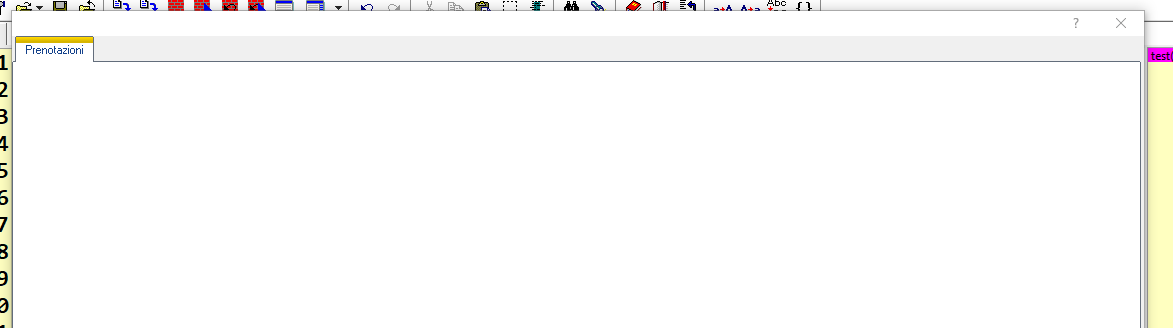

without resources
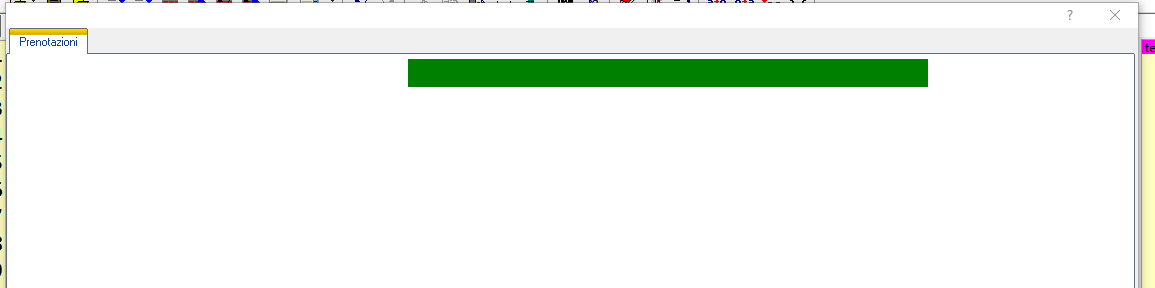

this is very very strange !!!!!


default.rc

Code (fw): Select all Collapse
#ifndef __64__
  1 24 "WinXP\WindowsXP.Manifest"
#else
  1 24 "WinXP\WindowsXP.Manifest64"
#endif


the test.prg
Code (fw): Select all Collapse
 #include "FiveWin.ch"


Function test()
Local oDlg,oSay,oFolder,oFont

local ctext:=""

DEFINE FONT oFont NAME "MS Sans Serif" SIZE 0,-8
       oBold := oFont:Bold()
 DEFINE DIALOG oDlg SIZE 1130,650 PIXEL TRUEPIXEL ;
                        FONT oFont

       @  1, 0 FOLDEREX oFolder OF oDlg SIZE oDlg:nWidth-585,oDlg:nHeight-390 PIXEL  ;
        PROMPT "Prenotazioni"

       @ 2,  200 SAY oSay PROMPT cText SIZE 260,14 PIXEL OF oFolder:aDialogs[1] CENTER VCENTER FONT oBold
       oSay:SetColor( CLR_GREEN, CLR_GREEN )


                oDlg:bResized  := <||
                oRect                := oDlg:GetCliRect()
                oFolder:nWidth       := oRect:nRight-2
                     oFolder:nHeight      := oRect:nBottom-160
                  return nil
                            >


                            ACTIVATE DIALOG oDlg CENTERED  ;
                            ON INIT (  Eval(oDlg:bResized)   )
return nil


Any solution ?
Since from 1991/1992 ( fw for clipper Rel. 14.4 - Momos)

I use : FiveWin for Harbour March-April 2024 - Harbour 3.2.0dev (harbour_bcc770_32_20240309) - Bcc7.70 - xMate ver. 1.15.3 - PellesC - mail: silvio[dot]falconi[at]gmail[dot]com
Posts: 10733
Joined: Sun Nov 19, 2006 05:22 AM
Re: Not show control say on folder with res
Posted: Wed Aug 25, 2021 12:03 AM

What is strange?
You set both text color and background color to GREEN.
How can you see any text?

Regards


G. N. Rao.

Hyderabad, India
Posts: 7318
Joined: Thu Oct 18, 2012 07:17 PM
Re: Not show control say on folder with res
Posted: Wed Aug 25, 2021 07:05 AM
nageswaragunupudi wrote:What is strange?
You set both text color and background color to GREEN.
How can you see any text?


I explain to you.
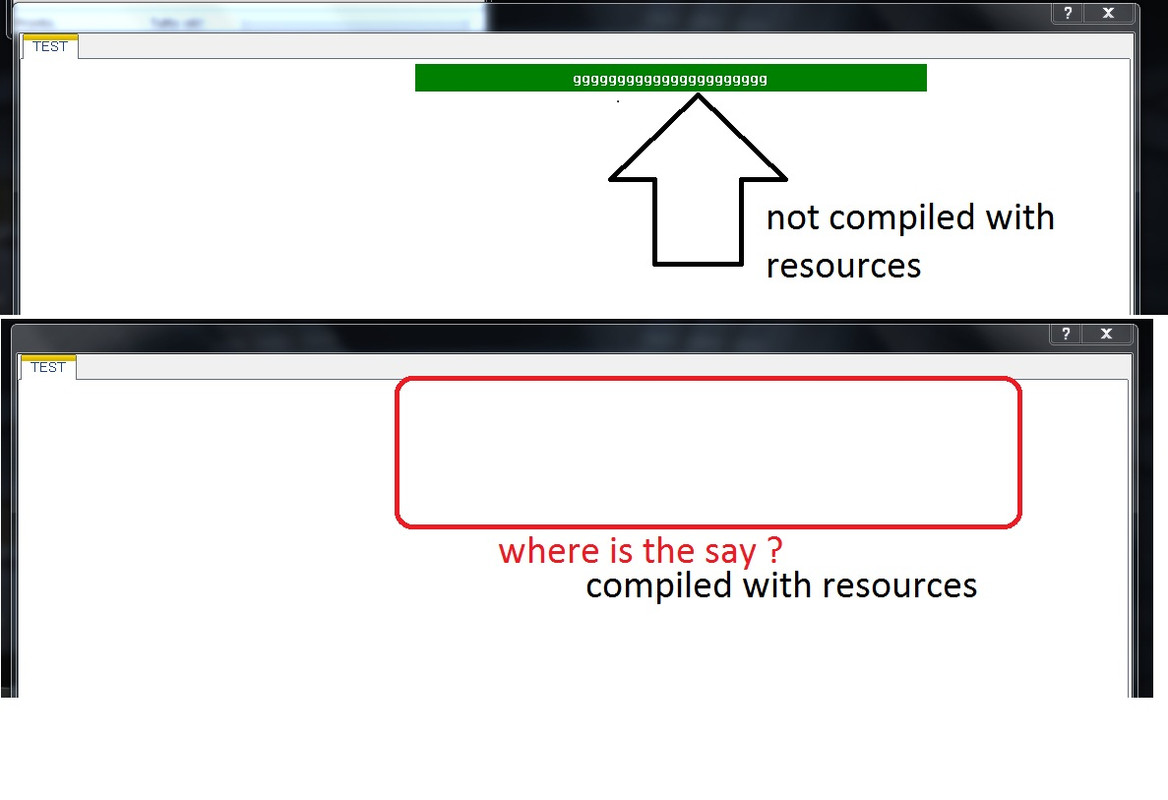
I add the text to make you understand where the error lies

local ctext:="gggggggggggggggggggggg"

if I compile the test.prg with the resource I don't see the string (say control) with the green background

If I compile the test WITHOUT the resource I see the string with the green background

But I need to compile with resources because I must insert bitmaps, How I can resolve ?

I try now also on Windows Seven ...same error


Code (fw): Select all Collapse
#include "FiveWin.ch"


    Function test()
    local oDlg,oSay,oFolder,oFont
    local ctext:="gggggggggggggggggggggg"

    DEFINE FONT oFont NAME "MS Sans Serif" SIZE 0,-8
    oBold := oFont:Bold()


     DEFINE DIALOG oDlg SIZE 1130,650 PIXEL TRUEPIXEL ;
            FONT oFont

           @  1, 0 FOLDEREX oFolder OF oDlg SIZE oDlg:nWidth-585,oDlg:nHeight-390 PIXEL  ;
            PROMPT "TEST"


           @ 2,  200 SAY oSay PROMPT cText SIZE 260,14 PIXEL OF oFolder:aDialogs[1] CENTER VCENTER FONT oBold
           oSay:SetColor( CLR_WHITE, CLR_GREEN )


                    oDlg:bResized  := <||
                                     oRect                := oDlg:GetCliRect()
                                     oFolder:nWidth       := oRect:nRight-2
                                     oFolder:nHeight      := oRect:nBottom-160
                                     return nil
                                      >


   ACTIVATE DIALOG oDlg CENTERED  ;
   ON INIT (  Eval(oDlg:bResized)   )
   RETURN NIL
Since from 1991/1992 ( fw for clipper Rel. 14.4 - Momos)

I use : FiveWin for Harbour March-April 2024 - Harbour 3.2.0dev (harbour_bcc770_32_20240309) - Bcc7.70 - xMate ver. 1.15.3 - PellesC - mail: silvio[dot]falconi[at]gmail[dot]com
Posts: 3022
Joined: Fri Oct 07, 2005 01:45 PM
Re: Not show control say on folder with res
Posted: Thu Aug 26, 2021 06:02 PM

I'm confused. You say you have a problem with a dialog defined in a resource and yet I see no code for a resource.

Can you please clarify ? All of my "forms" are created in a .rc file and I use SAY on folders with no problem. I'd be happy to help, but I only see the code build, not the .rc code.

Tim Stone
http://www.MasterLinkSoftware.com
http://www.autoshopwriter.com
timstone@masterlinksoftware.com
Using: FWH 23.10 with Harbour 3.2.0 / Microsoft Visual Studio Community 2022-24 32/64 bit
Posts: 7318
Joined: Thu Oct 18, 2012 07:17 PM
Re: Not show control say on folder with res
Posted: Thu Aug 26, 2021 06:50 PM
TimStone wrote:I'm confused. You say you have a problem with a dialog defined in a resource and yet I see no code for a resource.

Can you please clarify ? All of my "forms" are created in a .rc file and I use SAY on folders with no problem. I'd be happy to help, but I only see the code build, not the .rc code.


You understood well .
I have a dialog.
In this dialog I have a FolderEx (you can also use the normal folder)
in the folder in the first tab that is oFolder: adialogs [1] I inserted a simple say control of the type

Code (fw): Select all Collapse
@ 2,  200 SAY oSay PROMPT cText SIZE 260,14 PIXEL OF oFolder:aDialogs[1] CENTER VCENTER FONT oBold


at the time of compilation you have to add the theme win xp that you find in the fivewin sample folder

xplook.rc
Code (fw): Select all Collapse
#ifndef __64__
  1 24 "WinXP\WindowsXP.Manifest"
#else
  1 24 "WinXP\WindowsXP.Manifest64"
#endif


if you not use the xp look you 'll see the say control
Since from 1991/1992 ( fw for clipper Rel. 14.4 - Momos)

I use : FiveWin for Harbour March-April 2024 - Harbour 3.2.0dev (harbour_bcc770_32_20240309) - Bcc7.70 - xMate ver. 1.15.3 - PellesC - mail: silvio[dot]falconi[at]gmail[dot]com
Posts: 3022
Joined: Fri Oct 07, 2005 01:45 PM
Re: Not show control say on folder with res
Posted: Thu Aug 26, 2021 07:36 PM

When you said you were using a resource file, I understood that to mean you were building the dialog and folders in the .rc file.

Apparently you are only using the .rc to specify the manifest.

I simply include a manifest file in my application folder but don't really call it anywhere ( and it's not listed in my .rc file either ). I named it the same as my application, so if the application is Silvio.exe then I have Silvio.manifest in the same folder.

Since I use an .rc to define ALL of my screens, I'm sorry I can't assist here.

Tim Stone
http://www.MasterLinkSoftware.com
http://www.autoshopwriter.com
timstone@masterlinksoftware.com
Using: FWH 23.10 with Harbour 3.2.0 / Microsoft Visual Studio Community 2022-24 32/64 bit
Posts: 7318
Joined: Thu Oct 18, 2012 07:17 PM
Re: Not show control say on folder with res
Posted: Thu Aug 26, 2021 10:13 PM
TimStone wrote:When you said you were using a resource file, I understood that to mean you were building the dialog and folders in the .rc file.

Apparently you are only using the .rc to specify the manifest.

I simply include a manifest file in my application folder but don't really call it anywhere ( and it's not listed in my .rc file either ). I named it the same as my application, so if the application is Silvio.exe then I have Silvio.manifest in the same folder.

Since I use an .rc to define ALL of my screens, I'm sorry I can't assist here.


ok but have you tried to compile my test with a resources?

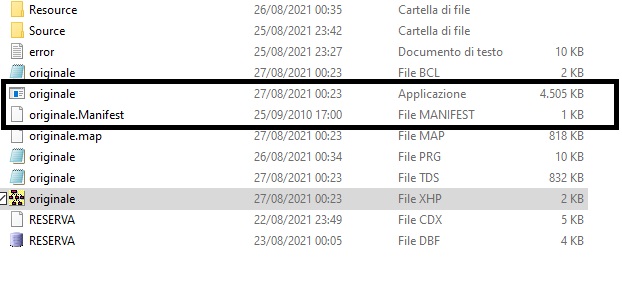
anyway I tried to make an exe and then I entered the manifest
original.exe
original.manifest
as you can see here


does not work
controls such as datepicks do not have a theme
Since from 1991/1992 ( fw for clipper Rel. 14.4 - Momos)

I use : FiveWin for Harbour March-April 2024 - Harbour 3.2.0dev (harbour_bcc770_32_20240309) - Bcc7.70 - xMate ver. 1.15.3 - PellesC - mail: silvio[dot]falconi[at]gmail[dot]com
Posts: 3022
Joined: Fri Oct 07, 2005 01:45 PM
Re: Not show control say on folder with res
Posted: Thu Aug 26, 2021 10:26 PM

Silvio,

No, I don't have the time to do that. Although I'm "semi-retired", I have a very challenging time just completing all the work that I must do in a day. In the time that I do have available, I'm working on adding SQL capabilities to my primary program, and that is a big learning curve. I want to do that while leaving my current .dbf and .adt options in place, so I assume I will be updating my data objects to accomplish that task.

Of course that will be in between attending my grandkids soccer ( fotbal ) games. They are very competitive and great fun.

Tim

Tim Stone
http://www.MasterLinkSoftware.com
http://www.autoshopwriter.com
timstone@masterlinksoftware.com
Using: FWH 23.10 with Harbour 3.2.0 / Microsoft Visual Studio Community 2022-24 32/64 bit
Posts: 10733
Joined: Sun Nov 19, 2006 05:22 AM
Re: Not show control say on folder with res
Posted: Fri Aug 27, 2021 08:15 AM
Change this line of code
Code (fw): Select all Collapse
      oSay:SetColor( CLR_GREEN, CLR_GREEN )


as

Code (fw): Select all Collapse
      oSay:SetColor( CLR_WHITE, CLR_GREEN )
Regards


G. N. Rao.

Hyderabad, India
Posts: 7318
Joined: Thu Oct 18, 2012 07:17 PM
Re: Not show control say on folder with res
Posted: Fri Aug 27, 2021 08:44 AM
nageswaragunupudi wrote:Change this line of code
Code (fw): Select all Collapse
      oSay:SetColor( CLR_GREEN, CLR_GREEN )


as

Code (fw): Select all Collapse
      oSay:SetColor( CLR_WHITE, CLR_GREEN )


allready made not run

see the last code test
Since from 1991/1992 ( fw for clipper Rel. 14.4 - Momos)

I use : FiveWin for Harbour March-April 2024 - Harbour 3.2.0dev (harbour_bcc770_32_20240309) - Bcc7.70 - xMate ver. 1.15.3 - PellesC - mail: silvio[dot]falconi[at]gmail[dot]com
Posts: 10733
Joined: Sun Nov 19, 2006 05:22 AM
Re: Not show control say on folder with res
Posted: Fri Aug 27, 2021 11:21 AM

Mr. Silivio

You are right.
On themed applications, Says on folder / folderex dialogs are always displayed with White back-color and we are not able to change it.
Looks like it is Windows behavior. Anyway we will look into this in greater detail.

For now you may use some foreground color on CLR_WHITE. eg: CLR_BLACK,CLR_WHITE etc.

Regards


G. N. Rao.

Hyderabad, India
Posts: 7318
Joined: Thu Oct 18, 2012 07:17 PM
Re: Not show control say on folder with res
Posted: Sun Aug 29, 2021 10:46 PM
nageswaragunupudi wrote:Mr. Silivio

You are right.
On themed applications, Says on folder / folderex dialogs are always displayed with White back-color and we are not able to change it.
Looks like it is Windows behavior. Anyway we will look into this in greater detail.

For now you may use some foreground color on CLR_WHITE. eg: CLR_BLACK,CLR_WHITE etc.


Nages,
For now I have solved it by inserting a panel control in the folder and in this the say control
But I hope you solve the problem
Since from 1991/1992 ( fw for clipper Rel. 14.4 - Momos)

I use : FiveWin for Harbour March-April 2024 - Harbour 3.2.0dev (harbour_bcc770_32_20240309) - Bcc7.70 - xMate ver. 1.15.3 - PellesC - mail: silvio[dot]falconi[at]gmail[dot]com

Continue the discussion