FiveTech Support Forums

FiveWin / Harbour / xBase community
Board index FiveWin para Harbour/xHarbour Botones dentro de la ventana principal
Posts: 152
Joined: Mon Feb 13, 2006 08:23 PM
Botones dentro de la ventana principal
Posted: Thu Sep 23, 2021 11:39 AM
Hola a todos

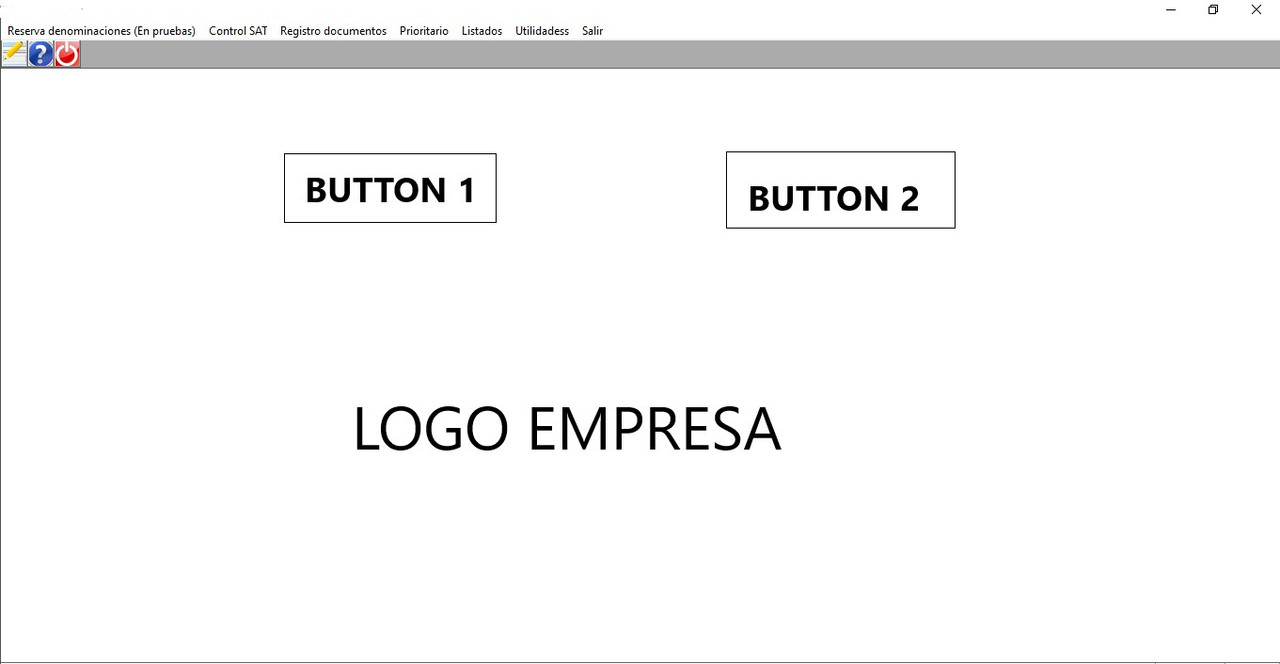
Veréis, me ha venido a la cabeza la idea de poner en la ventana principal unos botones, además de los que figuran en el menú. Si la memoria no me falla vi un ejemplo en samples de esto, pero no lo he visto.

La idea, ilustrada de forma sencilla de lo que pretendo hacer para que el usuario acceda directamente a la opción deseada sin necesidad de buscar en el menú, es esta:


Sé que para poner un logo se usa la función:
[code]@ 4, 16 BITMAP oBmp FILENAME CURDRIVE() +":"+"\COMPARTIDO\REGSAT\WINSAT\BITMAPS\LOGOGVA.png" NOBORDER OF oWnd ;
ON CLICK( oBmp:lStretch := ! oBmp:lStretch, oBmp:Refresh( .t. ) )

ACTIVATE WINDOW oWnd MAXIMIZED ;
ON PAINT PalBmpDraw( hDC, 150, 250, oBmp:hBitmap )

Pero cuando se trata de poner botones, encima del logo por ejemplo, ¿cómo se haría?

Gracias
FWH 20.12 BCC7
Posts: 1344
Joined: Wed Nov 16, 2005 09:14 PM
Re: Botones dentro de la ventana principal
Posted: Thu Sep 23, 2021 01:47 PM
Podrias manejarlo con un BRUSH
Code (fw): Select all Collapse
// Testing some nice brushes

#include "FiveWin.ch"

static oWnd

//----------------------------------------------------------------------------//

function Main()

   local oBrush, oBot := ARRAY(3)

   DEFINE BRUSH oBrush FILENAME "..\bitmaps\rainbow.bmp" STRETCH  // Este archivo sería tu logo

   DEFINE WINDOW oWnd TITLE "Testing brushes" ;
      BRUSH oBrush

   //DEFINE BUTTONBAR oBar _3D OF oWnd

   @  10, 10 BTNBMP PROMPT "Cambiar"+CHR(10)+"Fondo" OF oBot[1] ACTION ChangeBrush()    PIXEL SIZE 80,80
   @  10,150 BTNBMP PROMPT "Alguna"+CHR(10)+"Accion" OF oBot[2] ACTION MsgInfo("Algo")  PIXEL SIZE 80,80
   @  10,260 BTNBMP PROMPT "Salir"                   OF oBot[2] ACTION oWnd:End()       PIXEL SIZE 80,80

   ACTIVATE WINDOW oWnd

return nil

//----------------------------------------------------------------------------//

function ChangeBrush()

   local oBrush, oOldBrush

   static nBrush := 2

   nBrush = If( nBrush == 4, 1, ++nBrush )

   DEFINE BRUSH oBrush ;
      FILENAME "..\bitmaps\brush" + Str( nBrush, 1 ) + ".bmp" STRECH

   if Upper( oWnd:ClassName() ) == "TWINDOW"
      oWnd:SetBrush( oBrush )
   else   
      oWnd:oWndClient:SetBrush( oBrush )
   endif   

   oWnd:Refresh()

return nil
Posts: 8515
Joined: Tue Dec 20, 2005 07:36 PM
Re: Botones dentro de la ventana principal
Posted: Thu Sep 23, 2021 02:20 PM
Code (fw): Select all Collapse
// Testing Win32 XP Theme-aware bitmaped buttons
// Important: Use standard buttons on the resources!

#include "FiveWin.ch"

#Define COLOR_BTNFACE   15

#Define aPubGrad {| lInvert | If( lInvert, ;
                    { { 1 / 3, nRGB( 255, 253, 222 ), nRGB( 255, 231, 151 ) }, ;
                    { 2 / 3, nRGB( 255, 215,  84 ), nRGB( 255, 233, 162 ) }  ;
                    }, ;
                    { { 1 / 2, nRGB( 219, 230, 244 ), nRGB( 207 - 50, 221 - 25, 255 ) }, ;
                    { 1 / 2, nRGB( 201 - 50, 217 - 25, 255 ), nRGB( 231, 242, 255 ) }  ;
                    } ) }

FUNCTION Main()

   LOCAL oWnd, oBtnBmp, oBtnBmp2, lSetAlpha := .T., oBar, oBrush

   // Este archivo sería tu logo, deberas - CMSOFT
   DEFINE BRUSH oBrush FILENAME "..\bitmaps\rainbow.bmp" STRETCH  

   DEFINE WINDOW oWnd TITLE "FiveWin Theme-aware bitmaped buttons" BRUSH oBrush

   DEFINE BUTTONBAR oBar BUTTONSIZE 64, 52 _3DLOOK TOP OF oWnd 2007 GDIPLUS // NOBORDER

   oBar:bClrGrad := aPubGrad

   @ 12, 2 BUTTONBMP oBtnBmp OF oWnd ACTION BuildDialog() ;
      BITMAP "..\bitmaps\AlphaBmp\ichat.bmp"

   oBtnBmp:cToolTip = "AlphaBmp: Tooltip text"

   @ 17, 2 BUTTONBMP oBtnBmp2 OF oWnd ACTION MsgInfo( "Themes aware Button Bitmaps With Alpha Channel Support" ) ;
      BITMAP "..\bitmaps\AlphaBmp\text.bmp" PROMPT "Test" TEXTRIGHT SIZE 80, 100 ;
      MESSAGE "From source code"
      
   oBtnBmp2:cToolTip = "Tooltip text"

   DEFINE STATUSBAR OF oWnd PROMPT "StatusBar"
      
   ACTIVATE WINDOW oWnd MAXIMIZED

RETURN NIL

FUNCTION BuildDialog()

   LOCAL oDlg, oBtn
   
   DEFINE DIALOG oDlg RESOURCE "test"
   
   REDEFINE BUTTONBMP oBtn ID 1 OF oDlg BITMAP "button" ACTION MsgInfo( "click" )
   
   ACTIVATE DIALOG oDlg CENTERED
   
RETURN NIL

// FIN


Regards, saludos.
João Santos - São Paulo - Brasil - Phone: +55(11)95150-7341
Posts: 10733
Joined: Sun Nov 19, 2006 05:22 AM
Re: Botones dentro de la ventana principal
Posted: Fri Sep 24, 2021 05:25 PM
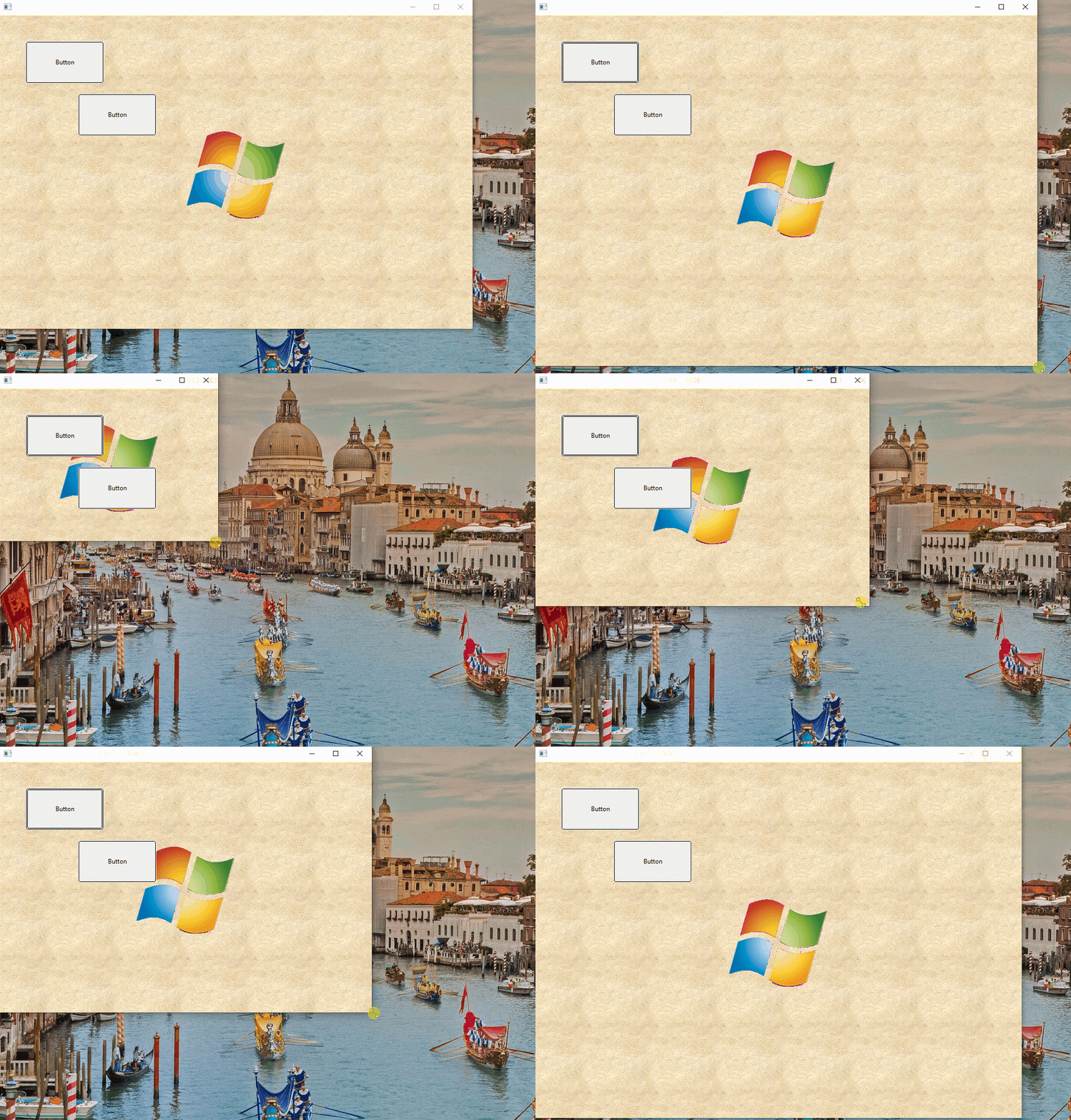
We recommend using oWnd:DrawImage( cLogo, [aRect] ) for showing logo.
With this, the logo is displayed over any brush used but beneath all controls.

Example:
Code (fw): Select all Collapse
#include "fivewin.ch"

function Main()

   local oWnd, oBrush
   local cLogo := "c:\fwh\bitmaps\windows.bmp"

   DEFINE BRUSH oBrush FILE "c:\fwh\bitmaps\backgrnd\beige2.bmp"
   DEFINE WINDOW oWnd BRUSH oBrush

   @  50, 50 BTNBMP PROMPT "Button" SIZE 150,80 PIXEL OF oWnd FLAT
   @ 150,150 BTNBMP PROMPT "Button" SIZE 150,80 PIXEL OF oWnd FLAT

   oWnd:bPainted := { || oWnd:DrawImage( cLogo ) }  // This line displays logo

   ACTIVATE WINDOW oWnd
   RELEASE BRUSH oBrush

return nil


Regards


G. N. Rao.

Hyderabad, India

Continue the discussion