FiveTech Support Forums

FiveWin / Harbour / xBase community
Board index FiveWin for Harbour/xHarbour Gluing images
Posts: 1392
Joined: Mon May 14, 2007 09:49 AM
Gluing images
Posted: Mon Oct 11, 2021 08:47 PM

Hi, !

Using the FW Save Screen() function, I cut out a certain number of identical fragments from the screen. Then I need to glue them together in a certain order (like puzzles - top, bottom, right, left) and save them to a bitmap file. How can this be done ?

Posts: 44158
Joined: Thu Oct 06, 2005 05:47 PM
Re: Gluing images
Posted: Tue Oct 12, 2021 05:40 AM

define SRCCOPY 13369376

local hDC := oDlg:GetDC()
local hDCMem := CreateComtatibleDC( hDC )
local hBitmap := CreateCompatibleBitmap( hDCMem, nWidth, nHeigth )
local hPrev := SelectObject( hDCMem, hBitmap )
local hBmp, hDib

now you paint your bitmaps on hDCMem this way:
hBmp = ReadBitmap( 0, "name.bmp" )
PalBmpDraw( hDCMem, nRow, nCol, hBmp )

Finally you save it and clean:
DibWrite( cFileName, DibFromBitmap( hBitmap ) )
SelectObject( hDCMem, hPrev )
DeleteObject( hBitmap )
DeleteDC( hDCMem )
oDlg:ReleaseDC()

regards, saludos

Antonio Linares
www.fivetechsoft.com
Posts: 1392
Joined: Mon May 14, 2007 09:49 AM
Re: Gluing images
Posted: Tue Oct 12, 2021 09:45 AM

Thank you, Antonio !

Posts: 10733
Joined: Sun Nov 19, 2006 05:22 AM
Re: Gluing images
Posted: Sat Oct 16, 2021 05:59 PM
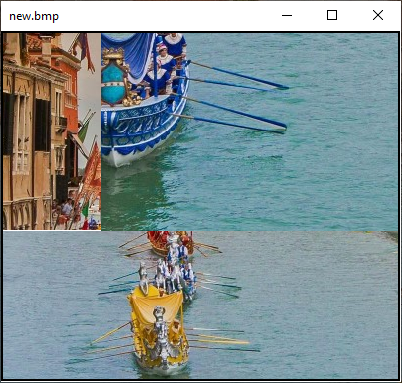
Code (fw): Select all Collapse
function StitchCrops()

   local hWnd, hBmp1, hBmp2, hBmp3, hNew

   hWnd  := GetDeskTopWindow()
   hBmp1 := FWSaveScreen( hWnd, 200,200,400,300 ) // 100x200
   hBmp2 := FWSaveScreen( hWnd, 700,650,900,950 ) // 300x200
   hBmp3 := FWSaveScreen( hWnd, 500,500,650,900 ) // 400x150

   hNew  := FW_MakeYourBitmap( 400, 350, <|hDC|
               FW_DrawImage( hDC, hBmp1, {   0,   0,  200, 100 } )
               FW_DrawImage( hDC, hBmp2, {   0, 100,  200, 400 } )
               FW_DrawImage( hDC, hBmp3, { 200,   0,  350, 400 } )
               return nil
               > )

   FW_SaveImage( hNew, "new.bmp" )

   DeleteObject( hNew )

   XImage( "new.bmp" )

return nil


Regards


G. N. Rao.

Hyderabad, India
Posts: 1392
Joined: Mon May 14, 2007 09:49 AM
Re: Gluing images
Posted: Tue Oct 19, 2021 11:34 AM

Rao, thank you very much !!! It can be printed in any format. And ate the picture in the size of the screen and if wider too

Posts: 10733
Joined: Sun Nov 19, 2006 05:22 AM
Re: Gluing images
Posted: Tue Oct 19, 2021 12:28 PM
It can be printed in any format.


Can be saved in any format.

And ate the picture in the size of the screen and if wider too


As the name itself indicates, FWSaveScreen() can extract full or part of what is visible on the screen only and nothing outside the screen.
But the resulting glued image can be larger than the screen.
Regards


G. N. Rao.

Hyderabad, India
Posts: 1392
Joined: Mon May 14, 2007 09:49 AM
Re: Gluing images
Posted: Tue Oct 19, 2021 01:01 PM

To use the FW Save Screen() function to print a container larger than the screen, you need to move this container using the :Move method to the screen. Then you can always read the device context of the required fragment. I printed out the map in A1, A0 formats (but there are some subtleties here by synchronously zooming in on the map)

Posts: 10733
Joined: Sun Nov 19, 2006 05:22 AM
Re: Gluing images
Posted: Tue Oct 19, 2021 01:38 PM
Natter wrote:To use the FW Save Screen() function to print a container larger than the screen, you need to move this container using the :Move method to the screen. Then you can always read the device context of the required fragment. I printed out the map in A1, A0 formats (but there are some subtleties here by synchronously zooming in on the map)


YOU ARE RIGHT
I did not suggest this because it is complex.
But glad you found it and did it
:-)
Regards


G. N. Rao.

Hyderabad, India
Posts: 1392
Joined: Mon May 14, 2007 09:49 AM
Re: Gluing images
Posted: Tue Oct 19, 2021 01:53 PM

To read the device context, you need to fix the screen. What is the best way to do it ?
You can, of course, display msginfo() after each execution of :Move, but it's not pretty

Continue the discussion