

Hola buenas tardes para todos
No se si es posible colocar en la barra del preview (rpreview.prg) un get o un combobox para que el usuario desde la previsualización, pueda seleccionar el numero de copias a imprimir.
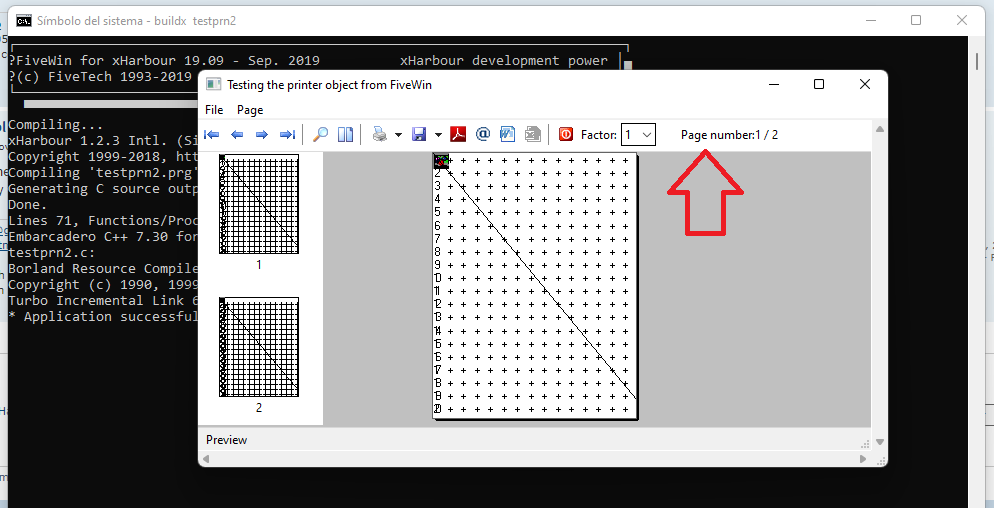
No se si es posible colocar en la barra del preview (rpreview.prg) un get o un combobox para que el usuario desde la previsualización, pueda seleccionar el numero de copias a imprimir.
// Sample showing how to manage the printer object

#include "FiveWin.ch"

static oWnd

//----------------------------------------------------------------------------//

function Main()

   local oPrn, oFont
   local nRowStep, nColStep
   local nRow := 0, nCol := 0, n, m

   // PrnSetSize( 2100, 1200 )     To adjust a different printer paper size!

   PRINT oPrn NAME "Testing the printer object from FiveWin" PREVIEW

      if Empty( oPrn:hDC )
         return nil          // Printer was not installed or ready
      endif

      DEFINE FONT oFont NAME "Ms Sans Serif" SIZE 0, -12 OF oPrn

      nRowStep = oPrn:nVertRes() / 20   // We want 20 rows
      nColStep = oPrn:nHorzRes() / 15   // We want 15 cols

      PAGE
         oPrn:SayBitmap( 1, 1, "..\bitmaps\fivewin.bmp" )
         for n = 1 to 20  // rows
             nCol = 0
             oPrn:Say( nRow, nCol, Str( n, 2 ), oFont )
             nCol += nColStep
             for m = 1 to 15
                oPrn:Say( nRow, nCol, "+", oFont )
                nCol += nColStep
             next
             nRow += nRowStep
         next
         oPrn:Line( 0, 0, nRow, nCol )
      ENDPAGE

      PAGE
         nRow = 0
         oPrn:SayBitmap( 1, 1, "..\bitmaps\fivewin.bmp" )
         for n = 1 to 20  // rows
             nCol = 0
             oPrn:Say( nRow, nCol, Str( n + 20, 2 ), oFont )
             nCol += nColStep
             for m = 1 to 15
                oPrn:Say( nRow, nCol, "+", oFont )
                nCol += nColStep
             next
             nRow += nRowStep
         next
         oPrn:Line( 0, 0, nRow, nCol )
      ENDPAGE

   ENDPRINT

   oFont:End()      // Destroy the font object

return nil

//----------------------------------------------------------------------------//

procedure AppSys  // XBase++ requirement

return

//----------------------------------------------------------------------------//
Saludos
LEANDRO AREVALO
Bogotá (Colombia)
https://hymlyma.com
https://hymplus.com/
leandroalfonso111@gmail.com
leandroalfonso111@hotmail.com
[ Turbo Incremental Link64 6.98 Embarcadero 7.70 ] [ FiveWin 25.01 ] [ xHarbour 64 bits) ]
LEANDRO AREVALO
Bogotá (Colombia)
https://hymlyma.com
https://hymplus.com/
leandroalfonso111@gmail.com
leandroalfonso111@hotmail.com
[ Turbo Incremental Link64 6.98 Embarcadero 7.70 ] [ FiveWin 25.01 ] [ xHarbour 64 bits) ]
