FiveTech Support Forums

FiveWin / Harbour / xBase community
Board index FiveWin for Harbour/xHarbour say border RESOLVED
Posts: 7317
Joined: Thu Oct 18, 2012 07:17 PM
say border RESOLVED
Posted: Sat Nov 13, 2021 10:37 AM
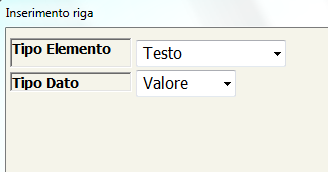
I have these say


but with border are no good


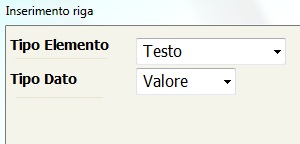
it is possible to do only one line under the say like this for example


and have the possibiliy to select color for the line ?
Since from 1991/1992 ( fw for clipper Rel. 14.4 - Momos)

I use : FiveWin for Harbour March-April 2024 - Harbour 3.2.0dev (harbour_bcc770_32_20240309) - Bcc7.70 - xMate ver. 1.15.3 - PellesC - mail: silvio[dot]falconi[at]gmail[dot]com
Posts: 6983
Joined: Fri Oct 07, 2005 07:07 PM
Re: say border
Posted: Sat Nov 13, 2021 11:08 AM

Silvio, look this post:

viewtopic.php?f=3t=36283hilit=cristobal

Regards,
Otto

&&

Posts: 7317
Joined: Thu Oct 18, 2012 07:17 PM
Re: say border
Posted: Sat Nov 13, 2021 12:58 PM
Otto wrote:Silvio, look this post:

viewtopic.php?f=3&t=36283&hilit=cristobal


Regards,
Otto


otto it is for get class
I mean say class
Since from 1991/1992 ( fw for clipper Rel. 14.4 - Momos)

I use : FiveWin for Harbour March-April 2024 - Harbour 3.2.0dev (harbour_bcc770_32_20240309) - Bcc7.70 - xMate ver. 1.15.3 - PellesC - mail: silvio[dot]falconi[at]gmail[dot]com
Posts: 8515
Joined: Tue Dec 20, 2005 07:36 PM
Re: say border
Posted: Sat Nov 13, 2021 02:38 PM
Code (fw): Select all Collapse
// \samples\CORSAY2.PRG - For apprentices. Swap colors.

#Include "FiveWin.ch"

STATIC oSay1, oSay2, oSay3, oSay4, oSay5, oSay6
STATIC oDlg, oFont1

FUNCTION Main()

   LOCAL cTitle

   cTitle := "Colors - CLICK WITH THE RIGHT MOUSE BUTTON"

   DEFINE FONT oFont1 NAME "MS Sans Serif" SIZE   0, - 24

   DEFINE DIALOG oDlg TITLE cTitle FROM 0, 0 TO 400, 700 PIXEL ;
      COLOR 0, 16777215 TRANSPARENT

   oDlg:lHelpIcon := .F.

   ACTIVATE DIALOG oDlg ON INIT Inicio() CENTERED

   oFont1:End()

RETURN NIL

FUNCTION Inicio()

   @  20,  22 SAY oSay1 VAR "Text Color:" SIZE 152, 24 PIXEL ;
      OF oDlg COLOR 0, 16777215 FONT oFont1

   @  20, 209 SAY oSay2 VAR "0" SIZE 142,  28 PIXEL;
      OF oDlg COLOR 0, 16777215 FONT oFont1

   @  20, 371 SAY oSay3 VAR RRGB( 0 ) SIZE 200, 28 PIXEL ;
      OF oDlg COLOR 0, 16777215 FONT oFont1

   @  80,  20 SAY oSay4 VAR "Window Color:" SIZE 175, 33 PIXEL ;
      OF oDlg COLOR 0, 16777215 FONT oFont1

   @  80, 209 SAY oSay5 VAR "0" SIZE 141, 39 PIXEL ;
      OF oDlg COLOR 0, 16777215 FONT oFont1

   @  80, 371 SAY oSay6 VAR RRGB( 0 ) SIZE 200, 39 PIXEL ;
      OF oDlg COLOR 0, 16777215 FONT oFont1

   // Right click
   oDlg:bRClicked := {| nRow, nCol | RPopup( nRow, nCol, oDlg, { oSay1, oSAy2, oSay3, oSay4, oSay5, oSay6 } ) }

RETURN NIL

FUNCTION RPopup( nRow, nCol, oDlg, aSays )

   LOCAL oMenu

   oMenu := MenuPopUp( oDlg, aSays )

   ACTIVATE POPUP oMenu WINDOW oDlg AT nRow, nCol

RETURN NIL

FUNCTION MenuPopUp( oDlg, aSays )

   LOCAL oMenu
   LOCAL nClrTxt := oSay1:nClrText
   LOCAL nClrDlg := oDlg:nClrPane

   MENU oMenu PopUp

      MenuItem "Text Color" ;
         Action ( nClrTxt := ChooseColor( nClrTxt ), ;
         AplicaCores( oDlg, aSays, nClrTxt, nClrDlg ) )

      MenuItem "Window Color" ;
         Action( nClrDlg := ChooseColor( nClrDlg ), ;
         AplicaCores( oDlg, aSays, nClrTxt, nClrDlg ) )

   ENDMENU

RETURN( oMenu )

FUNCTION AplicaCores( oDlg, aSays, nClrTxt, nClrDlg )

   LOCAL i, cRgbTxt, cRgbDlg

   oDlg:SetColor( nClrTxt, nClrDlg )

   oDlg:Refresh()

   FOR i := 1 TO 6

      SysRefresh()

      aSays[ i ]:SetColor( nClrTxt, nClrDlg )

      aSays[ i ]:Refresh()

   NEXT

   cRgbTxt := RRGB( nClrTxt )
   cRgbDlg := RRGB( nClrDlg )

   aSays[ 2 ]:SetText( nClrTxt )
   aSays[ 3 ]:SetText( cRgbTxt )
   aSays[ 5 ]:SetText( nClrDlg )
   aSays[ 6 ]:SetText( cRgbDlg )

RETURN NIL

FUNCTION RRGB( nCor )

   LOCAL cRGB := "{ " + StrZero( nRGBRed( nCor ), 3 )   + ", "   + ;
                        StrZero( nRGBGreen( nCor ), 3 ) + ", " + ;
                        StrZero( nRGBBlue( nCor ), 3 )  + " }"

RETURN( cRGB)

// FIN / END
João Santos - São Paulo - Brasil - Phone: +55(11)95150-7341
Posts: 866
Joined: Tue Oct 16, 2007 08:57 AM
Re: say border
Posted: Tue Nov 16, 2021 12:09 PM
Silvio.Falconi wrote:I have these say


but with border are no good


it is possible to do only one line under the say like this for example


and have the possibiliy to select color for the line ?


Look my gif.
viewtopic.php?f=3&t=41015
" rel="noopener">
viewtopic.php?f=3&t=41015
Best Regards,


Richard


Harbour 3.2.0dev (r2503251254) => Borland C++ v7.7 32bit

MySQL v8.0

Harbour 3.2.0dev (r2503251254) => Borland C++ v7.7 64bit
Posts: 7317
Joined: Thu Oct 18, 2012 07:17 PM
Re: say border
Posted: Tue Nov 16, 2021 01:07 PM
richard-service wrote:
Silvio.Falconi wrote:I have these say


but with border are no good


it is possible to do only one line under the say like this for example


and have the possibiliy to select color for the line ?


Look my gif.
viewtopic.php?f=3&t=41015
" rel="noopener">
viewtopic.php?f=3&t=41015


Sorry,

I don't want the line under the get control
I want to put the line under SAY control
Since from 1991/1992 ( fw for clipper Rel. 14.4 - Momos)

I use : FiveWin for Harbour March-April 2024 - Harbour 3.2.0dev (harbour_bcc770_32_20240309) - Bcc7.70 - xMate ver. 1.15.3 - PellesC - mail: silvio[dot]falconi[at]gmail[dot]com
Posts: 8515
Joined: Tue Dec 20, 2005 07:36 PM
Re: say border
Posted: Tue Nov 16, 2021 02:34 PM
João Santos - São Paulo - Brasil - Phone: +55(11)95150-7341
Posts: 7317
Joined: Thu Oct 18, 2012 07:17 PM
Re: say border
Posted: Tue Nov 16, 2021 04:08 PM
karinha wrote:Look this,

https://mega.nz/file/5QVUzRSS#CxqVYgUT9UVGs-YR0faToNmZYZkFekbZT5keQMGoccg

no , i no need a sensity say, you are joking?
Since from 1991/1992 ( fw for clipper Rel. 14.4 - Momos)

I use : FiveWin for Harbour March-April 2024 - Harbour 3.2.0dev (harbour_bcc770_32_20240309) - Bcc7.70 - xMate ver. 1.15.3 - PellesC - mail: silvio[dot]falconi[at]gmail[dot]com
Posts: 866
Joined: Tue Oct 16, 2007 08:57 AM
Re: say border
Posted: Wed Nov 17, 2021 02:05 AM
Silvio.Falconi wrote:
richard-service wrote:
Silvio.Falconi wrote:I have these say


but with border are no good


it is possible to do only one line under the say like this for example


and have the possibiliy to select color for the line ?


Look my gif.
viewtopic.php?f=3&t=41015
" rel="noopener">
viewtopic.php?f=3&t=41015


Sorry,

I don't want the line under the get control
I want to put the line under SAY control


Look it below:

Best Regards,


Richard


Harbour 3.2.0dev (r2503251254) => Borland C++ v7.7 32bit

MySQL v8.0

Harbour 3.2.0dev (r2503251254) => Borland C++ v7.7 64bit
Posts: 7317
Joined: Thu Oct 18, 2012 07:17 PM
Re: say border
Posted: Wed Nov 17, 2021 08:39 AM
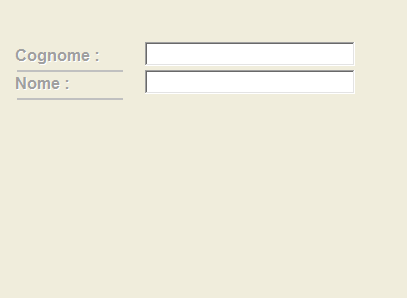
perhaps you not understood good

I not want line down the control get

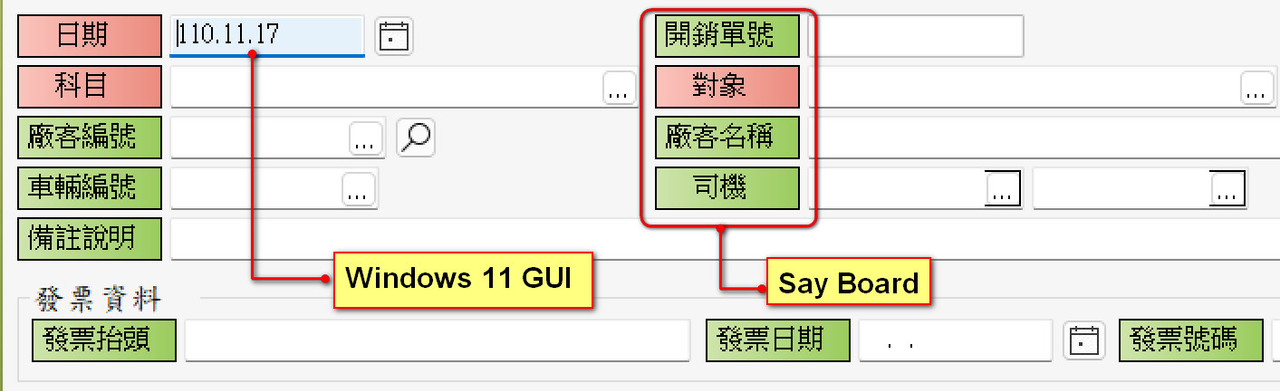
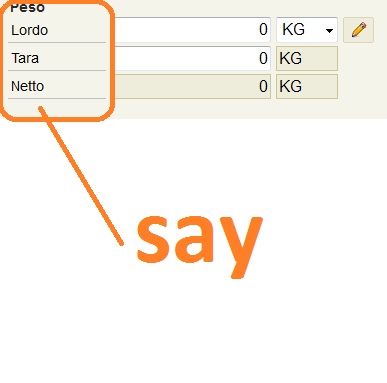
I wish line down the say control as you can see in this picture


I have seen this in other software made with delphi
the line is just an embellishment of the say must not be used with the mouse (ssay)
Since from 1991/1992 ( fw for clipper Rel. 14.4 - Momos)

I use : FiveWin for Harbour March-April 2024 - Harbour 3.2.0dev (harbour_bcc770_32_20240309) - Bcc7.70 - xMate ver. 1.15.3 - PellesC - mail: silvio[dot]falconi[at]gmail[dot]com
Posts: 6983
Joined: Fri Oct 07, 2005 07:07 PM
Re: say border
Posted: Wed Nov 17, 2021 03:27 PM
Hello Silvio,
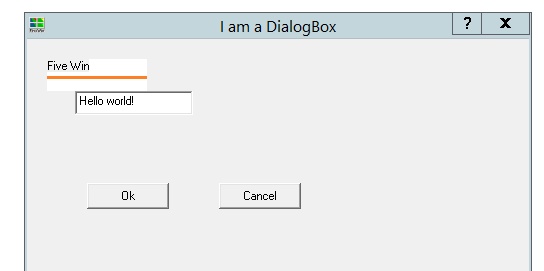
I tried with Brush and you can do what you want.
Best regards,
Otto


Code (fw): Select all Collapse
#include "FiveWin.ch"

function Main()
    local oDlg, oIco, cTest := "Hello world!   "
    local oBrush   
    
    DEFINE BRUSH oBrush FILENAME "../bitmaps/Backgrnd/linie.bmp"
    
    DEFINE ICON oIco FILE "..\icons\fivewin.ico"
    
    DEFINE DIALOG oDlg ;
    TITLE "I am a DialogBox" ;
    SIZE 500, 500 ;
    ICON oIco
    @ 10,10 ;
    SAY oSay ;
    PROMPT "Five Win" ;
    PIXEL ;
    SIZE 50, 16
    
    oSay:SetBrush( oBrush )
    
    @ 2, 3 GET cTest
    
    @ 4, 5 BUTTON "&Ok" SIZE 40, 12 ;
    ACTION MsgInfo( "Any action here!" ) DEFAULT
    
    @ 4, 16 BUTTON "&Cancel" SIZE 40, 12 ACTION oDlg:End()
    
    ACTIVATE DIALOG oDlg ;
    CENTERED  
    
return nil
Posts: 7317
Joined: Thu Oct 18, 2012 07:17 PM
Re: say border
Posted: Thu Nov 18, 2021 12:22 AM
Perhaps I found a Solution


a Little class :-)

I'll call it SAYLINE
Since from 1991/1992 ( fw for clipper Rel. 14.4 - Momos)

I use : FiveWin for Harbour March-April 2024 - Harbour 3.2.0dev (harbour_bcc770_32_20240309) - Bcc7.70 - xMate ver. 1.15.3 - PellesC - mail: silvio[dot]falconi[at]gmail[dot]com
Posts: 866
Joined: Tue Oct 16, 2007 08:57 AM
Re: say border
Posted: Thu Nov 18, 2021 04:22 AM
Silvio.Falconi wrote:perhaps you not understood good

I not want line down the control get

I wish line down the say control as you can see in this picture


I have seen this in other software made with delphi
the line is just an embellishment of the say must not be used with the mouse (ssay)


How about it.
Best Regards,


Richard


Harbour 3.2.0dev (r2503251254) => Borland C++ v7.7 32bit

MySQL v8.0

Harbour 3.2.0dev (r2503251254) => Borland C++ v7.7 64bit
Posts: 6983
Joined: Fri Oct 07, 2005 07:07 PM
Re: say border
Posted: Thu Nov 18, 2021 08:03 AM

Hello Richard,
I like your design.
Best regards,
Otto

Posts: 7317
Joined: Thu Oct 18, 2012 07:17 PM
Re: say border
Posted: Thu Nov 18, 2021 09:57 AM
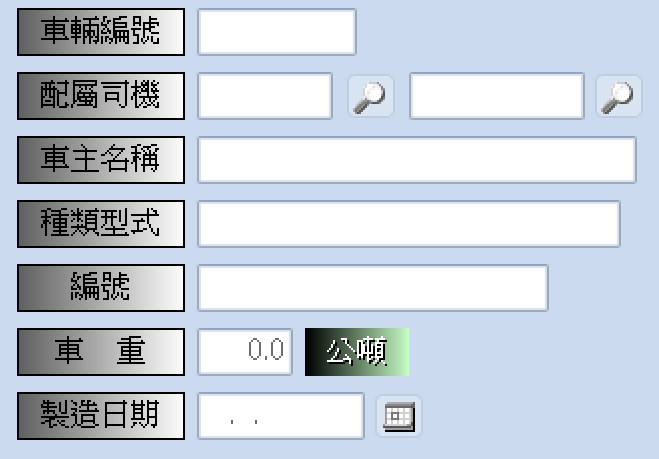
richard-service wrote:


No Mr Richard
SEE this

Since from 1991/1992 ( fw for clipper Rel. 14.4 - Momos)

I use : FiveWin for Harbour March-April 2024 - Harbour 3.2.0dev (harbour_bcc770_32_20240309) - Bcc7.70 - xMate ver. 1.15.3 - PellesC - mail: silvio[dot]falconi[at]gmail[dot]com