FiveTech Support Forums

FiveWin / Harbour / xBase community
Board index FiveWin for Harbour/xHarbour How many control per dialog?
Posts: 1598
Joined: Fri Oct 07, 2005 05:56 PM
How many control per dialog?
Posted: Tue Nov 16, 2021 07:34 AM

Dear All,

I try to put button, the limitation is 650 buttons. It will crash (got error), if it is greater than 650 buttons.
How many the limitation of controls per dialog?

Thanks in advance for any suggestion.

Regards,

Dutch


FWH 2304 / xHarbour Simplex 1.2.3 / BCC73 / Pelles C / UEStudio

FWPPC 10.02 / Harbour for PPC (FTDN)

ADS V.9 / MySql / MariaDB

R&R 12 Infinity / Crystal Report XI R2

(Thailand)
Posts: 44158
Joined: Thu Oct 06, 2005 05:47 PM
Re: How many control per dialog?
Posted: Tue Nov 16, 2021 08:20 AM
Dear Dutch,

FWH does not impose any limit on that, so I guess that you are reaching the limit of your Win32 app default HEAP.

You may try to increase the heap using the linker flag /HEAP when linking the EXE:

/HEAP: 0x10000, 0x1000

Please try to increase those values.

https://www.labri.fr/perso/betrema/winnt/heapmm.html

Please post here the example you are testing to review it as maybe it is a different issue
regards, saludos

Antonio Linares
www.fivetechsoft.com
Posts: 44158
Joined: Thu Oct 06, 2005 05:47 PM
Re: How many control per dialog?
Posted: Tue Nov 16, 2021 08:23 AM

Please try to build your PRG using FWH 64 as it should solve it also

regards, saludos

Antonio Linares
www.fivetechsoft.com
Posts: 1598
Joined: Fri Oct 07, 2005 05:56 PM
Re: How many control per dialog?
Posted: Tue Nov 16, 2021 09:39 AM
Dear Antonio,

I use UEStudio. Where do I set "/HEAP: 0x10000, 0x1000"? I try to add in [Settings] but nothing change.

Code (fw): Select all Collapse
[Settings]
Target = 
Category&01 = DEFAULT RUN CONFIGURATION
Working Directory =.
Command Line Arguments =

Category&02 = Harbour Options
Automatic Memvar Declaration = no|yes
Variables Are Assumed = no|yes
Generate Preprocessed Output = no|yes
Warning Level = 1|2|3|4|0
User Include Path =
User Defines =

Compiler Options =
Linker Options = /HEAP: 0x10000, 0x1000

Antonio Linares wrote:Dear Dutch,

FWH does not impose any limit on that, so I guess that you are reaching the limit of your Win32 app default HEAP.

You may try to increase the heap using the linker flag /HEAP when linking the EXE:

/HEAP: 0x10000, 0x1000

Please try to increase those values.

https://www.labri.fr/perso/betrema/winnt/heapmm.html

Please post here the example you are testing to review it as maybe it is a different issue
Regards,

Dutch


FWH 2304 / xHarbour Simplex 1.2.3 / BCC73 / Pelles C / UEStudio

FWPPC 10.02 / Harbour for PPC (FTDN)

ADS V.9 / MySql / MariaDB

R&R 12 Infinity / Crystal Report XI R2

(Thailand)
Posts: 44158
Joined: Thu Oct 06, 2005 05:47 PM
Re: How many control per dialog?
Posted: Tue Nov 16, 2021 10:52 AM

What C compiler are you using ?

regards, saludos

Antonio Linares
www.fivetechsoft.com
Posts: 1598
Joined: Fri Oct 07, 2005 05:56 PM
Re: How many control per dialog?
Posted: Tue Nov 16, 2021 02:42 PM
Dear Antonio,

I use BCC73 with UEStudio.
Antonio Linares wrote:What C compiler are you using ?


This UEStudio "Application"
Code (fw): Select all Collapse
# --------- xHarbour y FWH configuration --------
# --- general --------------------------------------
# $P  - project name
# $Pp - path to project directory
# $Pn - project name
# --- compile --------------------------------------
# $I  - input full name
# $Ip - input path
# $In - input name
# $Ie - input extension
# $O  - output file
# $Op - path to output file
# $On - output filename (without path)
# $Oe - output extension
# $R  - release/debug setting for compiler
# --- build ----------------------------------------
# $T  - target full name
# $Tp - target path
# $Tn - target name
# $O  - output file
# $Op - path to output file
# $On - output filename (without path)
# $Oe - output extension
# $R  - release/debug setting for linker

[Settings]
Target = 
Category&01 = DEFAULT RUN CONFIGURATION
Working Directory =.
Command Line Arguments =

Category&02 = Harbour Options
Automatic Memvar Declaration = no|yes
Variables Are Assumed = no|yes
Generate Preprocessed Output = no|yes
Warning Level = 1|2|3|4|0
User Include Path =
User Defines =

Compiler Options =
Linker Options = /HEAP: 0x10000, 0x1000

Excluded Files = Excludes

[SettingsInfo]
Target = Provides a space for you to specify an output file and location of the program that the linker creates.
Working Directory = Provides a space for you to specify the directory in which executing occurs. If you do not specify a directory, executing occurs in the directory where the executable is located.
Command Line Arguments = Provides a space for you to specify command-line arguments you want to pass to the program at startup.
Compiler Options = Provides a space for you to specify an additional compiler options.
User Defines = Shows the switches the tool will use to build. Use ';' as delimiter.
Linker Options = Provides a space for you to specify an additional linker options.
Excluded Files = This will exclude the file(s) included in this UE project group from the build.

[SettingsReps]
User Defines = @[;|-D%s]
Automatic Memvar Declaration = no=|yes=/a
Variables Are Assumed = no=|yes=/v
Generate Preprocessed Output = no=|yes=/p
User Include Path = ^^@[;|;%s]
User Include Path&1 = ^^@[;| /i%s]
Use Multi Thread Library = no|yes
Warning Level = @/w%s

[Variables]
FWH = D:\FWH1901
HPATH = D:\xHarbour1803
CPATH = D:\bcc73

HPATHL = $(HPATH)\LIB
CPATHL = $(CPATH)\LIB

HOPT = /n /gc0 /q $(Compiler Options) /i$(HPATH)\INCLUDE $(User Include Path&1) $(User Defines) $(Automatic Memvar Declaration) $(Variables Are Assumed) $(Generate Preprocessed Output) $(Warning Level)
COPT = -O2 -M -c -v -I$(HPATH)\INCLUDE -D__HARBOUR__ -D__FLAT__

LOPT = -Gn -aa -Tpe -s -v
LIBS0 = $(HPATHL)\LibMySql.lib
LIBS1 = $(FWH)\LIB\FiveHX.lib $(FWH)\LIB\FiveHC.lib 
LIBS2 = $(HPATHL)\rtl.lib $(HPATHL)\vm.lib $(HPATHL)\gtgui.lib $(HPATHL)\lang.lib $(HPATHL)\macro.lib $(HPATHL)\rdd.lib $(HPATHL)\dbfntx.lib $(HPATHL)\dbfcdx.lib $(HPATHL)\dbffpt.lib $(HPATHL)\hbsix.lib $(HPATHL)\debug.lib $(HPATHL)\common.lib $(HPATHL)\pp.lib $(HPATHL)\codepage.lib $(HPATHL)\pcrepos.lib $(HPATHL)\ct.lib $(HPATHL)\hbzip.lib $(HPATHL)\zlib.lib
LIBS3 = $(CPATHL)\cw32.lib $(CPATHL)\import32.lib $(CPATHL)\psdk\odbc32.lib $(CPATHL)\psdk\msimg32.lib $(CPATHL)\psdk\nddeapi.lib $(CPATHL)\psdk\iphlpapi.lib  $(CPATHL)\psdk\rasapi32.lib $(CPATHL)\psdk\psapi.lib $(CPATHL)\wininet.lib $(HPATHL)\PNG.lib $(CPATHL)\psdk\GdiPlus.lib $(CPATHL)\psdk\Shell32.lib
LIBS4 = $(FWH)\LIB\TWBRW32X.LIB $(FWH)\LIB\SBUTTONX.LIB $(FWH)\LIB\PICKDATE.LIB  $(FWH)\LIB\EZTw32.LIB
LIBS   = $(LIBS0) $(LIBS4) $(LIBS1) $(LIBS2) $(LIBS3)
$(HPATHL)\hbsix.lib $(HPATHL)\debug.lib $(HPATHL)\common.lib $(HPATHL)\pp.lib $(HPATHL)\codepage.lib $(HPATHL)\pcrepos.lib $(HPATHL)\ct.lib $(HPATHL)\hbzip.lib $(HPATHL)\zlib.lib 

[Environment]
PATH = $(HPATH)\BIN;$(CPATH)\BIN;%PATH%
INCLUDE = $(HPATH)\INCLUDE;$(CPATH)\INCLUDE;$(FWH)\INCLUDE
LIB = $(HPATH)\LIB;$(CPATH)\LIB;$(FWH)\LIB
BuildMode = %UESMode%

[General]
TargetExt = .EXE
ReleaseOut = Release
DebugOut = Debug
UseFullPaths = 1
UseDosNames = 1
Excludes = $(Excluded Files)
GenerateEDGroup=$(External Dependencies)
.CPP = .C

[MakeCommands]
run = Execute Application
makef = Show Makefile

[Execute Application]
Title = Execute $T
Cmd0 = $(Command Line Arguments)
Depends = $T
ShowWindow = 1
DisplayConsole = $(DCon)

[Show Makefile]
Title=Show makefile
Cmd0=uestudio makefile
ShowWindow=1
DisplayConsole=0

[InsertFiles]

[FileGroups]
FGO = .obj;
FGR = .res;
FGL = .lib;
FGD = .def;

[GroupFormats]
FGO = %s
FGR = %s
FGL = %s

[Build]
Out = $T
Depends = $FGO $FGR
DebugFlag = 
ReleaseFlag = 
Cmd0 = ilink32 $(LOPT) c0w32.obj $FGO, $T,, $(LIBS),, $FGR

[.PRG]
Out = $In.c
DebugFlag = /b
ReleaseFlag = 
Cmd0 = harbour $I $(HOPT) $R /o$O 

IncFiles = 1
CaseSensitive = 0
IncDirs = .;$(INCLUDE);
IncKeyWords = #include;
Comments = /*.*/.//.eol.

[.C]
Out = $In.obj
Cmd0 = bcc32 $(COPT) -o$O $I

[.RC]
Out = $In.res
Cmd0 = brc32 -r -fo$O $I

IncFiles = 1
CaseSensitive = 0
IncDirs = .;$(INCLUDE);
IncKeyWords = #include;
Comments = /*.*/.//.eol.
Regards,

Dutch


FWH 2304 / xHarbour Simplex 1.2.3 / BCC73 / Pelles C / UEStudio

FWPPC 10.02 / Harbour for PPC (FTDN)

ADS V.9 / MySql / MariaDB

R&R 12 Infinity / Crystal Report XI R2

(Thailand)
Posts: 4840
Joined: Fri Nov 18, 2005 04:52 PM
Re: How many control per dialog?
Posted: Thu Nov 18, 2021 05:46 PM

Dutch,

Wow, 650 buttons! Maybe you should re-think your interface design. Try doing a Google search for "software dialogs," and select "images." The most buttons I saw on any dialog was five. 650 buttons is way too complex to understand.

I think the most complex dialog I ever did was with 6 folders and four buttons, Print Help Cancel OK. The 4 buttons were outside the folders--they applied to all of the folders.

If you need 650 choices maybe you should consider a drop-down list with two buttons, Cancel OK.

FWH 18.05/xHarbour 1.2.3/BCC7/Windows 10
Posts: 1598
Joined: Fri Oct 07, 2005 05:56 PM
Re: How many control per dialog?
Posted: Fri Nov 19, 2021 01:49 AM
Dear James,

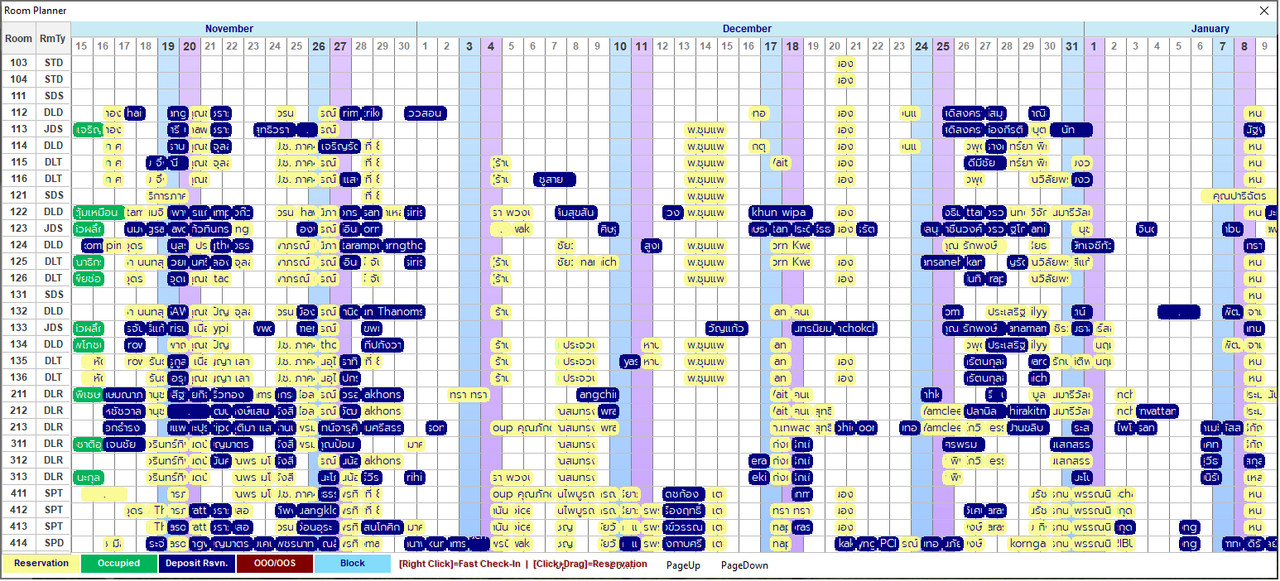
This is what I do. The hotel room planner, sometime it has more 650 booking in 1 dialog to show.
betta fish meme
James Bott wrote:Dutch,

Wow, 650 buttons! Maybe you should re-think your interface design. Try doing a Google search for "software dialogs," and select "images." The most buttons I saw on any dialog was five. 650 buttons is way too complex to understand.

I think the most complex dialog I ever did was with 6 folders and four buttons, Print Help Cancel OK. The 4 buttons were outside the folders--they applied to all of the folders.

If you need 650 choices maybe you should consider a drop-down list with two buttons, Cancel OK.
Regards,

Dutch


FWH 2304 / xHarbour Simplex 1.2.3 / BCC73 / Pelles C / UEStudio

FWPPC 10.02 / Harbour for PPC (FTDN)

ADS V.9 / MySql / MariaDB

R&R 12 Infinity / Crystal Report XI R2

(Thailand)
Posts: 1487
Joined: Tue Jun 14, 2016 07:51 AM
Re: How many control per dialog?
Posted: Fri Nov 19, 2021 08:25 AM

Just curious...

Why not use the cell content of the browse for activating a action ?

You prefer a button action. Is this because the buttons seems to be on top en overlapping the cells ?

Marc Venken

Using: FWH 23.08 with Harbour
Posts: 1598
Joined: Fri Oct 07, 2005 05:56 PM
Re: How many control per dialog?
Posted: Fri Nov 19, 2021 10:04 AM
Dear Richard,

Yes, of course. I need button overlap the grid. Because it is the guest stay noon 1st day to noon 2nd day. It is not browse, it is sayline().

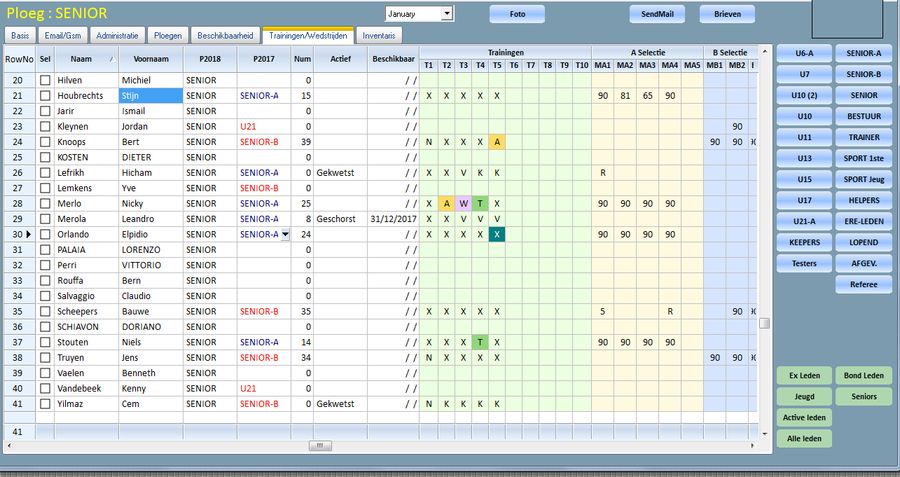
Sometime I try to find Grantt library to make like this picture but not found. If you have any idea, most welcome.
Thanks for your question.
Marc Venken wrote:Just curious...

Why not use the cell content of the browse for activating a action ?

You prefer a button action. Is this because the buttons seems to be on top en overlapping the cells ?
Regards,

Dutch


FWH 2304 / xHarbour Simplex 1.2.3 / BCC73 / Pelles C / UEStudio

FWPPC 10.02 / Harbour for PPC (FTDN)

ADS V.9 / MySql / MariaDB

R&R 12 Infinity / Crystal Report XI R2

(Thailand)
Posts: 1487
Joined: Tue Jun 14, 2016 07:51 AM
Re: How many control per dialog?
Posted: Fri Nov 19, 2021 11:44 AM
I use a Xbrowse for something simular and no need for extra libs that are not included in standard FW (so also no issues from older libs)

Marc Venken

Using: FWH 23.08 with Harbour
Posts: 7317
Joined: Thu Oct 18, 2012 07:17 PM
Re: How many control per dialog?
Posted: Fri Nov 19, 2021 12:33 PM
dutch wrote:
betta fish meme

wich class you use for this planner ?

Can you publish a small test sample ?
Since from 1991/1992 ( fw for clipper Rel. 14.4 - Momos)

I use : FiveWin for Harbour March-April 2024 - Harbour 3.2.0dev (harbour_bcc770_32_20240309) - Bcc7.70 - xMate ver. 1.15.3 - PellesC - mail: silvio[dot]falconi[at]gmail[dot]com
Posts: 4840
Joined: Fri Nov 18, 2005 04:52 PM
Re: How many control per dialog?
Posted: Fri Nov 19, 2021 04:58 PM
Dutch,

This is what I do. The hotel room planner


OK, that is not a typical dialog. I can't really tell from the picture if it is actually a dialog or a window?

Was it working until just recently, or is this a new project or design?

You should be able to find the maximum controls you can have on a dialog by just creating a dialog and then adding controls one at a time in a loop, until it crashes.
FWH 18.05/xHarbour 1.2.3/BCC7/Windows 10
Posts: 44158
Joined: Thu Oct 06, 2005 05:47 PM
Re: How many control per dialog?
Posted: Sat Nov 20, 2021 05:06 AM
Dear Dutch,

Google results:
You can change the heap sizes the linker uses via the -GH flag for ilink32 or ilink64. Use -GH<heapname>=size to allocate a larger heap or multiple heaps. For example, to link the release version of the DLL OWLNext library, internal C++Builder developers use -GHinfo=0x13000000

https://docwiki.embarcadero.com/RADStudio/Sydney/en/Handling_Linker_Out_of_Memory_Errors

My advise is to stop using Borland and start using Microsoft Visual Community. Borland C compiler is the slowest of all and it does not compare at all to current Microsoft C compiler so powerful tools. You should consider migrating to MSVC :-)

Anyhow I am not sure yet that this may solve your issue but it is worth to try it
regards, saludos

Antonio Linares
www.fivetechsoft.com
Posts: 6983
Joined: Fri Oct 07, 2005 07:07 PM
Re: How many control per dialog?
Posted: Sat Nov 20, 2021 07:52 AM

Dear Antonio,
Is there a step-by-step guide on how to switch to MSVC.
I use UEStudio and xHarbour to compile.
Thank you very much in advance.
Best regards,
Otto