

I saw I can create a dialog with
local nHt := Int( ScreenHeight() * 0.5 )
local nWd := Int( ScreenWidth() * 0.5 )
DEFINE DIALOG oDlgAgenti SIZE nWd, nHt PIXEL FONT oFont TRUEPIXEL ;
TITLE cTitle TRANSPARENT COLOR CLR_BLACK,RGB( 245,244,234 ) ICON oIcon
But How I can calc the exact position of each say and get control with respect to the height of the dialog created?
for a sample I made
local nHt := Int( ScreenHeight() * 0.5 )
local nWd := Int( ScreenWidth() * 0.66 )
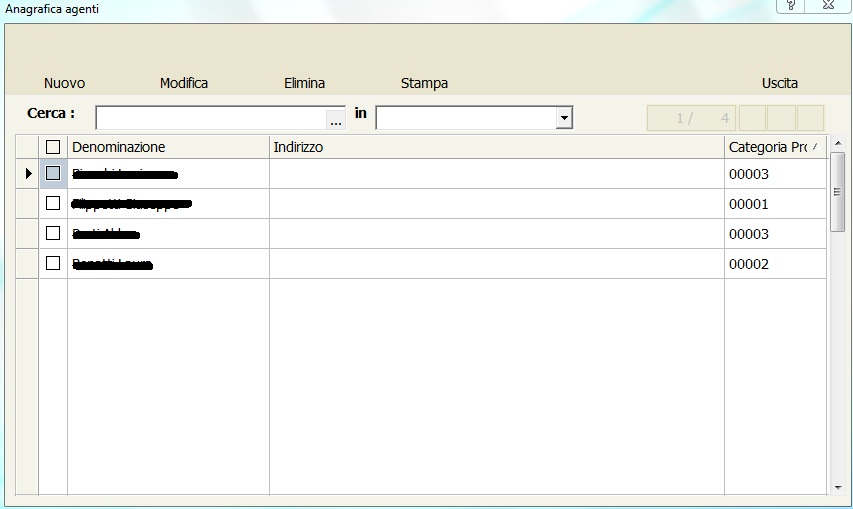
But i have a comboand get control and for now is ok if Ichange the configuration
local nHt := Int( ScreenHeight() * 0.5 )
local nWd := Int( ScreenWidth() * 0.3 )
they are no longer good
for the xbrowse I made
@ 110,10 XBROWSE oBrwAge SIZE nWd-10, nHt-10 PIXEL OF oDlgAgenti ;
DATASOURCE oAgenti COLUMNS aCols ;
AUTOSORT ;
NOBORDER CELL LINES
local nHt := Int( ScreenHeight() * 0.5 )
local nWd := Int( ScreenWidth() * 0.5 )
DEFINE DIALOG oDlgAgenti SIZE nWd, nHt PIXEL FONT oFont TRUEPIXEL ;
TITLE cTitle TRANSPARENT COLOR CLR_BLACK,RGB( 245,244,234 ) ICON oIcon
But How I can calc the exact position of each say and get control with respect to the height of the dialog created?
for a sample I made
local nHt := Int( ScreenHeight() * 0.5 )
local nWd := Int( ScreenWidth() * 0.66 )
But i have a comboand get control and for now is ok if Ichange the configuration
local nHt := Int( ScreenHeight() * 0.5 )
local nWd := Int( ScreenWidth() * 0.3 )
they are no longer good
for the xbrowse I made
@ 110,10 XBROWSE oBrwAge SIZE nWd-10, nHt-10 PIXEL OF oDlgAgenti ;
DATASOURCE oAgenti COLUMNS aCols ;
AUTOSORT ;
NOBORDER CELL LINES
Since from 1991/1992 ( fw for clipper Rel. 14.4 - Momos)
I use : FiveWin for Harbour March-April 2024 - Harbour 3.2.0dev (harbour_bcc770_32_20240309) - Bcc7.70 - xMate ver. 1.15.3 - PellesC - mail: silvio[dot]falconi[at]gmail[dot]com
I use : FiveWin for Harbour March-April 2024 - Harbour 3.2.0dev (harbour_bcc770_32_20240309) - Bcc7.70 - xMate ver. 1.15.3 - PellesC - mail: silvio[dot]falconi[at]gmail[dot]com