FiveTech Support Forums

FiveWin / Harbour / xBase community
Board index FiveWin for Harbour/xHarbour Can Colorized this border ?
Posts: 7317
Joined: Thu Oct 18, 2012 07:17 PM
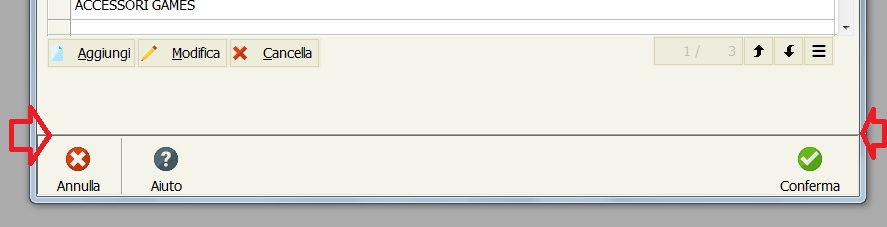
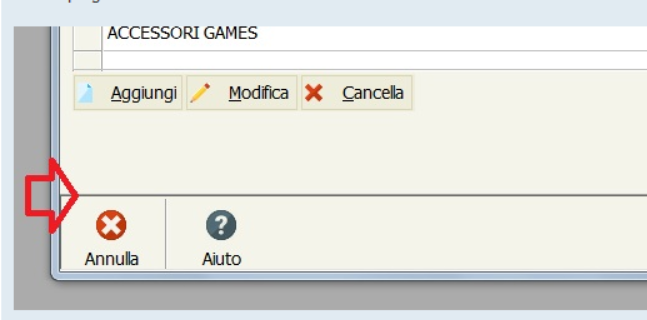
Can Colorized this border ?
Posted: Thu Dec 02, 2021 07:33 AM
could i program the color of this border?

Since from 1991/1992 ( fw for clipper Rel. 14.4 - Momos)

I use : FiveWin for Harbour March-April 2024 - Harbour 3.2.0dev (harbour_bcc770_32_20240309) - Bcc7.70 - xMate ver. 1.15.3 - PellesC - mail: silvio[dot]falconi[at]gmail[dot]com
Posts: 8515
Joined: Tue Dec 20, 2005 07:36 PM
Re: Can Colorized this border ?
Posted: Thu Dec 02, 2021 12:27 PM

Show how you made this edge. on this forum, there are programmers, not soothsayers.

Muestre cómo hizo este borde. en este foro, hay programadores, no adivinos.

Te he pedido varias veces que siempre publiques el código.

I have asked you several times to always post the code.

João Santos - São Paulo - Brasil - Phone: +55(11)95150-7341
Posts: 7317
Joined: Thu Oct 18, 2012 07:17 PM
Re: Can Colorized this border ?
Posted: Thu Dec 02, 2021 12:32 PM
karinha wrote:Show how you made this edge. on this forum, there are programmers, not soothsayers.

Muestre cómo hizo este borde. en este foro, hay programadores, no adivinos.

Te he pedido varias veces que siempre publiques el código.

I have asked you several times to always post the code.


You said right they are not fortune tellers but programmers
Dijiste bien que no son adivinos sino programadores

this is a simple buttonbar
esta es una barra de botones simple

which code should i display?
¿Qué código debo mostrar?


Code (fw): Select all Collapse
 DEFINE BUTTONBAR oBarCat OF oDlg SIZE 80, 60  2015   BOTTOM BORDER
Since from 1991/1992 ( fw for clipper Rel. 14.4 - Momos)

I use : FiveWin for Harbour March-April 2024 - Harbour 3.2.0dev (harbour_bcc770_32_20240309) - Bcc7.70 - xMate ver. 1.15.3 - PellesC - mail: silvio[dot]falconi[at]gmail[dot]com
Posts: 8515
Joined: Tue Dec 20, 2005 07:36 PM
Re: Can Colorized this border ?
Posted: Thu Dec 02, 2021 03:05 PM
Cuando alguien pide un ejemplo, debería publicarse, más o menos como si lo estuviera publicando ahora. Si el ejemplo no funciona para usted, funcionará para otro usuario del foro. Vea si este código le ayuda.

When someone asks for an example, it should get posted, more or less like I'm posting it now. If the example doesn't work for you, it will work for another forum user. See if this code helps you.


Code (fw): Select all Collapse
// \SAMPLES\COLORBAR.PRG - <!-- e --><a href="mailto:kapiabafwh@gmail.com">kapiabafwh@gmail.com</a><!-- e -->

#Include "FiveWin.ch"

#Define CLR_LGREEN     nRGB( 190, 215, 190 )
#Define aPubGrad        {| lInvert | If( lInvert, ;
                        { { 1 / 3, nRGB( 255, 253, 222 ), nRGB( 255, 231, 151 ) }, ;
                        { 2 / 3, nRGB( 255, 215,  84 ), nRGB( 255, 233, 162 ) }  ;
                        }, ;
                        { { 1 / 2, nRGB( 219, 230, 244 ), nRGB( 207 - 50, 221 - 25, 255 ) }, ;
                        { 1 / 2, nRGB( 201 - 50, 217 - 25, 255 ), nRGB( 231, 242, 255 ) }  ;
                        } ) }

STATIC oWnd
STATIC oDlg

FUNCTION Main()

   LOCAL oBar, cTitle, nRet

   cTitle := "Color in ButtonBar in Dialog"

   SkinButtons()

   DEFINE WINDOW oWnd TITLE cTitle

   DEFINE BUTTONBAR oBar _3D OF oWnd

   DEFINE BUTTON OF oBar ACTION( ColorBar1() )

   SET MESSAGE OF oWnd TO cTitle NOINSET CLOCK DATE KEYBOARD

   ACTIVATE WINDOW oWnd MAXIMIZED

RETURN NIL

FUNCTION ColorBar1()

   LOCAL oFont, oBold, oBar, cTitle, oImp, oExit

   cTitle := "Color in ButtonBar"

   DEFINE FONT oFont NAME 'Tahoma' SIZE 0, -16 BOLD
   DEFINE FONT oBold NAME 'Tahoma' SIZE 0, -14 BOLD

   DEFINE DIALOG oDlg SIZE 400, 400 PIXEL TRUEPIXEL ;
      TITLE cTitle

   oDlg:lHelpIcon := .F.

   DEFINE BUTTONBAR oBar _3D OF oDlg SIZE 64, 70 2007

   WITH OBJECT oBar

      oBar:bClrGrad := aPubGrad

      oBar:bRClicked := { || NIL }
      oBar:bLClicked := { || NIL }

      oBar:SetFont( oFont )

      oBar:nClrText := CLR_CYAN
      oBar:Adjust()

   END

   DEFINE BUTTON oImp OF oBar PROMPT "Print"       ;
      FILENAME "..\bitmaps\16x16\printer.bmp" FLAT ;
      ACTION( Imprimir() )

   oImp:cToolTip := "Impresion"

   DEFINE BUTTON oExit OF oBar PROMPT "Exit"       ;
      FILENAME "..\bitmaps\16x16\Exit.bmp" FLAT    ;
      ACTION( oDlg:End() )

   oExit:cToolTip := "Exit"

   ACTIVATE DIALOG oDlg CENTERED

   oFont:End()
   oBold:End()

RETURN NIL

FUNCTION Imprimir()

   ? [Impresion]

RETURN NIL

// FIN / END


Regards, saludos.
João Santos - São Paulo - Brasil - Phone: +55(11)95150-7341
Posts: 7317
Joined: Thu Oct 18, 2012 07:17 PM
Re: Can Colorized this border ?
Posted: Thu Dec 02, 2021 03:59 PM
karinha wrote:Cuando alguien pide un ejemplo, debería publicarse, más o menos como si lo estuviera publicando ahora. Si el ejemplo no funciona para usted, funcionará para otro usuario del foro. Vea si este código le ayuda.

When someone asks for an example, it should get posted, more or less like I'm posting it now. If the example doesn't work for you, it will work for another forum user. See if this code helps you.


Code (fw): Select all Collapse
// \SAMPLES\COLORBAR.PRG - <!-- e --><a href="mailto:kapiabafwh@gmail.com">kapiabafwh@gmail.com</a><!-- e -->

#Include "FiveWin.ch"

#Define CLR_LGREEN     nRGB( 190, 215, 190 )
#Define aPubGrad        {| lInvert | If( lInvert, ;
                        { { 1 / 3, nRGB( 255, 253, 222 ), nRGB( 255, 231, 151 ) }, ;
                        { 2 / 3, nRGB( 255, 215,  84 ), nRGB( 255, 233, 162 ) }  ;
                        }, ;
                        { { 1 / 2, nRGB( 219, 230, 244 ), nRGB( 207 - 50, 221 - 25, 255 ) }, ;
                        { 1 / 2, nRGB( 201 - 50, 217 - 25, 255 ), nRGB( 231, 242, 255 ) }  ;
                        } ) }

STATIC oWnd
STATIC oDlg

FUNCTION Main()

   LOCAL oBar, cTitle, nRet

   cTitle := "Color in ButtonBar in Dialog"

   SkinButtons()

   DEFINE WINDOW oWnd TITLE cTitle

   DEFINE BUTTONBAR oBar _3D OF oWnd

   DEFINE BUTTON OF oBar ACTION( ColorBar1() )

   SET MESSAGE OF oWnd TO cTitle NOINSET CLOCK DATE KEYBOARD

   ACTIVATE WINDOW oWnd MAXIMIZED

RETURN NIL

FUNCTION ColorBar1()

   LOCAL oFont, oBold, oBar, cTitle, oImp, oExit

   cTitle := "Color in ButtonBar"

   DEFINE FONT oFont NAME 'Tahoma' SIZE 0, -16 BOLD
   DEFINE FONT oBold NAME 'Tahoma' SIZE 0, -14 BOLD

   DEFINE DIALOG oDlg SIZE 400, 400 PIXEL TRUEPIXEL ;
      TITLE cTitle

   oDlg:lHelpIcon := .F.

   DEFINE BUTTONBAR oBar _3D OF oDlg SIZE 64, 70 2007

   WITH OBJECT oBar

      oBar:bClrGrad := aPubGrad

      oBar:bRClicked := { || NIL }
      oBar:bLClicked := { || NIL }

      oBar:SetFont( oFont )

      oBar:nClrText := CLR_CYAN
      oBar:Adjust()

   END

   DEFINE BUTTON oImp OF oBar PROMPT "Print"       ;
      FILENAME "..\bitmaps\16x16\printer.bmp" FLAT ;
      ACTION( Imprimir() )

   oImp:cToolTip := "Impresion"

   DEFINE BUTTON oExit OF oBar PROMPT "Exit"       ;
      FILENAME "..\bitmaps\16x16\Exit.bmp" FLAT    ;
      ACTION( oDlg:End() )

   oExit:cToolTip := "Exit"

   ACTIVATE DIALOG oDlg CENTERED

   oFont:End()
   oBold:End()

RETURN NIL

FUNCTION Imprimir()

   ? [Impresion]

RETURN NIL

// FIN / END


Regards, saludos.


dear sir i didn't ask to move an example to color the buttonbar. my request was quite different.
Once again I ask you to be punctual on the answers (if you want to help) and not to answer with other arguments or other things that I have never asked you.
I only asked if it was possible to color the border of the buttonbar, I didn't ask what you answered
Since from 1991/1992 ( fw for clipper Rel. 14.4 - Momos)

I use : FiveWin for Harbour March-April 2024 - Harbour 3.2.0dev (harbour_bcc770_32_20240309) - Bcc7.70 - xMate ver. 1.15.3 - PellesC - mail: silvio[dot]falconi[at]gmail[dot]com
Posts: 8515
Joined: Tue Dec 20, 2005 07:36 PM
Re: Can Colorized this border ?
Posted: Thu Dec 02, 2021 07:03 PM

ok. sirve para otro usuário.

João Santos - São Paulo - Brasil - Phone: +55(11)95150-7341
Posts: 4043
Joined: Wed Dec 19, 2007 06:40 PM
Re: Can Colorized this border ?
Posted: Sat Dec 04, 2021 10:34 AM
Silvio,

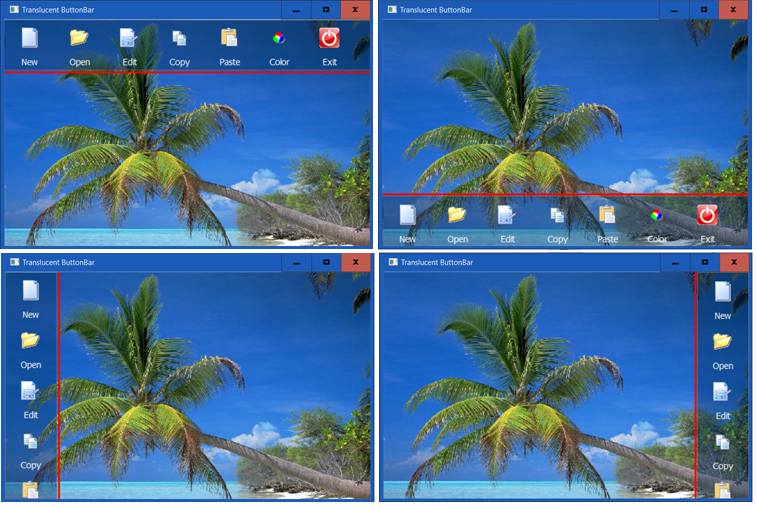
my solution is tested on all 4 positions

possible to define : pensize, color and the pen transparentlevel


regards
Uwe :-)
Since 1995 ( the first release of FW 1.9 )

i work with FW.

If you have any questions about special functions, maybe i can help.
Posts: 7317
Joined: Thu Oct 18, 2012 07:17 PM
Re: Can Colorized this border ?
Posted: Sat Dec 04, 2021 12:17 PM

I resolved thanks

Since from 1991/1992 ( fw for clipper Rel. 14.4 - Momos)

I use : FiveWin for Harbour March-April 2024 - Harbour 3.2.0dev (harbour_bcc770_32_20240309) - Bcc7.70 - xMate ver. 1.15.3 - PellesC - mail: silvio[dot]falconi[at]gmail[dot]com

Continue the discussion