FiveTech Support Forums

FiveWin / Harbour / xBase community
Board index FiveWin for Harbour/xHarbour Resolution of monitor
Posts: 1392
Joined: Mon May 14, 2007 09:49 AM
Resolution of monitor
Posted: Thu Dec 23, 2021 01:47 PM

Hi,

The resolution of my monitor is 1920 x 1080. However, the ScrResolution() function returns
{ 1536, 864 }. Why ?

Posts: 2706
Joined: Fri Oct 07, 2005 01:50 PM
Re: Resolution of monitor
Posted: Thu Dec 23, 2021 02:28 PM
Natter

Try it this way ...

Code (fw): Select all Collapse
nSCR1 := GetSysMetrics(0)
nSCR2 := GetSysMetrics(1)


This will give you the horizontal and vertical resolution ...

Rick Lipkin
Posts: 1392
Joined: Mon May 14, 2007 09:49 AM
Re: Resolution of monitor
Posted: Thu Dec 23, 2021 02:43 PM

I tried it. Getsystemmetrics returns the same values. Mysticism :(

Posts: 1515
Joined: Thu Oct 30, 2008 02:37 PM
Re: Resolution of monitor
Posted: Thu Dec 23, 2021 02:51 PM
Posts: 1392
Joined: Mon May 14, 2007 09:49 AM
Re: Resolution of monitor
Posted: Thu Dec 23, 2021 03:02 PM

So what ?

Posts: 1598
Joined: Fri Oct 07, 2005 05:56 PM
Re: Resolution of monitor
Posted: Thu Dec 23, 2021 04:25 PM
Hi Natter,

Because of Display Setup (Scale and Layout is 125%)
Natter wrote:Hi,

The resolution of my monitor is 1920 x 1080. However, the ScrResolution() function returns
{ 1536, 864 }. Why ?
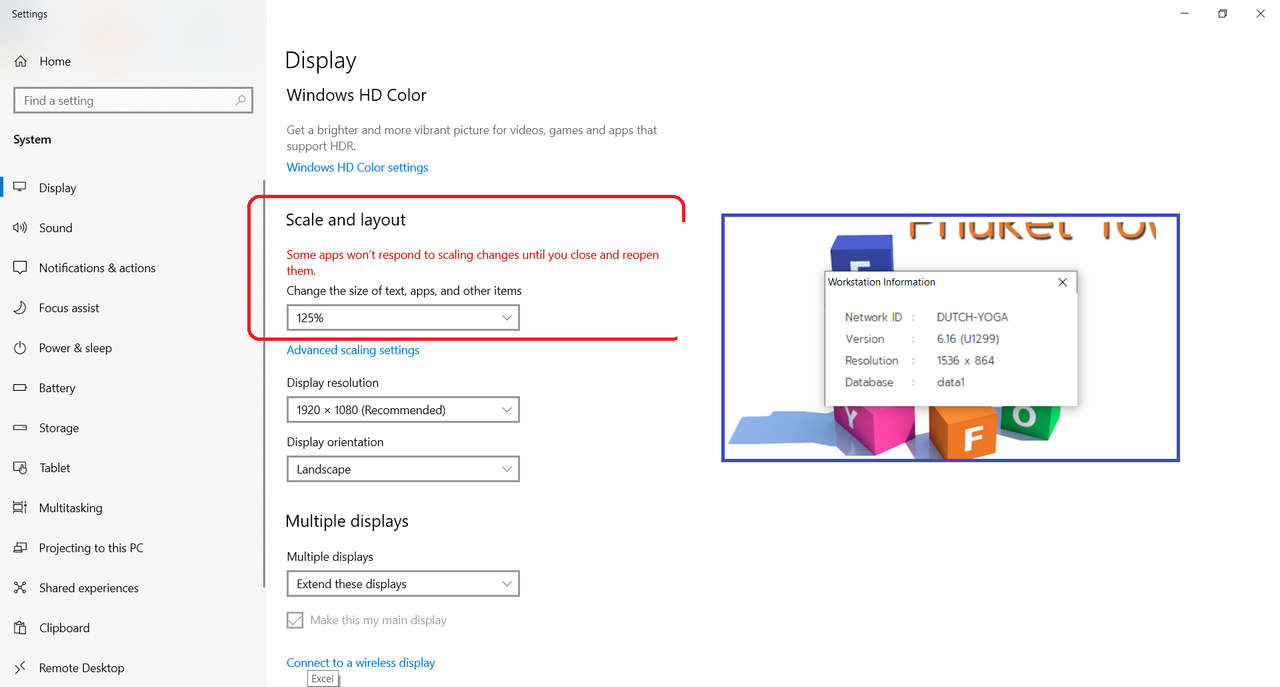
Regards,

Dutch


FWH 2304 / xHarbour Simplex 1.2.3 / BCC73 / Pelles C / UEStudio

FWPPC 10.02 / Harbour for PPC (FTDN)

ADS V.9 / MySql / MariaDB

R&R 12 Infinity / Crystal Report XI R2

(Thailand)
Posts: 1392
Joined: Mon May 14, 2007 09:49 AM
Re: Resolution of monitor
Posted: Thu Dec 23, 2021 04:56 PM
Yes, dutch, you're right. Thanks !

Can I get this scale from FWH ?
Posts: 1487
Joined: Tue Jun 14, 2016 07:51 AM
Re: Resolution of monitor
Posted: Thu Dec 23, 2021 11:31 PM
Marc Venken

Using: FWH 23.08 with Harbour
Posts: 1467
Joined: Mon Oct 10, 2005 11:26 AM
Re: Resolution of monitor
Posted: Sat Dec 25, 2021 03:21 PM

Is there a function that can read the scaling of your desktop?

Thanks.

Regards,

Michel D.
Genk (Belgium)


_____________________________________________________________________________________________

I use : FiveWin for (x)Harbour v. 25.12 - Harbour 3.2.0 (May 2025) - xHarbour Builder (January 2020) - Bcc773

Posts: 1392
Joined: Mon May 14, 2007 09:49 AM
Re: Resolution of monitor
Posted: Sat Dec 25, 2021 09:59 PM

It is not possible to get DPI yet. It might be worth trying in the registry

Posts: 1772
Joined: Thu Sep 05, 2019 05:32 AM
Re: Resolution of monitor
Posted: Sun Dec 26, 2021 05:49 AM
hi,

there are different Way to get Scale-Factor.

for single Monitor you can use "real" / "virtual" Desktop Size to get Scale-Factor

Code (fw): Select all Collapse
#define HORZRES              0x0008   // (  8) Horizontal width in pixels
#define VERTRES              0x000A   // ( 10) Vertical width in pixels
#define LOGPIXELSX           0x0058   // ( 88) Logical pixels/inch in X
#define LOGPIXELSY           0x005A   // ( 90) Logical pixels/inch in Y
#define DESKTOPVERTRES       0x0075   // (117) Vertical height  of entire desktop in pixels
#define DESKTOPHORZRES       0x0076   // (118) Horizontal width of entire desktop in pixels

Function GetDeskSize(nHDC,lVirtual)
LOCAL nWidth,nHeight
   nWidth  := HMG_CallDLL('GDI32.dll', DLL_OSAPI, 'GetDeviceCaps', nHDC, iif(lVirtual, HORZRES, DESKTOPHORZRES))
   nHeight := HMG_CallDLL('GDI32.dll', DLL_OSAPI, 'GetDeviceCaps', nHDC, iif(lVirtual, VERTRES, DESKTOPVERTRES))
RETURN{nWidth,nHeight}

---

for multi-Monitor you need

MonitorFromWindow https://docs.microsoft.com/en-us/windows/win32/api/winuser/nf-winuser-monitorfromwindow
GetScaleFactorForMonitor https://docs.microsoft.com/en-us/windows/win32/api/shellscalingapi/nf-shellscalingapi-getscalefactorformonitor
DEVICE_SCALE_FACTOR https://docs.microsoft.com/en-us/windows/win32/api/shtypes/ne-shtypes-device_scale_factor

GetScaleFactorForDevice is IMHO outdate
https://docs.microsoft.com/en-us/windows/win32/api/shellscalingapi/nf-shellscalingapi-getscalefactorfordevice
greeting,

Jimmy
Posts: 1392
Joined: Mon May 14, 2007 09:49 AM
Re: Resolution of monitor
Posted: Sun Dec 26, 2021 10:57 AM

Jimmy, great! GetDeviceCaps(DC, 117/118) works correctly

Posts: 8515
Joined: Tue Dec 20, 2005 07:36 PM
Re: Resolution of monitor
Posted: Sun Sep 04, 2022 04:12 PM

Hi Jimmy, how do I do this in FiveWin? I don't use HMG.

Hola Jimmy, ¿cómo hago esto en FiveWin? No uso HMG.

Regards, saludos.

João Santos - São Paulo - Brasil - Phone: +55(11)95150-7341
Posts: 1772
Joined: Thu Sep 05, 2019 05:32 AM
Re: Resolution of monitor
Posted: Sun Sep 04, 2022 04:49 PM
hi karinha,
karinha wrote:how do I do this in FiveWin? I don't use HMG.

FiveWin have in c:\fwh\source\winapi\device.c
Code (fw): Select all Collapse
HB_FUNC( GETDEVICECAPS )     //  ()    HDC, int iIndex

so as Natter wrote use
Code (fw): Select all Collapse
#define DESKTOPVERTRES       0x0075   // (117) Vertical height  of entire desktop in pixels
#define DESKTOPHORZRES       0x0076   // (118) Horizontal width of entire desktop in pixels

   Vertical   := GetDeviceCaps(DC, 0x0075) 
   Horizontal := GetDeviceCaps(DC, 0x0076)
greeting,

Jimmy
Posts: 8515
Joined: Tue Dec 20, 2005 07:36 PM
Re: Resolution of monitor
Posted: Sun Sep 04, 2022 05:06 PM
Hola Jimmy, ¿puedes hacer un ejemplo completo y funcional? Necesito cambiar la RESOLUCIÓN DEL VIDEO a 1280x768 en tiempo real y luego volver a la RESOLUCIÓN DEL CLIENTE como estaba antes. ¿Es posible o no?

Hi Jimmy, can you make a complete and working example? I need to change the VIDEO RESOLUTION to 1280x768 in realtime, and then go back to CLIENT RESOLUTION as it was before. Is it possible or not?

WINDOW 7 and WINDOWS 10 please.

Gracias, thanks.

Origen:

http://forums.fivetechsupport.com/viewtopic.php?f=6&t=42143&sid=f7177597dbec68af574f19f84a5e1875

Regards, saludos.
João Santos - São Paulo - Brasil - Phone: +55(11)95150-7341