FiveTech Support Forums

FiveWin / Harbour / xBase community
Board index FiveWin for Harbour/xHarbour a question MDI
Posts: 7317
Joined: Thu Oct 18, 2012 07:17 PM
a question MDI
Posted: Mon Jan 03, 2022 05:56 AM
I am experimenting with an all windowed MDI system.
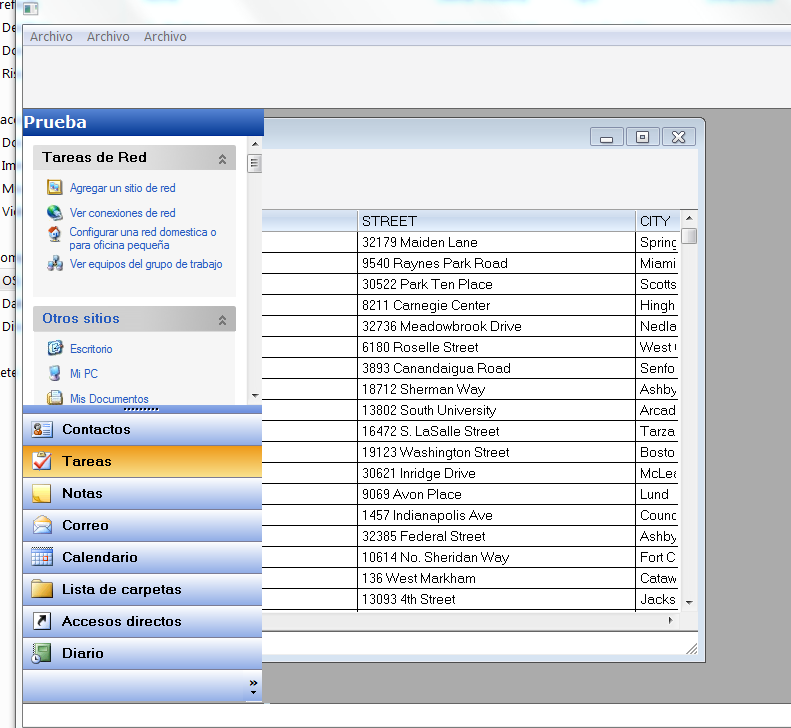
How should I lock a Mdichild window so that the end user cannot put it where I put it (see the figure) and hide it under the explorerbar?


i open the mdichild with

Code (fw): Select all Collapse
Function test1(oWnd)
   Local oBrw,oBar

   use customer

   DEFINE WINDOW oWndClients MDICHILD OF oWnd TITLE "Clients"

   @ 2, 0 XBROWSE oBrw OF oWndClients LINES AUTOSORT ;
         AUTOCOLS DATASOURCE "Customer" NOBORDER
      oBrw:CreateFromCode()
      oBrw:SetFocus()

      DEFINE BUTTONBAR oBar OF oWndClients 2015 SIZE 70, 60

     oWndClients:oClient = oBrw
     oWndClients:oControl = oBrw

      DEFINE MSGBAR oMsgBar OF oWndClients 2015

    ACTIVATE WINDOW oWndClients MAXIMIZED ;
         VALID ( oWndClients := nil, .T. )
    return nil
Since from 1991/1992 ( fw for clipper Rel. 14.4 - Momos)

I use : FiveWin for Harbour March-April 2024 - Harbour 3.2.0dev (harbour_bcc770_32_20240309) - Bcc7.70 - xMate ver. 1.15.3 - PellesC - mail: silvio[dot]falconi[at]gmail[dot]com
Posts: 8515
Joined: Tue Dec 20, 2005 07:36 PM
Re: a question MDI
Posted: Tue Jan 04, 2022 06:03 PM

Look \samples,

ADORICK.PRG

João Santos - São Paulo - Brasil - Phone: +55(11)95150-7341
Posts: 7317
Joined: Thu Oct 18, 2012 07:17 PM
Re: a question MDI
Posted: Fri Jan 07, 2022 07:43 AM
karinha wrote:Look \samples,

ADORICK.PRG


????
Since from 1991/1992 ( fw for clipper Rel. 14.4 - Momos)

I use : FiveWin for Harbour March-April 2024 - Harbour 3.2.0dev (harbour_bcc770_32_20240309) - Bcc7.70 - xMate ver. 1.15.3 - PellesC - mail: silvio[dot]falconi[at]gmail[dot]com
Posts: 8515
Joined: Tue Dec 20, 2005 07:36 PM
Re: a question MDI
Posted: Fri Jan 07, 2022 04:31 PM
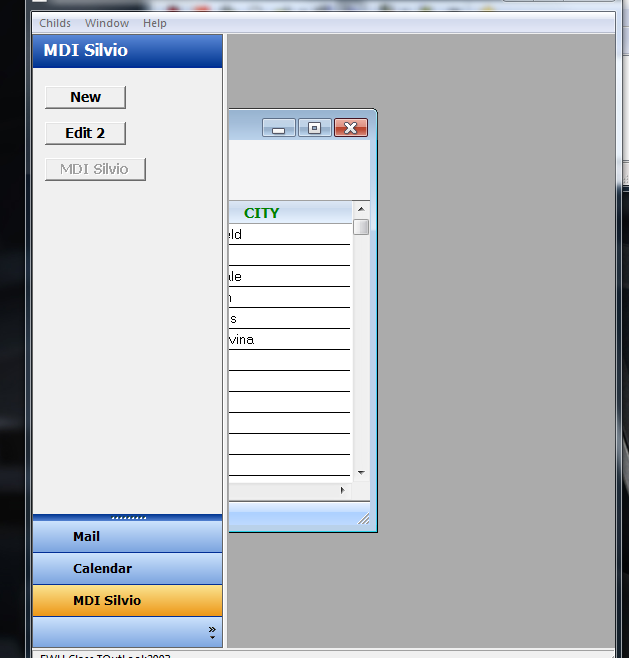
Silvio, compile this example, \SAMPLES\TEST2003.PRG, and say what's not good for you? What you would like to do and can't. Be as logical as possible and with a complete example. Don't post pieces of programs, it's useless.

Silvio, compila este ejemplo, \ SAMPLES \ TEST2003.PRG, y di lo que no es bueno para ti. Lo que le gustaría hacer y lo que no puede. Sea lo más lógico posible y con un ejemplo completo. No publique fragmentos de programas, es inútil.

Code (fw): Select all Collapse
// FWH Class TOutLook2003 - \SAMPLES\TEST2003.PRG

#include "FiveWin.ch"
#include "Splitter.ch"
#include "OutLook.ch"

STATIC oBtn1, oBtn2, oBtn3, oBtn4

function Main()

   LOCAL oFont, oBold
   LOCAL oWnd, oOutLook2003, oStatusBar, oSplit, cCombo, oRad, nValue := 1
   LOCAL oExBar, oPanel1, oPanel2, bClick := { | o | MsgInfo( o:GetText() ) }

   DEFINE FONT oBold NAME "Tahoma" SIZE 0, -14 BOLD
   DEFINE FONT oFont NAME "Tahoma" SIZE 0, -14

   DEFINE WINDOW oWnd TITLE "FWH new Class TOutLook2003" MDI

   /*
   DEFINE OUTLOOK2003 oOutLook2003 OF oWnd ;
      PROMPTS "Mail", "Calendar", "Contacts", "" ;
      BITMAPS "..\bitmaps\mail.bmp", "..\bitmaps\calendar.bmp", "..\bitmaps\notes.bmp"
   */
   DEFINE OUTLOOK2003 oOutLook2003 OF oWnd ;
      PROMPTS "Mail", "Calendar", "MDI Silvio", "" ;
      BITMAPS "..\bitmaps\mail.bmp", "..\bitmaps\calendar.bmp", "..\bitmaps\notes.bmp"
      
   oWnd:oLeft = nil // Because the splitter is going to control the resize   

   @ 0, 0 EXPLORERBAR oExBar OF oOutLook2003:aDialogs[ 1 ] ;
      SIZE oOutLook2003:aDialogs[ 1 ]:nWidth, oOutLook2003:aDialogs[ 1 ]:nHeight 

   oPanel1 = oExBar:AddPanel( "One", "..\bitmaps\32x32\people.bmp" )
   oPanel1:lSpecial = .T.
   oPanel1:AddLink( "First item", bClick, "..\bitmaps\16x16\additem.bmp" )
   oPanel1:AddLink( "Second item", bClick, "..\bitmaps\16x16\copy.bmp" )
      
   oPanel2 = oExBar:AddPanel( "Two", "..\bitmaps\32x32\case.bmp" )
   oPanel2:AddLink( "First item", bClick, "..\bitmaps\16x16\adddbf.bmp" )
   oPanel2:AddLink( "Second item", bClick, "..\bitmaps\16x16\delete0.bmp" )
   oPanel2:AddLink( "Third item", bClick, "..\bitmaps\16x16\envelope.bmp" )
   oPanel2:AddLink( "Fourth item", bClick, "..\bitmaps\16x16\copy.bmp" )      
      
   @ 1, 1 COMBOBOX cCombo ITEMS { "January", "February", "March", "April", "May" } ;
      OF oOutLook2003:aDialogs[ 2 ] SIZE 170, 100 
   
   DEFINE FONT oFont NAME "Arial" SIZE 0, -10
   
   @ 12, 10 SAY Date() OF oOutLook2003:aDialogs[ 2 ] SIZE 80, 20 FONT oFont
   
   @ 3, 1 RADIO oRad VAR nValue OF oOutLook2003:aDialogs[ 2 ] ;
      ITEMS "&Day", "&Week", "&Month" SIZE 100, 20
      
   oRad:SetFont( oFont )   

   @ 1, 2 BUTTON oBtn1 PROMPT( "New" ) OF oOutLook2003:aDialogs[ 3 ] SIZE 80, 22 ;
      ACTION BuildDlg()

   SET FONT OF oBtn1 TO oBold

   @ 3, 2 BUTTON oBtn2 PROMPT( "Edit 2" ) OF oOutLook2003:aDialogs[ 3 ] SIZE 80, 22 ;
      ACTION MsgInfo( "Edit" )

   SET FONT OF oBtn2 TO oBold

   @ 5, 2 BUTTON oBtn3 PROMPT( "MDI Silvio" ) OF oOutLook2003:aDialogs[ 3 ] ;
      SIZE 100, 22                                                          ;
      ACTION( SILVIO_MDI_FWH( oBtn3, oWnd ) ) // MsgInfo( "Search" )

   SET FONT OF oBtn3 TO oBold

   DEFINE STATUSBAR oStatusBar PROMPT "  FWH Class TOutLook2003" OF oWnd

   SetParent( oOutLook2003:hWnd, oWnd:hWnd )
   
   oWnd:oClient = nil
   
   @ 0, 191 SPLITTER oSplit ;
      VERTICAL _3DLOOK ;
      PREVIOUS CONTROLS oOutLook2003 ; 
      HINDS CONTROLS oWnd:oWndClient ;
      SIZE 4, oWnd:nHeight - 70 PIXEL ;
      OF oWnd

   SetParent( oSplit:hWnd, oWnd:hWnd )

   ACTIVATE WINDOW oWnd ;
      ON RESIZE ( oSplit:Adjust(),;
                  WndLeft( oWnd:oWndClient:hWnd, oSplit:nRight + 1 ),;
                  WndWidth( oWnd:oWndClient:hWnd, oWnd:nWidth - oOutLook2003:nWidth - 23 ) )

   oFont:End()
   oBold:End()

return nil

//----------------------------------------------------------------------------//

FUNCTION SILVIO_MDI_FWH( oBtn3, oWnd )

   LOCAL oBrw, oBar, oWndChild, oMsgBar, oFont, oBold, nColuna

   oBtn3:Disable()
   oBtn3:Refresh()

   USE CUSTOMER NEW ALIAS "CUSTOMER"
   GO TOP

   nColuna := 3 // Inicia cursor na Descricao do Produto.

   DEFINE FONT oBold NAME "Tahoma" SIZE 0, -14 BOLD
   DEFINE FONT oFont NAME "Tahoma" SIZE 0, -14

   DEFINE WINDOW oWndChild MDICHILD OF oWnd TITLE "Clients"

   @ 2, 0 XBROWSE oBrw OF oWndChild LINES AUTOSORT ;
      AUTOCOLS DATASOURCE "Customer" NOBORDER

   oBrw:nHeadStrAligns := AL_CENTER  // Centraliza os textos dos Titulos

   oBrw:bClrHeader     := {|| { CLR_GREEN, CLR_WHITE } } // cor dos titulos.
   oBrw:bClrSelFocus = {|| { CLR_WHITE, RGB( 0, 128, 128 ) } } // CUANDO TIENE EL FOCUS

   oBrw:nStretchCol := STRETCHCOL_WIDEST  // Ajusta as colunas do xBrowse.

   oBrw:nColSel := nColuna // <n>  // Mister Nages - Perfect. Cursor inicia na xBrowse()

   oBrw:oHeaderFonts := oBold // fonte nos titulos
   oBrw:oFooterFonts := oBold

   oBrw:CreateFromCode()
   oBrw:SetFocus()

   DEFINE BUTTONBAR oBar OF oWndChild 2015 SIZE 70, 60

   oWndChild:oClient  := oBrw

   DEFINE MSGBAR oMsgBar OF oWndChild 2007

    ACTIVATE WINDOW oWndChild MAXIMIZED ;
         VALID( oBtn3:Enable(), oBtn3:Refresh(), oWndChild := nil, .T. )

   oFont:End()
   oBold:End()

   /*
   oBtn3:Enable()
   oBtn3:Refresh()
   */

RETURN NIL

//----------------------------------------------------------------------------//

function BuildDlg()

   local oDlg, oOutL2003

   DEFINE DIALOG oDlg RESOURCE "Test"
   
   REDEFINE OUTLOOK2003 oOutL2003 ID 110 OF oDlg ;
      PROMPTS "One", "Two", "Three" ;
      BITMAPS "..\bitmaps\mail.bmp", "..\bitmaps\calendar.bmp", "..\bitmaps\notes.bmp" ;
      DIALOGS "Page1", "Page2", "Page3"

   REDEFINE BUTTON ID 110 OF oOutL2003:aDialogs[ 1 ] ACTION MsgInfo( "Click" )
      
   ACTIVATE DIALOG oDlg CENTERED
   
return nil

// FIN / END
João Santos - São Paulo - Brasil - Phone: +55(11)95150-7341
Posts: 7317
Joined: Thu Oct 18, 2012 07:17 PM
Re: a question MDI
Posted: Fri Jan 07, 2022 04:51 PM
SAME PROBLEM


Once again I have understood that you did not fully understand what I had asked for.
The oWndChild window is initially MAXIMIZED and fills the oClient of the oWnd window, then the user resizes the window with the mouse and can hide it under the explorerbar panel.

In a software I have seen instead that if the user moves the window it always remains inside the space and does not go under the explorerbar panel
how can this change be implemented?
Since from 1991/1992 ( fw for clipper Rel. 14.4 - Momos)

I use : FiveWin for Harbour March-April 2024 - Harbour 3.2.0dev (harbour_bcc770_32_20240309) - Bcc7.70 - xMate ver. 1.15.3 - PellesC - mail: silvio[dot]falconi[at]gmail[dot]com
Posts: 8515
Joined: Tue Dec 20, 2005 07:36 PM
Re: a question MDI
Posted: Fri Jan 07, 2022 06:45 PM
See if I understand now, otherwise you have to speak to FiveTech support.

Vea si lo entiendo ahora; de lo contrario, debe hablar con el soporte de FiveTech.

Code (fw): Select all Collapse
   DEFINE WINDOW oWndChild MDICHILD OF oWnd TITLE "Clients"                  ;
      STYLE nOR( WS_CAPTION, WS_MAXIMIZEBOX, WS_MINIMIZEBOX, WS_THICKFRAME )


.OR.,

Code (fw): Select all Collapse
   DEFINE WINDOW oWndChild MDICHILD OF oWnd TITLE "Clients"                  ;
      BORDER NONE NOMAXIMIZE NOZOOM NOMINIMIZE // prevent resizing


Reagards, saludos.
João Santos - São Paulo - Brasil - Phone: +55(11)95150-7341
Posts: 7317
Joined: Thu Oct 18, 2012 07:17 PM
Re: a question MDI
Posted: Fri Jan 07, 2022 07:27 PM

karinha el usuario final puede cambiar el tamaño de la ventana pero la ventana no puede ir más allá de la columna izquierda donde está el panel de la barra del Explorador,

Since from 1991/1992 ( fw for clipper Rel. 14.4 - Momos)

I use : FiveWin for Harbour March-April 2024 - Harbour 3.2.0dev (harbour_bcc770_32_20240309) - Bcc7.70 - xMate ver. 1.15.3 - PellesC - mail: silvio[dot]falconi[at]gmail[dot]com
Posts: 8515
Joined: Tue Dec 20, 2005 07:36 PM
Re: a question MDI
Posted: Fri Jan 07, 2022 08:10 PM
Entiendo. Esto está más allá de mi conocimiento. No recuerdo ningún comando para hacer esto. Quizás el maestro Navarro lo sepa.

I understand. This is beyond my knowledge. I don't remember any commands to do this. Perhaps Master Navarro knows.

Asi, no funciona:

Code (fw): Select all Collapse
   DEFINE WINDOW oWndChild MDICHILD OF oWnd TITLE "Clients" 

   ACTIVATE WINDOW oWndChild MAXIMIZED ;
      ON INIT( oWndChild:SetSize( oWnd:nWidth, oWnd:nHeight )  )


Regards, saludos.

Regards, saludos.
João Santos - São Paulo - Brasil - Phone: +55(11)95150-7341
Posts: 6755
Joined: Wed Feb 15, 2012 08:25 PM
Re: a question MDI
Posted: Fri Jan 07, 2022 08:41 PM

Silvio, use Splitter for this
Look my sample

https://bitbucket.org/fivetech/fivewin- ... estmdi.prg

Cristobal Navarro

Hay dos tipos de personas: las que te hacen perder el tiempo y las que te hacen perder la noción del tiempo

El secreto de la felicidad no está en hacer lo que te gusta, sino en que te guste lo que haces
Posts: 1344
Joined: Wed Nov 16, 2005 09:14 PM
Re: a question MDI
Posted: Fri Jan 07, 2022 09:44 PM
Silvio, puedes intentar con esto. Tendras que ver que cuales son tus coordenadas limites.
Code (fw): Select all Collapse
oWndClients :bMoved    := { |nRow, nCol| IF(nCol < 90,oWndClients :Move(90,oWndClients :nTop),.t.) }
Posts: 7317
Joined: Thu Oct 18, 2012 07:17 PM
Re: a question MDI
Posted: Mon Jan 10, 2022 08:24 AM
cmsoft wrote:Silvio, puedes intentar con esto. Tendras que ver que cuales son tus coordenadas limites.
Code (fw): Select all Collapse
oWndClients :bMoved    := { |nRow, nCol| IF(nCol < 90,oWndClients :Move(90,oWndClients :nTop),.t.) }

I tried with
Code (fw): Select all Collapse
    ACTIVATE WINDOW oWndChild MAXIMIZED ;
                      ON INIT( oWndChild:SetSize( oWnd:nWidth, oWnd:nHeight )  ) ;
             VALID( oBtn3:Enable(), oBtn3:Refresh(), oWndChild := nil, .T. )  ;
             ON RESIZE oWndChild:bMoved := { |nRow, nCol| IF(nCol < 70,oWndChild:Move(70,oWndChild:nTop),.t.) }

but there's problem
Since from 1991/1992 ( fw for clipper Rel. 14.4 - Momos)

I use : FiveWin for Harbour March-April 2024 - Harbour 3.2.0dev (harbour_bcc770_32_20240309) - Bcc7.70 - xMate ver. 1.15.3 - PellesC - mail: silvio[dot]falconi[at]gmail[dot]com
Posts: 8515
Joined: Tue Dec 20, 2005 07:36 PM
Re: a question MDI
Posted: Mon Jan 10, 2022 01:35 PM
cnavarro wrote:Silvio, use Splitter for this
Look my sample
https://bitbucket.org/fivetech/fivewin- ... estmdi.prg


Mestre Navarro, publique un ejemplo que, cuando se compila, funciona correctamente. ¿Y dónde está ese camión lleno de BitMaps que el programa va a buscar en un directorio infinito? ¿Es posible crear un .RAR y poner a disposición el SOURCE, un .EXE y los BITMAPS de este ejemplo para realizar pruebas? Sea práctico, por favor. Gracias.

Mestre Navarro, publish an example that, when compiled, works correctly. And where are this truckload of BitMaps that the program goes to look for in an infinite directory? Is it possible to create a .RAR and make available the SOURCE, an .EXE and the BITMAPS of this example for testing? Be practical, please. Thanks.

Para que hacer esto? Por diós!

Code (fw): Select all Collapse
      :AddLink( "Close", bClick, "D:\Fwh\FwhTeam\BmpsVS_32\DatabaseOffline_16x_32.bmp", , METRO_OLIVE, , )


Code (fw): Select all Collapse
   Error description: Error BASE/1075  Argument error: >

Stack Calls
===========
   Called from: .\source\classes\TEXPLBAR.PRG => TEXPLORERBAR:RESIZE( 244 )
   Called from: .\source\classes\CONTROL.PRG => TPANEL:_NALIGN( 1590 )
   Called from: TESTMDIN.prg => HAZEXPLORERBAR( 167 )
   Called from: TESTMDIN.prg => (b)MAIN( 56 )
   Called from: .\source\classes\WINDOW.PRG => TWINDOW:ACTIVATE( 1083 )
   Called from: TESTMDIN.prg => MAIN( 56 )


Regards, saludos.
João Santos - São Paulo - Brasil - Phone: +55(11)95150-7341
Posts: 1344
Joined: Wed Nov 16, 2005 09:14 PM
Re: a question MDI
Posted: Mon Jan 10, 2022 06:04 PM
Silvio:
Prueba poner antes de la clausula ACTIVATE los bloques de código que te pase.
Code (fw): Select all Collapse
Function test1(oWnd)
   Local oBrw,oBar

   use customer

   DEFINE WINDOW oWndClients MDICHILD OF oWnd TITLE "Clients"

   @ 2, 0 XBROWSE oBrw OF oWndClients LINES AUTOSORT ;
         AUTOCOLS DATASOURCE "Customer" NOBORDER
      oBrw:CreateFromCode()
      oBrw:SetFocus()

      DEFINE BUTTONBAR oBar OF oWndClients 2015 SIZE 70, 60

     oWndClients:oClient = oBrw
     oWndClients:oControl = oBrw

      DEFINE MSGBAR oMsgBar OF oWndClients 2015
    oWndClients :bMoved    := { |nRow, nCol| IF(nCol < 90,oWndClients :Move(90,oWndClients :nTop),.t.) }
    oWndClients :bResized    := { |nRow, nCol| IF(nCol < 90,oWndClients :Move(90,oWndClients :nTop),.t.) }
    ACTIVATE WINDOW oWndClients MAXIMIZED ;
         VALID ( oWndClients := nil, .T. )
    return nil
Posts: 7317
Joined: Thu Oct 18, 2012 07:17 PM
Re: a question MDI
Posted: Tue Jan 11, 2022 08:52 AM
cmsoft wrote:Silvio:
Prueba poner antes de la clausula ACTIVATE los bloques de código que te pase.
Code (fw): Select all Collapse
Function test1(oWnd)
   Local oBrw,oBar

   use customer

   DEFINE WINDOW oWndClients MDICHILD OF oWnd TITLE "Clients"

   @ 2, 0 XBROWSE oBrw OF oWndClients LINES AUTOSORT ;
         AUTOCOLS DATASOURCE "Customer" NOBORDER
      oBrw:CreateFromCode()
      oBrw:SetFocus()

      DEFINE BUTTONBAR oBar OF oWndClients 2015 SIZE 70, 60

     oWndClients:oClient = oBrw
     oWndClients:oControl = oBrw

      DEFINE MSGBAR oMsgBar OF oWndClients 2015
    oWndClients :bMoved    := { |nRow, nCol| IF(nCol < 90,oWndClients :Move(90,oWndClients :nTop),.t.) }
    oWndClients :bResized    := { |nRow, nCol| IF(nCol < 90,oWndClients :Move(90,oWndClients :nTop),.t.) }
    ACTIVATE WINDOW oWndClients MAXIMIZED ;
         VALID ( oWndClients := nil, .T. )
    return nil


Application
===========
Path and name: C:\work\Errori\testMdi\testmdi.Exe (32 bits)
Size: 4,605,440 bytes
Compiler version: Harbour 3.2.0dev (r1904111533)
FiveWin version: FWH 21.11
C compiler version: Borland/Embarcadero C++ 7.0 (32-bit)
Windows version: 6.1, Build 7601 Service Pack 1

Time from start: 0 hours 0 mins 3 secs
Error occurred at: 01/11/22, 09:51:19
Error description: Error BASE/1073 Argument error: <
Args:
[ 1] = U
[ 2] = N 90

Stack Calls
===========
Called from: test2.prg => (b)TEST1( 121 )
Called from: .\source\classes\WINDOW.PRG => TMDICHILD:RESIZE( 2367 )
Called from: .\source\classes\WINDOW.PRG => TWINDOW:ACTIVATE( 1086 )
Called from: .\source\classes\MDICHILD.PRG => TMDICHILD:ACTIVATE( 269 )
Called from: test2.prg => TEST1( 123 )
Since from 1991/1992 ( fw for clipper Rel. 14.4 - Momos)

I use : FiveWin for Harbour March-April 2024 - Harbour 3.2.0dev (harbour_bcc770_32_20240309) - Bcc7.70 - xMate ver. 1.15.3 - PellesC - mail: silvio[dot]falconi[at]gmail[dot]com
Posts: 1344
Joined: Wed Nov 16, 2005 09:14 PM
Re: a question MDI
Posted: Tue Jan 11, 2022 11:04 AM
Tienes Razón, de esa manera da error.
Prueba así:
Code (fw): Select all Collapse
Function test1(oWnd)
   Local oBrw,oBar

   use customer

   DEFINE WINDOW oWndClients MDICHILD OF oWnd TITLE "Clients"

   @ 2, 0 XBROWSE oBrw OF oWndClients LINES AUTOSORT ;
         AUTOCOLS DATASOURCE "Customer" NOBORDER
      oBrw:CreateFromCode()
      oBrw:SetFocus()

      DEFINE BUTTONBAR oBar OF oWndClients 2015 SIZE 70, 60

     oWndClients:oClient = oBrw
     oWndClients:oControl = oBrw

      DEFINE MSGBAR oMsgBar OF oWndClients 2015
    oWndClients :bMoved    := { |nRow, nCol| IF(nCol < 90,oWndClients :Move(90,oWndClients :nTop),.t.) }
    oWndClients :bResized    := {||  IF(oWndClients:nLeft < 90,oWndClients :Move(90,oWndClients :nTop),.t.) }
    ACTIVATE WINDOW oWndClients MAXIMIZED ;
         VALID ( oWndClients := nil, .T. )
    return nil