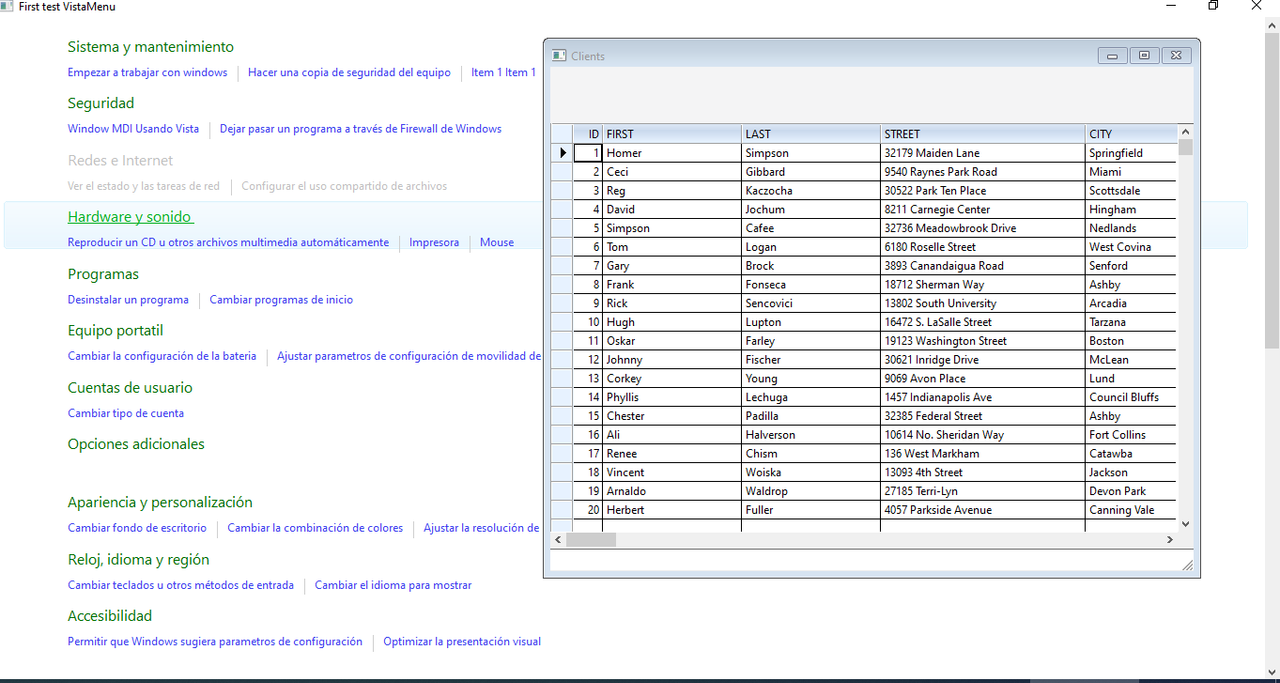
Como usar VistaMenu con MDI?
Regards, saludos.
// \samples\VISTAMN1.PRG

#include "fivewin.ch"

STATIC oWnd

FUNCTION Main()

   // LOCAL oWnd
   LOCAL oVmenu
   LOCAL oItem
   LOCAL oIcon

   DEFINE ICON oIcon NAME "C5ICON"

   DEFINE WINDOW oWnd TITLE "First test VistaMenu" ICON oIcon

   oVMenu := TVistaMenu():New( 0, 0, 100, 100, oWnd )
   oVMenu:nColumns := 1
   oVMenu:nType := 2

   oItem := oVMenu:AddItem( "Sistema y mantenimiento ", ".\..\bitmaps\pngs\image1.png" )

   oItem:AddItem( "Empezar a trabajar con windows",, ;
      {|| MsgInfo( "Sistema y mantenimiento" ) } )

   oItem:AddItem( "Hacer una copia de seguridad del equipo" )

   oItem:AddItem( "Item 1 Item 1" )
   oItem:AddItem( "ItemItem2 ItemItem2" )
   oItem:AddItem( "ItemItemItem3 ItemItemItem3" )

   /*
   oItem := oVMenu:AddItem( "Tabelas ", "" )

   oItem:AddItem( "Ramo de Atividades",, ;
      {| o | o := SILVIOMDI_FWH() } )
   */

   oItem := oVMenu:AddItem( "Seguridad", ".\..\bitmaps\pngs\image2.png" )

   oItem:AddItem( "Window MDI Usando Vista",, ;
      {| o | o := VISTA_MDI_FWH( oWnd ) } )

   /*
   oItem:AddItem( "Buscar actualizaciones" )
   */

   oItem:AddItem( "Dejar pasar un programa a través de Firewall de Windows" )

   oItem := oVMenu:AddItem( "Redes e Internet", ".\..\bitmaps\pngs\image3.png" )

   oItem:lEnable := .F.

   oItem:AddItem( "Ver el estado y las tareas de red" )
   oItem:AddItem( "Configurar el uso compartido de archivos" )

   oItem := oVMenu:AddItem( "Hardware y sonido", ".\..\bitmaps\pngs\image4.png" )

   oItem:AddItem( "Reproducir un CD u otros archivos multimedia automáticamente" )

   oItem:AddItem( "Impresora" )

   oItem:AddItem( "Mouse" )

   oItem := oVMenu:AddItem( "Programas", ".\..\bitmaps\pngs\image5.png" )

   oItem:AddItem( "Desinstalar un programa" )
   oItem:AddItem( "Cambiar programas de inicio" )

   oItem := oVMenu:AddItem( "Equipo portatil", ".\..\bitmaps\pngs\image6.png" )

   oItem:AddItem( "Cambiar la configuración de la bateria" )
   oItem:AddItem( "Ajustar parametros de configuración de movilidad de uso frecuente" )

   oItem := oVMenu:AddItem( "Cuentas de usuario", ".\..\bitmaps\pngs\image7.png" )

   oItem:AddItem( "Cambiar tipo de cuenta" )

   oItem := oVMenu:AddItem( "Opciones adicionales", ".\..\bitmaps\pngs\image12.png" )

   oItem := oVMenu:AddItem( "Apariencia y personalización", ".\..\bitmaps\pngs\image8.png" )

   oItem:AddItem( "Cambiar fondo de escritorio" )
   oItem:AddItem( "Cambiar la combinación de colores" )
   oItem:AddItem( "Ajustar la resolución de pantalla" )

   oItem := oVMenu:AddItem( "Reloj, idioma y región", ".\..\bitmaps\pngs\image9.png" )

   oItem:AddItem( "Cambiar teclados u otros métodos de entrada" )
   oItem:AddItem( "Cambiar el idioma para mostrar" )

   oItem := oVMenu:AddItem( "Accesibilidad", ".\..\bitmaps\pngs\image10.png" )

   oItem:AddItem( "Permitir que Windows sugiera parametros de configuración" )
   oItem:AddItem( "Optimizar la presentación visual" )

   oWnd:oClient := oVMenu

   ACTIVATE WINDOW oWnd CENTERED MAXIMIZED

RETURN 0

FUNCTION VISTA_MDI_FWH( oWnd )

   Local oBrw,oBar, oWndClients, oMsgBar

   use customer

   DEFINE WINDOW oWndClients MDICHILD OF oWnd TITLE "Clients"

   @ 2, 0 XBROWSE oBrw OF oWndClients LINES AUTOSORT ;
         AUTOCOLS DATASOURCE "Customer" NOBORDER

   oBrw:CreateFromCode()
   oBrw:SetFocus()

   DEFINE BUTTONBAR oBar OF oWndClients 2015 SIZE 70, 60

   oWndClients:oClient = oBrw
   oWndClients:oControl = oBrw

   DEFINE MSGBAR oMsgBar OF oWndClients 2015

    ACTIVATE WINDOW oWndClients MAXIMIZED ;
         VALID ( oWndClients := nil, .T. )

RETURN NIL
Regards, saludos.
João Santos - São Paulo - Brasil - Phone: +55(11)95150-7341