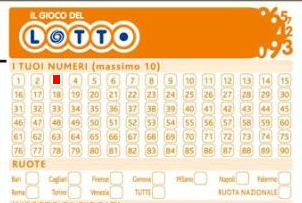
example

any test sample pls ?
I use : FiveWin for Harbour March-April 2024 - Harbour 3.2.0dev (harbour_bcc770_32_20240309) - Bcc7.70 - xMate ver. 1.15.3 - PellesC - mail: silvio[dot]falconi[at]gmail[dot]com


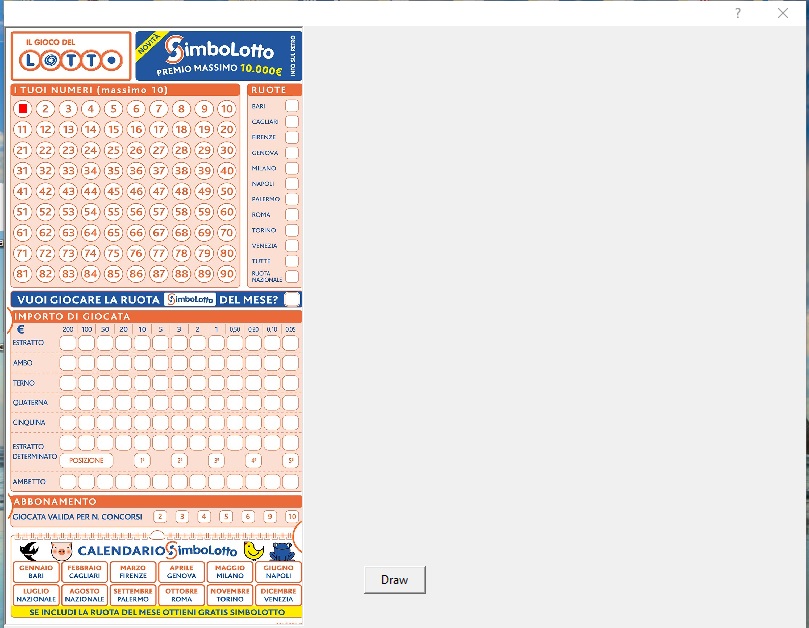
#include "Fivewin.ch"
#define SRCCOPY 13369376
FUNCTION MAIN()
LOCAL oDlg, oImg
DEFINE DIALOG oDlg;
SIZE 800, 600
@ 0, 0 IMAGE oImg;
SIZE 150, 100;
FILE "TEST.JPG";
ADJUST
@ 15, 0 BUTTON "Draw";
ACTION DRAWIMG( oImg )
@ 15, 20 BUTTON "Save";
ACTION oImg:SaveImage( "MYIMAGETEST.JPG", 2 )
ACTIVATE DIALOG oDlg;
CENTER
RETURN NIL
STATIC FUNCTION DRAWIMG( oImg )
LOCAL hDC := oImg:GetDC()
LOCAL nWidth := oImg:nWidth()
LOCAL nHeight := oImg:nHeight()
LOCAL hMemDC := CREATECOMPATIBLEDC( hDC )
LOCAL hMemBmp := CREATECOMPATIBLEBITMAP( hDC, nWidth, nHeight )
LOCAL hBmpOld := SELECTOBJECT( hMemDC, hMemBmp )
LOCAL hBitmap := oImg:hBitmap
LOCAL hPalette := oImg:hPalette
LOCAL x, y
PALBMPDRAW( hMemDC, 0, 0, hBitmap, hPalette, nWidth, nHeight )
FOR y = 128 TO 135
FOR x = 128 TO 135
SETPIXEL( hMemDC, x, y, CLR_HRED )
NEXT
NEXT
FOR y = 110 TO 117
FOR x = 110 TO 117
SETPIXEL( hMemDC, x, y, CLR_HRED )
NEXT
NEXT
SELECTOBJECT( hMemDC, hBmpOld )
DELETEDC( hMemDC )
oImg:hBitmap = hMemBmp
PALBMPFREE( hBitmap, hPalette )
PALBMPNEW( oImg:hWnd, oImg:hBitmap, oImg:hPalette )
oImg:Refresh()
RETURN NILSomething like that although I'd like to have the squares blinking.
A question: if a pixel is at x, y on the video how does it relate to the print?
I'll explain well: the user must select some numbers that he must play and the press must insert black boxes in correspondence with the numbers themselves
I try to understand what you would like to do...
I would generate a dialog with all buttons (bmp) for each lotto nummer. (design the lotto form) At that point, you have a button for each number that can interact with clicks and change the button into a square and/or other color etc... Printing will be something like a lottoform jpg to print and position the squares on it. As always... easier said than done )))
Marc Venken wrote:I try to understand what you would like to do...
I would generate a dialog with all buttons (bmp) for each lotto nummer. (design the lotto form) At that point, you have a button for each number that can interact with clicks and change the button into a square and/or other color etc... Printing will be something like a lottoform jpg to print and position the squares on it. As always... easier said than done )))
try to show an animated gif which is blinking at the desired position.
Detlef wrote:try to show an animated gif which is blinking at the desired position.

Silvio,
I understand your problem.
Unfortunately I'm on voyage at the moment.
I'll send you a formula for finding the correct place of each number later today.
Pleased, tell me the perimeter of one of the circles.
Regards, Detlef
Detlef wrote:Silvio,
I understand your problem.
Unfortunately I'm on voyage at the moment.
I'll send you a formula for finding the correct place of each number later today.
Pleased, tell me the perimeter of one of the circles.
Regards, Detlef
Sorry, Silvio,
I made an error answering the wrong topic.
See you there...