

How to do it.?
Regard.
Mulyadi
How to do it.?
Regard.
Mulyadi
I don't understand, why do you want to drag and drop a GET? What is the purpose of it?
No entiendo, ¿por qué quieres arrastrar y soltar un GET? ¿Cuál es el propósito de esto?
Regards, saludos.
/*

  in this example I will pass data from cell xbrowse
  to variable oGet1 or oGet2

*/

#include "fivewin.Ch"

//------------------------------------------------------------------//

function Main()

  local oDlg, oBrw, oBtn, oFont, oCur

  local oGet1, oGet2, xVar1 := space(10), xVar2 := space(10)
  local aData := { {"11", "TEST AAAAAA"}, ;
                   {"22", "TEST BBBBBB"}, ;
                   {"33", "TEST CCCCCC"}, ;
                   {"44", "TEST DDDDDD"} }

  DEFINE CURSOR oCur DRAG
  DEFINE FONT oFont NAME "TAHOMA" SIZE 0,-13

  DEFINE DIALOG oDlg SIZE 400,250 PIXEL TRUEPIXEL ;
  TITLE "TEST DROP DOWN FROM XBROWSE TO GET"

  @ 10, 10 say "From :" OF oDlg size 30,12 pixel
  @ 10,100 say "To :"   OF oDlg size 30,12 pixel
  @ 10, 40 get oGet1 var xVar1 OF oDlg size 50,20 pixel update
  @ 10,140 get oGet2 var xVar2 OF oDlg size 50,20 pixel update

  // not work.
  oGet1:bDropOver := <|u, r, c, f|
    MsgBeep()
    ? u
    return nil
    >

  // not work
  oGet2:bDropOver := <|u, r, c, f|
    MsgBeep()
    ? u
    return nil
    >

  @ 10,260 BUTTON oBtn PROMPT "Exit" ACTION oDlg:End() PIXEL SIZE 50,20

  @ 40, 10 XBROWSE oBrw OF oDlg size 300, 140 pixel ;
  DATASOURCE aData ;
  columns ;
  "1 as Col1 width 80" ,;
  "2 as Col2 width 200" ;
  cell lines autosort

  with object oBrw
    :oDragCursor := oCur

    :bDragBegin  :=<|r,c,nF,o|
      SetDropInfo( oBrw:aRow[1] )
      return nil
      >

    :bDropOver := < | u, r, c, f |
      ? r, c, f, u
      return nil
      >

    :CreateFromCode()

  end

  ACTIVATE DIALOG oDlg CENTERED
  RELEASE FONT oFont

return nil#include "fivewin.Ch"
//------------------------------------------------------------------//
function Main()
local oDlg, oGet1, oGet2, oGet3, oBrw, oBtn, oFont, oCur
local cVar1, cVar2, cVar3
local aData := { {"11", "TEST AAAAAA"}, ;
{"22", "TEST BBBBBB"}, ;
{"33", "TEST CCCCCC"}, ;
{"44", "TEST DDDDDD"} }
cVar1 := cVar2 := cVar3 := Space( 5 )
DEFINE FONT oFont NAME "TAHOMA" SIZE 0,-15
DEFINE CURSOR oCur DRAG
DEFINE DIALOG oDlg SIZE 440,300 PIXEL TRUEPIXEL FONT oFont
@ 80, 10 XBROWSE oBrw OF oDlg size 300, 160 pixel ;
DATASOURCE aData ;
columns ;
"1 as Col1 width 80" ,;
"2 as Col2 width 200" ;
CELL LINES AUTOSORT NOBORDER
WITH OBJECT oBrw
:oDragCursor := oCur
:bDragBegin :=<|r,c,nF,o|
SetDropInfo( oBrw:aRow[1] )
return nil
>
:bDropOver := < | u, r, c, f |
? r, c, f, u
return nil
>
:CreateFromCode()
END
@ 70, 360 GET oGet3 VAR cVar3 SIZE 40,24 PIXEL OF oDlg
oGet3:bDropOver := { |u| oGet3:cText := PadR( u, 5 ) }
@ 250, 10 SAY "From :" SIZE 50,24 PIXEL OF oDlg
@ 250, 200 SAY "To :" SIZE 50,24 PIXEL OF oDlg
@ 250, 60 GET oGet1 VAR cVar1 SIZE 100,26 PIXEL OF oDlg
oGet1:bDropOver := { |u| oGet1:cText := PadR( u, 5 ) }
@ 250, 260 GET oGet2 VAR cVar2 SIZE 100,26 PIXEL OF oDlg
oGet2:bDropOver := { |u| oGet2:cText := PadR( u, 5 ) }
ACTIVATE DIALOG oDlg CENTERED
RELEASE FONT oFont
RELEASE CURSOR oCur
return nil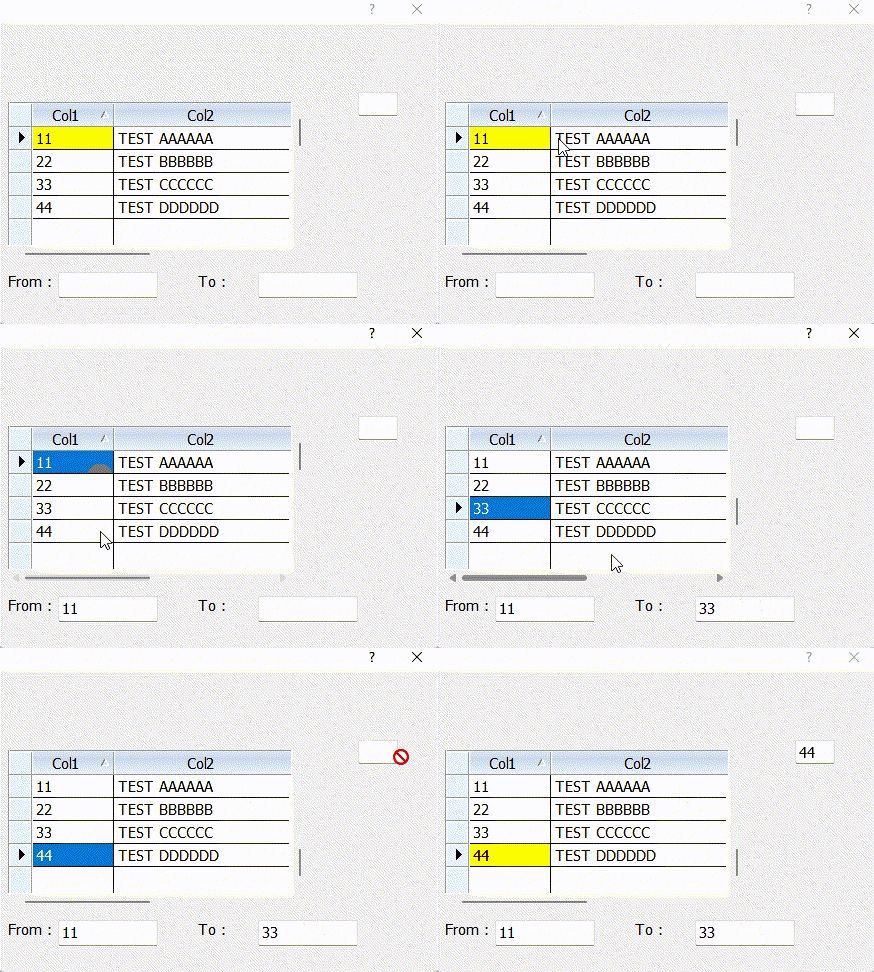
Thank you Mr Rao.
this mechanism is what i want and i have unpacked the TGET class but it doesn't work.
Once again, thank you so much.
Regards...

