FiveTech Support Forums

FiveWin / Harbour / xBase community
Board index FiveWin for Harbour/xHarbour Different style of window
Posts: 7317
Joined: Thu Oct 18, 2012 07:17 PM
Different style of window
Posted: Sat May 14, 2022 10:46 AM
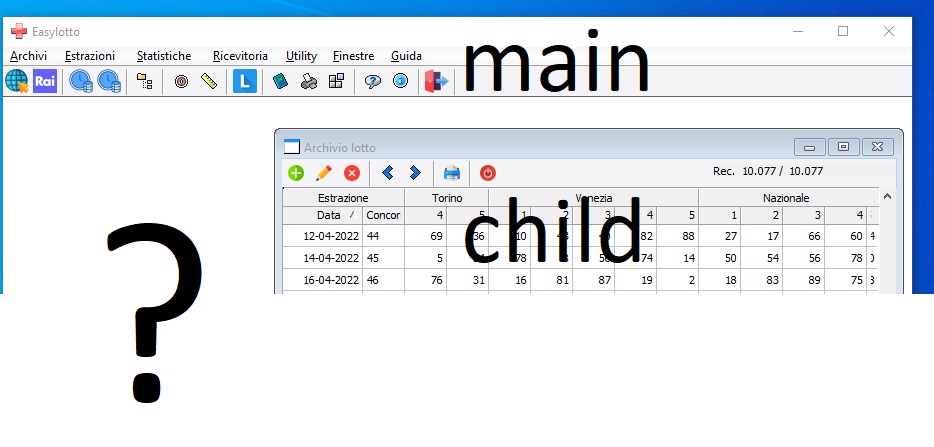
how is it possible that in windows 10 I have different styles of windows, the Main is in style w10 the child is still style win 7

Since from 1991/1992 ( fw for clipper Rel. 14.4 - Momos)

I use : FiveWin for Harbour March-April 2024 - Harbour 3.2.0dev (harbour_bcc770_32_20240309) - Bcc7.70 - xMate ver. 1.15.3 - PellesC - mail: silvio[dot]falconi[at]gmail[dot]com
Posts: 1772
Joined: Thu Sep 05, 2019 05:32 AM
Re: Different style of window
Posted: Sat May 14, 2022 08:06 PM

hi,

it seems a Problem to use "visual Style" on MDI Child-Windows also with Xbase++ or HMG.
have found no Solution yet :(

greeting,

Jimmy
Posts: 44158
Joined: Thu Oct 06, 2005 05:47 PM
Re: Different style of window
Posted: Sat May 14, 2022 09:25 PM

Dear Silvio,

Please review FWH\samples\skin1.prg and skin2.prg and then use your own skin for the mdichilds

regards, saludos

Antonio Linares
www.fivetechsoft.com
Posts: 7317
Joined: Thu Oct 18, 2012 07:17 PM
Re: Different style of window
Posted: Mon May 16, 2022 07:56 AM
Antonio Linares wrote:Dear Silvio,

Please review FWH\samples\skin1.prg and skin2.prg and then use your own skin for the mdichilds


Antonio,
the problem is the native style of windows that is, if I use Win 10 differently from win 7 or win xp the main and child windows must have the graphics and the style of Win10, it is not a graphic Skin that could weigh down the application making it unmanageable.

It seems strange fwh takes the style of win10 for the main window and then for the other windows including the Tdialog class it takes the previous style (win7)

This has not been the case in the past

It was the policy of Fwh since its creation .. an application created with fwh takes the windows engine and style by making windows create alo itself and not as Vb or Delphi or FoxPro which need to load Dynamic Library in memory which are ultra heavy first to load the application

Do you need to change anything in the Windows class? what then is that mother of all classes?
Since from 1991/1992 ( fw for clipper Rel. 14.4 - Momos)

I use : FiveWin for Harbour March-April 2024 - Harbour 3.2.0dev (harbour_bcc770_32_20240309) - Bcc7.70 - xMate ver. 1.15.3 - PellesC - mail: silvio[dot]falconi[at]gmail[dot]com
Posts: 44158
Joined: Thu Oct 06, 2005 05:47 PM
Re: Different style of window
Posted: Mon May 16, 2022 10:47 AM

Dear Silvio,

Jimmy clearly explained it to you

regards, saludos

Antonio Linares
www.fivetechsoft.com
Posts: 7317
Joined: Thu Oct 18, 2012 07:17 PM
Re: Different style of window
Posted: Wed May 18, 2022 10:47 AM
Antonio Linares wrote:Dear Silvio,

Please review FWH\samples\skin1.prg and skin2.prg and then use your own skin for the mdichilds


Antonio,
I tried but now on a dialog I have these command


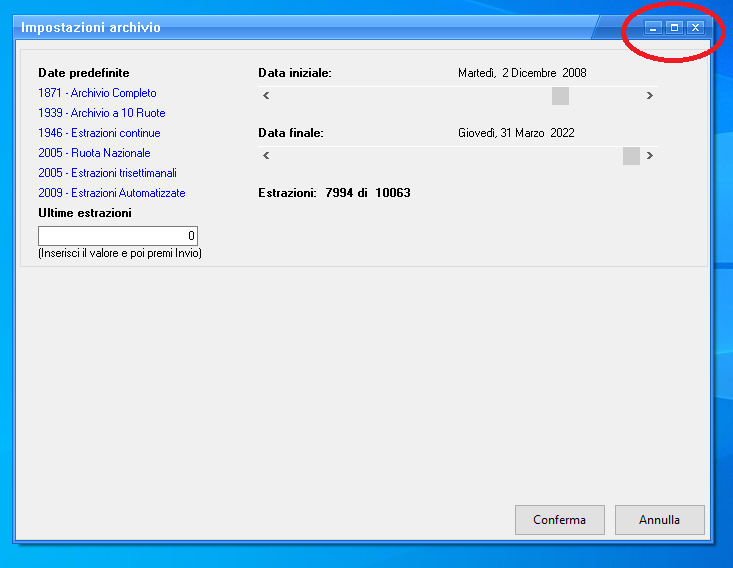
how do i remove the magnification of the window? ie the user does not have to resize the dialog

DEFINE DIALOG oDlg ;
SIZE 700, 500 PIXEL ;
TITLE cTitle STYLE WS_POPUP

oDlg:bStart := {|| oSkin := Skin( oDlg, "Blue_skin" ) }

ACTIVATE DIALOG oDlg center


I tried also with oDlg:aMinMaxInfo := { nil, nil, ,, 600, 350,600, 350 }

but not run
Since from 1991/1992 ( fw for clipper Rel. 14.4 - Momos)

I use : FiveWin for Harbour March-April 2024 - Harbour 3.2.0dev (harbour_bcc770_32_20240309) - Bcc7.70 - xMate ver. 1.15.3 - PellesC - mail: silvio[dot]falconi[at]gmail[dot]com
Posts: 44158
Joined: Thu Oct 06, 2005 05:47 PM
Re: Different style of window
Posted: Wed May 18, 2022 11:18 AM

Dear Silvio,

Please try this:

oDlg:bStart := {|| oSkin := Skin( oDlg, "Blue_skin" ), oSkin:this[ 10 ]:bLButtonUp := nil }

or

oDlg:bStart := {|| oSkin := Skin( oDlg, "Blue_skin" ), oSkin:this[ 10 ]:bLButtonUp := { || nil } }

regards, saludos

Antonio Linares
www.fivetechsoft.com
Posts: 7317
Joined: Thu Oct 18, 2012 07:17 PM
Re: Different style of window
Posted: Wed May 18, 2022 11:50 AM
Antonio Linares wrote:Dear Silvio,

Please try this:

oDlg:bStart := {|| oSkin := Skin( oDlg, "Blue_skin" ), oSkin:this[ 10 ]:bLButtonUp := nil }

or

oDlg:bStart := {|| oSkin := Skin( oDlg, "Blue_skin" ), oSkin:this[ 10 ]:bLButtonUp := { || nil } }


Run ok the first

Code (fw): Select all Collapse
 oDlg:bStart := {|| oSkin := Skin( oDlg, "Blue_skin" ),;
                       oSkin:this[ 10 ]:bLButtonUp := nil  ,;
                       oSkin:this[ 11 ]:bLButtonUp := nil ,;
                       oSkin:this[ 9 ]:bLButtonUp := nil }
Since from 1991/1992 ( fw for clipper Rel. 14.4 - Momos)

I use : FiveWin for Harbour March-April 2024 - Harbour 3.2.0dev (harbour_bcc770_32_20240309) - Bcc7.70 - xMate ver. 1.15.3 - PellesC - mail: silvio[dot]falconi[at]gmail[dot]com
Posts: 1772
Joined: Thu Sep 05, 2019 05:32 AM
Re: Different style of window
Posted: Wed May 18, 2022 12:28 PM
hi Silvio,

you can use these DLL Function to "remove" Minimize and/or Maximize Button on upper right
Code (fw): Select all Collapse
* Source : WindowFuncs.prg
* System : Windows
* Author : Phil Ide
* Created: 10/09/2003
*
* Purpose:
* ----------------------------
* History:
* ----------------------------
*    10/09/2003 14:17 PPI - Created
*
* modify for harbour HMG by Auge & Ohr, Jimmy
*****************************/

#include "Common.ch"
#include "dll.ch"
#include "winuser.ch"

/* Toggle window properties
   Example:

   A. To turn off (disable) the Maximise button:

       SetWindowPropertyOff( oDlg, WS_MAXIMIZEBOX )

   B. To turn off (disable) the Minimise button:

       SetWindowPropertyOff( oDlg, WS_MINIMIZEBOX )

   C. To turn off the max and min buttons:

       SetWindowPropertyOff( oDlg, WS_MAXIMIZEBOX+WS_MINIMIZEBOX )

   Notes:
   Sample A only disables the maximise button.
   Sample B only disables the minimise button.
   Sample C actually removes the minimise and maximise buttons.

   The inference here is that one cannot exist without the other.

*/

Function SetWindowPropertyOff( HWnd, nProperties, lOnOff )
   local nPtr
   local i

   DEFAULT lOnOff to FALSE // toggle=off

   nPtr := GetWindowLongA( HWnd, GWL_STYLE )
   for i := 1 to 32
      if nProperties[i]
         nPtr[i] := lOnOff
      endif
   next
   SetWindowLongA( HWnd, GWL_STYLE, nPtr )
return Nil

FUNCTION GetWindowLongA( nHwnd, nStyle ) 
RETURN HMG_CallDLL( "User32.dll", DLL_OSAPI, "GetWindowLongA". nHwnd, nStyle )

FUNCTION SetWindowLongA( nHwnd, nStyle, nPtr ) 
RETURN HMG_CallDLL( "User32.dll", DLL_OSAPI, "SetWindowLongA", nHwnd, nStyle, nPtr )


not sure if FiveWin have these Constante of "winuser.ch"
Code (fw): Select all Collapse
#ifndef __WINUSER_
#define __WINUSER_
   /*
    * Window field offsets for GetWindowLong()
    */
   #define GWL_WNDPROC         (-4)
   #define GWL_HINSTANCE       (-6)
   #define GWL_HWNDPARENT      (-8)
   #define GWL_STYLE           (-16)
   #define GWL_EXSTYLE         (-20)
   #define GWL_USERDATA        (-21)
   #define GWL_ID              (-12)

   /*
    * Window Styles
    */
   #define WS_OVERLAPPED       0x00000000
   #define WS_POPUP            0x80000000
   #define WS_CHILD            0x40000000
   #define WS_MINIMIZE         0x20000000
   #define WS_VISIBLE          0x10000000
   #define WS_DISABLED         0x08000000
   #define WS_CLIPSIBLINGS     0x04000000
   #define WS_CLIPCHILDREN     0x02000000
   #define WS_MAXIMIZE         0x01000000
   #define WS_CAPTION          0x00C00000     /* WS_BORDER | WS_DLGFRAME  */
   #define WS_BORDER           0x00800000
   #define WS_DLGFRAME         0x00400000
   #define WS_VSCROLL          0x00200000
   #define WS_HSCROLL          0x00100000
   #define WS_SYSMENU          0x00080000
   #define WS_THICKFRAME       0x00040000
   #define WS_GROUP            0x00020000
   #define WS_TABSTOP          0x00010000

   #define WS_MINIMIZEBOX      0x00020000
   #define WS_MAXIMIZEBOX      0x00010000

#endif
greeting,

Jimmy
Posts: 7317
Joined: Thu Oct 18, 2012 07:17 PM
Re: Different style of window
Posted: Wed May 18, 2022 06:34 PM
Antonio Linares wrote:Dear Silvio,

Please try this:

oDlg:bStart := {|| oSkin := Skin( oDlg, "Blue_skin" ), oSkin:this[ 10 ]:bLButtonUp := nil }

or

oDlg:bStart := {|| oSkin := Skin( oDlg, "Blue_skin" ), oSkin:this[ 10 ]:bLButtonUp := { || nil } }


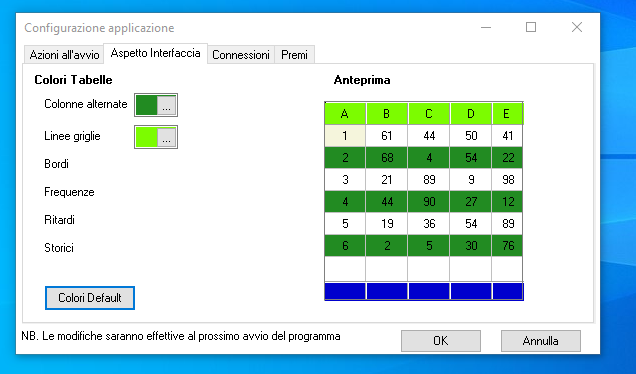
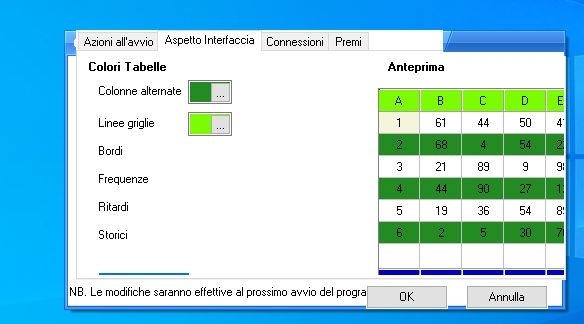
With folder it is impossible

Original


with skin class

Since from 1991/1992 ( fw for clipper Rel. 14.4 - Momos)

I use : FiveWin for Harbour March-April 2024 - Harbour 3.2.0dev (harbour_bcc770_32_20240309) - Bcc7.70 - xMate ver. 1.15.3 - PellesC - mail: silvio[dot]falconi[at]gmail[dot]com
Posts: 7317
Joined: Thu Oct 18, 2012 07:17 PM
Re: Different style of window
Posted: Fri May 20, 2022 11:07 AM
Antonio Linares wrote:Dear Silvio,

Please review FWH\samples\skin1.prg and skin2.prg and then use your own skin for the mdichilds


Antonio,
skin good for dialog
I not Know how put ski on Mdichild sample I have TLotto class is a MdiChild

on METHOD Activar(oItem,oBtnB) CLASS TLotto

I insert

::oWinlotto:bStart := {|| oSkin := Skin( ::oWinlotto, "Blue_skin" )}

but this make error


Code (fw): Select all Collapse
CLASS TLotto
   DATA oWinlotto
   DATA oBar
   DATA olotto
   DATA oLbx
   DATA cTitulo
   DATA oTabs
   DATA oIcon
   DATA oCont

   METHOD New(oItem,oBtnB) CONSTRUCTOR
   METHOD Activar()

ENDCLASS

METHOD New(oItem,oBtnB) CLASS TLotto
   local oSelf:=self
   local cOrder := ""
   local oBtn

 if ::oWinlotto == nil

 DEFINE WINDOW ::oWinLotto  MDICHILD ;
      FROM 0, 0 TO 24, 79   ;
      TITLE ::cTitulo       ;
      ICON ::oIcon  of oApp:oWinMain


 else
      ::oWinlotto:SetFocus()
   endif

RETURN Self

METHOD Activar(oItem,oBtnB) CLASS TLotto
 
   ::oWinlotto:bStart := {|| oSkin := Skin( ::oWinlotto, "Blue_skin" )}  // this make error


    ACTIVATE WINDOW ::oWinlotto MAXIMIZED ;
           VALID     (::oWinlotto:=Nil,Exit_Wnd(oItem,oBtnB),.T.)

   RETURN NIL


THE ERROR

Code (fw): Select all Collapse
  Error occurred at: 20-05-2022, 13:09:48
   Error description: Error BASE/1005  Message not found: TMDICHILD:_BSTART
   Args:
     [   1] = O   TMDICHILD

Stack Calls
===========
   Called from:  => __ERRRT_SBASE( 0 )
   Called from: ../../../tobject.prg => TMDICHILD:ERROR( 148 )
   Called from: ../../../tobject.prg => (b)HBOBJECT( 77 )
   Called from: ../../../tobject.prg => TMDICHILD:MSGNOTFOUND( 0 )
   Called from: ../../../tobject.prg => TMDICHILD:_BSTART( 142 )
   Called from: source\Tlotto.prg => TLOTTO:ACTIVAR( 267 )
   Called from: source\Main.prg => (b)TAPP_MENU( 391 )
   Called from: .\source\classes\MENU.PRG => TMENU:COMMAND( 1563 )
   Called from: .\source\classes\WINDOW.PRG => TWINDOW:COMMAND( 1141 )
   Called from: .\source\classes\MDIFRAME.PRG => TMDIFRAME:COMMAND( 272 )
   Called from:  => TMDIFRAME:HANDLEEVENT( 0 )
   Called from: .\source\classes\WINDOW.PRG => _FWH( 3560 )
   Called from:  => WINRUN( 0 )
   Called from: .\source\classes\WINDOW.PRG => TMDIFRAME:ACTIVATE( 1097 )
   Called from: source\Main.prg => TAPP:ACTIVATE( 357 )
   Called from: source\Main.prg => MAIN( 72 )
Since from 1991/1992 ( fw for clipper Rel. 14.4 - Momos)

I use : FiveWin for Harbour March-April 2024 - Harbour 3.2.0dev (harbour_bcc770_32_20240309) - Bcc7.70 - xMate ver. 1.15.3 - PellesC - mail: silvio[dot]falconi[at]gmail[dot]com

Continue the discussion