FiveTech Support Forums

FiveWin / Harbour / xBase community
Board index FiveWin para Harbour/xHarbour ACERCA DE BTNBMP FLAT [DESCARTADO]
Posts: 152
Joined: Mon Feb 13, 2006 08:23 PM
ACERCA DE BTNBMP FLAT [DESCARTADO]
Posted: Mon May 23, 2022 07:30 AM
Hola a todos

Hace tiempo solicit茅 ayuda de c贸mo colocar botones en la pantalla principal y segu铆 las recomendaciones de Mr. Rao en este post, con BTNBMP PROMPT "Button" SIZE 150,80 PIXEL OF oWnd FLAT:

https://forums.fivetechsupport.com/viewtopic.php?f=6&t=40860&start=0&sid=880b3cc08da3e2febbc109927e09277e

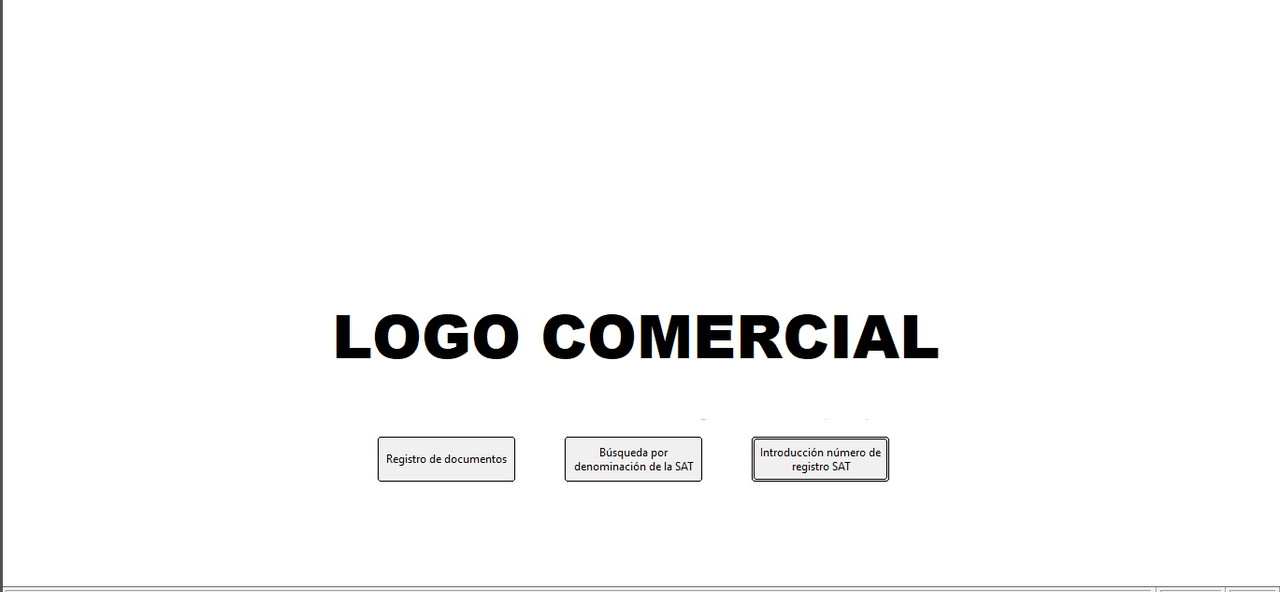
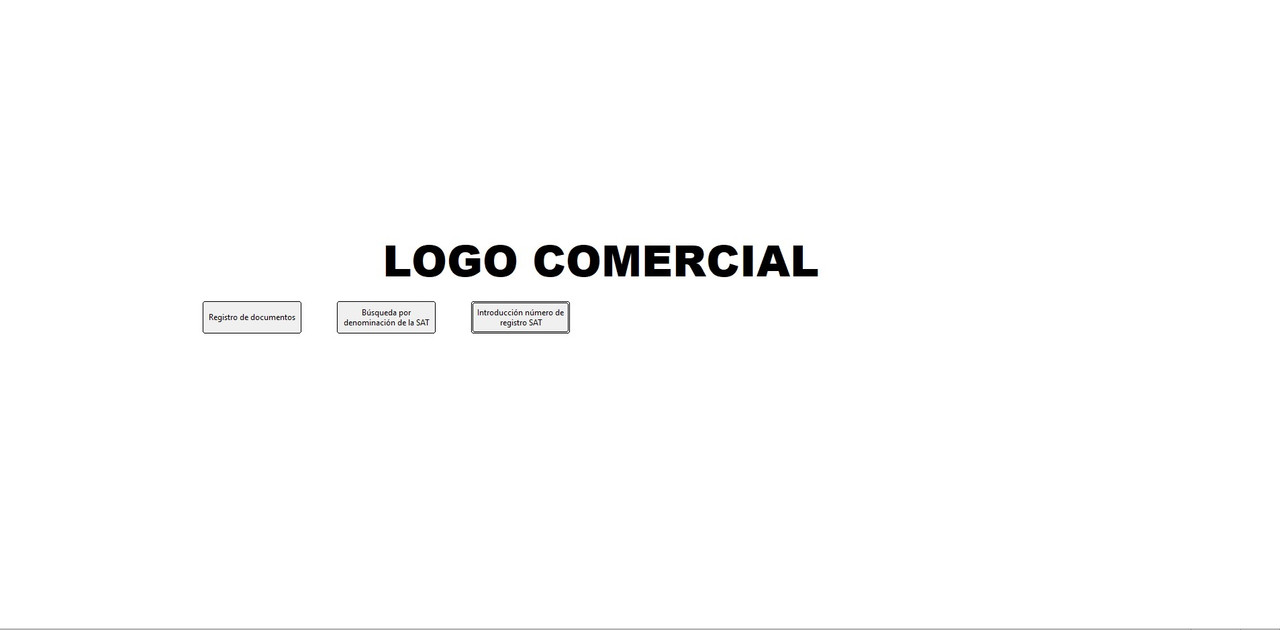
Al ver el funcionamiento de la aplicaci贸n en otro puesto que ten铆a el monitor con mayor resoluci贸n vi que, si bien el logo se manten铆a centrado, los botones se desplazaban llegando a montarse sobre el logo.

Por ejemplo, en monitor con resoluci贸n 1360x768:

En un monitor con mayor resoluci贸n:


驴Hay alguna forma de que no desplacen, como ocurre con el logo?

Saludos
FWH 20.12 BCC7
Posts: 44158
Joined: Thu Oct 06, 2005 05:47 PM
Re: ACERCA DE BTNBMP FLAT
Posted: Mon May 23, 2022 07:33 AM

Puedes copiar aqui el c贸digo que usas para dibujar el logo y los botones ?

gracias

regards, saludos

Antonio Linares
www.fivetechsoft.com
Posts: 152
Joined: Mon Feb 13, 2006 08:23 PM
Re: ACERCA DE BTNBMP FLAT
Posted: Mon May 23, 2022 10:07 AM
Hola, Antonio

El c贸digo de los botones es este:

Code (fw): Select all Collapse
cLogo:=alltrim(cruta)+"\BITMAPS\LOGO.png" // Logo central de la pantalla principal

DEFINE BRUSH oBrush COLOR RGB(255,255,255)       // Fondo blanco

DEFINE WINDOW oWnd FROM 4, 4 TO 25, 75  TITLE "Registro de SAT";
   MENU BuildMenu(cRuta,crutatemp);
    BRUSH oBrush     
//   MDI VSCROLL;     

@ 500, 400 BTNBMP oBmp1 PROMPT "Registro de documentos" SIZE 150,50 PIXEL OF oWnd;
    FLAT Tooltip "Acceso al registro de documentos"  ACTION (msgrun(,,,,),Registro(cRuta))

obmp1:cTooltip :={ "Acceso al registro general de documentos", ;
                     "SAT", 1, CLR_WHITE, CLR_CYAN }   

@ 500, 600 BTNBMP oBmp2 PROMPT "B煤squeda por denominaci贸n del  SAT" SIZE 150,50 PIXEL OF oWnd;
    FLAT Tooltip "B煤squeda por letras o palabras" ACTION Clients(cRuta, crutatemp)

obmp2:cTooltip :={ "B煤squeda por denominaci贸n del SAT", ;
                     "SAT", 1, CLR_WHITE, CLR_CYAN } 
 
@ 500, 800 BTNBMP oBmp3 PROMPT "Introducci贸n n煤mero de registro SAT" SIZE 150,50 PIXEL OF oWnd;
   FLAT Tooltip "B煤squeda por n煤mero de registro SAT" ACTION Clientsat(cRuta)
 
obmp3:cTooltip :={ "B煤squeda por introducci贸n del n煤mero de registro del SAT", ;
                     "SAT", 1, CLR_WHITE, CLR_CYAN }    
                            
 oWnd:bPainted := { || oWnd:DrawImage( cLogo ) }  

 ACTIVATE WINDOW oWnd MAXIMIZED
   
return nil


Un saludo
FWH 20.12 BCC7
Posts: 152
Joined: Mon Feb 13, 2006 08:23 PM
Re: ACERCA DE BTNBMP FLAT
Posted: Wed May 25, 2022 06:26 AM
Buenos d铆as, Antonio

Aprovechando el c贸digo de otro post, que ya est谩 solucionado, te pongo el siguiente para que lo compiles y lo compruebes. Mi monitor, que es 24', esta en una resoluci贸n de 1366x768 y aqu铆 se ve el logo centrado y los botones debajo del logo tambi茅n alineados.

Si el monitor lo configuras con par谩metros diferentes, el logo sigue estando centrado, pero los botones ya se mueven. Por ejemplo pones, el monitor a 1920x1080, que es el recomendado por la mayor铆a de los monitores (para mi gusto est谩 todo muy peque帽o), el logo se mantiene centrado, pero los botones se montan sobre el logo.

El c贸digo para que lo compiles y lo pruebes es este:

Code (fw): Select all Collapse
#include 'fivewin.ch'

//-----------------------------TESTING BTNBMP FLAT -----------------------------------------------//

function Main()
聽
聽 local oWnd, oBrush, cLogo, oFont, oBtn1, oBtn2, oBtn3, oBtn4, oBtn5
聽 

聽 聽SetBalloon( .T. )
聽
聽 聽cLogo:="C:\FWH\BITMAPS\fivewin.bmp"
聽 聽DEFINE FONT oFont NAME "TAHOMA" SIZE 0,-12
聽 
聽 DEFINE BRUSH oBrush COLOR RGB(255,255,255)
聽 
聽 DEFINE WINDOW oWnd FROM 4, 4 TO 25, 75 聽TITLE "Testing buttons BTNBMP FLAT"

聽 聽 聽 聽 聽 聽 聽
聽 聽@ 500, 200 BTNBMP oBtn1 PROMPT "&New" SIZE 150, 50 OF oWnd FLAT FONT oFont ACTION MsgInfo("New")
聽 聽@ 500, 400 BTNBMP oBtn2 PROMPT "&Edit" SIZE 150, 50 OF oWnd FLAT FONT oFont ACTION MsgInfo("Edit")
聽 聽@ 500, 600 BTNBMP oBtn3 PROMPT "&Delete" SIZE 150, 50 OF oWnd FLAT FONT oFont ACTION MsgInfo("Delete")
聽 聽@ 500, 800 BTNBMP oBtn4 PROMPT "&Print" SIZE 150, 50 OF oWnd FLAT FONT oFont ACTION MsgInfo("Print")
聽 聽@ 500,1000 BTNBMP oBtn5 PROMPT "&Bye" SIZE 150, 50 OF oWnd FLAT FONT oFont ACTION (MsgInfo("Exit"),oWnd:End()) 

聽 聽oBtn1:cTooltip:="New"
聽 聽oBtn2:cTooltip:="Edit"
聽 聽oBtn3:cTooltip:="Delete"
聽 聽oBtn4:cTooltip:="Print"
聽 聽oBtn5:cTooltip:="Exit" 

聽 聽 oWnd:bPainted := { || oWnd:DrawImage( cLogo ) } 聽

聽 聽ACTIVATE WINDOW oWnd MAXIMIZED
聽 聽
聽 聽RELEASE oFont

RETURN nil


Saludos
FWH 20.12 BCC7
Posts: 10733
Joined: Sun Nov 19, 2006 05:22 AM
Re: ACERCA DE BTNBMP FLAT
Posted: Fri May 27, 2022 11:13 AM
Code (fw): Select all Collapse
oWnd:DrawImage( cLogo )

By default, this will always centers the image in the Window.

But you have created the buttons with absolute coordinates in pixel.
If you want them to be move in relation to the size of the window, you need to recalculating the coordinates relative to the screen size, in oWnd:bResized code block.
Regards


G. N. Rao.

Hyderabad, India
Posts: 152
Joined: Mon Feb 13, 2006 08:23 PM
Re: ACERCA DE BTNBMP FLAT
Posted: Fri May 27, 2022 08:07 PM

Thank you Mr Rao

It is not worth the work of recalculating all the possible coordinates for only three buttons that are not very important. I'm going to remove them.

Regards

FWH 20.12 BCC7

Continue the discussion