

When I make a conversion I use
local bprogress := { || ( oProgress:SetPos( npos++ ),;
SysRefresh() ) }
oProgress:SetRange( 0, (len(aData)/1000) )
oProgress:SetPos( 0 )
oLotto2:fw_ArrayToDBF( aData,,bProgress)
aData is big
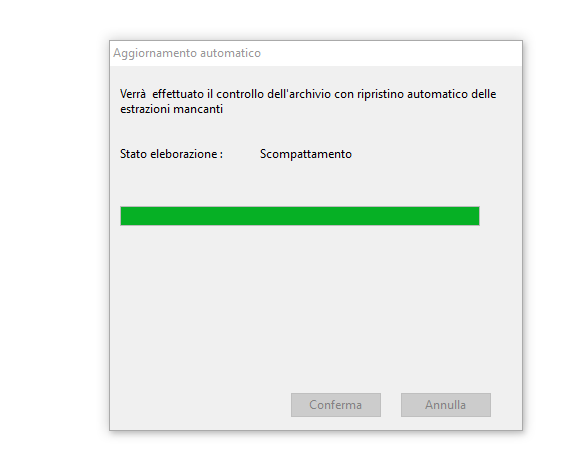
and the bar is immediate, that is, it immediately reaches the end but in reality the procedure is still working and still for a long time
how can I give to give the right percentage to the progress control?
I tried with oProgress:SetRange( 0, (len(aData)/2) )
it can run but the bar ends at the record 49000 approximately
local bprogress := { || ( oProgress:SetPos( npos++ ),;
SysRefresh() ) }
oProgress:SetRange( 0, (len(aData)/1000) )
oProgress:SetPos( 0 )
oLotto2:fw_ArrayToDBF( aData,,bProgress)
aData is big
and the bar is immediate, that is, it immediately reaches the end but in reality the procedure is still working and still for a long time
how can I give to give the right percentage to the progress control?
I tried with oProgress:SetRange( 0, (len(aData)/2) )
it can run but the bar ends at the record 49000 approximately
Since from 1991/1992 ( fw for clipper Rel. 14.4 - Momos)
I use : FiveWin for Harbour March-April 2024 - Harbour 3.2.0dev (harbour_bcc770_32_20240309) - Bcc7.70 - xMate ver. 1.15.3 - PellesC - mail: silvio[dot]falconi[at]gmail[dot]com
I use : FiveWin for Harbour March-April 2024 - Harbour 3.2.0dev (harbour_bcc770_32_20240309) - Bcc7.70 - xMate ver. 1.15.3 - PellesC - mail: silvio[dot]falconi[at]gmail[dot]com
