
Hola Amigos.. como se podria hacer esto:
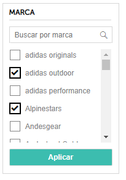
con xbrowse se podria... pero otra forma
saludos
con xbrowse se podria... pero otra forma
saludos
Interesante...
Me sumo a la inquietud +1
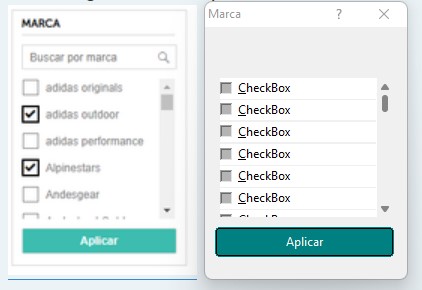

#include "fivewin.ch"
#include "constant.ch"

static oDlg, oPanel

function Main()

  local oBtn

  DEFINE DIALOG oDlg TITLE "Marca" ;
   SIZE 200, 250 PIXEL

  @ 100, 5 BTNBMP oBtn PROMPT "Aplicar" SIZE 90, 15 FLAT

   ACTIVATE DIALOG oDlg CENTERED ;
     ON INIT ( oBtn:SetColor( "W+/BG+" ), CreatePanel(), CreateCheckBoxes(), oPanel:SetRange() )

return nil

//--------------------------------------------------------------------------------------//

function CreatePanel()

  oPanel = TScrollPanel():New( 50, 11, oDlg:nBottom - 60, oDlg:nWidth - 20, oDlg )
  oPanel:WinStyle( WS_BORDER, .F. )

return nil

//--------------------------------------------------------------------------------------//

function CreateCheckBoxes()

  local aValues := Array( 12 ), nTop := 0

  AFill( aValues, .F. )

  @ nTop,        0.5 CHECKBOX aValues[ 1 ] SIZE oPanel:nRight, 20 OF oPanel  // SCROLL ADJUST
  @ nTop += 1.7, 0.5 CHECKBOX aValues[ 2 ] SIZE oPanel:nRight, 20 OF oPanel  // SCROLL ADJUST
  @ nTop += 1.7, 0.5 CHECKBOX aValues[ 3 ] SIZE oPanel:nRight, 20 OF oPanel  // SCROLL ADJUST
  @ nTop += 1.7, 0.5 CHECKBOX aValues[ 4 ] SIZE oPanel:nRight, 20 OF oPanel  // SCROLL ADJUST
  @ nTop += 1.7, 0.5 CHECKBOX aValues[ 5 ] SIZE oPanel:nRight, 20 OF oPanel  // SCROLL ADJUST
  @ nTop += 1.7, 0.5 CHECKBOX aValues[ 6 ] SIZE oPanel:nRight, 20 OF oPanel  // SCROLL ADJUST
  @ nTop += 1.7, 0.5 CHECKBOX aValues[ 7 ] SIZE oPanel:nRight, 20 OF oPanel  // SCROLL ADJUST
  @ nTop += 1.7, 0.5 CHECKBOX aValues[ 8 ] SIZE oPanel:nRight, 20 OF oPanel  // SCROLL ADJUST
  @ nTop += 1.7, 0.5 CHECKBOX aValues[ 9 ] SIZE oPanel:nRight, 20 OF oPanel  // SCROLL ADJUST
  @ nTop += 1.7, 0.5 CHECKBOX aValues[ 10 ] SIZE oPanel:nRight, 20 OF oPanel  // SCROLL ADJUST
  @ nTop += 1.7, 0.5 CHECKBOX aValues[ 11 ] SIZE oPanel:nRight, 20 OF oPanel  // SCROLL ADJUST
  @ nTop += 1.7, 0.5 CHECKBOX aValues[ 12 ] SIZE oPanel:nRight, 20 OF oPanel  // SCROLL ADJUST

return nil

//--------------------------------------------------------------------------------------//Antonio Linares wrote:Esta es una posible forma, aunque sin usar un combobox:
Vamos a ir mejorándolo
#include "fivewin.ch"
#include "constant.ch"

static oDlg, oPanel

function Main()

  local oBtn

  DEFINE DIALOG oDlg TITLE "Marca" ;
   SIZE 200, 250 PIXEL

  @ 100, 5 BTNBMP oBtn PROMPT "Aplicar" SIZE 90, 15 FLAT

   ACTIVATE DIALOG oDlg CENTERED ;
     ON INIT ( oBtn:SetColor( "W+/BG+" ), CreatePanel(), CreateCheckBoxes(), oPanel:SetRange() )

return nil

//--------------------------------------------------------------------------------------//

function CreatePanel()

  oPanel = TScrollPanel():New( 50, 11, oDlg:nBottom - 60, oDlg:nWidth - 20, oDlg )
  oPanel:WinStyle( WS_BORDER, .F. )

return nil

//--------------------------------------------------------------------------------------//

function CreateCheckBoxes()

  local aValues := Array( 12 ), nTop := 0

  AFill( aValues, .F. )

  @ nTop,        0.5 CHECKBOX aValues[ 1 ] SIZE oPanel:nRight, 20 OF oPanel  // SCROLL ADJUST
  @ nTop += 1.7, 0.5 CHECKBOX aValues[ 2 ] SIZE oPanel:nRight, 20 OF oPanel  // SCROLL ADJUST
  @ nTop += 1.7, 0.5 CHECKBOX aValues[ 3 ] SIZE oPanel:nRight, 20 OF oPanel  // SCROLL ADJUST
  @ nTop += 1.7, 0.5 CHECKBOX aValues[ 4 ] SIZE oPanel:nRight, 20 OF oPanel  // SCROLL ADJUST
  @ nTop += 1.7, 0.5 CHECKBOX aValues[ 5 ] SIZE oPanel:nRight, 20 OF oPanel  // SCROLL ADJUST
  @ nTop += 1.7, 0.5 CHECKBOX aValues[ 6 ] SIZE oPanel:nRight, 20 OF oPanel  // SCROLL ADJUST
  @ nTop += 1.7, 0.5 CHECKBOX aValues[ 7 ] SIZE oPanel:nRight, 20 OF oPanel  // SCROLL ADJUST
  @ nTop += 1.7, 0.5 CHECKBOX aValues[ 8 ] SIZE oPanel:nRight, 20 OF oPanel  // SCROLL ADJUST
  @ nTop += 1.7, 0.5 CHECKBOX aValues[ 9 ] SIZE oPanel:nRight, 20 OF oPanel  // SCROLL ADJUST
  @ nTop += 1.7, 0.5 CHECKBOX aValues[ 10 ] SIZE oPanel:nRight, 20 OF oPanel  // SCROLL ADJUST
  @ nTop += 1.7, 0.5 CHECKBOX aValues[ 11 ] SIZE oPanel:nRight, 20 OF oPanel  // SCROLL ADJUST
  @ nTop += 1.7, 0.5 CHECKBOX aValues[ 12 ] SIZE oPanel:nRight, 20 OF oPanel  // SCROLL ADJUST

return nil

//--------------------------------------------------------------------------------------//
Dear Richard,
standard Windows resources (RC files) don't allow to define childs of childs (grandchilds 
so you can only place a TScrollPanel on the resource and from the ON INIT of the dialog, place the checkboxes on the panel
I think it may be easier if we use the samples/ownerdra.prg way...
Antonio Linares wrote:Dear Richard,
standard Windows resources (RC files) don't allow to define childs of childs (grandchilds
so you can only place a TScrollPanel on the resource and from the ON INIT of the dialog, place the checkboxes on the panel
I think it may be easier if we use the samples/ownerdra.prg way...


