
I add groups to RibbonBar by using the method :AddGroup(). As a result, all groups will be lined up from left to right. Can I make the arrangement of groups from right to left ?
Board index FiveWin for Harbour/xHarbour Location of groups in the ribbonbar
Page: 1 2 (17 posts)

Dear Yuri,
Do you want the first group to become to rightmost group or just to move all of them to the right but respecting the current order ?
1, 2, 3, 4, ... --> ..., 4, 3, 2, 1
or
1, 2, 3, 4, ... --> (right) 1, 2, 3, 4, ...
thanks
Also, if the window that contains the ribbonbar is resized, what should be the expected behavior ?
-
The groups automatically move to the left so they remain visible ?
-
The groups remain where they are, becoming not visible if the window width is not enough to show them
May I ask you whats the reason for wanting this behavior ?
The program is always expanded to full screen. I.e. the ribbonbar groups are always visible. On one of the windows, I use buttons with large icons in the ribbon bar and it is visually more convenient for me to see the groups pressed to the right. It would be very convenient to specify the horizontal position of the group - this way you can adjust to any screen
1, 2, 3, 4, ... --> ..., 4, 3, 2, 1
or
1, 2, 3, 4, ... --> (right) 1, 2, 3, 4, ...
Yes, I want to move all the groups to the right, but keeping the current order
1, 2, 3, 4, ... --> (right) 1, 2, 3, 4, ...
1, 2, 3, 4, ... --> (right) 1, 2, 3, 4, ...
Dear Yuri,
Once you create your ribbonbar as usual, please call this function passing the ribbonbar as the parameter:
Here it is working fine
Once you create your ribbonbar as usual, please call this function passing the ribbonbar as the parameter:
Here it is working fine
function RibbonGroupsToRight( oRBar )

   local oDlg, oRBGroup, nTotalWidth, nWidth

   for each oDlg in oRBar:aDialogs
      nTotalWidth = 0
      for each oRBGroup in oDlg:aControls
         nTotalWidth += oRBGroup:nWidth
      next

      for each oRBGroup in oDlg:aControls
         nWidth = oRBGroup:nWidth
         oRbGroup:nLeft  = oRBar:nWidth - nTotalWidth - 5
         oRbGroup:nRight = oRBGroup:nLeft + nWidth
         __objModMethod( oRBGroup, "CalPos", @Empty() )
         nTotalWidth -= nWidth
      next
   next

return nil
I have this result :
Top = original
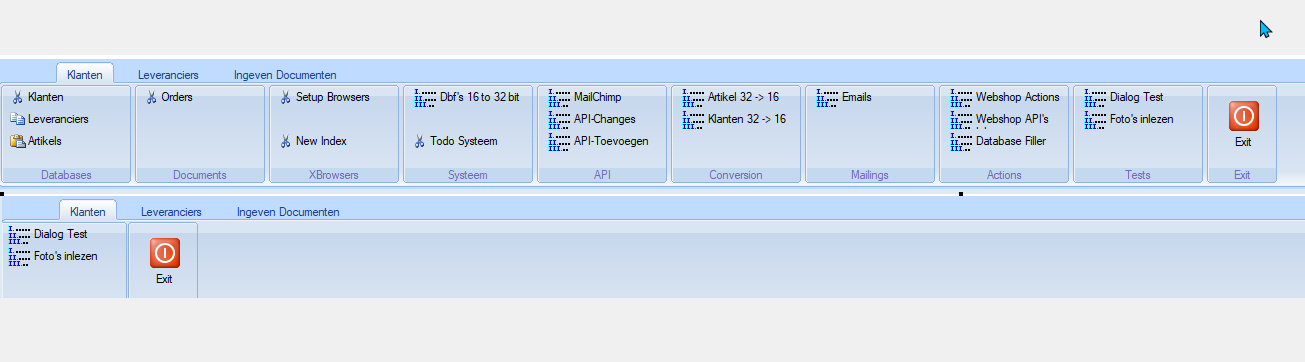
Top = original
Marc Venken
Using: FWH 23.08 with Harbour
Using: FWH 23.08 with Harbour
Dear Mark,
Many thanks for your feedback
I have tested it using FWH\samples\rbdesign.prg and it seems to work fine.
Wondering what could be the difference. Here you have rbdesign.prg modified to use the function. Please build it and test it, many thanks
rbdesign.prg
Many thanks for your feedback
I have tested it using FWH\samples\rbdesign.prg and it seems to work fine.
Wondering what could be the difference. Here you have rbdesign.prg modified to use the function. Please build it and test it, many thanks
rbdesign.prg
// RibbonBar designer (c) FiveTech Software 2011

#include "FiveWin.ch"
#include "ribbon.ch"
#include "slider.ch"

#define TYPE_NORMAL           0
#define TYPE_POPUP            1
#define TYPE_SPLITPOPUP       2
#define TYPE_SAYBUTTON        3

//----------------------------------------------------------------------------//

function Main()

   local oWnd, oRBar

   DEFINE WINDOW oWnd TITLE "RibbonBar designer (c) FiveTech Software 2011"

   DEFINE RIBBONBAR oRBar WINDOW oWnd PROMPT "One", "Two", "Three" HEIGHT 133 TOPMARGIN 25 2016 // 2010, 2013

   SetRibbonEditable( oRBar )

   DEFINE MSGBAR OF oWnd PROMPT "Right click on the RibbonBar top area or on each RibbonBar item" 2007

   ACTIVATE WINDOW oWnd MAXIMIZED

return nil

//----------------------------------------------------------------------------//

function SetRibbonEditable( oRBar )

   local n, m, p, oGroup, oButton

   oRBar:bLDblClick = { || If( oRBar:nHeight > 27, oRBar:nHeight := 27, oRBar:nHeight := 129 ) }

   oRBar:bRClicked = { | nRow, nCol | RibbonBarOptions( nRow, nCol, oRBar, oRBar:oWnd ) }

   for n = 1 to Len( oRBar:aDialogs )
      oRBar:aDialogs[ n ]:bRClicked = { | nRow, nCol | RibbonDialogOptions( nRow, nCol, oRBar, oRBar:oWnd ) }

      if oRBar:aDialogs[ n ]:aControls != nil
         for m = 1 to Len( oRBar:aDialogs[ n ]:aControls )
            oGroup = oRBar:aDialogs[ n ]:aControls[ m ]
            oGroup:bRClicked = GenGroupBlock( oGroup )

            if oGroup:aControls != nil
               for p = 1 to Len( oGroup:aControls )
                  oButton = oGroup:aControls[ p ]
                  oButton:bRClicked = GenButtonBlock( oButton )
               next
            endif

         next
      endif
   next

return nil

//----------------------------------------------------------------------------//

static function GenGroupBlock( oRBGroup )

return { | nRow, nCol | RibbonGroupOptions( nRow, nCol, oRBGroup ) }

//----------------------------------------------------------------------------//

static function GenButtonBlock( oButton )

return { | nRow, nCol | RibbonButtonOptions( nRow, nCol, oButton ) }

//----------------------------------------------------------------------------//

function RibbonBarOptions( nRow, nCol, oRBar, oWnd )

   local oMenu

   MENU oMenu POPUP
      MENUITEM "Add a tab..." ;
         ACTION ( oRBar:AddTab( "new" ), ATail( oRBar:aDialogs ):bRClicked := { | nRow, nCol | RibbonDialogOptions( nRow, nCol, oRBar ) } )

      MENUITEM "Edit tab label..." ACTION EditTabLabel( oRBar )

      MENUITEM "Delete tab..." ACTION DeleteTab( oRBar )

      SEPARATOR

      MENUITEM "Non Style" ACTION ChangeStyle( oRBar, 1 )
      MENUITEM "Style 2010" ACTION ChangeStyle( oRBar, 2 )
      MENUITEM "Style 2013" ACTION ChangeStyle( oRBar, 3 )
      MENUITEM "Style 2015" ACTION ChangeStyle( oRBar, 4 )
      MENUITEM "Style 2016" ACTION ChangeStyle( oRBar, 5 )

      SEPARATOR

      if oRBar:lQuickRound
         MENUITEM "QuickButton" ACTION BuildNewRibbon( oRBar, 60 ) CHECKED
      else
         MENUITEM "QuickButton" ACTION oRBar := BuildNewRibbon( oRBar, 60 ), oRBar:QuickRoundBtn(), oRBar:Refresh()
      endif

      if oRBar:oQuickAcc == nil
         MENUITEM "QuickAccess" ACTION oRBar:QuickAccess(), oRBar:Refresh()
      else
         MENUITEM "QuickAccess" ACTION oRBar:oQuickAcc:End(), oRBar:oQuickAcc := nil, oRBar:Refresh() CHECKED
      endif

      SEPARATOR

      MENUITEM "Source code..." ACTION SourceEdit( "function BuildRibbonBar()" + CRLF + CRLF + ;
                                                   oRBar:cGenPrg() + "return nil" + CRLF + CRLF + ;
                                                   oRBar:cGenButtonMenus(), "source code" )

      SEPARATOR

      MENUITEM "Save as..." ACTION MemoWrit( cGetFile( "myribbon.prg", "Please select a PRG filename to save the RibbonBar in" ),;
                                             BuildRibbonCode( oRBar ) )

      MENUITEM "Load from..." ACTION CompileRibbon( oWnd, oRBar )

      SEPARATOR

      MENUITEM "New design..." ACTION If( MsgYesNo( "Do you want to start a new design ?" ), BuildNewRibbon( oRBar, 25 ),)

   ENDMENU

   ACTIVATE POPUP oMenu WINDOW oRBar AT nRow, nCol

return nil

//----------------------------------------------------------------------------//

function BuildRibbonCode( oRBar )

   local cCode := '#include "FiveWin.ch"' + CRLF + '#include "ribbon.ch"' + CRLF + CRLF

   cCode += "function BuildRibbonBar( oWnd, _oRBar )" + CRLF + CRLF
   cCode += oRBar:cGenPrg()
   cCode += "return _oRBar := oRBar" + CRLF + CRLF
   cCode += oRBar:cGenButtonMenus()

return cCode

//----------------------------------------------------------------------------//

function ButtonPosDim( oButton )

   local oDlg

   DEFINE DIALOG oDlg TITLE "Button position and dimensions"

   @ 0.2, 1.6 SAY "Top:" OF oDlg

   @ 1, 1 GET oButton:nTop SPINNER OF oDlg SIZE 30, 15

   @ 0.2, 13.6 SAY "Left:" OF oDlg

   @ 1, 10 GET oButton:nLeft SPINNER OF oDlg SIZE 30, 15

   @ 2.1, 1.6 SAY "Width:" OF oDlg

   @ 3.2, 1 GET oButton:nWidth SPINNER OF oDlg SIZE 30, 15

   @ 2.1, 13.6 SAY "Height:" OF oDlg

   @ 3.2, 10 GET oButton:nHeight SPINNER OF oDlg SIZE 30, 15

   ACTIVATE DIALOG oDlg CENTERED

return nil

//----------------------------------------------------------------------------//

function BuildNewRibbon( oRBar, nHeight )

   local oWnd := oRBar:oWnd

   oRBar:End()

   DEFINE RIBBONBAR oRBar WINDOW oWnd PROMPT "One", "Two", "Three" HEIGHT 133 TOPMARGIN nHeight // 2010

   oRBar:SetSize( oWnd:nWidth, oRBar:nHeight )
   SetRibbonEditable( oRBar )

return oRBar

//----------------------------------------------------------------------------//

function RibbonDialogOptions( nRow, nCol, oRBar )

   local oMenu, oRBGroup

   MENU oMenu POPUP
      MENUITEM "Add a group..." ;
         ACTION ( oRBGroup := oRBar:AddGroup( 200, "new", oRBar:nOption ),;
                  oRBGroup:bRClicked := { | nRow, nCol | RibbonGroupOptions( nRow, nCol, oRBGroup ) } )
      SEPARATOR
      MENUITEM "From left to right" ;
         ACTION RibbonGroupsToRight( oRBar )
   ENDMENU

   ACTIVATE POPUP oMenu WINDOW oRBar:aDialogs[ oRBar:nOption ] AT nRow, nCol

return nil

//----------------------------------------------------------------------------//

function RibbonGroupsToRight( oRBar )

   local oDlg, oRBGroup, nTotalWidth, nWidth

   for each oDlg in oRBar:aDialogs
      nTotalWidth = 0
      for each oRBGroup in oDlg:aControls
         nTotalWidth += oRBGroup:nWidth
      next

      for each oRBGroup in oDlg:aControls
         nWidth = oRBGroup:nWidth
         oRbGroup:nLeft  = oRBar:nWidth - nTotalWidth - 5
         oRbGroup:nRight = oRBGroup:nLeft + nWidth
         __objModMethod( oRBGroup, "CalPos", @Empty() )
         nTotalWidth -= nWidth
      next
   next

return nil

//----------------------------------------------------------------------------//

function RibbonGroupOptions( nRow, nCol, oRBGroup )

   local oMenu, oButton, bClick := { | o | MsgInfo( "click" ) }

   MENU oMenu POPUP
      MENUITEM "Add a button" ;
         ACTION ( oButton := oRBGroup:AddButton( 3, If( ! Empty( oRBGroup:aControls ) .and. Len( oRBGroup:aControls ) > 0, ATail( oRBGroup:aControls ):nRight + 1, 3 ), oRBGroup:nHeight - 19, 80, "new", bClick ),;
                  oButton:bRClicked := { | nRow, nCol | RibbonButtonOptions( nRow, nCol, oButton ) } )
      MENUITEM "Edit width..." ACTION EditGroupWidth( oRBGroup )
      MENUITEM "Edit label..." ACTION EditGroupLabel( oRBGroup )
      MENUITEM "Select colors..." ACTION SelGroupColors( oRBGroup )
      SEPARATOR

      MENUITEM "Delete group..." ACTION ;
         If( MsgYesNo( "Are you sure ?", "Delete this group" ), oRBGroup:End(),)

   ENDMENU

   ACTIVATE POPUP oMenu WINDOW oRBGroup AT nRow, nCol

return nil

//----------------------------------------------------------------------------//

function RibbonButtonOptions( nRow, nCol, oButton )

   local oMenu, oPopup := oButton:oPopup

   MENU oMenu POPUP
      MENUITEM "Edit prompt..." ACTION EditButtonLabel( oButton )

      MENUITEM "Edit tooltip..." ACTION EditButtonToolTip( oButton )

      MENUITEM "Select bitmap..." ACTION ( oButton:LoadBitmaps( cGetFile( "*.bmp" ) ), oButton:Refresh() )

      MENUITEM "Popup menu..." ACTION ( oPopup := EditButtonMenu( oButton, oPopup ) )

      MENUITEM "Set style"
      MENU
         if oButton:nTypeButton == TYPE_NORMAL
            MENUITEM "NORMAL"     ACTION ( oButton:nTypeButton := TYPE_NORMAL, oButton:Refresh() ) CHECKED
         else
            MENUITEM "NORMAL"     ACTION ( oButton:nTypeButton := TYPE_NORMAL, oButton:Refresh() )
         endif
         if oButton:nTypeButton == TYPE_POPUP
            MENUITEM "POPUP"      ACTION ( oButton:nTypeButton := TYPE_POPUP, oButton:Refresh() ) CHECKED
         else
            MENUITEM "POPUP"      ACTION ( oButton:nTypeButton := TYPE_POPUP, oButton:Refresh() )
         endif
         if oButton:nTypeButton == TYPE_SPLITPOPUP
            MENUITEM "SPLITPOPUP" ACTION ( oButton:nTypeButton := TYPE_SPLITPOPUP, oButton:Refresh() ) CHECKED
         else
            MENUITEM "SPLITPOPUP" ACTION ( oButton:nTypeButton := TYPE_SPLITPOPUP, oButton:Refresh() )
         endif
         if oButton:nTypeButton == TYPE_SAYBUTTON
            MENUITEM "SAYBUTTON"  ACTION ( oButton:nTypeButton := TYPE_SAYBUTTON, oButton:Refresh() ) CHECKED
         else
            MENUITEM "SAYBUTTON"  ACTION ( oButton:nTypeButton := TYPE_SAYBUTTON, oButton:Refresh() )
         endif
      ENDMENU

      MENUITEM "Set layout"
      MENU
         if oButton:nLayout == 3
            MENUITEM "TOP"       ACTION ( oButton:nLayout := 3, oButton:Refresh() ) CHECKED
         else
            MENUITEM "TOP"       ACTION ( oButton:nLayout := 3, oButton:Refresh() )
         endif
         if oButton:nLayout == 4
            MENUITEM "LEFT"      ACTION ( oButton:nLayout := 4, oButton:Refresh() ) CHECKED
         else
            MENUITEM "LEFT"      ACTION ( oButton:nLayout := 4, oButton:Refresh() )
         endif
         if oButton:nLayout == 1
            MENUITEM "BOTTOM"    ACTION ( oButton:nLayout := 1, oButton:Refresh() ) CHECKED
         else
            MENUITEM "BOTTOM"    ACTION ( oButton:nLayout := 1, oButton:Refresh() )
         endif
         if oButton:nLayout == 2
            MENUITEM "RIGHT"     ACTION ( oButton:nLayout := 2, oButton:Refresh() ) CHECKED
         else
            MENUITEM "RIGHT"     ACTION ( oButton:nLayout := 2, oButton:Refresh() )
         endif
         if oButton:nLayout == 5
            MENUITEM "MOSTLEFT"  ACTION ( oButton:nLayout := 5, oButton:Refresh() ) CHECKED
         else
            MENUITEM "MOSTLEFT"  ACTION ( oButton:nLayout := 5, oButton:Refresh() )
         endif
         if oButton:nLayout == 6
            MENUITEM "MOSTRIGHT" ACTION ( oButton:nLayout := 6, oButton:Refresh() ) CHECKED
         else
            MENUITEM "MOSTRIGHT" ACTION ( oButton:nLayout := 6, oButton:Refresh() )
         endif
         if oButton:nLayout == 7
            MENUITEM "CENTER"    ACTION ( oButton:nLayout := 7, oButton:Refresh() ) CHECKED
         else
            MENUITEM "CENTER"    ACTION ( oButton:nLayout := 7, oButton:Refresh() )
         endif
      ENDMENU

      MENUITEM "Set border"
      MENU
         if ! oButton:lBorder
            MENUITEM "NOBORDER"       ACTION ( oButton:lBorder := .F., oButton:Refresh() ) CHECKED
         else
            MENUITEM "NOBORDER"       ACTION ( oButton:lBorder := .F., oButton:Refresh() )
         endif
         if oButton:lBorder .and. ! oButton:lRound
            MENUITEM "SQUARE BORDER"  ACTION ( oButton:lBorder := .T., oButton:lRound := .F., oButton:Refresh() ) CHECKED
         else
            MENUITEM "SQUARE BORDER"  ACTION ( oButton:lBorder := .T., oButton:lRound := .F., oButton:Refresh() )
         endif
         if oButton:lBorder .and. oButton:lRound
           MENUITEM "ROUNDED BORDER" ACTION ( oButton:lBorder := .T., oButton:lRound := .T., oButton:Refresh() ) CHECKED
         else
           MENUITEM "ROUNDED BORDER" ACTION ( oButton:lBorder := .T., oButton:lRound := .T., oButton:Refresh() )
         endif
      ENDMENU

      MENUITEM "Position and dimensions..." ACTION ButtonPosDim( oButton )

      MENUITEM "Colors"
      MENU
         MENUITEM "Not pressed..." ACTION ChooseGradient( Eval( oButton:bClrGradNormal, .F. ),;
                                                          { | oGrad | oButton:bClrGradNormal := GenGradBlock( oGrad, oButton, .F. ) } )
         MENUITEM "Pressed..." ACTION ChooseGradient( Eval( oButton:bClrGradNormal, .T. ),;
                                                      { | oGrad | oButton:bClrGradNormal := GenGradBlock( oGrad, oButton, .T. ) } )
      ENDMENU

      SEPARATOR

      MENUITEM "Delete button..." ACTION ;
         If( MsgYesNo( "Are you sure ?", "Delete this button" ), oButton:End(),)
   ENDMENU

   ACTIVATE POPUP oMenu WINDOW oButton AT nRow, nCol SAVE // SAVE it so it will not be destroyed later on

   if oPopup != nil .and. oPopup:hMenu != oMenu:hMenu
      oButton:oPopup = oPopup
   endif

return nil

//----------------------------------------------------------------------------//

function GenGradBlock( oGrad, oButton, lIsPressed )

   local aGradPrevious := Eval( oButton:bClrGradNormal, ! lIsPressed )
   local aGradNew := oGrad:aGradOut

return { | lPressed | If( lPressed, If( lIsPressed, aGradNew, aGradPrevious ),;
                                    If( ! lIsPressed, aGradNew, aGradPrevious ) ) }

//----------------------------------------------------------------------------//

function CompileRibbon( oWnd, oRBar )

   local oHrb, cResult, bOldError, lError := .T.
   local cCode := MemoRead( cGetFile( "*.prg", "Please select the PRG to build the RibbonBar from" ) )

   if Empty( cCode )
      return nil
   endif

   oRBar:End()

   FReOpen_Stderr( "comp.log", "w" )
   oHrb = HB_CompileFromBuf( cCode, "-n", "-Ic:\fwh\include", "-Ic:\harbour\include" )

   If ! Empty( cResult := MemoRead( "comp.log" ) )
      MsgInfo( cResult )
   endif

   if ! Empty( oHrb )
      BEGIN SEQUENCE
         bOldError = ErrorBlock( { | o | DoBreak( o ) } )
         oRBar = hb_HrbRun( oHrb, oWnd, oRBar )
         lError = .F.
      END SEQUENCE
      ErrorBlock( bOldError )

      if lError
         DEFINE RIBBONBAR oRBar WINDOW oWnd PROMPT "One", "Two", "Three" HEIGHT 133 TOPMARGIN 25 // 2010
      endif
      oRBar:SetSize( oWnd:nWidth, oRBar:nHeight )
      SetRibbonEditable( oRBar )
   endif

return nil

//----------------------------------------------------------------------------//

static function DoBreak( oError )

   local cInfo := oError:operation, n

   if ValType( oError:Args ) == "A"
      cInfo += "   Args:" + CRLF
      for n = 1 to Len( oError:Args )
         MsgInfo( oError:Args[ n ] )
         cInfo += "[" + Str( n, 4 ) + "] = " + ValType( oError:Args[ n ] ) + ;
                   "   " + cValToChar( oError:Args[ n ] ) + CRLF
      next
   endif

   MsgStop( oError:Description + CRLF + cInfo,;
            "Script error at line: " + Str( ProcLine( 4 ) ) )

   BREAK

return nil

//----------------------------------------------------------------------------//

function EditGroupWidth( oRBGroup )

   local oDlg, nWidth := oRBGroup:nWidth, nOldWidth := nWidth

   DEFINE DIALOG oDlg TITLE "Edit Group width"

   @ 1.8, 4 GET nWidth SIZE 80, 8 SPINNER ;
      ON CHANGE oRBGroup:SetSize( nWidth, oRBGroup:nHeight )

   @ 3, 6 BUTTON "&Ok" OF oDlg ACTION ( oRBGroup:SetSize( nWidth, oRBGroup:nHeight ), oDlg:End() )

   @ 3, 14 BUTTON "&Cancel" OF oDlg ACTION ( oRBGroup:SetSize( nOldWidth, oRBGroup:nHeight ), oDlg:End() )

   ACTIVATE DIALOG oDlg CENTERED

return nil

//----------------------------------------------------------------------------//

function EditTabLabel( oRBar )

   local oDlg, oGet, cLabel := PadR( oRBar:aPrompts[ oRBar:nOption ], 100 ), cOldLabel := oRBar:aPrompts[ oRBar:nOption ]

   DEFINE DIALOG oDlg TITLE "Edit tab label"

   @ 1.8, 4 GET oGet VAR cLabel SIZE 100, 12 ;
      ON CHANGE ( oRBar:aPrompts[ oRBar:nOption ] := AllTrim( oGet:GetText() ), oRBar:CalcPos(), oRBar:Refresh() )

   @ 3, 6 BUTTON "&Ok" OF oDlg ACTION ( oRBar:aPrompts[ oRBar:nOption ] := AllTrim( oGet:GetText() ), oRBar:CalcPos(), oRBar:Refresh(), oDlg:End() )

   @ 3, 14 BUTTON "&Cancel" OF oDlg ACTION ( oRBar:aPrompts[ oRBar:nOption ] := cOldLabel, oRBar:CalcPos(), oRBar:Refresh(), oDlg:End() )

   ACTIVATE DIALOG oDlg CENTERED

return nil

//----------------------------------------------------------------------------//

function DeleteTab( oRBar )

   if MsgYesNo( "Are you sure ?" )
      oRBar:DeleteTab()
   endif

return nil

//----------------------------------------------------------------------------//

function EditGroupLabel( oRBGroup )

   local oDlg, oGet, cLabel := PadR( oRBGroup:cCaption, 100 ), cOldLabel := oRBGroup:cCaption

   DEFINE DIALOG oDlg TITLE "Edit Group label"

   @ 1.8, 4 GET oGet VAR cLabel SIZE 100, 12 ;
      ON CHANGE ( oRBGroup:SetText( AllTrim( oGet:GetText() ) ), oRBGroup:Refresh() )

   @ 3, 6 BUTTON "&Ok" OF oDlg ACTION ( oRBGroup:SetText( AllTrim( oGet:GetText() ) ), oRBGroup:Refresh(), oDlg:End() )

   @ 3, 14 BUTTON "&Cancel" OF oDlg ACTION ( oRBGroup:SetText( cOldLabel ), oRBGroup:Refresh(), oDlg:End() )

   ACTIVATE DIALOG oDlg CENTERED

return nil

//----------------------------------------------------------------------------//

function EditButtonLabel( oButton )

   local oDlg, oGet, cLabel := PadR( oButton:cCaption, 100 ), cOldLabel := oButton:cCaption

   DEFINE DIALOG oDlg TITLE "Edit Button label"

   @ 1.8, 4 GET oGet VAR cLabel SIZE 100, 12 ;
      ON CHANGE ( oButton:SetText( AllTrim( oGet:GetText() ) ), oButton:Refresh() )

   @ 3, 6 BUTTON "&Ok" OF oDlg ACTION ( oButton:SetText( AllTrim( oGet:GetText() ) ), oButton:Refresh(), oDlg:End() )

   @ 3, 14 BUTTON "&Cancel" OF oDlg ACTION ( oButton:SetText( cOldLabel ), oButton:Refresh(), oDlg:End() )

   ACTIVATE DIALOG oDlg CENTERED

return nil

//----------------------------------------------------------------------------//

function EditButtonToolTip( oButton )

   local oDlg, oGet, cLabel := PadR( oButton:cToolTip, 100 ), cOldToolTip := oButton:cToolTip

   if Empty( cLabel )
      cLabel = PadR( "tooltip", 100 )
   endif

   DEFINE DIALOG oDlg TITLE "Edit Button ToolTip"

   @ 1.8, 4 GET oGet VAR cLabel SIZE 100, 12 ;
      ON CHANGE oButton:cTooltip := AllTrim( oGet:GetText() )

   @ 3, 6 BUTTON "&Ok" OF oDlg ACTION ( oButton:cToolTip := AllTrim( oGet:GetText() ), oDlg:End() )

   @ 3, 14 BUTTON "&Cancel" OF oDlg ACTION ( oButton:cToolTip := cOldToolTip, oDlg:End() )

   ACTIVATE DIALOG oDlg CENTERED

return nil

//----------------------------------------------------------------------------//

function EditButtonMenu( oButton, oPopup )

   local oDlg, oTv, oGet, cLabel := Space( 30 )

   DEFINE DIALOG oDlg TITLE "Button menu editor" SIZE 329, 300

   @ 0.2, 1 SAY "Items"

   @ 1, 1 TREEVIEW oTv OF oDlg SIZE 100, 100 ;
      ON CHANGE oGet:SetText( oTv:GetSelected():GetText() )

   @ 0.8, 18.5 BUTTON "Add item" OF oDlg SIZE 46, 13 ACTION oTv:Add( "New" )

   @ 1.8, 18.5 BUTTON "Add subitem" OF oDlg SIZE 46, 13 ACTION oTv:Select( oTv:GetSelected():Add( "New" ) )

   @ 2.8, 18.5 BUTTON "Del item" OF oDlg SIZE 46, 13 ACTION oTv:GetSelected():End()

   @ 6.2, 18.5 BUTTON "&Ok" OF oDlg SIZE 46, 13 ACTION ( oPopup := oTv:GenMenu(), oDlg:End() )

   @ 7.2, 18.5 BUTTON "&Cancel" OF oDlg SIZE 46, 13 ACTION oDlg:End()

   @ 8, 1 SAY "Label" OF oDlg

   @ 10, 0.8 GET oGet VAR cLabel OF oDlg SIZE 100, 13 ;
      ON CHANGE oTv:GetSelected():SetText( AllTrim( oGet:GetText() ) )

   ACTIVATE DIALOG oDlg CENTERED ;
      ON INIT If( oPopup != nil, oTv:LoadFromMenu( oPopup ), oTv:SetItems( { "one", "two", "three" } ) )

   if oPopup != nil
      if oButton:nTypeButton == TYPE_NORMAL .or. oButton:nTypeButton == TYPE_SAYBUTTON
         oButton:nTypeButton = TYPE_POPUP
         oButton:Refresh()
      endif
   endif

return oPopup

//----------------------------------------------------------------------------//

function SelGroupColors( oRBGroup )

   local bChoose := { | oG | ChangeGrad1( oG, oRBGroup ) }

   ChooseGradient( oRBGroup:aGradSel, bChoose, , { | oChoose | CancelGroupGrad( oChoose, oRBGroup ) } )

return nil


//----------------------------------------------------------------------------//

FUNCTION CancelGroupGrad( oChoose, oRBGroup )

   local aGrad1
   local hBmp, hBright

   aGrad1 = oChoose:aInit

   oRBGroup:aGradSel = aGrad1
   DeleteObject( oRBGroup:hBrushUnSel )
   DeleteObject( oRBGroup:hBrushSel )
   oRBGroup:hBrushUnSel = nil
   oRBGroup:hBrushSel = nil

   hBmp = GradientBmp( oRBGroup, oRBGroup:nWidth, oRBGroup:nHeight, aGrad1 )
   oRBGroup:hBrushUnSel =  CreatePatternBrush( hBmp )

   hBright  = BrightImg( oRBGroup:GetDC(), hBmp, 20 )
   oRBGroup:hBrushSel := CreatePatternBrush( hBright )

   DeleteObject( hBmp )
   DeleteObject( hBright)
   oRBGroup:ReleaseDC()
   oRBGroup:Refresh()

RETURN nil

//----------------------------------------------------------------------------//

FUNCTION ChangeGrad1( oGrad, oRBGroup )

   local aGrad1
   local hBmp, hBright

   aGrad1 = oGrad:aGradOut
   oRBGroup:aGradSel = aGrad1
   DeleteObject( oRBGroup:hBrushUnSel )
   DeleteObject( oRBGroup:hBrushSel )
   oRBGroup:hBrushUnSel = nil
   oRBGroup:hBrushSel = nil

   hBmp = GradientBmp( oRBGroup, oRBGroup:nWidth, oRBGroup:nHeight, aGrad1 )
   oRBGroup:hBrushUnSel =  CreatePatternBrush( hBmp )

   hBright  = BrightImg( oRBGroup:GetDC(), hBmp, 20 )
   oRBGroup:hBrushSel := CreatePatternBrush( hBright )

   DeleteObject( hBmp )
   DeleteObject( hBright)
   oRBGroup:ReleaseDC()
   oRBGroup:Refresh()

RETURN nil

//----------------------------------------------------------------------------//

Function ChangeStyle( oRBar, nStyle )

   DEFAULT nStyle := 1

   oRBar:l2010  := .F.
   oRBar:l2013  := .F.
   oRBar:l2015  := .F.

   Do Case
      Case nStyle == 1
         oRBar:SetStyles( .F., .F., .F., , , , , , , , , , , )

      Case nStyle == 2
         oRBar:SetStyles( .T., .F., .F., , , , , , , , , , , )

      Case nStyle == 3
         oRBar:SetStyles( .F., .T., .F., , , , , , , , , , , )

      Case nStyle == 4
         oRBar:SetStyles( .F., .F., .T., , , , , , , , , , , )

      Case nStyle == 5
         oRBar:SetStyles( .F., .F., .F., , , , , , , , , , , .T. )

   EndCase
   oRBar:Refresh()

Return nil

//----------------------------------------------------------------------------//Your sample is working.
For my purpose, i don't need them to flip to the right, so if the original poster has it working, no time is needed to find why it is not working here...
The code I use is like this :
Maybe the fact that I have a hardcoded MOSTLEFT for the buttons, they can't go right.
For my purpose, i don't need them to flip to the right, so if the original poster has it working, no time is needed to find why it is not working here...
The code I use is like this :
Maybe the fact that I have a hardcoded MOSTLEFT for the buttons, they can't go right.
   DEFINE RIBBONBAR oRBar WINDOW oWnd PROMPT "Klanten", "Leveranciers", "Ingeven Documenten";
      HEIGHT 130 TOPMARGIN 25

//  Databases =============================
   ADD GROUP oGr1  RIBBON oRBar TO OPTION 1 PROMPT "Databases" width 130 ;
      BITMAP "bitmaps\maveco.ico"

   @ 02, 05 ADD BUTTON oBtn1_1 GROUP oGr1 BITMAP "bitmaps\cut16.BMP" ;
      SIZE 120, 20 PROMPT "Klanten"  MOSTLEFT round ;
      action ( Folder_klanten(oWnd) )

   @ 24, 05 ADD BUTTON oBtn1_2 GROUP oGr1 BITMAP "bitmaps\copy16.BMP" ;
      SIZE 120, 20 PROMPT "Leveranciers"  MOSTLEFT round;
      action ( Folder_Leveranciers(oWnd) )

   @ 46, 05 ADD BUTTON oBtn1_3 GROUP oGr1 BITMAP "bitmaps\paste16.BMP" ;
      SIZE 120, 20 PROMPT "Artikels"  MOSTLEFT round;
      action ( Folder_artikels(oWnd) )

//  Documents =============================

   ADD GROUP oGr2  RIBBON oRBar TO OPTION 1 PROMPT "Documents" width 130 ;
      BITMAP "bitmaps\fivetech.BMP"

   @ 02, 05 ADD BUTTON oBtn2_1 GROUP oGr2 BITMAP "bitmaps\cut16.BMP" ;
      SIZE 120, 20 PROMPT "Orders"  MOSTLEFT round ;
      action ( Folder_Orders(oWnd) )

//  X-Browsers =============================
Marc Venken
Using: FWH 23.08 with Harbour
Using: FWH 23.08 with Harbour
Thank you, Antonio! However, it does not work. 
If I use the __objModMethod() function, the program closes (without an error).
If I don't use it, then the groups move as they should, but when you hover the mouse cursor, they immediately return to the left side of the ribbonbar
Dear Yuri,
Are you using Harbour or xHarbour ?
xHarbour
Dear Yuri,
Time to migrate to Harbour. Forget about xHarbour, follow my advise 
If you need to continue with xHarbour, for any reason, then you need to modify Class TRbGroup Method CalPos()
A perfect time and reason to go for Harbour 
Page: 1 2 (17 posts)