

Saludos,
Existe alguna clase que me permita manejar graficos de este tipo en tiempo de ejecucion?
Gracias de antemano
FWH 25.12
Harbour/Hbmk2
Microsoft Visual C++
MySql 8.0
Antigravity
Saludos,
Existe alguna clase que me permita manejar graficos de este tipo en tiempo de ejecucion?
Gracias de antemano
FWH 25.12
Harbour/Hbmk2
Microsoft Visual C++
MySql 8.0
Antigravity

Gracias maestro,
En tiempo de ejecucion necesito cambiar los valores e irlos viendo al mismo tiempo, por lo tanto esta solucion no creo que sea viable.
FWH 25.12
Harbour/Hbmk2
Microsoft Visual C++
MySql 8.0
Antigravity
Si explicas con mas detalle lo que necesitas, veremos como poder hacerlo y ayudarte mejor 
Antonio Linares wrote:Si explicas con mas detalle lo que necesitas, veremos como poder hacerlo y ayudarte mejor


FWH 25.12
Harbour/Hbmk2
Microsoft Visual C++
MySql 8.0
Antigravity
Que aplicación es esa ? Existe demo ?
Antonio Linares wrote:Que aplicación es esa ? Existe demo ?
FWH 25.12
Harbour/Hbmk2
Microsoft Visual C++
MySql 8.0
Antigravity
Gracias maestro,
Existe algun ejemplo en los samples de FWH?
FWH 25.12
Harbour/Hbmk2
Microsoft Visual C++
MySql 8.0
Antigravity
#include "FiveWin.ch"
#include "slider.ch"

static nLargoManga := 400

function Main()

   local oWnd, oSlider, nValue := 400, oPanel

   DEFINE WINDOW oWnd

   @ 2, 2 SLIDER oSlider VAR nValue SIZE 300, 20 OF oWnd ;
      COLORS nil, nil, CLR_BLUE SLIMSTYLE ;
      RANGE 0, 800 ON CHANGE ( nLargoManga := nValue, oPanel:Refresh() )

   @ 20, 350 PANEL oPanel OF oWnd SIZE 1200, 800

   oPanel:SetColor( "W/N" )
   oPanel:bPainted = { | hDC | Paint( hDC ) }

   ACTIVATE WINDOW oWnd MAXIMIZED

return nil

function Paint( hDC )

   local hOldPen, hBluePen

   hBluePen  = CreatePen( PS_SOLID, 1, CLR_HBLUE )
   hOldPen = SelectObject( hDC, hBluePen )
   MoveTo( hDC, 100, 100 )
   LineTo( hDC, 100, nLargoManga )
   MoveTo( hDC, 100, nLargoManga )
   LineTo( hDC, 200, nLargoManga )
   MoveTo( hDC, 200, nLargoManga )
   LineTo( hDC, 200, 200 )
   SelectObject( hDC, hOldPen )

return nil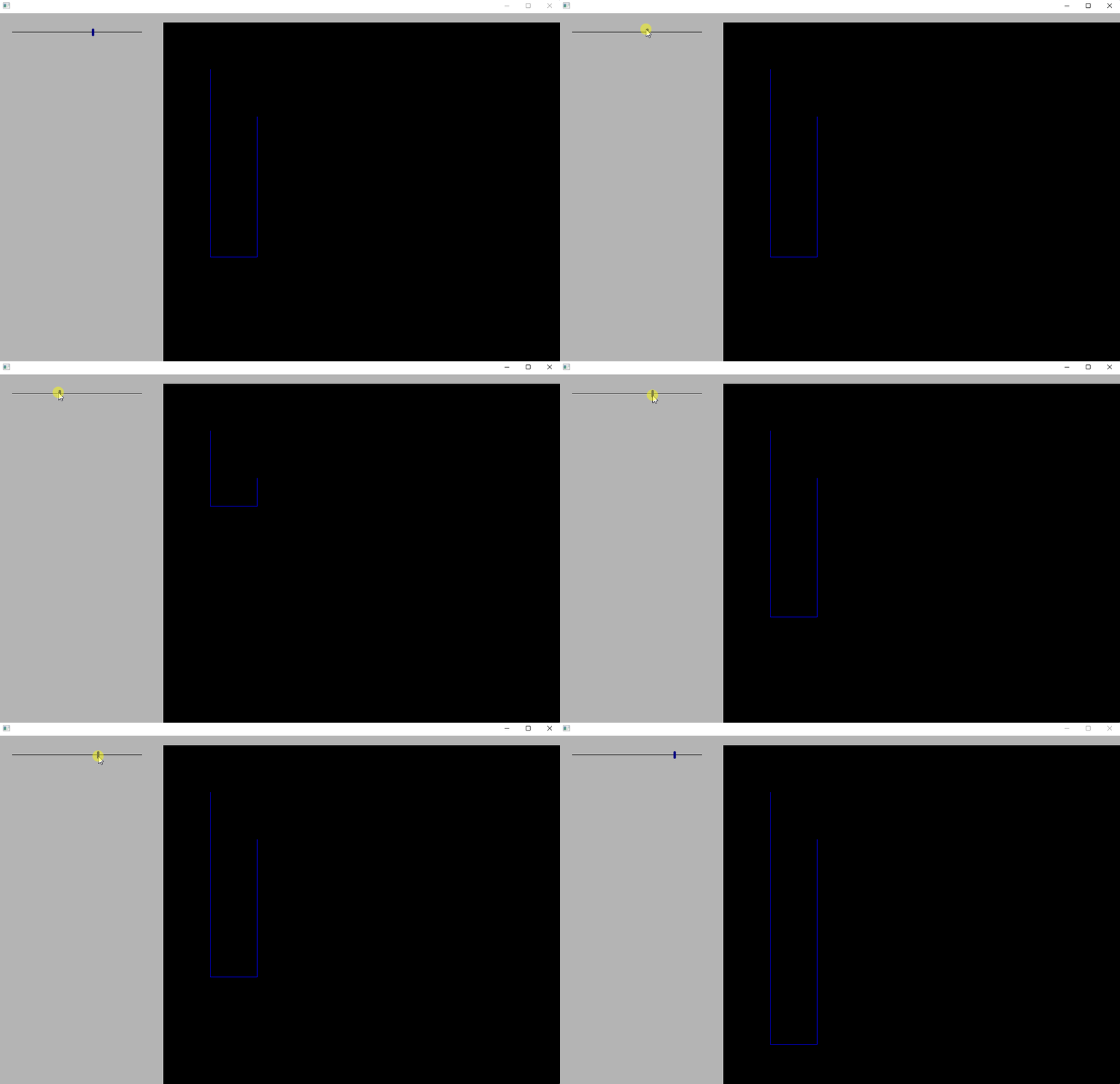
WOW!!
Que potencia la de FWH.
Muchas gracuias maestro, probare lo de las curvas.
FWH 25.12
Harbour/Hbmk2
Microsoft Visual C++
MySql 8.0
Antigravity
Antonio, buenas noches.
Por favor un ejemplo con lineas y arcos unidos
Gracias
J. Ernesto Pinto Q.
Fwh_x64 2501, BCC++_x64 7_70 , Harbour 3.20, LopeEdit 5.8
jepsys@hotmail.com, jepsys@gmail.com
#include "FiveWin.ch"
#include "slider.ch"

static nLargoManga := 400

function Main()

   local oWnd, oSlider, nValue := 400, oPanel

   DEFINE WINDOW oWnd

   @ 2, 2 SLIDER oSlider VAR nValue SIZE 300, 20 OF oWnd ;
      COLORS nil, nil, CLR_BLUE SLIMSTYLE ;
      RANGE 0, 800 ON CHANGE ( nLargoManga := nValue, oPanel:Refresh() )

   @ 20, 350 PANEL oPanel OF oWnd SIZE 1200, 800

   oPanel:SetColor( "W/N" )
   oPanel:bPainted = { | hDC | Paint( hDC ) }

   ACTIVATE WINDOW oWnd MAXIMIZED

return nil

function Paint( hDC )

   local hOldPen, hBluePen, x, y, n

   hBluePen  = CreatePen( PS_SOLID, 1, CLR_HBLUE )
   hOldPen = SelectObject( hDC, hBluePen )
   MoveTo( hDC, 100, 100 )
   LineTo( hDC, 100, nLargoManga )
   MoveTo( hDC, 100, nLargoManga )
   LineTo( hDC, 200, nLargoManga )
   MoveTo( hDC, 200, nLargoManga )
   LineTo( hDC, 200, 160 )
   MoveTo( hDC, 100, 100 )

   x = 100
   y = 100

   for n = 0 to 100
       x = x + 1
       y = y + ( 1 * sin( n * 3.14 / 100 ) )
       SetPixel( hdc, x, y, CLR_HBLUE )
   next

   SelectObject( hDC, hOldPen )

return nil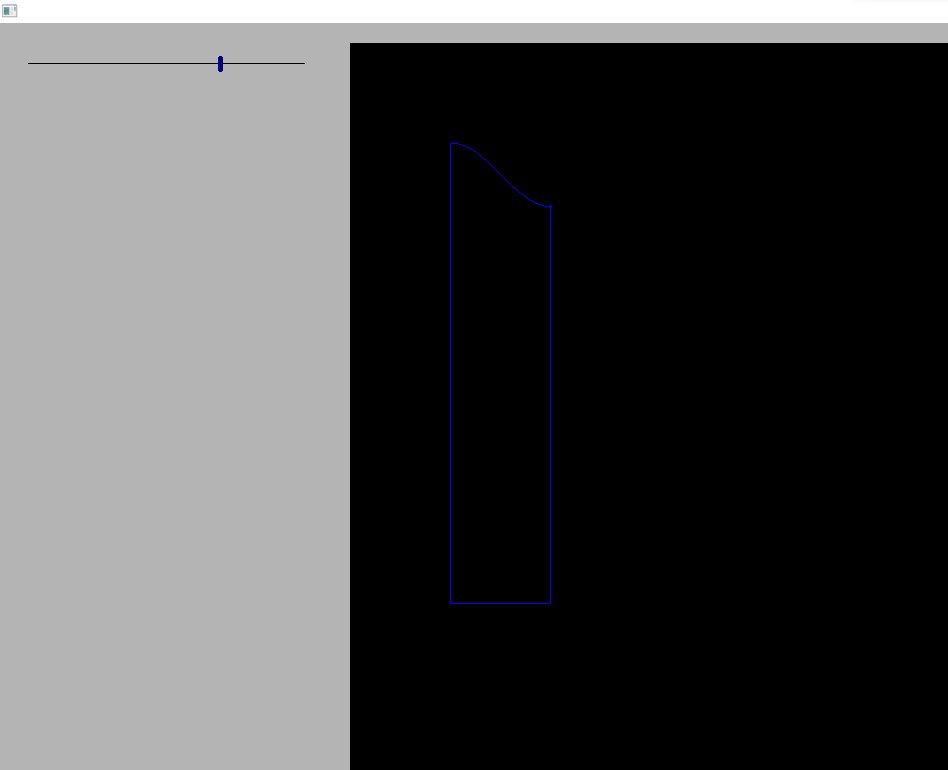
Hola maestro, muchas gracias por los ejemplos.
Como puedo expresar o calcular los valores en centimetros o pulgadas, es decir, la altura en centimetros o pulgadas y que estos sean centimetros o pulgadas cuando se imprima? (Me disculpo por la redundancia)
Gracias de antemano
FWH 25.12
Harbour/Hbmk2
Microsoft Visual C++
MySql 8.0
Antigravity
Existen varios factores a tener en cuenta:
centimetros = pulgadas x 2,54
en la pantalla vemos pixeles, y la cantidad de pixeles depende de los DPI (dots per inch = puntos por pulgada) del dispositivo
una aproximación sería que points = pixels * 72 / 96, lo que quiere decir que hacen falta 72 puntos por pulgadas y 96 pixeles por pulgadas
Normalmente usamos 300 DPI para imprimir, esto es: 300 pixeles por pulgada

