FiveTech Support Forums

FiveWin / Harbour / xBase community
Board index FiveWin for Harbour/xHarbour convert from a txt text file to a dbf with errors - RESOLVED
Posts: 7317
Joined: Thu Oct 18, 2012 07:17 PM
convert from a txt text file to a dbf with errors - RESOLVED
Posted: Sat Sep 17, 2022 06:59 AM
I have to convert from a txt text file to an archive dbf

sample of storico.txt
Code (fw): Select all Collapse
1939/01/07  BA  58  22  47  49  69
1939/01/07  FI  27  57  81  43  61
1939/01/07  MI  40  38  57  67  7
1939/01/07  NA  85  44  48  88  55
1939/01/07  PA  73  80  39  38  57
1939/01/07  RM  73  24  4   39  22
1939/01/07  TO  19  43  10  31  27
1939/01/07  VE  9   43  61  14  75


the fields of dbf

Code (fw): Select all Collapse
local aFields :=      { { "DATA" , "D", 8, 0 },;
                        { "RUOTA", "C", 2, 0 },;
                        { "N1"   , "N", 2, 0 },;
                        { "N2"   , "N", 2, 0 },;
                        { "N3"   , "N", 2, 0 },;
                        { "N4"   , "N", 2, 0 },;
                        { "N5"   , "N", 2, 0 }}


the conversion from historical file.txt to aData array does it well in fact I can see it in a browse

Code (fw): Select all Collapse
   Local  cFieldList:="data,ruota,n1,n2,n3,n4,n5"
      Local  csvfile := cDirZip+"storico.txt"
      Local  cSymbol := CHR( 9 )
      Local  cText := StrTran( MemoRead( csvfile ), CHR( 10 ), Chr(1) )
      Local  aData := HB_ATokens( cText, Chr(1), .t., .t. )
      local  nPos     := 0

     AEval( aData, { |c,i| c := StrTran( c, Chr(1), CRLF ), aData[ i ] := HB_ATokens( c, cSymbol, .t., .t. ) } )

      if len( ATail( aData ) ) < 2
           ASize( aData, Len( aData ) - 1 )
        endif

        AEVAL( aData, { | arr, nIndex | aData[nIndex][1] := SUBSTR( arr[1], 9, 2 ) + "/" + SUBSTR( arr[1], 6, 2 ) + "/" + LEFT( arr[1], 4 ) } )

      XBROWSER aData TITLE "TXT AS ARRAY" SETUP oBrw:cHeaders := { "Data", "Ruota", "Num1", "Num2", "Num3", "Num4", "Num5" }


when I then do the conversion, that is,

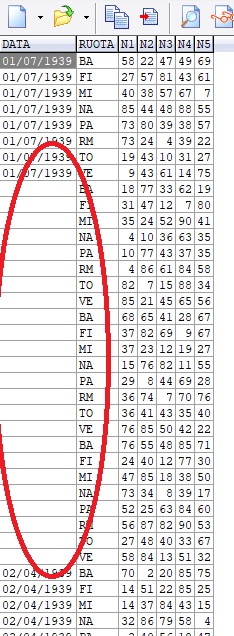
I copy the records of the aData array into the dbf archive, it makes errors, every now and then it does not insert the date field


Code (fw): Select all Collapse
 local  bprogress  := { || (oProgress:Set( npos++ ),; //oProgress:SetPos( npos++ ),;
                                 oSay[3]:SetText(ltrim(str(npos))),;
                                   oSay[3]:refresh(),;
                                  SysRefresh() ) }


      nMeter := 0
     oMeter:set(nMeter)
      sysrefresh()


          oProgress:ntotal:= len(aData)

         olotto2:= TDatabase():Open( , cPath+"STORICO", "DBFCDX", .T. )
         SET DELETED  ON
         olotto2:setorder(0)
         oLotto2:gotop()
         oLotto2:fw_ArrayToDBF( aData,,bProgress)
     //FW_ArrayToDBF( aData, cFieldList, bProgress, lOverWrite, lRecallDeleted, bTrigger )
        DbCloseAll()
     return nil


result


Any solution pls ?
Since from 1991/1992 ( fw for clipper Rel. 14.4 - Momos)

I use : FiveWin for Harbour March-April 2024 - Harbour 3.2.0dev (harbour_bcc770_32_20240309) - Bcc7.70 - xMate ver. 1.15.3 - PellesC - mail: silvio[dot]falconi[at]gmail[dot]com
Posts: 137
Joined: Mon Oct 22, 2012 04:43 PM
Re: convert from a txt text file to a dbf with errors
Posted: Sat Sep 17, 2022 07:45 AM

It seems that SET DATE to the right format is not set in prg DD.MM.YYYY ?

Regards


Ing. Anton Lerchster
Posts: 7317
Joined: Thu Oct 18, 2012 07:17 PM
Re: convert from a txt text file to a dbf with errors
Posted: Sat Sep 17, 2022 10:19 AM

I made It on main, i must repeat It. ?

Since from 1991/1992 ( fw for clipper Rel. 14.4 - Momos)

I use : FiveWin for Harbour March-April 2024 - Harbour 3.2.0dev (harbour_bcc770_32_20240309) - Bcc7.70 - xMate ver. 1.15.3 - PellesC - mail: silvio[dot]falconi[at]gmail[dot]com
Posts: 1772
Joined: Thu Sep 05, 2019 05:32 AM
Re: convert from a txt text file to a dbf with errors - RESOLVED
Posted: Sat Sep 17, 2022 10:54 AM
hi Silvio,

what DATE Format do you use :-)

you got YYYY/MM/DD but there is no DATEFORMAT like that

Syntax Date Format

ANSI yy.mm.dd
BRITISH dd/mm/yy
FRENCH dd/mm/yy
GERMAN dd.mm.yy
ITALIAN dd-mm-yy
JAPAN yy.mm.dd
USA mm-dd-yy
AMERICAN mm/dd/yy

so "extract" YYYY, MM and DD from Element before store into DBF
greeting,

Jimmy
Posts: 10733
Joined: Sun Nov 19, 2006 05:22 AM
Re: convert from a txt text file to a dbf with errors - RESOLVED
Posted: Sat Sep 17, 2022 04:05 PM
Setting date format this way also is valid
Code (fw): Select all Collapse
   SET DATE FORMAT TO "YYYY/MM/DD"
   ? Date()
Regards


G. N. Rao.

Hyderabad, India
Posts: 10733
Joined: Sun Nov 19, 2006 05:22 AM
Re: convert from a txt text file to a dbf with errors - RESOLVED
Posted: Sat Sep 17, 2022 04:08 PM
Actually he converted the date string from the format
YYYY/MM/DD
to
DD/MM/YYYY

with this code
Code (fw): Select all Collapse
        AEVAL( aData, { | arr, nIndex | aData[nIndex][1] := SUBSTR( arr[1], 9, 2 ) + "/" + SUBSTR( arr[1], 6, 2 ) + "/" + LEFT( arr[1], 4 ) } )
Regards


G. N. Rao.

Hyderabad, India
Posts: 10733
Joined: Sun Nov 19, 2006 05:22 AM
Re: convert from a txt text file to a dbf with errors - RESOLVED
Posted: Sat Sep 17, 2022 04:09 PM

Glad you are back to work my friend Silvio
Please send the full text file to my email

Regards


G. N. Rao.

Hyderabad, India
Posts: 10733
Joined: Sun Nov 19, 2006 05:22 AM
Re: convert from a txt text file to a dbf with errors - RESOLVED
Posted: Sat Sep 17, 2022 05:34 PM
Most of the above comments were made, not knowing the full capabilities of FW_ArrayToDBF.

The function FW_ArrayToDBF( aData ) converts any string values to the destination field type, before saving the data. This function is made keeping in view conversion from CSV.

This type conversion is made using the function
Code (fw): Select all Collapse
uCharToVal( cValue, cFieldType ) //--> Coverted value of the FieldType

Converting strings to DateType is obviously difficult. This works well but may fail in some cases.

You may test this:
Code (fw): Select all Collapse
   SET DATE ITALIAN
   SET CENTURY ON

   ? uCharToVal( "2021/10/23", "D" ), ;
     uCharToVal( "23/10/2021", "D" ), ;
     uCharToVal( "10/23/2121", "D" ), ;
     uCharToVal( "23 Oct 2021", "D" ), ;
     uCharToVal( "OctOber 23, 2021", "D" )

In all the above cases, the result is date value 23-10-2021.
This function works irrespective of the date format set.
In some cases like "10/04/21", the function can not decide whether it is formatted as dd/mm/yy or mm/dd/yy or yy/mm/dd, etc. In such cases, set date format is used.
Still there may be some cases, where this function may fail

I like to examine Mr.Silvio's data.
Regards


G. N. Rao.

Hyderabad, India
Posts: 7317
Joined: Thu Oct 18, 2012 07:17 PM
Re: convert from a txt text file to a dbf with errors - RESOLVED
Posted: Sun Sep 18, 2022 10:17 AM

I sent you Yesterday storico.txt

Since from 1991/1992 ( fw for clipper Rel. 14.4 - Momos)

I use : FiveWin for Harbour March-April 2024 - Harbour 3.2.0dev (harbour_bcc770_32_20240309) - Bcc7.70 - xMate ver. 1.15.3 - PellesC - mail: silvio[dot]falconi[at]gmail[dot]com
Posts: 10733
Joined: Sun Nov 19, 2006 05:22 AM
Re: convert from a txt text file to a dbf with errors - RESOLVED
Posted: Sun Sep 18, 2022 10:43 AM
Please try this.
Code (fw): Select all Collapse
#include "fivewin.ch"

REQUEST DBFCDX

function Main()

   local cText, aData
   local aFields :=   { { "DATA" , "D", 8, 0 },;
                        { "RUOTA", "C", 2, 0 },;
                        { "N1"   , "N", 2, 0 },;
                        { "N2"   , "N", 2, 0 },;
                        { "N3"   , "N", 2, 0 },;
                        { "N4"   , "N", 2, 0 },;
                        { "N5"   , "N", 2, 0 }}

   cText    := HB_MEMOREAD( "storico.txt" )
   cText    := FW_ALLTRIM( cText )
   cText    := StrTran( cText, CRLF, Chr( 10 ) )

   aData    := HB_ATokens( cText, Chr( 10 ) )
   AEval( aData, { |c,i| aData[ i ] := HB_ATokens( c, Chr( 9 ) ) } )
   AEval( aData, { |a,i| a[ 1 ] := uCharToVal( a[ 1 ], "D" ) } )

   DBCREATE( "TEST.DBF", aFields, "DBFCDX", .T., "TT" )
   FW_ArrayToDBF( aData )
   GO TOP
   XBROWSER ALIAS() SHOW RECID
   CLOSE DATA

return nil


This is working for me here.
Regards


G. N. Rao.

Hyderabad, India
Posts: 7317
Joined: Thu Oct 18, 2012 07:17 PM
Re: convert from a txt text file to a dbf with errors - RESOLVED
Posted: Mon Sep 19, 2022 07:11 AM
nageswaragunupudi wrote:Please try this.
Code (fw): Select all Collapse
#include "fivewin.ch"

REQUEST DBFCDX

function Main()

   local cText, aData
   local aFields :=   { { "DATA" , "D", 8, 0 },;
                        { "RUOTA", "C", 2, 0 },;
                        { "N1"   , "N", 2, 0 },;
                        { "N2"   , "N", 2, 0 },;
                        { "N3"   , "N", 2, 0 },;
                        { "N4"   , "N", 2, 0 },;
                        { "N5"   , "N", 2, 0 }}

   cText    := HB_MEMOREAD( "storico.txt" )
   cText    := FW_ALLTRIM( cText )
   cText    := StrTran( cText, CRLF, Chr( 10 ) )

   aData    := HB_ATokens( cText, Chr( 10 ) )
   AEval( aData, { |c,i| aData[ i ] := HB_ATokens( c, Chr( 9 ) ) } )
   AEval( aData, { |a,i| a[ 1 ] := uCharToVal( a[ 1 ], "D" ) } )

   DBCREATE( "TEST.DBF", aFields, "DBFCDX", .T., "TT" )
   FW_ArrayToDBF( aData )
   GO TOP
   XBROWSER ALIAS() SHOW RECID
   CLOSE DATA

return nil


This is working for me here.

THANKS RAO
Since from 1991/1992 ( fw for clipper Rel. 14.4 - Momos)

I use : FiveWin for Harbour March-April 2024 - Harbour 3.2.0dev (harbour_bcc770_32_20240309) - Bcc7.70 - xMate ver. 1.15.3 - PellesC - mail: silvio[dot]falconi[at]gmail[dot]com

Continue the discussion