FiveTech Support Forums

FiveWin / Harbour / xBase community
Board index FiveWin for Harbour/xHarbour btnbmp gradient
Posts: 7317
Joined: Thu Oct 18, 2012 07:17 PM
btnbmp gradient
Posted: Fri Oct 07, 2022 02:22 PM
When I create a btnbmp gradient with

Code (fw): Select all Collapse
oBtnNum[k,t]:bClrGrad := { | lInvert | If( lInvert, ;
                               { { 1/3, aBack[k], aGradient[k] }, ;
                                 { 2/3, aGradient[k], aBack[k] }  ;
                               }, ;
                               { { 1/2, aGradient[k], aBack[k] }, ;
                                 { 1/2, aBack[k], aGradient[k] }  ;
                                } ) }


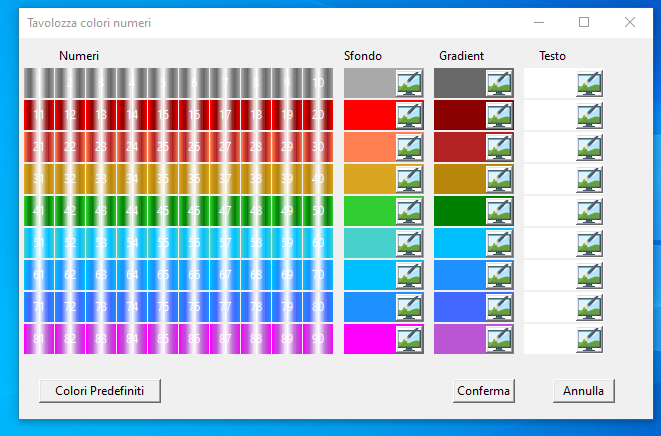
I have a btnbmp as this


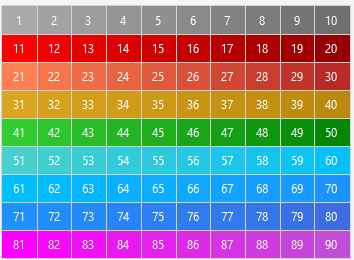
practically I have a horizontal gradient how do I get a vertical gradient? ie like this



I tried also with

Code (fw): Select all Collapse
 oBtnNum[k,t]:bClrGrad  := { | lPressed | If( ! lPressed,;
            { { 1, aBack[k], aGradient[k] } },;
            { { 1, aGradient[k], aBack[k] } } ) }


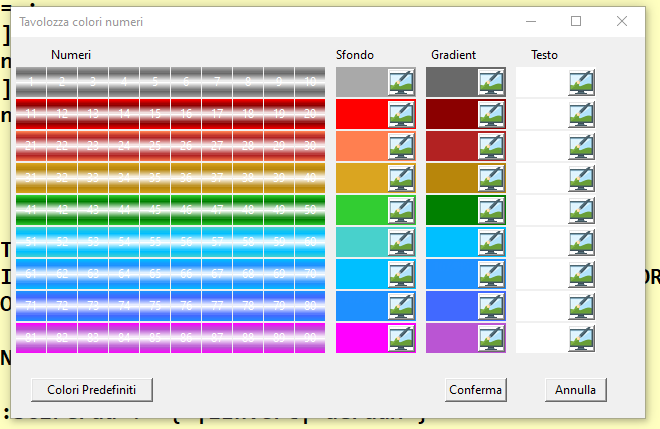
result


which is the worst situation but it is not what I was looking for


any solution pls ?
Since from 1991/1992 ( fw for clipper Rel. 14.4 - Momos)

I use : FiveWin for Harbour March-April 2024 - Harbour 3.2.0dev (harbour_bcc770_32_20240309) - Bcc7.70 - xMate ver. 1.15.3 - PellesC - mail: silvio[dot]falconi[at]gmail[dot]com
Posts: 8515
Joined: Tue Dec 20, 2005 07:36 PM
Re: btnbmp gradient
Posted: Fri Oct 07, 2022 06:06 PM
João Santos - São Paulo - Brasil - Phone: +55(11)95150-7341
Posts: 7317
Joined: Thu Oct 18, 2012 07:17 PM
Re: btnbmp gradient
Posted: Sat Oct 08, 2022 10:22 AM
karinha wrote:Dear Silvio, Mira se ayuda:

http://forums.fivetechsupport.com/viewtopic.php?f=3&t=41854&p=250898&hilit=VERTICAL&sid=b0f0694dee37dc4a589488fbf28046ce&sid=9b82f74546e15892f4616af974cd6d21#p250898

Regards, saludos.


I tried and it crash out with btnbmp

local aGradH := ;
{ { 0.20, aBack[k], aGradient[k] } ;
, { 0.30, aGradient[k], atext[k] } ;
, { 0.30, atext[k], aGradient[k] } ;
, { 0.20, aGradient[k], aBack[k] } ;
, .F. ;
}
oBtnNum[k,t]:bClrGrad := aGradH
Since from 1991/1992 ( fw for clipper Rel. 14.4 - Momos)

I use : FiveWin for Harbour March-April 2024 - Harbour 3.2.0dev (harbour_bcc770_32_20240309) - Bcc7.70 - xMate ver. 1.15.3 - PellesC - mail: silvio[dot]falconi[at]gmail[dot]com
Posts: 10733
Joined: Sun Nov 19, 2006 05:22 AM
Re: btnbmp gradient
Posted: Sun Oct 09, 2022 09:45 AM
Please try:
Code (fw): Select all Collapse
oBtnNum[k,t]:bClrGrad := { |lInvert| aGradH }
Regards


G. N. Rao.

Hyderabad, India
Posts: 7317
Joined: Thu Oct 18, 2012 07:17 PM
Re: btnbmp gradient
Posted: Mon Oct 10, 2022 04:25 PM
nageswaragunupudi wrote:Please try:
Code (fw): Select all Collapse
oBtnNum[k,t]:bClrGrad := { |lInvert| aGradH }


Nages,
with
local aGradH := ;
{ { 0.20, aBack[k], aGradient[k] } ;
, { 0.30, aGradient[k], atext[k] } ;
, { 0.30, atext[k], aGradient[k] } ;
, { 0.20, aGradient[k], aBack[k] } ;
, .f. ;
}

I have this


with

local aGradH := ;
{ { 0.20, aBack[k], aGradient[k] } ;
, { 0.30, aGradient[k], atext[k] } ;
, { 0.30, atext[k], aGradient[k] } ;
, { 0.20, aGradient[k], aBack[k] } ;
, .t. ;
}

I have this


I wish on Horizontal n1 more clear n.10 more back
as this : i look it on another software not mine

Since from 1991/1992 ( fw for clipper Rel. 14.4 - Momos)

I use : FiveWin for Harbour March-April 2024 - Harbour 3.2.0dev (harbour_bcc770_32_20240309) - Bcc7.70 - xMate ver. 1.15.3 - PellesC - mail: silvio[dot]falconi[at]gmail[dot]com
Posts: 10733
Joined: Sun Nov 19, 2006 05:22 AM
Re: btnbmp gradient
Posted: Mon Oct 10, 2022 06:37 PM

I explained how to make horizontal gradient. We can make angular gradients too and also use alpha colors.
In all cases, final appearance depends on choice of colors and percent values.

Regards


G. N. Rao.

Hyderabad, India
Posts: 7317
Joined: Thu Oct 18, 2012 07:17 PM
Re: btnbmp gradient
Posted: Tue Oct 11, 2022 06:15 AM
nageswaragunupudi wrote:I explained how to make horizontal gradient. We can make angular gradients too and also use alpha colors.
In all cases, final appearance depends on choice of colors and percent values.


I not think it is angular gradient
the number 1 much lighter and the number 10 much darker, I have these three colors
Back color
Gradient color
Text color
I thought that I could make a gradient to the btnbmp with the "back color" and the "gradient color" and put the "text color" to write the text

the gradient starts from the buttons on the left which are light to the last one on the right which are dark
Instead, until now I have a horizontal and vertical gradien in the middle in the button instead the vertical should always start vertically from left to right
Since from 1991/1992 ( fw for clipper Rel. 14.4 - Momos)

I use : FiveWin for Harbour March-April 2024 - Harbour 3.2.0dev (harbour_bcc770_32_20240309) - Bcc7.70 - xMate ver. 1.15.3 - PellesC - mail: silvio[dot]falconi[at]gmail[dot]com

Continue the discussion