FiveTech Support Forums

FiveWin / Harbour / xBase community
Board index FiveWin for Harbour/xHarbour show a btnbmp pressed on buttonbar
Posts: 7318
Joined: Thu Oct 18, 2012 07:17 PM

show a btnbmp pressed on buttonbar

Posted: Mon Oct 17, 2022 10:14 AM


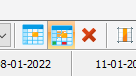
On a buttonbar (2015) I have these btnbmps

and I would like that when I press a button it stays pressed to simulate the select option , so I made

DEFINE BUTTON oSelf:oPlus FILENAME ".\bitmaps\plus.bmp" OF ::oBar ;
TOOLTIP "plus numbers" ;
ACTION (oSelf:=!oSelf:lPressed, oSelf:refresh())

but it is pressed but not change the color how resolve?
Since from 1991/1992 ( fw for clipper Rel. 14.4 - Momos)

I use : FiveWin for Harbour March-April 2024 - Harbour 3.2.0dev (harbour_bcc770_32_20240309) - Bcc7.70 - xMate ver. 1.15.3 - PellesC - mail: silvio[dot]falconi[at]gmail[dot]com
Posts: 44162
Joined: Thu Oct 06, 2005 05:47 PM

Re: show a btnbmp pressed

Posted: Mon Oct 17, 2022 10:31 AM

Dear Silvio,

Maybe replacing the bitmap with another with different color ?

regards, saludos

Antonio Linares
www.fivetechsoft.com
Posts: 7318
Joined: Thu Oct 18, 2012 07:17 PM

Re: show a btnbmp pressed

Posted: Mon Oct 17, 2022 10:38 AM
Antonio Linares wrote:Dear Silvio,

Maybe replacing the bitmap with another with different color ?


I did not think about it
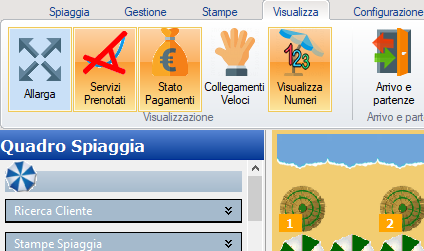
but otherwise in the ribbonbar it does it automatically if you use lselected as you can see here


why on buttonbar not is the same ?
Since from 1991/1992 ( fw for clipper Rel. 14.4 - Momos)

I use : FiveWin for Harbour March-April 2024 - Harbour 3.2.0dev (harbour_bcc770_32_20240309) - Bcc7.70 - xMate ver. 1.15.3 - PellesC - mail: silvio[dot]falconi[at]gmail[dot]com
Posts: 7318
Joined: Thu Oct 18, 2012 07:17 PM

Re: show a btnbmp pressed

Posted: Mon Oct 17, 2022 10:44 AM

I tried

DEFINE BUTTON oSelf:oPlus FILENAME ".\bitmaps\plus.bmp" OF ::oBar ;
TOOLTIP "plus numbers" ;
ACTION (oSelf:oPlus:lPressed:=!oSelf:oPlus:lPressed,;
oSelf:oPlus:setcolor( CLR_BLUE, If( oSelf:oPlus:lPressed == .t., CLR_RED, CLR_BLUE )) ,;
oSelf:oPlus:refresh()

but not run ok

Since from 1991/1992 ( fw for clipper Rel. 14.4 - Momos)

I use : FiveWin for Harbour March-April 2024 - Harbour 3.2.0dev (harbour_bcc770_32_20240309) - Bcc7.70 - xMate ver. 1.15.3 - PellesC - mail: silvio[dot]falconi[at]gmail[dot]com
Posts: 7318
Joined: Thu Oct 18, 2012 07:17 PM

Re: show a btnbmp pressed

Posted: Mon Oct 17, 2022 10:51 AM
No I made

DEFINE BUTTON oSelf:oPlus FILENAME ".\bitmaps\plus.bmp" OF ::oBar ;
TOOLTIP "plus numbers" ;
ACTION (ChangePressedBtn(oSelf:oPlus))


Code (fw): Select all Collapse
Function ChangePressedBtn(oBtn)
   local  bClrGradSelect := {| lPressed | if( lPressed  ,;
      { ;
         {2/5, nRGB( 253,212,168 ), nRGB( 251,178,99 ) },;
        {3/5, nRGB( 250,157,52 ), nRGB( 252,234,163 ) };
      },;
      { ;
         {2/5, nRGB( 245,177,110 ), nRGB( 243,165,89 ) },;
        {3/5, nRGB( 216,136,52 ), nRGB( 249,202,98 ) } ;
      } ) }

    local  bClrGradNormal := { | lPressed | if ( lPressed,;
        { ;
          { 2/5, RGB( 194, 213, 242 ), RGB( 194, 213, 242 ) } , ;
          { 3/5, RGB( 194, 213, 242 ), RGB( 194, 213, 242 ) } ;
        },;
        {;
          { 2/5, nRGB( 201, 224, 247 ), nRGB( 201, 224, 247 ) } , ;
          { 3/5, nRGB( 201, 224, 247 ), nRGB( 201, 224, 247 ) } ;
        } ) }

    oBtn:lPressed:=!oBtn:lPressed

    ?  oBtn:lPressed

    If oBtn:lPressed
       oBtn:bClrGrad    := bClrGradSelect
   else
       oBtn:bClrGrad    :=  bClrGradNormal
   Endif


   oBtn:refresh()

   return nil


It run but when we put it back it doesn't take away the color maybe I did something wrong :-) lpressed is alway .t.
Since from 1991/1992 ( fw for clipper Rel. 14.4 - Momos)

I use : FiveWin for Harbour March-April 2024 - Harbour 3.2.0dev (harbour_bcc770_32_20240309) - Bcc7.70 - xMate ver. 1.15.3 - PellesC - mail: silvio[dot]falconi[at]gmail[dot]com
Posts: 7318
Joined: Thu Oct 18, 2012 07:17 PM

Re: show a btnbmp pressed

Posted: Mon Oct 17, 2022 11:35 AM
Please try this test

Code (fw): Select all Collapse
#include "fivewin.ch"

Function test()
local oWnd
local oBar,oPlus,oNumber,oCancel

DEFINE WINDOW  oWnd


 DEFINE BUTTONBAR oBar TOP  OF oWnd  2015

DEFINE BUTTON oNumber FILENAME "one.bmp"  OF oBar    ;
      TOOLTIP "one n umber"  ;
      ACTION  ChangePressedBtn(oNumber)

DEFINE BUTTON oPlus FILENAME "plus.bmp"  OF oBar    ;
      TOOLTIP "plus numbers"  ;
      ACTION ChangePressedBtn(oPlus)


DEFINE BUTTON oCancel  FILENAME "delete.bmp"    OF oBar    ;
      TOOLTIP "cancel"  ;
      ACTION (ChangePressedBtn(oPlus),;
              ChangePressedBtn(oNumber) )


ACTIVATE WINDOW oWnd
RETURN NIL
//---------------------------------------------------------------------//

Function ChangePressedBtn(oBtn)

 local  bClrGradSelect :=   { | lInvert | If( ! lInvert,;
                    { { 1, RGB( 244, 244, 245 ), RGB( 244, 244, 245 ) } },;
                    { { 1, RGB( 255, 253, 222 ), RGB( 255, 231, 151 ) } } ) }

 local  bClrGradNormal :=  { | lInvert | If( ! lInvert,;
                    { { 1, RGB( 244, 244, 245 ), RGB( 244, 244, 245 ) } },;
                    { { 1, RGB( 145, 201, 247 ), RGB( 145, 201, 247 ) } } ) }

   oBtn:Toggle()

    If oBtn:lPressed
       oBtn:bClrGrad    := bClrGradSelect
   else
      oBtn:bClrGrad    :=  bClrGradNormal
    Endif

    oBtn:refresh()
   return ni


plus.bmp


one.bmp


delete.bmp


it seem run ok but when I press X (3th button) it not refresh
Since from 1991/1992 ( fw for clipper Rel. 14.4 - Momos)

I use : FiveWin for Harbour March-April 2024 - Harbour 3.2.0dev (harbour_bcc770_32_20240309) - Bcc7.70 - xMate ver. 1.15.3 - PellesC - mail: silvio[dot]falconi[at]gmail[dot]com
Posts: 8523
Joined: Tue Dec 20, 2005 07:36 PM

Re: show a btnbmp pressed on buttonbar

Posted: Mon Oct 17, 2022 04:38 PM

Dear Silvio, mira C:\FWH..\SAMPLES\TESTSK1.PRG si ayuda.

Regards, saludos.

João Santos - São Paulo - Brasil - Phone: +55(11)95150-7341
Posts: 8523
Joined: Tue Dec 20, 2005 07:36 PM

Re: show a btnbmp pressed on buttonbar

Posted: Mon Oct 17, 2022 07:49 PM
Estimado Silvio, única forma en que logré hacerlo funcionar.

Dear Silvio, only way I managed to make it work.

Code (fw): Select all Collapse
// C:\FWH..\SAMPLES\GRADSIL.PRG

#include "FiveWin.ch"

#define K_F5  (-4)
#Define aPubGrad {| lInvert | If( lInvert, ;
                 { { 1 / 3, nRGB( 255, 253, 222 ), nRGB( 255, 231, 151 ) }, ;
                 { 2 / 3, nRGB( 255, 215,  84 ), nRGB( 255, 233, 162 ) }    ;
                 },                                                         ;
                 { { 1 / 2, nRGB( 219, 230, 244 ), nRGB( 207 - 50, 221 - 25, 255 ) }, ;
                 { 1 / 2, nRGB( 201 - 50, 217 - 25, 255 ), nRGB( 231, 242, 255 ) }    ;
                 } ) }

STATIC oWnd, oBmp, oBtn1, oBtn2, oBtn3, oBtn4, oBtn5, oBtn6, oBtn7, oBtn8, oBtn9

function Main()

   local oBrush, oBar, hDLL
   local oSkinB

   SET _3DLOOK ON

   oSkinB = TSkinButton():New()
   oSkinB:nClrBorder0_N = RGB( 249, 194, 179 )
   oSkinB:nClrBorder1_N = RGB( 181, 61, 29 )
   oSkinB:aClrNormal    = { { 0.2, RGB( 254, 154, 128 ), RGB( 254, 154, 128 ) }, ;
                            { 0.8, RGB( 252, 85, 40 ), RGB( 181, 61, 29 ) } }
   
   SkinButtons( oSkinB )

   // don't use VK_F5 because VK_F5 and 't' have the same code !
   // for VK_F5 use Clipper's K_F5
   SetKey( K_F5, { || MsgInfo( "Testing SetKey feature..." ) } )

   DEFINE BRUSH oBrush STYLE BORLAND

   DEFINE WINDOW oWnd FROM 1, 5 TO 20, 75 BRUSH oBrush        ;
      TITLE "Cambiar los colores de los botones de ButtonBar" ;
      MENU  BuildMenu()

   DEFINE BUTTONBAR oBar _3D SIZE 31, 33 OF oWnd // 2007 // no use 2007/2015

   WITH OBJECT oBar  // VER: ANCHO.PRG

      oBar:bClrGrad := aPubGrad

      oBar:bRClicked := { || NIL } // Botao direito  do Mouse desligado.
      oBar:bLClicked := { || NIL } // Botao Esquerdo do Mouse desligado.

      // oBar:SetFont( oFont )
      // Cor no Prompt dos Botoes
      // oBar:nClrText := CLR_HBLUE // BLACK
      oBar:Adjust()

   END

   DEFINE BUTTON oBtn1 FILE "..\bitmaps\Select.bmp" OF oBar ;
      MESSAGE "Testing a sample selection dialog" NOBORDER  ;
      TOOLTIP "Selection Dialog"

   DEFINE BUTTON oBtn2 FILE "..\bitmaps\Edit.bmp"   OF oBar ;
      MESSAGE "Testing a typical bussiness dialog" NOBORDER ;
      TOOLTIP "Images DataBase"

   DEFINE BUTTON oBtn3 FILE "..\bitmaps\Browse.bmp"   OF oBar ;
      MESSAGE "Easy and powerfull Browsers" NOBORDER          ;
      TOOLTIP "Browse"

   DEFINE BUTTON oBtn4 FILE "..\bitmaps\Exit.bmp"   OF oBar   ;
      ACTION _Exit() MESSAGE "When you want to end"  NOBORDER ;
      TOOLTIP "Exit"

   DEFINE BUTTON oBtn5 FILE "..\bitmaps\Colors.bmp" OF oBar   ;
      ACTION ChooseColor() GROUP                              ;
      MESSAGE "Calling Windows standard color selection dialog" NOBORDER ;
      TOOLTIP "Colors"

   DEFINE BUTTON oBtn6 FILE "..\bitmaps\Dlg.bmp"    OF oBar ;
      ACTION cGetFile( "*.dbf", "Select a DBF" ) ;
      MESSAGE "Calling Windows standard Get a File dialog" NOBORDER ;
      TOOLTIP "GetFile"

   DEFINE BUTTON oBtn7 FILE "..\bitmaps\Fonts.bmp"  OF oBar ACTION ChooseFont() ;
      MESSAGE "Calling Windows standard font selection dialog" NOBORDER ;
      TOOLTIP "GetFont"

   DEFINE BUTTON oBtn8 FILE "..\bitmaps\Blocks.bmp" OF oBar GROUP ;
      MESSAGE "About FiveWin designers" NOBORDER ;
      TOOLTIP "About"

   DEFINE BUTTON oBtn9 FILE "..\bitmaps\Open.bmp" OF oBar ;
      ACTION CAMBIA_COLOR() MESSAGE "Cambiar colores de los Buttons" NOBORDER ;
      TOOLTIP "Cambiar colores de los Buttons"

   //   @ 6, 18 BITMAP oBmp FILENAME "..\bitmaps\Luck.bmp" OF oWnd
   DEFINE BITMAP oBmp FILENAME "..\bitmaps\fiveback.bmp"

   oWnd:bPainted = { | hDC | BmpTiled( hDC, oWnd, oBmp ) }

   SET MESSAGE OF oWnd ;
      TO "FiveWin - Cambiar los colores de los botones de ButtonBar!" ;
      CENTERED 2007

   ACTIVATE WINDOW oWnd MAXIMIZED

return nil

FUNCTION CAMBIA_COLOR()

   LOCAL nCor

   nCor := ChooseColor()

   oBtn1:nClrText := nCor
   oBtn1:nClrPane := nCor

   oBtn2:nClrText := nCor
   oBtn2:nClrPane := nCor

   oBtn3:nClrText := nCor
   oBtn3:nClrPane := nCor

   oBtn4:nClrText := nCor
   oBtn4:nClrPane := nCor

   oBtn5:nClrText := nCor
   oBtn5:nClrPane := nCor

   oBtn6:nClrText := nCor
   oBtn6:nClrPane := nCor

   oBtn7:nClrText := nCor
   oBtn7:nClrPane := nCor

   oBtn8:nClrText := nCor
   oBtn8:nClrPane := nCor

   oBtn9:nClrText := nCor
   oBtn9:nClrPane := nCor

RETURN NIL

function BuildMenu()

   local oMenu

   MENU oMenu 2007

      MENUITEM "Some &Dialogs"
      MENU
         MENUITEM "Make a selection..." ;
            MESSAGE "It's time to start building Windows applications easily!"

         MENUITEM "Now you have a real chance..." ;
            MESSAGE "Quick and easy Windows applications using your Clipper!!!"

         SEPARATOR

         MENUITEM "End..." MESSAGE "Exit this demo" ACTION _Exit()     // UDF
      ENDMENU

      MENUITEM "Some &Standards..."
      MENU
         MENUITEM "Choose A &Color..." ;
            MESSAGE "Calling standard Windows dialogs" ACTION ChooseColor()

         MENUITEM "Getting a &file..." ;
            MESSAGE "Hey, see how easy this is" ;
            ACTION cGetFile( "*.dbf", "Select a DBF" )

         MENUITEM "Selecting a f&ont..." ;
            MESSAGE "Any Windows facility is ready for you" ;
            ACTION ChooseFont()
      ENDMENU

      MENUITEM "About..." ;
         MESSAGE "Come on... we would like to see your name here soon!"

   ENDMENU

return oMenu

function _Exit()

   oWnd:End()

return nil

STATIC FUNCTION BmpTiled( hDC, oWnd, oBmp )

   local nWidth := oWnd:nWidth(), nHeight := oWnd:nHeight()
   local nRow := 0, nCol := 0, n
   local nBmpWidth  := oBmp:nWidth(),  nBmpHeight := oBmp:nHeight()

   if oBmp:hBitmap == 0
      return nil
   endif

   while nRow < nHeight
      nCol = 0
      while nCol < nWidth
         PalBmpDraw( hDC, nRow, nCol, oBmp:hBitmap )
         nCol += nBmpWidth
      end
      nRow += nBmpHeight
   end

return nil

// FIN / END


Regards, saludos.
João Santos - São Paulo - Brasil - Phone: +55(11)95150-7341
Posts: 7318
Joined: Thu Oct 18, 2012 07:17 PM

Re: show a btnbmp pressed on buttonbar

Posted: Tue Oct 18, 2022 08:28 AM
I have a different thing. the two btnbmp are active through a logical variable lnumber, if it is active, oPlus must be activated, if it is negative, oNumber must be activated.
Instead oCancel deselects both buttons and lnumber: = nil
I just solved it like this


Code (fw): Select all Collapse
#include "fivewin.ch"

Function test()
local oWnd
local oBar,oPlus,oNumber,oCancel
local lNumber:=nil

DEFINE WINDOW  oWnd


 DEFINE BUTTONBAR oBar TOP  OF oWnd  2015

DEFINE BUTTON oNumber FILENAME "one.bmp"  OF oBar    ;
      TOOLTIP "one number"  ;
      ACTION  ( ChangePressedBtn(oNumber), lNumber:=.f.)

DEFINE BUTTON oPlus FILENAME "plus.bmp"  OF oBar    ;
      TOOLTIP "plus numbers"  ;
      ACTION (ChangePressedBtn(oPlus), lNumber:=.t.)


DEFINE BUTTON oCancel  FILENAME "delete.bmp"    OF oBar    ;
      TOOLTIP "cancel"  ;
      ACTION  AnnullaSelezione(oPlus,oNumber,lNumber)


ACTIVATE WINDOW oWnd
RETURN NIL
//---------------------------------------------------------------------//

Function ChangePressedBtn(oBtn)

 local  bClrGradSelect :=   { | lInvert | If( ! lInvert,;
                    { { 1, RGB( 244, 244, 245 ), RGB( 244, 244, 245 ) } },;
                    { { 1, RGB( 255, 253, 222 ), RGB( 255, 231, 151 ) } } ) }

 local  bClrGradNormal :=  { | lInvert | If( ! lInvert,;
                    { { 1, RGB( 244, 244, 245 ), RGB( 244, 244, 245 ) } },;
                    { { 1, RGB( 145, 201, 247 ), RGB( 145, 201, 247 ) } } ) }

   oBtn:Toggle()

    If oBtn:lPressed
       oBtn:bClrGrad    := bClrGradSelect
   else
      oBtn:bClrGrad    :=  bClrGradNormal
    Endif

    oBtn:refresh()
    return nil
//--------------------------------------------------------//
Function AnnullaSelezione(oPlus,oNumber,lNumber)
       IF lNumber !=nil
          IF lNumber
             ChangePressedBtn(oPlus)
          Endif
          IF !lNumber
             ChangePressedBtn(oNumber)
          Endif
          oPlus:refresh()
          oNumber:refresh()
       Endif
 return nil
//--------------------------------------------------------/
Since from 1991/1992 ( fw for clipper Rel. 14.4 - Momos)

I use : FiveWin for Harbour March-April 2024 - Harbour 3.2.0dev (harbour_bcc770_32_20240309) - Bcc7.70 - xMate ver. 1.15.3 - PellesC - mail: silvio[dot]falconi[at]gmail[dot]com
Posts: 8523
Joined: Tue Dec 20, 2005 07:36 PM

Re: show a btnbmp pressed on buttonbar

Posted: Tue Oct 18, 2022 12:33 PM
Very good Silvio. Congratulations. Funciona mui bien.

Code (fw): Select all Collapse
// C:\FWH..\SAMPLES\GRADSIL2.PRG

#Include "FiveWin.ch"

#Define GRAD_BTN_BLACK { | lInvert | If( ! lInvert, ;
                       { { 0.70,0      ,12429486 },{ 0.70,12429486,0       } },;
                       { { 0.40,9928844,12429486 },{ 0.40,12429486,9928844 } } ) }

#Define aPubGrad       { | lInvert | If( lInvert, ;
                       { { 1/3, nRGB( 255, 253, 222 ), nRGB( 255, 231, 151 ) }, ;
                       { 2/3, nRGB( 255, 215,  84 ), nRGB( 255, 233, 162 ) }  ;
                       }, ;
                       { { 1/2, nRGB( 219, 230, 244 ), nRGB( 207-50, 221-25, 255 ) }, ;
                       { 1/2, nRGB( 201-50, 217-25, 255 ), nRGB( 231, 242, 255 ) }  ;
                       } ) }

#Define aPubRedGr      { | lInvert | If( ! lInvert, { { 0.50,16776960,16777215 }, ;
                       { 0.50,16777215,16776960 } }, { { 0.50,128,16777215 },     ;
                       { 0.50,16777215,128 } } ) }

#Define bGrad          { | lInvert | If( ! lInvert, ;
                       { { 1, nRGB( 255, 255, 255 ), nRGB( 230, 234, 239 ) } }, ;
                       { { 1/3, nRGB( 255, 253, 222 ), nRGB( 255, 231, 151 ) }, ;
                       { 2/3, nRGB( 255, 215,  84 ), nRGB( 255, 233, 162 ) }    ;
                       } ) }

FUNCTION Test()

   LOCAL oWnd
   LOCAL oBar, oPlus, oNumber, oCancel, oExit
   LOCAL lNumber := nil

   DEFINE WINDOW  oWnd

   DEFINE BUTTONBAR oBar TOP  OF oWnd 2015

   DEFINE BUTTON oNumber FILENAME "..\bitmaps\16x16\floppy.bmp" OF oBar      ;
      TOOLTIP "one number"                                                   ;
      ACTION ( ChangePressedBtn( oNumber ), lNumber := .F. )

   DEFINE BUTTON oPlus FILENAME "..\bitmaps\16x16\plus.bmp" OF oBar          ;
      TOOLTIP "plus numbers"                                                 ;
      ACTION ( ChangePressedBtn( oPlus ), lNumber := .T. )

   DEFINE BUTTON oCancel  FILENAME "..\bitmaps\16x16\delete.bmp" OF oBar     ;
      TOOLTIP "cancel"                                                       ;
      ACTION  AnnullaSelezione( oPlus, oNumber, lNumber )

   DEFINE BUTTON oExit  FILENAME "..\bitmaps\16x16\exit.bmp"    OF oBar      ;
      TOOLTIP "Salida - Exit - Cancelar"                                     ;
      ACTION( oWnd:End() )

   ACTIVATE WINDOW oWnd

RETURN NIL

FUNCTION ChangePressedBtn( oBtn )

   LOCAL  bClrGradSelect :=   { | lInvert | If( ! lInvert,   ;
      { { 1, RGB( 244, 244, 245 ), RGB( 244, 244, 245 ) } }, ;
      { { 1, RGB( 255, 253, 222 ), RGB( 255, 231, 151 ) } } ) }

   LOCAL  bClrGradNormal :=  { | lInvert | If( ! lInvert,    ;
      { { 1, RGB( 244, 244, 245 ), RGB( 244, 244, 245 ) } }, ;
      { { 1, RGB( 145, 201, 247 ), RGB( 145, 201, 247 ) } } ) }

   oBtn:Toggle()

   IF oBtn:lPressed

      // bGrad-aPubRedGr-aPubGrad-bClrGradSelect
      oBtn:bClrGrad := GRAD_BTN_BLACK // Bello.

   ELSE

      oBtn:bClrGrad := bClrGradNormal

   ENDIF

   oBtn:refresh()

RETURN NIL

FUNCTION AnnullaSelezione( oPlus, oNumber, lNumber )

   IF lNumber != nil

      IF lNumber
         ChangePressedBtn( oPlus )
      ENDIF

      IF !lNumber
         ChangePressedBtn( oNumber )
      ENDIF

      oPlus:refresh()
      oNumber:refresh()

   ENDIF

RETURN NIL

// FIN / END


Regards, saludos.
João Santos - São Paulo - Brasil - Phone: +55(11)95150-7341

Continue the discussion