FiveTech Support Forums

FiveWin / Harbour / xBase community
Board index FiveWin for Harbour/xHarbour Version Info
Posts: 3022
Joined: Fri Oct 07, 2005 01:45 PM
Version Info
Posted: Thu Oct 27, 2022 11:59 PM
At one point this was working. Now it is not. I see there were some posts on updates. What was the final verdict.

I have this code in my .rc file. It no longer shows the results in properties.
Code (fw): Select all Collapse
VS_VERSION_INFO VERSIONINFO
 FILEVERSION 1,0,0,1
 PRODUCTVERSION 12,24,1,1
 FILEFLAGSMASK 0x3fL
#ifdef _DEBUG
 FILEFLAGS 0x1L
#else
 FILEFLAGS 0x0L
#endif
 FILEOS 0x40004L
 FILETYPE 0x1L
 FILESUBTYPE 0x0L
BEGIN
    BLOCK "StringFileInfo"
    BEGIN
        BLOCK "0c0a04b0"
        BEGIN
            VALUE "CompanyName", "MasterLink Software SBS"
            VALUE "FileDescription", "Shop Service Writer"
            VALUE "FileVersion", "12.2.4.0"
            VALUE "InternalName", "MLS12.exe"
            VALUE "LegalCopyright", "Copyright (C) MasterLinkSoftware 1982-2023"
            VALUE "OriginalFilename", "MLS12.exe"
            VALUE "ProductName", "<Service Shop Writer>"
            VALUE "ProductVersion", "12.24.1.1"
        END
    END
    BLOCK "VarFileInfo"
    BEGIN
        VALUE "Translation", 0x09, 1200
    END
END
Using FWH 22.06, Harbour, MS Visual Studio Community 2022.
Tim Stone
http://www.MasterLinkSoftware.com
http://www.autoshopwriter.com
timstone@masterlinksoftware.com
Using: FWH 23.10 with Harbour 3.2.0 / Microsoft Visual Studio Community 2022-24 32/64 bit
Posts: 1772
Joined: Thu Sep 05, 2019 05:32 AM
Re: Version Info
Posted: Fri Oct 28, 2022 04:53 AM
hi Tim,

i have posted working Sample for MSVC 64 Bit here
https://forums.fivetechsupport.com/viewtopic.php?f=3&t=42360&p=254731
Code (fw): Select all Collapse
 1 24 "Windows11.Manifest"

1 VERSIONINFO
FILEVERSION 0,0,1,27
PRODUCTVERSION 1,0,0,0
FILEOS 0x4
FILETYPE 0x1
try it if it work for you
greeting,

Jimmy
Posts: 3022
Joined: Fri Oct 07, 2005 01:45 PM
Re: Version Info
Posted: Tue Nov 01, 2022 10:24 PM

I think we are referring to two different things.

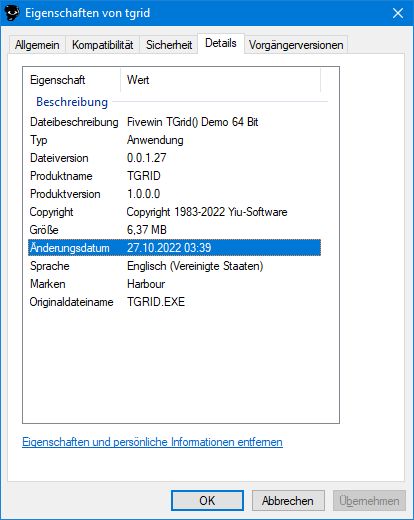
I posted about the info we could display in properties of an executable.

Tim Stone
http://www.MasterLinkSoftware.com
http://www.autoshopwriter.com
timstone@masterlinksoftware.com
Using: FWH 23.10 with Harbour 3.2.0 / Microsoft Visual Studio Community 2022-24 32/64 bit
Posts: 1772
Joined: Thu Sep 05, 2019 05:32 AM
Re: Version Info
Posted: Tue Nov 01, 2022 10:54 PM
TimStone wrote:I think we are referring to two different things.

I posted about the info we could display in properties of an executable.
do you mean this :?:
greeting,

Jimmy
Posts: 3022
Joined: Fri Oct 07, 2005 01:45 PM
Re: Version Info
Posted: Wed Nov 02, 2022 10:52 PM

Yes. A while back Antonio posted code that set it up, and it worked, but now it doesn't.

My code was derived from that original post.

Tim Stone
http://www.MasterLinkSoftware.com
http://www.autoshopwriter.com
timstone@masterlinksoftware.com
Using: FWH 23.10 with Harbour 3.2.0 / Microsoft Visual Studio Community 2022-24 32/64 bit
Posts: 1772
Joined: Thu Sep 05, 2019 05:32 AM
Re: Version Info
Posted: Wed Nov 02, 2022 11:01 PM
hi Tim
TimStone wrote:Yes. A while back Antonio posted code that set it up, and it worked, but now it doesn't.
My code was derived from that original post.
i had the Problem with 64 Bit App while 32 Bit App show it
so i compare *.RC with HMG and Xbase++ and found different Setting

this seems to work under 64 Bit and 32 Bit under Fivewin
Code (fw): Select all Collapse
1 VERSIONINFO
FILEVERSION 0,0,1,27
PRODUCTVERSION 1,0,0,0
FILEOS 0x4
FILETYPE 0x1
greeting,

Jimmy
Posts: 3022
Joined: Fri Oct 07, 2005 01:45 PM
Re: Version Info
Posted: Thu Nov 03, 2022 10:43 PM
After consulting a lot of online articles, and making modifications accordingly, I finally got the version info to work properly in both 32 bit and 64 bit applications.

I am using FWH 12.06, Harbour, and Visual Studio 2022.

Here is the code placed in my .rc file that actually has worked:
Code (fw): Select all Collapse
1 VERSIONINFO
 FILEVERSION 12,3,0,0
 PRODUCTVERSION 12,3, 0, 0
 FILEFLAGS 0x00000001
 FILEFLAGSMASK 0x0000003F
 FILEOS 0x00040000 
 FILETYPE 0x1
 FILESUBTYPE 0x040
 BEGIN
    BLOCK "StringFileInfo"
    BEGIN
        BLOCK "040904B0"
        BEGIN
            VALUE "CompanyName", "MasterLink Software SBS"
            VALUE "FileDescription", "Shop Service Writer"
            VALUE "FileVersion", "12.30.0.0"
            VALUE "InternalName", "MLS12.exe"
            VALUE "LegalCopyright", "Copyright (C) MasterLinkSoftware 1982-2023"
            VALUE "OriginalFilename", "MLS12.exe"
            VALUE "ProductName", "<Service Shop Writer>"
            VALUE "ProductVersion", "12.30.0.0"
        END
    END
    BLOCK "VarFileInfo"
    BEGIN
        VALUE "Translation", 0x0409, 1200
    END
 END
According to several references, there is no value for a 64 bit OS, so using the value for NT will work.

Some of the discrepancies I found had to do with the values before the BLOCK CODE. Those are fixed values and may have changed from earlier versions of VC and Windows.
Tim Stone
http://www.MasterLinkSoftware.com
http://www.autoshopwriter.com
timstone@masterlinksoftware.com
Using: FWH 23.10 with Harbour 3.2.0 / Microsoft Visual Studio Community 2022-24 32/64 bit

Continue the discussion