FiveTech Support Forums

FiveWin / Harbour / xBase community
Board index FiveWin for Harbour/xHarbour Newbie have COMBOBOX Question
Posts: 1772
Joined: Thu Sep 05, 2019 05:32 AM
Newbie have COMBOBOX Question
Posted: Sun Oct 30, 2022 05:21 AM
hi,

i have
Code (fw): Select all Collapse
   LOCAL aDrives   := aDrives()
   @ 0,0 COMBOBOX oCombo_left ITEMS aDrives SIZE 100,300 PIXEL

   // while Combobox does not show 1st Drive
   oCombo_left:Select(1)
   // need later when resize
   oCombo_Left:SetPos( 30,0)
but both Method give Error ... :shock:

what i´m doing wrong :?:
greeting,

Jimmy
Posts: 1772
Joined: Thu Sep 05, 2019 05:32 AM
Re: Newbie have COMBOBOX Question
Posted: Sun Oct 30, 2022 06:19 AM
Ok, i have change to OOP Style instead of #xcommand
Code (fw): Select all Collapse
   oCombo_left  := TComboBox():new(0,0        , , aDrives, 100, 300,oMain)
   oCombo_left:Select(1)

   Combo_Right := TComboBox():new(0, nWidth/2, , aDrives, 100, 300, oMain)
   Combo_Right:Select(1)
Code (fw): Select all Collapse
STATIC PROCEDURE DoResize( oMain )
   oCombo_Left:SetPos( 0,0)
   oCombo_Right:SetPos( 0, nWidth/2 )
this work without Problem :D
greeting,

Jimmy
Posts: 9020
Joined: Thu Oct 06, 2005 08:17 PM
Re: Newbie have COMBOBOX Question
Posted: Sun Oct 30, 2022 08:01 AM

Please, always post a complete sample of the problem. You don't need to use Select() nor SetPos() with Comboboxes. And commands are the best option in 99% of code. Commands are far more readable and maintainable than functions.

Posts: 1772
Joined: Thu Sep 05, 2019 05:32 AM
Re: Newbie have COMBOBOX Question
Posted: Sun Oct 30, 2022 10:08 AM
hi Enrico,
Enrico Maria Giordano wrote:Please, always post a complete sample of the problem.

i understand that a Sample is need to reproduce Problem, but as Newbie i "ask" for a (simple) Sample

---

i found out that 3rd Parameter bSetGet is used when "on change" Event is fired
Sample i saw look like this
Code (fw): Select all Collapse
local cItem
o:bSetGet := {|u| If( PCount()==0, citem , citem := u ) }
now i have "Value" in cItem but what about ENTER (or Dblclick) :?:
which Codeblock ( from which Super CLASS ) have to be use :?:

---

for RbDown i found this
Code (fw): Select all Collapse
   oCbx:bRClicked = { | nRow, nCol | EditControl( nRow, nCol, oCbx ) }
Enrico Maria Giordano wrote:You don't need to use Select() nor SetPos() with Comboboxes. And commands are the best option in 99% of code. Commands are far more readable and maintainable than functions.
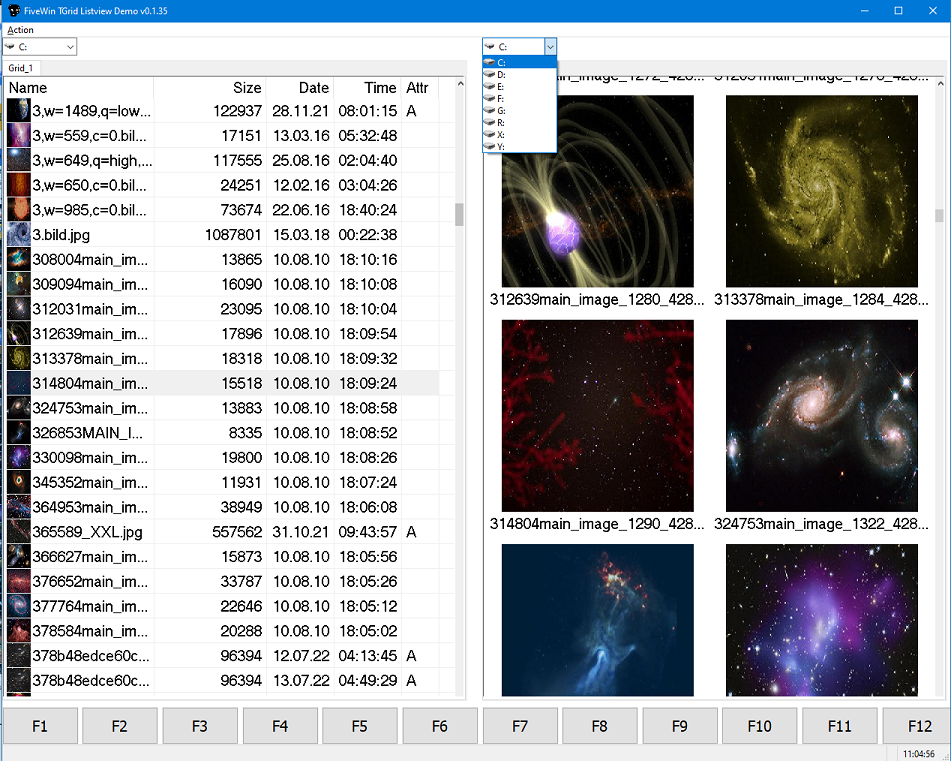
this is while i put 2 x "Explorer" into Window and each "Side" have a own Combobox

when "resize" e.g. "maximize" i need to calculate new Position of Control.
greeting,

Jimmy
Posts: 1772
Joined: Thu Sep 05, 2019 05:32 AM
Re: Newbie have COMBOBOX Question
Posted: Sun Oct 30, 2022 01:09 PM
hi,

found a Solution
Code (fw): Select all Collapse
oCombo_Right:bKeyDown := { |nKey| IF(nKey=13,MsgInfo(oCombo_Right:GetSelText()),nil )}
not sure if it is right Way ... but i got right Result
greeting,

Jimmy
Posts: 9020
Joined: Thu Oct 06, 2005 08:17 PM
Re: Newbie have COMBOBOX Question
Posted: Sun Oct 30, 2022 01:24 PM

It looks right to me.

Posts: 6983
Joined: Fri Oct 07, 2005 07:07 PM
Re: Newbie have COMBOBOX Question
Posted: Sun Oct 30, 2022 03:13 PM

Hi Jimmy,

with Fivewin you have all the source code of the classes:

c:\fwh\source\classes\combobox.prg

You can link in the class and insert msginfo() to see where you are.

I always use: msginfo( procname() + " " + str(procline()) )

Thank you for your hard work. I am glad you joined our group.

Best regards,

Otto

Continue the discussion