FiveTech Support Forums

FiveWin / Harbour / xBase community
Board index FiveWin for Harbour/xHarbour set spinner on combobox
Posts: 7317
Joined: Thu Oct 18, 2012 07:17 PM
set spinner on combobox
Posted: Mon Oct 31, 2022 03:54 PM


when the user change the second combobox , the procedure must change the value of the tget
Code (fw): Select all Collapse
      @ 480,630 COMBOBOX oCbx3 Var cFormazione ITEMS aFormazione ;
             SIZE 120,70 PIXEL OF oDlg HEIGHTGET 18
       @ 510,630 COMBOBOX oCbx4 Var cCalcolo ITEMS aCalcolo ;
             SIZE 120,70 PIXEL OF oDlg HEIGHTGET 18 ;
             ON CHANGE ( [b]ResetValore[/b](oCbx3:nAt,oCbx4:nAt, @nValore,aGet) )
       @ 540,630 GET aGet[8] var nValore SIZE 100,20 PIXEL RIGHT OF oDlg  SPINNER MIN 1 MAX 90


Function ResetValore(nForma,nMetodo, nValore,oControls)

     IF nForma= 1 .and. nMetodo= 3
        nValore:= 3
     *  oControls[8]:bMin := 3

     elseif nForma= 2 .and. nMetodo= 3
        nValore:= 6
       * oControls[8]:bMin := 6
        Endif
         oControls[8]:refresh()
   return nil
How I can to set MIN and MAX ? ( I must change only the value of MIN
I tried with oControls[8]:bMin := 3 and make error
Since from 1991/1992 ( fw for clipper Rel. 14.4 - Momos)

I use : FiveWin for Harbour March-April 2024 - Harbour 3.2.0dev (harbour_bcc770_32_20240309) - Bcc7.70 - xMate ver. 1.15.3 - PellesC - mail: silvio[dot]falconi[at]gmail[dot]com
Posts: 8515
Joined: Tue Dec 20, 2005 07:36 PM
Re: set spinner on combobox
Posted: Mon Oct 31, 2022 05:31 PM

Mire en \samples\XBRCALEN.PRG si le ayuda. No entiendo muy bien lo que quieres hacer. Un ejemplo completo siempre es bienvenido para las críticas.

Look in \samples\XBRCALEN.PRG if it helps. I don't quite understand what you want to do. A complete example is always welcome for criticism.

Regards, saludos.

João Santos - São Paulo - Brasil - Phone: +55(11)95150-7341
Posts: 7317
Joined: Thu Oct 18, 2012 07:17 PM
Re: set spinner on combobox
Posted: Mon Oct 31, 2022 09:03 PM
karinha wrote:Mire en \samples\XBRCALEN.PRG si le ayuda. No entiendo muy bien lo que quieres hacer. Un ejemplo completo siempre es bienvenido para las críticas.

Look in \samples\XBRCALEN.PRG if it helps. I don't quite understand what you want to do. A complete example is always welcome for criticism.

Regards, saludos.

in fact I understood that you did not understand
Is simple
if the first combo is 1 and the second is 3 the value in the get must be 3 as the min value and 90 as the max
if the first combo is 2 and the second is 3 the value in the get must be 6 as the min value and 90 as the max

here is a little test, obviously it changes the value of the get but if the user presses the spinner he could put the value 1 instead of three or six
I wanted to block the minimum value
Code (fw): Select all Collapse
#include "fivewin.ch"
#include "constant.ch"

Function test()
local oDlg, oBrw, oFont, oBold, oFontGet
local nBottom   := 44
local nRight    := 98
local nWidth    := Max( nRight * DLG_CHARPIX_W, 180 )
local nHeight   := nBottom * DLG_CHARPIX_H

local aGet:=array(10)
local oSay:=array(20)
local aFormazione:={"apples","bananas"}
local cFormazione:= "apples"
local aCalcolo:={"method 1","method 2",;
                 "method 3","method 4"}
local cCalcolo := "method 1"
local oCbx3
local nValore:= 1
local oCbx4

 DEFINE DIALOG oDlg SIZE  nWidth, nHeight  ;
   PIXEL TRUEPIXEL FONT oFont    ;  //RESIZABLE   FONT oFont
   TiTle " Test"


     @ 480,510 SAY oSay[9] PROMPT "Fruit :" SIZE 80,20 PIXEL OF oDlg
     @ 510,510 SAY oSay[10] PROMPT "Method :" SIZE 80,20 PIXEL OF oDlg
     @ 540,510 SAY oSay[11] PROMPT "Value :" SIZE 80,20 PIXEL OF oDlg


       @ 480,630 COMBOBOX oCbx3 Var cFormazione ITEMS aFormazione ;
             SIZE 120,70 PIXEL OF oDlg HEIGHTGET 18  ;
              ON CHANGE ( ResetValore(oCbx3:nAt,oCbx4:nAt, @nValore,aGet) )
       @ 510,630 COMBOBOX oCbx4 Var cCalcolo ITEMS aCalcolo ;
             SIZE 120,70 PIXEL OF oDlg HEIGHTGET 18 ;
             ON CHANGE ( ResetValore(oCbx3:nAt,oCbx4:nAt, @nValore,aGet) )
       @ 540,630 GET aGet[8] var nValore SIZE 100,20 PIXEL RIGHT OF oDlg  SPINNER MIN 1 MAX 90


ACTIVATE DIALOG oDlg CENTERED
return nil

Function ResetValore(nForma,nMetodo, nValore,oControls)
   Do case
    case nForma= 1 .and. nMetodo= 3
        nValore:= 3
    case nForma= 2 .and. nMetodo= 3
       nValore:= 6
     otherwise
       nValore:= 1
    endcase

    oControls[8]:SetText(nValore)
    oControls[8]:refresh()
   return nil
Since from 1991/1992 ( fw for clipper Rel. 14.4 - Momos)

I use : FiveWin for Harbour March-April 2024 - Harbour 3.2.0dev (harbour_bcc770_32_20240309) - Bcc7.70 - xMate ver. 1.15.3 - PellesC - mail: silvio[dot]falconi[at]gmail[dot]com
Posts: 8515
Joined: Tue Dec 20, 2005 07:36 PM
Re: set spinner on combobox
Posted: Mon Oct 31, 2022 11:31 PM
Caro Silvio, mira se yuda:
Code (fw): Select all Collapse
// \SAMPLES\SETSPINN.PRG - By Silvio Falconi.

#include "fivewin.ch"
#include "constant.ch"

FUNCTION Main()

   LOCAL oDlg, oBrw, oFont, oBold, oFontGet
   LOCAL nBottom   := 44
   LOCAL nRight    := 98
   LOCAL nWidth    := Max( nRight * DLG_CHARPIX_W, 180 )
   LOCAL nHeight   := nBottom * DLG_CHARPIX_H
   LOCAL aGet := ARRAY( 10 )
   LOCAL oSay := ARRAY( 20 )
   LOCAL aFormazione := { "apples", "bananas" }
   LOCAL cFormazione := "apples"
   LOCAL aCalcolo := { "method 1", "method 2", "method 3", "method 4" }
   LOCAL cCalcolo := "method 1"
   LOCAL oCbx3
   LOCAL nValore := 1
   LOCAL oCbx4

   DEFINE DIALOG oDlg SIZE  nWidth, nHeight PIXEL TRUEPIXEL FONT oFont ;
      TiTle " Test"

   oDlg:lHelpIcon := .F.

   @ 480, 510 SAY oSay[9] PROMPT "Fruit :" SIZE 80, 20 PIXEL OF oDlg

   @ 510, 510 SAY oSay[10] PROMPT "Method :" SIZE 80, 20 PIXEL OF oDlg

   @ 540, 510 SAY oSay[11] PROMPT "Value :" SIZE 80, 20 PIXEL OF oDlg

   @ 480, 630 COMBOBOX oCbx3 Var cFormazione ITEMS aFormazione ;
      SIZE 120, 70 PIXEL OF oDlg HEIGHTGET 18                  ;
        ON CHANGE ( ResetValore( oCbx3:nAt, oCbx4:nAt, @nValore,aGet ) )

   @ 510, 630 COMBOBOX oCbx4 Var cCalcolo ITEMS aCalcolo ;
      SIZE 120, 70 PIXEL OF oDlg HEIGHTGET 18            ;
      ON CHANGE( ResetValore( oCbx3:nAt, oCbx4:nAt, @nValore, aGet ) )

   @ 540, 630 GET aGet[8] VAR nValore SIZE 100, 20 PIXEL RIGHT OF oDlg ;
      SPINNER MIN 1 MAX 90 UPDATE                                      ;
      VALID( nValore >= 1 .AND. nValore <= 90 )

   ACTIVATE DIALOG oDlg CENTERED

   RETURN NIL

FUNCTION ResetValore( nForma, nMetodo, nValore, oControls )

   DO CASE
   CASE nForma = 1 .AND. nMetodo = 3

      nValore := 3

   CASE nForma = 2 .AND. nMetodo = 3

      nValore := 6

   OTHERWISE

      nValore := 1

   ENDCASE

   IF( nValore >= 1 .AND. nValore <= 90 )

      oControls[8]:VARPUT( nValore )
      oControls[8]:Refresh()

   ELSE  // aGet[8]

      nValore := 0

      oControls[8]:VARPUT( nValore )
      oControls[8]:Refresh()

   ENDIF

RETURN( .T. )

// FIN / END
Regards, saludos.
João Santos - São Paulo - Brasil - Phone: +55(11)95150-7341
Posts: 1772
Joined: Thu Sep 05, 2019 05:32 AM
Re: set spinner on combobox
Posted: Tue Nov 01, 2022 03:56 AM
hi Silvio,

i would try aGet[8]:bMin
Code (fw): Select all Collapse
METHOD Spinner( bUp, bDown, bMin, bMax ) CLASS TGet

   If ::lReadOnly
      return nil
   Endif

   ::bMin := bMin
   ::bMax := bMax
greeting,

Jimmy
Posts: 7317
Joined: Thu Oct 18, 2012 07:17 PM
Re: set spinner on combobox
Posted: Tue Nov 01, 2022 10:22 AM
karinha wrote:Caro Silvio, mira se yuda:
Code (fw): Select all Collapse
// \SAMPLES\SETSPINN.PRG - By Silvio Falconi.

#include "fivewin.ch"
#include "constant.ch"

FUNCTION Main()

   LOCAL oDlg, oBrw, oFont, oBold, oFontGet
   LOCAL nBottom   := 44
   LOCAL nRight    := 98
   LOCAL nWidth    := Max( nRight * DLG_CHARPIX_W, 180 )
   LOCAL nHeight   := nBottom * DLG_CHARPIX_H
   LOCAL aGet := ARRAY( 10 )
   LOCAL oSay := ARRAY( 20 )
   LOCAL aFormazione := { "apples", "bananas" }
   LOCAL cFormazione := "apples"
   LOCAL aCalcolo := { "method 1", "method 2", "method 3", "method 4" }
   LOCAL cCalcolo := "method 1"
   LOCAL oCbx3
   LOCAL nValore := 1
   LOCAL oCbx4

   DEFINE DIALOG oDlg SIZE  nWidth, nHeight PIXEL TRUEPIXEL FONT oFont ;
      TiTle " Test"

   oDlg:lHelpIcon := .F.

   @ 480, 510 SAY oSay[9] PROMPT "Fruit :" SIZE 80, 20 PIXEL OF oDlg

   @ 510, 510 SAY oSay[10] PROMPT "Method :" SIZE 80, 20 PIXEL OF oDlg

   @ 540, 510 SAY oSay[11] PROMPT "Value :" SIZE 80, 20 PIXEL OF oDlg

   @ 480, 630 COMBOBOX oCbx3 Var cFormazione ITEMS aFormazione ;
      SIZE 120, 70 PIXEL OF oDlg HEIGHTGET 18                  ;
        ON CHANGE ( ResetValore( oCbx3:nAt, oCbx4:nAt, @nValore,aGet ) )

   @ 510, 630 COMBOBOX oCbx4 Var cCalcolo ITEMS aCalcolo ;
      SIZE 120, 70 PIXEL OF oDlg HEIGHTGET 18            ;
      ON CHANGE( ResetValore( oCbx3:nAt, oCbx4:nAt, @nValore, aGet ) )

   @ 540, 630 GET aGet[8] VAR nValore SIZE 100, 20 PIXEL RIGHT OF oDlg ;
      SPINNER MIN 1 MAX 90 UPDATE                                      ;
      VALID( nValore >= 1 .AND. nValore <= 90 )

   ACTIVATE DIALOG oDlg CENTERED

   RETURN NIL

FUNCTION ResetValore( nForma, nMetodo, nValore, oControls )

   DO CASE
   CASE nForma = 1 .AND. nMetodo = 3

      nValore := 3

   CASE nForma = 2 .AND. nMetodo = 3

      nValore := 6

   OTHERWISE

      nValore := 1

   ENDCASE

   IF( nValore >= 1 .AND. nValore <= 90 )

      oControls[8]:VARPUT( nValore )
      oControls[8]:Refresh()

   ELSE  // aGet[8]

      nValore := 0

      oControls[8]:VARPUT( nValore )
      oControls[8]:Refresh()

   ENDIF

RETURN( .T. )

// FIN / END
Regards, saludos.
No not run

if the user changes the value back to 1 when the minimum is 3 or 6 the procedure could crash because I'll explain for example if we analyze the sequences
1-2 adds up to 3 this when it comes to sequences with two numbers
1-2-3 the minimum sum is 6 this when it concerns the sequences with three numbers
if the user changes and puts 1 the procedure will never be able to create an array in which the summed sequences make 1 and therefore could crash the program making an error
I think I have explained the problem well
Since from 1991/1992 ( fw for clipper Rel. 14.4 - Momos)

I use : FiveWin for Harbour March-April 2024 - Harbour 3.2.0dev (harbour_bcc770_32_20240309) - Bcc7.70 - xMate ver. 1.15.3 - PellesC - mail: silvio[dot]falconi[at]gmail[dot]com
Posts: 514
Joined: Sun Oct 16, 2005 03:32 AM
Re: set spinner on combobox
Posted: Wed Nov 02, 2022 05:33 PM
Silvio:
Code (fw): Select all Collapse
Function ResetValore(nForma,nMetodo, nValore,oControls)
   Do case
      case nForma= 1 .and. nMetodo= 3
          nValore:= 3
      case nForma= 2 .and. nMetodo= 3
          nValore:= 6
      otherwise
          nValore:= 1
    endcase

  // ***** This do the trick ***** //
    oControls[8]:bMin := {|| nValore }  

    oControls[8]:SetText(nValore)
    oControls[8]:refresh()
return nil

Saludos,


Carlos Gallego


*** FWH-25.12, xHarbour 1.3.1 Build 20241008, Borland C++7.70, PellesC, ADS 11.1***

Posts: 7317
Joined: Thu Oct 18, 2012 07:17 PM
Re: set spinner on combobox
Posted: Wed Nov 02, 2022 07:14 PM
Cgallegoa wrote:Silvio:
Code (fw): Select all Collapse
Function ResetValore(nForma,nMetodo, nValore,oControls)
   Do case
      case nForma= 1 .and. nMetodo= 3
          nValore:= 3
      case nForma= 2 .and. nMetodo= 3
          nValore:= 6
      otherwise
          nValore:= 1
    endcase

  // ***** This do the trick ***** //
    oControls[8]:bMin := {|| nValore }  

    oControls[8]:SetText(nValore)
    oControls[8]:refresh()
return nil


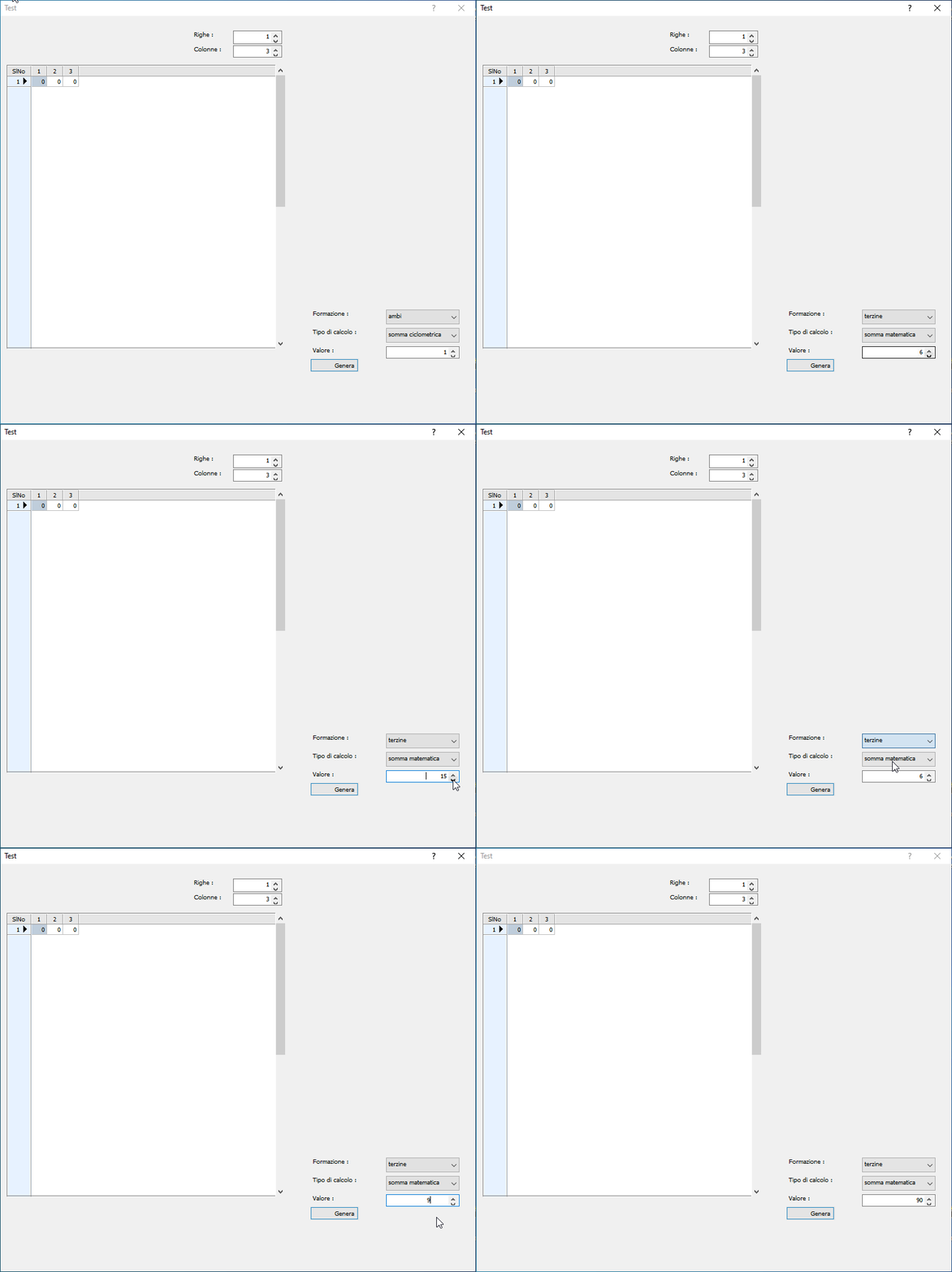
Thanks I had already tried ... but there is a problem !! If the procedure tells the tget that bMin: = {|| nValue}, changes the value ok. if the user increases and then decreases it does not return to the minimum number

perhaps with a video I try to understand the problem


ie if the user presses the down arrow he cannot decrease the value

the user can initially decrease or increase the value in the get by pressing the spinner buttons,

once the ResetValore() function has set the minimum value the user can only increase the value, and cannot return back
Since from 1991/1992 ( fw for clipper Rel. 14.4 - Momos)

I use : FiveWin for Harbour March-April 2024 - Harbour 3.2.0dev (harbour_bcc770_32_20240309) - Bcc7.70 - xMate ver. 1.15.3 - PellesC - mail: silvio[dot]falconi[at]gmail[dot]com

Continue the discussion