FiveTech Support Forums

FiveWin / Harbour / xBase community
Board index FiveWin for Harbour/xHarbour How to make TFolderEx excel-like?
Posts: 1096
Joined: Fri Oct 28, 2005 02:27 AM
How to make TFolderEx excel-like?
Posted: Wed Nov 09, 2022 07:54 AM

I was tasked to do the following:

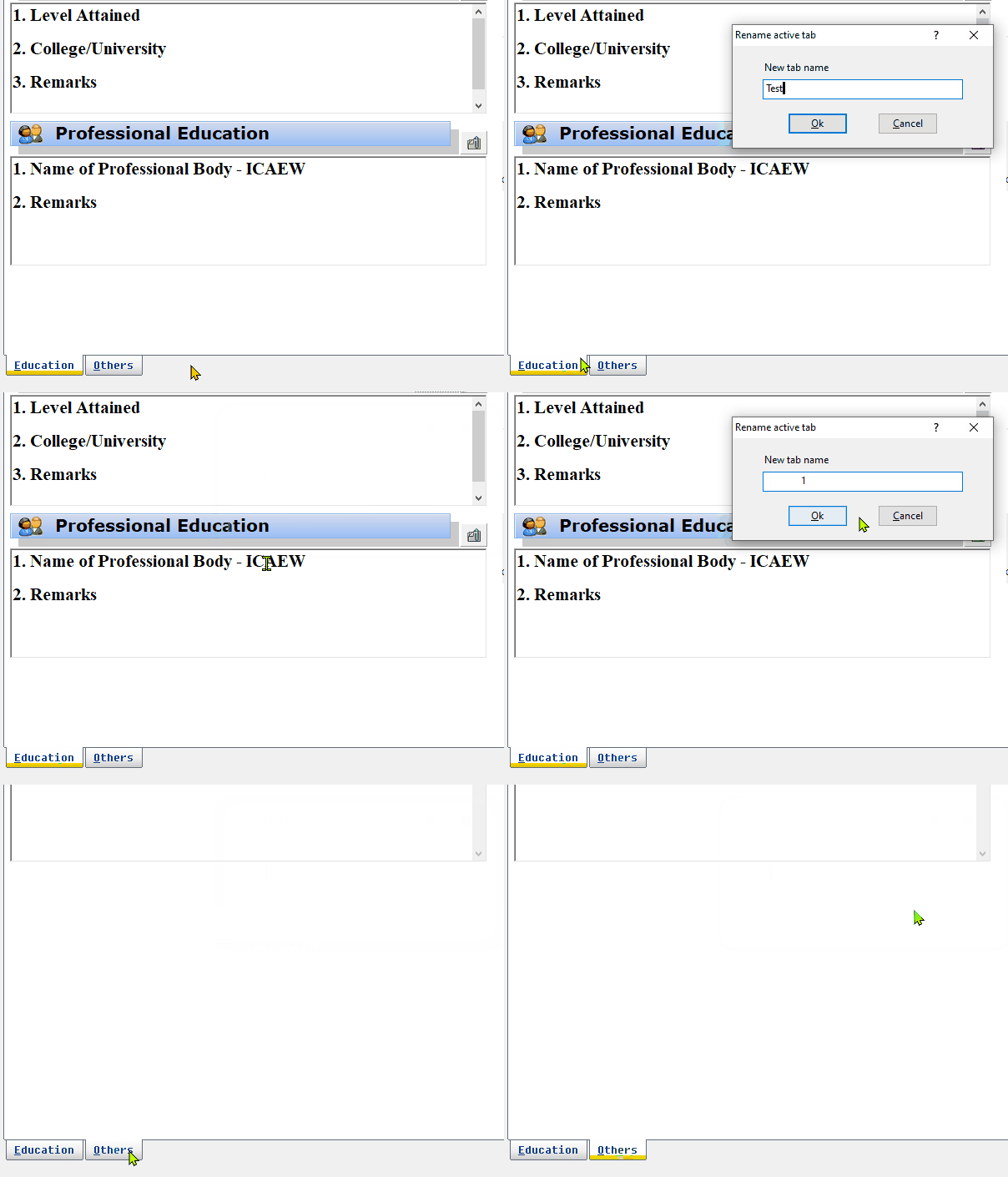
i. Allow user to change tab names on the go similar to excel sheet. Right click, key-in new tab name and see it immediately reflected

ii. Have something similar to excel new sheet icon where on clicking it, a new folder would be added

Any pointers? TIA

FWH 11.08/FWH 19.12

BCC5.82/BCC7.3

xHarbour/Harbour
Posts: 1772
Joined: Thu Sep 05, 2019 05:32 AM
Re: How to make TFolderEx excel-like?
Posted: Wed Nov 09, 2022 08:40 AM
hi hua,
hua wrote:i. Allow user to change tab names on the go similar to excel sheet. Right click, key-in new tab name and see it immediately reflected
Code (fw): Select all Collapse
METHOD RButtonDown( nRow, nCol, nFlags ) CLASS TFolderEx
...
      if ::bRClicked != nil
         Eval( ::bRClicked, nRow, nCol, nFlags, Self )
so what is your Problem :?:
greeting,

Jimmy
Posts: 1096
Joined: Fri Oct 28, 2005 02:27 AM
Re: How to make TFolderEx excel-like?
Posted: Thu Nov 10, 2022 02:23 AM
Getting the new name is the easy part. But what method to call to change the Tab's name?

FWH 11.08/FWH 19.12

BCC5.82/BCC7.3

xHarbour/Harbour
Posts: 6755
Joined: Wed Feb 15, 2012 08:25 PM
Re: How to make TFolderEx excel-like?
Posted: Thu Nov 10, 2022 04:42 AM
Try with
Code (fw): Select all Collapse
   // n := oFld:nOption
   oFld:aPrompts[ n ] := "New Name"
   //oFld:Default()
   oFld:Refresh()
Cristobal Navarro

Hay dos tipos de personas: las que te hacen perder el tiempo y las que te hacen perder la noción del tiempo

El secreto de la felicidad no está en hacer lo que te gusta, sino en que te guste lo que haces
Posts: 1772
Joined: Thu Sep 05, 2019 05:32 AM
Re: How to make TFolderEx excel-like?
Posted: Thu Nov 10, 2022 06:24 AM
hi,

i have this to change "Name of TAB"
Code (fw): Select all Collapse
   aPrompts := ACLONE( oTab:aPrompts )
   aPrompts[ nDim ] := aToken[ LEN( aToken ) - 1 ]  // Name of Folder
   oTab:SetPrompts( aPrompts )
greeting,

Jimmy
Posts: 1096
Joined: Fri Oct 28, 2005 02:27 AM
Re: How to make TFolderEx excel-like?
Posted: Thu Nov 10, 2022 07:01 AM
Thanks Cristobal, it works.
However is it possible to adjust the tab width automatically to accommodate long name?
Thank you
cnavarro wrote:Try with
Code (fw): Select all Collapse
   // n := oFld:nOption
   oFld:aPrompts[ n ] := "New Name"
   //oFld:Default()
   oFld:Refresh()
FWH 11.08/FWH 19.12

BCC5.82/BCC7.3

xHarbour/Harbour
Posts: 1096
Joined: Fri Oct 28, 2005 02:27 AM
Re: How to make TFolderEx excel-like?
Posted: Thu Nov 10, 2022 07:02 AM
Thank Jimmy.
:setPrompts() is only available if using TFolder class. I am using TFolderEx
Jimmy wrote: i have this to change "Name of TAB"
Code (fw): Select all Collapse
   aPrompts := ACLONE( oTab:aPrompts )
   aPrompts[ nDim ] := aToken[ LEN( aToken ) - 1 ]  // Name of Folder
   oTab:SetPrompts( aPrompts )
FWH 11.08/FWH 19.12

BCC5.82/BCC7.3

xHarbour/Harbour
Posts: 44158
Joined: Thu Oct 06, 2005 05:47 PM
Re: How to make TFolderEx excel-like?
Posted: Thu Nov 10, 2022 07:16 AM

Dear Hua,

Please check DATA aSizes

regards, saludos

Antonio Linares
www.fivetechsoft.com
Posts: 1096
Joined: Fri Oct 28, 2005 02:27 AM
Re: How to make TFolderEx excel-like?
Posted: Thu Nov 10, 2022 07:46 AM

Thanks for the tip Antonio.

How to be able to right-click on a TTitle and change the text Antonio? Would it be possible?

FWH 11.08/FWH 19.12

BCC5.82/BCC7.3

xHarbour/Harbour
Posts: 44158
Joined: Thu Oct 06, 2005 05:47 PM
Re: How to make TFolderEx excel-like?
Posted: Thu Nov 10, 2022 08:49 AM

Try this:

oTitle:aText[ 3 ] = "new text"

oTitle:Refresh()

regards, saludos

Antonio Linares
www.fivetechsoft.com
Posts: 6755
Joined: Wed Feb 15, 2012 08:25 PM
Re: How to make TFolderEx excel-like?
Posted: Thu Nov 10, 2022 11:55 AM
hua wrote:Thanks Cristobal, it works.
However is it possible to adjust the tab width automatically to accommodate long name?
Thank you
Try with
Code (fw): Select all Collapse
   // n := oFld:nOption
   oFld:aPrompts[ n ] := "New Name"
   //oFld:Default()
   oFld:Refresh()
Please, for this, call method oFld:Default(), and try
Cristobal Navarro

Hay dos tipos de personas: las que te hacen perder el tiempo y las que te hacen perder la noción del tiempo

El secreto de la felicidad no está en hacer lo que te gusta, sino en que te guste lo que haces
Posts: 1096
Joined: Fri Oct 28, 2005 02:27 AM
Re: How to make TFolderEx excel-like?
Posted: Mon Nov 14, 2022 10:38 AM
Thanks Cristobal. I'll give it a try.
cnavarro wrote:
Thanks Cristobal, it works.
However is it possible to adjust the tab width automatically to accommodate long name?
Thank you
Try with
Code (fw): Select all Collapse
   // n := oFld:nOption
   oFld:aPrompts[ n ] := "New Name"
   //oFld:Default()
   oFld:Refresh()
Please, for this, call method oFld:Default(), and try
FWH 11.08/FWH 19.12

BCC5.82/BCC7.3

xHarbour/Harbour
Posts: 1096
Joined: Fri Oct 28, 2005 02:27 AM
Re: How to make TFolderEx excel-like?
Posted: Mon Nov 14, 2022 10:39 AM
Thanks Antonio. This works!
Anything similar for images created using TITLEIMG?
Antonio Linares wrote:Try this:

oTitle:aText[ 3 ] = "new text"
oTitle:Refresh()
FWH 11.08/FWH 19.12

BCC5.82/BCC7.3

xHarbour/Harbour
Posts: 44158
Joined: Thu Oct 06, 2005 05:47 PM
Re: How to make TFolderEx excel-like?
Posted: Mon Nov 14, 2022 11:24 AM

Dear Hua,

Do you mean to replace the image ?

regards, saludos

Antonio Linares
www.fivetechsoft.com
Posts: 1096
Joined: Fri Oct 28, 2005 02:27 AM
Re: How to make TFolderEx excel-like?
Posted: Tue Nov 15, 2022 02:17 AM
Yes. To allow user to choose other image to replace the current one being displayed.
Thanks.
Antonio Linares wrote: Do you mean to replace the image ?
FWH 11.08/FWH 19.12

BCC5.82/BCC7.3

xHarbour/Harbour