

hi,
i have COMBOBOX where i show Drive-Letter and Bitmap from Resource
now i try to use same CODE for LISTBOX but i get no Image :shock:
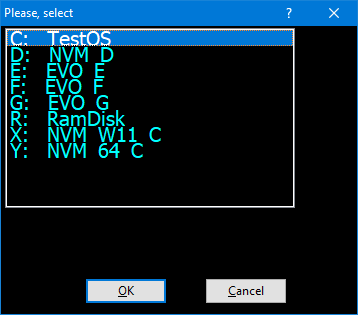
COMBOBOX and LISTBOX both use SetItems()/SetBitmaps()
for LISTBOX , which is in other *.PRG, i got Array this Way
what i´m doing wrong :?:
did somebody have a working LISTBOX Sample which use Image from Resource :?:
i have COMBOBOX where i show Drive-Letter and Bitmap from Resource
now i try to use same CODE for LISTBOX but i get no Image :shock:
COMBOBOX and LISTBOX both use SetItems()/SetBitmaps()
   oCombo_Left:SetItems( acItem, .T. )
oCombo_Left:SetBitmaps( acBitmaps )local aDrives := FillDriveArray()
oListbox:SetItems( aDrives[1], .T. )
oListbox:SetBitmaps( aDrives[2] )FUNCTION FillDriveArray()
GetAllDrive()
RETURN {acItem,acBitmaps,nPosiUSB}STATIC FUNCTION GetAllDrive()
LOCAL aDrives := aDrives()
LOCAL ii, cDrive, nType, cLabel, cBitmap
// Field-wide STATIC
acItem := {}
acBitmaps := {}
nPosiUSB := 0
FOR ii := 1 TO LEN( aDrives )
cDrive := SUBSTR( aDrives[ ii ], 1, 1 )
nType := GETDRIVETYPE( cDrive + ":" )
cLabel := VOLUMENAME( cDrive + ":\" )
DO CASE
CASE nType = DRIVE_UNKNOWN
cBitmap := "MYUNKNOWN16"
CASE nType = DRIVE_NO_ROOT_DIR
cBitmap := "MYFIXDRIVE16"
CASE nType = DRIVE_REMOVABLE
IF cDrive $ "AB"
cBitmap := "MYFLOPPY16" // Floppy
ELSE
cBitmap := "MYUSBSTICK16" // DRIVE_REMOVABLE
IF EMPTY(nPosiUSB)
nPosiUSB := ii
ENDIF
ENDIF
CASE nType = DRIVE_FIXED
IF cDrive = "C"
cBitmap := "MYSYSDRIVE16"
ELSE
cBitmap := "MYFIXDRIVE16"
ENDIF
CASE nType = DRIVE_REMOTE
cBitmap := "MYNETDRIVE16"
CASE nType = DRIVE_CDROM
cBitmap := "MYCDROM16"
CASE nType = DRIVE_RAMDISK
cBitmap := "MYRAMDISK16"
OTHERWISE
cBitmap := "MYUNKNOWN16"
ENDCASE
AADD( acItem, cDrive + ":" + SPACE( 3 ) + cLabel )
AADD( acBitmaps, cBitmap )
NEXT
RETURN aDrivesdid somebody have a working LISTBOX Sample which use Image from Resource :?:
greeting,
Jimmy
Jimmy