FiveTech Support Forums

FiveWin / Harbour / xBase community
Board index FiveWin for Harbour/xHarbour REDEFINE SAY on Buttonbar
Posts: 3022
Joined: Fri Oct 07, 2005 01:45 PM
REDEFINE SAY on Buttonbar
Posted: Mon Dec 05, 2022 02:07 AM

I have a buttonbar. On the right side, I want to display text. To do this, I must redefine a SAY ( text ) control.

 REDEFINE SAY oSay13 PROMPT cVIN ID 4001 OF oWdlg1 FONT oXLfont

Yes, it works.

Here is my problem. The BUTTONBAR has a gradient background. It looks nice. Unfortunately, the SAY displays in a box with a different background.

What I actually want is for just the lettering to display on the gradient background of the buttonbar, and not have a field showing.

Suggestions ? Yes, it works, but it doesn't look good.

Tim Stone
http://www.MasterLinkSoftware.com
http://www.autoshopwriter.com
timstone@masterlinksoftware.com
Using: FWH 23.10 with Harbour 3.2.0 / Microsoft Visual Studio Community 2022-24 32/64 bit
Posts: 6755
Joined: Wed Feb 15, 2012 08:25 PM
Re: REDEFINE SAY on Buttonbar
Posted: Mon Dec 05, 2022 08:37 AM
TimStone wrote:I have a buttonbar. On the right side, I want to display text. To do this, I must redefine a SAY ( text ) control.

REDEFINE SAY oSay13 PROMPT cVIN ID 4001 OF oWdlg1 FONT oXLfont

Yes, it works.

Here is my problem. The BUTTONBAR has a gradient background. It looks nice. Unfortunately, the SAY displays in a box with a different background.
What I actually want is for just the lettering to display on the gradient background of the buttonbar, and not have a field showing.

Suggestions ? Yes, it works, but it doesn't look good.
Try with
Code (fw): Select all Collapse
   oSay13:lTransparent   := .T.
Cristobal Navarro

Hay dos tipos de personas: las que te hacen perder el tiempo y las que te hacen perder la noción del tiempo

El secreto de la felicidad no está en hacer lo que te gusta, sino en que te guste lo que haces
Posts: 9020
Joined: Thu Oct 06, 2005 08:17 PM
Re: REDEFINE SAY on Buttonbar
Posted: Mon Dec 05, 2022 08:37 AM

We need a reduced sample showing the problem that can be compiled and run.

Posts: 1487
Joined: Tue Jun 14, 2016 07:51 AM
Re: REDEFINE SAY on Buttonbar
Posted: Mon Dec 05, 2022 01:29 PM
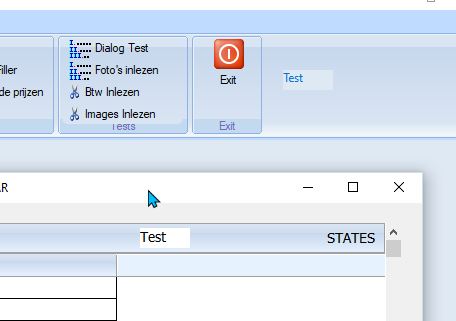
I have almost the same issue. In my case it seems to be with buttonbar in xbrowse and ribbonbar.

Here I tried a sample ... (for the xbrowse version) The picture shows ribbonbar and this sample.

Transparent does not do it.

In the pic of browse, you see 'STATES'. That is correct view, but this is from insite the class xbrowse
Code (fw): Select all Collapse
#include "fivewin.ch"

REQUEST DBFCDX

function Main()

   local oDlg, oFont, oBrw

   USE CUSTOMER NEW SHARED VIA "DBFCDX"
   USE STATES   NEW SHARED VIA "DBFCDX"

   DEFINE FONT oFont NAME "TAHOMA" SIZE 0,-14
   DEFINE DIALOG oDlg SIZE 600,470 PIXEL TRUEPIXEL RESIZABLE FONT oFont ;
      TITLE "XBROWSE : BUILT-IN BUTTON BAR"

   @  20,20 XBROWSE oBrw SIZE -20,200 PIXEL OF oDlg ;
      DATASOURCE "STATES" AUTOCOLS CELL LINES NOBORDER

   XbrSetupBar( oBrw )

   WITH OBJECT oBrw
      :nEditTypes    := EDIT_GET
      :SetChecks()
      //
      :CreateFromCode()
   END

   @ 250,20 XBROWSE oBrw SIZE -20,200 PIXEL OF oDlg ;
      DATASOURCE "CUSTOMER" AUTOCOLS CELL LINES NOBORDER

   XbrSetupBar( oBrw )

   WITH OBJECT oBrw
      :nEditTypes    := EDIT_GET
      :SetChecks()
      //
      :CreateFromCode()
   END

   ACTIVATE DIALOG oDlg CENTERED
   RELEASE FONT oFont

return nil

function XbrSetupBar( oBrw )
   local oSay13

   oBrw:nTopBarHeight := 30
   oBrw:bOnAdjust := <||
      local oBtn
      @ 05,05 BTNBMP oBtn FILE "..\bitmaps\16X16\new.bmp" SIZE 30,20 PIXEL OF oBrw NOBORDER ;
        ACTION oBrw:EditSource( .t. ) TOOLTIP "Add New Record"
      @ 05,45 BTNBMP oBtn FILE "..\bitmaps\edit.bmp" SIZE 30,20 PIXEL OF oBrw NOBORDER ;
        ACTION oBrw:EditSource() TOOLTIP "Edit this record"
      @ 05,85 BTNBMP oBtn FILE "..\bitmaps\16x16\delete.bmp" SIZE 30,20 PIXEL OF oBrw NOBORDER ;
        ACTION If( MsgNoYes( "Delete this row?" ),,oBrw:Delete() ) TOOLTIP "Delete This Record"
      @ 05,300 SAY oSay13 var "Test" SIZE 50, 20 PIXEL OF oBrw TRANSPARENT UPDATE
      oSay13:lTransparent   := .T.

      return nil
      >

return nil
Marc Venken

Using: FWH 23.08 with Harbour
Posts: 9020
Joined: Thu Oct 06, 2005 08:17 PM
Re: REDEFINE SAY on Buttonbar
Posted: Mon Dec 05, 2022 01:53 PM
This is a workaround:
Code (fw): Select all Collapse
#include "Fivewin.ch"


FUNCTION MAIN()

    LOCAL oDlg

    DEFINE DIALOG oDlg

    ACTIVATE DIALOG oDlg;
             ON INIT MKBUTTONBAR( oDlg );
             CENTER

    RETURN NIL


STATIC FUNCTION MKBUTTONBAR( oDlg )

    DEFINE BUTTONBAR OF oDlg 3D 2007

    oDlg:oBar:bPainted = { || oDlg:oBar:Say( 5, 200, "Test", , , , .T., .T. ) }

    RETURN NIL
Posts: 2170
Joined: Fri Jul 18, 2008 01:24 AM
Re: REDEFINE SAY on Buttonbar
Posted: Mon Dec 05, 2022 02:46 PM
Here other way.
Code (fw): Select all Collapse
#include "FiveWin.ch"

Static oWnd

Function Main()
   local oBar, oFont1

   DEFINE FONT oFont1 NAME "ARIAL" SIZE 0,-14 BOLD

   DEFINE WINDOW oWnd MDI;
      FROM 0, 0 TO 24.8, 80 ;
      TITLE "TEST"

   DEFINE BUTTONBAR oBar 3D SIZE 40,40 OF oWnd 2007
   oBar:bPainted = { ||;
        DrawText2(oBar:hDC, oFont1:hFont, 1, "THIS IS A TEXT ON BUTTONBAR" ,;
        10, 420, 500, 500, CLR_BLACK ) }

   ACTIVATE WINDOW oWnd MAXIMIZED 

   RELEASE oFont1

RETURN( NIL )

FUNCTION DrawText2( hDC, hFont, nBkMode, cText, nTop, nLeft, nWidth, nHeight,color )     //<---- I took this code, from the forum
   LOCAL hFontOld:= SelectObject( hDC, hFont )
   LOCAL nBkOld := SetBkMode( hDC, nBkMode )
   SetTextColor( hDC, color )
   DrawText( hDC, cText, { nTop, nLeft, nTop+nWidth, nLeft+nHeight } )
   SelectObject( hDC, hFontOld )
   SetBkMode( hDC, nBkOld )
RETURN( NIL )
Regards.
Francisco J. Alegría P.

Chinandega, Nicaragua.


Fwxh-MySql-TMySql
Posts: 8515
Joined: Tue Dec 20, 2005 07:36 PM
Re: REDEFINE SAY on Buttonbar
Posted: Mon Dec 05, 2022 02:51 PM
Marc, In my humble opinion, that's all right, you're writing over the bar.
Code (fw): Select all Collapse
#include "fivewin.ch"

#define COLOR_BTNFACE       15

REQUEST DBFCDX

function Main()

   local oDlg, oFont, oBrw, oSay13

   USE CUSTOMER NEW SHARED VIA "DBFCDX"
   USE STATES   NEW SHARED VIA "DBFCDX"

   SkinButtons()

   DEFINE FONT oFont NAME "TAHOMA" SIZE 0,-14

   DEFINE DIALOG oDlg SIZE 600,470 PIXEL TRUEPIXEL RESIZABLE FONT oFont ;
      TITLE "XBROWSE : BUILT-IN BUTTON BAR"

   @  20,20 XBROWSE oBrw SIZE -20,200 PIXEL OF oDlg ;
      DATASOURCE "STATES" AUTOCOLS CELL LINES NOBORDER

   XbrSetupBar( oBrw )

   WITH OBJECT oBrw
      :nEditTypes    := EDIT_GET
      :SetChecks()
      //
      :CreateFromCode()
   END

   @ 250,20 XBROWSE oBrw SIZE -20,200 PIXEL OF oDlg ;
      DATASOURCE "CUSTOMER" AUTOCOLS CELL LINES NOBORDER

   XbrSetupBar( oBrw )

   WITH OBJECT oBrw

      oBrw:l2007 := .F.

      :nEditTypes    := EDIT_GET
      :SetChecks()
      //
      :CreateFromCode()
   END

   ACTIVATE DIALOG oDlg CENTERED

   RELEASE FONT oFont

return nil

function XbrSetupBar( oBrw )

   local oSay13

   oBrw:nTopBarHeight := 30
   oBrw:bOnAdjust := <||
      local oBtn

      @ 05,05 BTNBMP oBtn FILE "..\bitmaps\16X16\new.bmp" SIZE 30,20 PIXEL OF oBrw NOBORDER ;
        ACTION oBrw:EditSource( .t. ) TOOLTIP "Add New Record"

      @ 05,45 BTNBMP oBtn FILE "..\bitmaps\edit.bmp" SIZE 30,20 PIXEL OF oBrw NOBORDER ;
        ACTION oBrw:EditSource() TOOLTIP "Edit this record"

      @ 05,85 BTNBMP oBtn FILE "..\bitmaps\16x16\delete.bmp" SIZE 30,20 PIXEL OF oBrw NOBORDER ;
        ACTION If( MsgNoYes( "Delete this row?" ),,oBrw:Delete() ) TOOLTIP "Delete This Record"

      @ 05,300 SAY oSay13 var "Test SAY" SIZE 065, 20 PIXEL OF oBrw ;
         UPDATE TRANSPARENT

      oSay13:SetColor( CLR_BLACK, GetSysColor( COLOR_BTNFACE ) )

      oBrw:bClrGrad = {| lInvert | If( lInvert, ;
         { { 1 / 3, nRGB( 255, 253, 222 ), nRGB( 255, 231, 151 ) }, ;
         { 2 / 3, nRGB( 255, 215,  84 ), nRGB( 255, 233, 162 ) }    ;
         },                                                         ;
         { { 1 / 2, nRGB( 219, 230, 244 ), nRGB( 207 - 50, 221 - 25, 255 ) }, ;
         { 1 / 2, nRGB( 201 - 50, 217 - 25, 255 ), nRGB( 231, 242, 255 ) }    ;
         } ) }

      return nil
      >

return nil
Regards, saludos.
João Santos - São Paulo - Brasil - Phone: +55(11)95150-7341
Posts: 3022
Joined: Fri Oct 07, 2005 01:45 PM
Re: REDEFINE SAY on Buttonbar
Posted: Mon Dec 05, 2022 02:58 PM

The SAY has a variable which changes depending on a status of what data is being displayed. That is why it is used.

The word "Test" in one of Marc's screen shots is exactly what I'm explaining.

Transparent does not resolve the problem.

My concern with the Paint options is that the display will change while working on the data. So I have a Dialogs of fields, and a browse. One button changes a "filter" status on the database, and the words displayed on the button bar indicate which filter is used.

I appreciate the desire for a sample to test, but the issue here is how to display a variable text on top of a buttonbar without showing a background. Also, I am using this with resources ( .rc ), and the control to use is for the SAY method.

Tim Stone
http://www.MasterLinkSoftware.com
http://www.autoshopwriter.com
timstone@masterlinksoftware.com
Using: FWH 23.10 with Harbour 3.2.0 / Microsoft Visual Studio Community 2022-24 32/64 bit
Posts: 1487
Joined: Tue Jun 14, 2016 07:51 AM
Re: REDEFINE SAY on Buttonbar
Posted: Tue Dec 06, 2022 09:24 AM
karinha wrote:Marc, In my humble opinion, that's all right, you're writing over the bar.
Code (fw): Select all Collapse
Regards, saludos.[/quote]

Hey,

But with this sample, also the buttons seems not to be ok.  Maybe I miss understood your idea or the point you would like to make ?

[img]https://maveco.be/fivewin/browse.jpg[/img]
Marc Venken

Using: FWH 23.08 with Harbour
Posts: 44158
Joined: Thu Oct 06, 2005 05:47 PM
Re: REDEFINE SAY on Buttonbar
Posted: Tue Dec 06, 2022 09:54 AM
regards, saludos

Antonio Linares
www.fivetechsoft.com
Posts: 9020
Joined: Thu Oct 06, 2005 08:17 PM
Re: REDEFINE SAY on Buttonbar
Posted: Tue Dec 06, 2022 10:04 AM

What's wrong with mine? At least it is simpler. Both codes use bPainted codeblock so they are equivalent.

Posts: 1487
Joined: Tue Jun 14, 2016 07:51 AM
Re: REDEFINE SAY on Buttonbar
Posted: Tue Dec 06, 2022 10:08 AM
Antonio Linares wrote:Francisco's code is the way to do it:

http://fivetechsupport.com/forums/viewtopic.php?p=256043&sid=5966c1a097dcce11ee22cae35e00fafa#p256043
Correct, but it is always interesting why some of us do things.

Antonio, I wonder ..... Is this a temporary workaround or something that is going to change in next version ? Seemse strange that it takes extra lines of code in putting a transparent say on a dialog while other items are transparent.
I looked into the xbrowse code, but that is high level programming... Not for me )))) and I don't change originale FW-code for updates.

Thanks...
Marc Venken

Using: FWH 23.08 with Harbour
Posts: 1487
Joined: Tue Jun 14, 2016 07:51 AM
Re: REDEFINE SAY on Buttonbar
Posted: Tue Dec 06, 2022 10:13 AM
Enrico Maria Giordano wrote:What's wrong with mine? At least it is simpler. Both codes use bPainted codeblock so they are equivalent.
It is working indeed... But I wonder why bPainted is needed ? What does it do ?
Marc Venken

Using: FWH 23.08 with Harbour
Posts: 9020
Joined: Thu Oct 06, 2005 08:17 PM
Re: REDEFINE SAY on Buttonbar
Posted: Tue Dec 06, 2022 10:35 AM

bPainted is executed when the control (the buttonbar in this case) needs to be repainted.

Posts: 44158
Joined: Thu Oct 06, 2005 05:47 PM
Re: REDEFINE SAY on Buttonbar
Posted: Tue Dec 06, 2022 01:55 PM
ops, Enrico, I missed your solution that was posted earlier :-)
regards, saludos

Antonio Linares
www.fivetechsoft.com